
Do you need cold email templates? A self-assessment for sales teams
Most teams do not need full cold email templates until send volume passes 500 per month or sender count passes 3. Run the five-factor assessment below (volume,
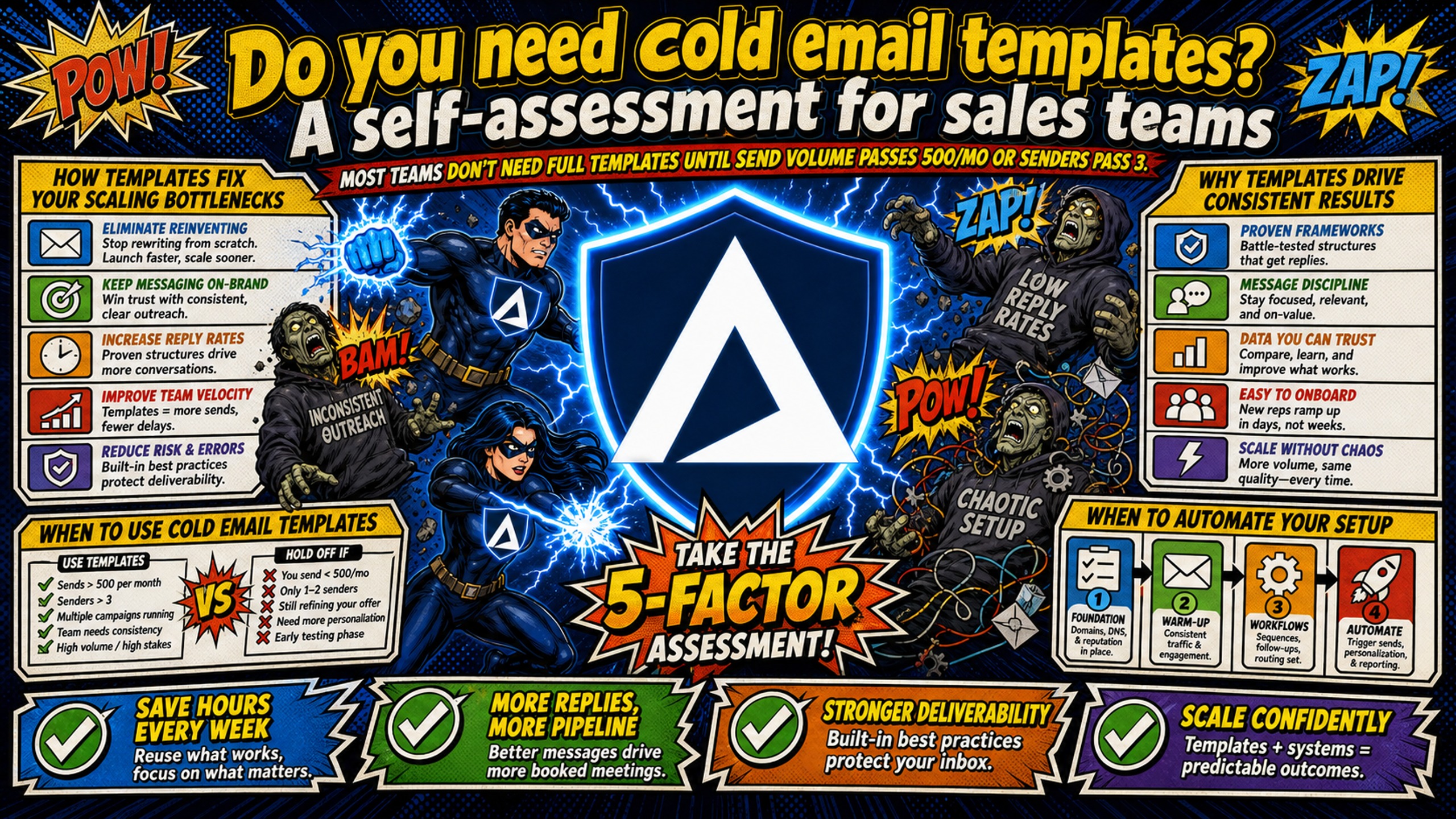
TL;DR: Most teams do not need full cold email templates until send volume passes 500 per month or sender count passes 3. Run the five-factor assessment below (volume, sender count, reply-rate gaps, personalization depth, and setup velocity) to decide between templates, manual outreach, or a hybrid approach. Backlinko and Pitchbox's 2019 analysis of 12 million outreach emails found only 8.5% get a response, so personalization matters most at low volume. Infrastructure readiness, including DNS, inbox provisioning, and warmup, determines whether scaled template sends land in the inbox at all.
Most cold email advice assumes you need templates, but Woodpecker's cold email data reports advanced personalization lifting response rates to roughly 17-18%, compared to around 7-9% for emails with basic or no personalization. The question is not whether templates work but whether your current volume, team size, and reply-rate goals justify them.
Cold email templates can help scale outreach by trading personalization depth for consistency and speed, which may pay off when send volume, sender count, or onboarding demands cross specific thresholds. This article gives you a five-factor self-assessment to determine whether templates, manual outreach, or a hybrid approach fits your current operation, and what infrastructure you need before scaling template sends safely.
How templates fix your scaling bottlenecks
Templates solve consistency and speed problems when volume and team size grow. The core trade-off is personalization depth for repeatable process. Manual research per prospect becomes increasingly difficult as send volume rises and team size expands, forcing a choice between volume and quality.
Why templates drive consistent results
Templates standardize messaging, reduce variance across senders, and make reply-rate performance predictable. Individual SDR skill and daily effort can create inconsistent results across a team. One rep writes compelling openers while another struggles, and aggregate campaign performance becomes unpredictable.
Templates help ensure all sales representatives use consistent messaging, branding, and tone when communicating with prospects. This consistency matters because prospects compare notes. When two decision-makers at the same company receive contradictory value propositions from different SDRs, credibility collapses.
Templates create a predictable baseline you can improve systematically. Instead of hoping each rep writes well, you test one template against another and apply the winner across the entire team.
When to automate your email setup
Scaled template sends require automated DNS, inbox provisioning, and credential export. Manual infrastructure work becomes the bottleneck before copywriting does. Setting up 50 cold email domains with manual DNS configuration takes 12+ hours, logging into DNS panels, creating SPF/DKIM/DMARC records, waiting for propagation, and testing deliverability.
Inframail automates SPF/DKIM/DMARC configuration, eliminating manual DNS panel work entirely. Customer testimonials report spinning up 10 inboxes in 2 minutes. When templates demand 50 new inboxes for a campaign launch, automated provisioning matches template speed. Note that warmup tools (approximately $15-50 per inbox monthly) remain a separate required cost.
When to use cold email templates
Templates may be appropriate when send volume is substantial, multiple senders need consistent positioning, the offer is repeatable across prospects, and personalization depth requirements are low.
Scaling your outbound with pre-built templates
Templates become necessary when scaling creates specific operational bottlenecks. The transition from manual to templated outreach follows predictable patterns based on volume, team size, and learning velocity requirements. Lemlist notes that templates solve the blank page problem. The solution is building adaptation into the workflow.
High-volume outreach (500+ sends/month)
Manual personalization breaks down at 500+ sends monthly because the time-per-email math becomes unforgiving.
Table 1: Illustrative manual personalization time by monthly send volume (assumes 5 or 15 minutes of research per email)
| Sends/Month | 5 min/email | 15 min/email |
|---|---|---|
| 200 | ~17 hours | ~50 hours |
| 500 | ~42 hours | ~125 hours |
| 1,000 | ~83 hours | ~250 hours |
Table 1 is an illustrative model built on two assumed research rates, 5 minutes and 15 minutes per email. These are assumptions, not measured figures, so replace them with your own per-email research time. At 200 sends monthly, those two rates add up to roughly 17-50 hours of research for one rep. Templates compress that context-building into reusable blocks that all senders share.
At 1,000 sends monthly with 15-minute personalization, you would need approximately 250 hours of research time. That exceeds one full-time employee's total working hours. Templates replace that per-email research with merge fields, so the 83 to 250 hours Table 1 shows at 1,000 sends shrinks to the time needed to build the list and write the template.
Scaling outreach with multiple senders
Multiple SDRs create message drift without templates. Each rep interprets the offer differently, emphasizes different benefits, and develops individual writing habits. Within weeks, prospects receive inconsistent positioning that confuses the market and fragments your learning.
Templates enforce consistent positioning, offer language, and compliance across senders. When one rep discovers a high-converting opener, you update the template and every sender benefits immediately. Without templates, that learning stays trapped in one rep's sent folder.
Scaling success with repeatable copy
Templates let you A/B test at volume. Repeatable copy creates a feedback loop: test, measure, iterate. Without templates, every email is a one-off with no learning. You cannot compare subject line performance when every subject line is unique.
Inframail's A/B testing framework emphasizes that valid testing requires isolating variables. Templates provide the control group that makes experimentation possible. Change one element, keep everything else constant, and measure the delta.
Simplifying onboarding for new SDRs
Templates compress ramp time. New SDRs start with proven messaging instead of writing from scratch. Instead of spending their first week studying your offer and guessing at positioning, they send tested copy from day one.
Inframail's automated inbox provisioning means new SDRs get operational infrastructure in minutes, not days. Export credentials to CSV, import to Instantly or Smartlead, and the new hire can begin sending quickly. Manual DNS setup for 50 domains takes 12+ hours while IT configures records and waits for propagation.
Signs your email library is doing damage
Templates hurt when personalization matters. The damage signals include declining reply rates on high-value accounts, generic messaging in competitive niches, and lost deals due to irrelevant outreach. Recognizing these signals early prevents template overuse from damaging your best opportunities. To learn more, you can read Inframail's article about the signs your cold email outreach has outgrown basic templates.
Managing high-value, low-volume accounts
High-value accounts require research-driven personalization. A templated email to an enterprise prospect signals low effort, but a researched, personalized email demonstrates commitment before the first conversation.
Backlinko's 2019 email outreach study found that only 8.5% of all outreach emails receive a response, which shows how much generic outreach has to overcome. Personalization value increases as volume decreases.
Enterprise deals with high contract values justify significant research investment, but lower-value transactions do not. Templates fit low-value, high-volume scenarios, and manual outreach fits high-value, low-volume scenarios.
Managing complex buying committees
Multiple stakeholders with different priorities require customized messaging. Templates cannot address role-specific pain points. The CFO wants cost reduction, the VP of Sales wants quota attainment, and the Operations Manager wants implementation clarity. One template cannot speak to all three without becoming generic.
Inframail's opener psychology article argues that prospects quickly dismiss generic openers. Committee members compare notes, and identical messaging across roles signals you do not understand their distinct concerns.
Manual outreach lets you craft role-specific value propositions. The CFO receives cost analysis, the VP receives competitive differentiation, and the Operations Manager receives an implementation timeline. Templates force you to choose one message for all three.
Why manual outreach wins for VIPs
Manual outreach wins when deal size justifies the time, so calculate the break-even. High-value deals justify extensive research and personalization, but low-value deals do not. Woodpecker's cold email data reports advanced personalization lifting response rates to roughly 17-18%, compared to around 7-9% for emails with basic or no personalization, which points toward manual research for high-value targets.
For lower-value deals with similar reply rate differentials, the expected value difference may not justify extensive research investment. The ROI calculation determines the approach.
Backlinko and Pitchbox's 2019 analysis of 12 million outreach emails found that personalized message bodies drew 32.7 percent more responses, and personalized subject lines drew 30.5 percent more. That lift makes personalization worth the research time for high-value targets.
Should I use cold email templates? Run this assessment
The five-factor self-assessment produces a qualified yes/no/conditional answer. Assess each factor against your current operation.
Set your volume threshold
Factor 1: Volume. Under 500 sends per month, score this factor for manual outreach. At 500 or more sends per month, score it for templates. Table 1 shows why the line sits there: 500 sends need roughly 42 to 125 hours of research each month, depending on whether you spend 5 or 15 minutes per email.
Evaluate your current sender footprint
Factor 2: Sender count. 1-2 senders can sustain manual. 3+ senders need templates for consistency. Multiple senders without templates create message drift that confuses prospects and fragments learning.
Inframail's flat-rate unlimited inboxes mean adding senders does not add per-seat infrastructure cost. At $147 monthly, you can provision multiple inboxes for the same platform fee, removing the cost barrier to team scaling. Warmup tools remain a separate cost typically ranging from approximately $15-50 per inbox monthly.
Measure reply rate performance gaps
Factor 3: Reply-rate gaps. Compare your last 90 days of sends to a floor of 7-9%, the range Woodpecker's cold email data (updated June 23, 2026) gives for cold emails with basic or no personalization. If your reply rate is below 7%, the problem may be targeting or offer, not templates.
Templates will not fix a broken offer, so diagnose before templating. If your manual sends sit below 7%, score this factor for manual until you fix targeting or offer. If they sit at or above 7%, score this factor for templates, and A/B test the template against your current copy first.
Match personalization depth to your goals
Factor 4: Personalization depth. High-touch, account-based outreach needs manual. High-volume, broad outreach needs templates. Match the tool to the goal.
If your ideal customer profile comprises a small number of named enterprise accounts, manual outreach typically performs better. If your ICP spans thousands of SMBs, templates typically perform better. The deal size and competitive density determine which approach produces acceptable ROI.
Weigh your setup velocity needs
Factor 5: Setup velocity. If launch speed matters more than per-email personalization, templates win for teams with warm inboxes. When a competitor launches in days and your manual process takes weeks, templates compress the copy step. New inboxes still need warmup first, so templates shorten copy production but not the launch itself.
Decision summary: Assess each factor against your current operation. If most factors favor manual, use manual outreach. If most factors favor templates, adopt full templates. If factors split evenly, use a hybrid approach. Reassess regularly as volume and team size change.
Before you launch, run the 15-point cold email template quality checklist to catch reply killers in copy, personalization, and deliverability.
When templates work and when they do not
Templates work under specific conditions and fail under others. The evidence shows clear patterns based on volume, personalization depth, and campaign structure.
Do templates boost reply rates?
Templates create consistent baseline performance rather than inherently boosting reply rates. Reply rates vary by campaign and audience, so your own past sends give the most reliable baseline. Templates help maintain performance within a predictable band rather than swinging between extremes based on individual rep performance.
Personalization can lift reply rates above the band on low-volume, high-value outreach. Backlinko's 2019 email outreach study found that emails with personalized message bodies have a 32.7% better response rate than those that don't personalize their messages. That lift requires research time that does not scale.
Template impact on setup velocity
Templates cut time-to-first-send for teams with already-warm inboxes. A new campaign can launch in hours instead of days. Template selection, merge field configuration, and list upload replace the per-email research, writing, and review that Table 1 prices at roughly 42 to 125 hours for 500 sends. New inboxes still need warmup first.
Inframail's automated DNS and inbox provisioning compress infrastructure setup from 12+ hours to minutes, matching template speed. When template copy is ready but infrastructure is not, the bottleneck shifts to DNS configuration. Automation removes the DNS bottleneck, though warmup remains the constraint on new inboxes.
How templates stabilize reply rates
Templates reduce variance. Without templates, reply rates can swing based on individual SDR skill and daily effort. Templates create a floor and ceiling that narrows the performance band more consistently.
This stability enables forecasting. When you establish predictable reply rate patterns, you can plan meeting capacity and pipeline coverage. Unpredictable reply rates make planning impossible.
Evaluating custom alternatives to email templates
Templates are not the only scaling option. Alternatives exist for teams that need more personalization than templates allow but more efficiency than full manual writing provides.
Building reusable email blocks
Modular blocks let you assemble semi-personalized emails faster than full manual writing while keeping more personalization than full templates. Build a library of opening lines, value propositions, and calls-to-action. Mix and match based on prospect research.
Inframail's personalized opener article argues that trigger-based personalization, referencing a funding round, hiring move, or product launch, outperforms basic merge tags. Blocks let you personalize the opener while templating the body and CTA.
AI tools for customized email sequences
AI writing tools generate personalized variations at scale. The trade-off is precision. AI personalization is faster than manual but less accurate than deep research, so human review remains necessary for high-value accounts.
Position AI as a middle path: more scalable than manual, more personalized than templates. Use AI for volume segments, manual for strategic accounts.
When to mix templates and manual outreach
The hybrid model splits volume by value. Templates handle top-of-funnel volume, and manual outreach handles high-value accounts. This hybrid requires infrastructure that scales with template volume while preserving sender reputation for manual sends.
Essential setup before scaling cold email
Infrastructure readiness determines whether scaled template sends land in the inbox at all. The three areas below cover domain and inbox limits, warmup timelines, and sender reputation monitoring. For the full rollout sequence from domain registration to first send, see Inframail's cold email template implementation guide.
Domain count and inbox capacity limits
Sending too many emails from one domain or inbox triggers spam filters. The commonly cited safe maximum is 50 emails per day per account, so spread volume across more inboxes and domains to stay under it. Limits vary by provider and change over time, so confirm each provider's current sending documentation. Exceeding these limits can damage sender reputation and inbox placement.
Inframail's flat-rate unlimited inboxes let you scale domain and inbox count without per-seat costs. To size your setup, divide your target daily sends by 50, the per-account maximum above, so 500 emails per day needs at least 10 inboxes. The platform costs $147 monthly, plus $5-16 per domain annually, and you choose how many domains to spread those inboxes across.
Automating inbox warmup timelines
New inboxes need warmup before high-volume sends. Warmup tool pricing typically ranges from approximately $15-50 monthly per inbox.
Skipping warmup can lead to deliverability issues. Inframail's Email Warmup Sequences: Why They Matter & How to Execute Them Correctly details the four-week ramp schedule for new and changed inboxes.
Inframail does not include warmup, requiring external tools at additional cost. Factor approximately $15-50 per inbox monthly into your total cost model.
Tracking sender reputation in real time
Blacklist monitoring and delisting matter. Inframail's dashboard tracks domain and IP health, with a 68.3% blacklist delisting success rate within 48 hours.
Dedicated IPs isolate reputation versus shared pools where other users' behavior affects your deliverability. Shared IP structures mean your template sends compete for reputation with unknown third parties.
Start scaling cold email with Inframail
Inframail is a flat-rate Microsoft email infrastructure platform built for agencies and sales teams running 50-200 cold email domains. The platform fee is $147/month for unlimited inboxes, automated SPF/DKIM/DMARC configuration, and dedicated IP infrastructure, with 98%+ deliverability and a 68.3% blacklist delisting success rate within 48 hours. Domain costs run $5-16 per domain annually, and warmup tools are a separate cost typically ranging from approximately $15-50 per inbox monthly.
Watch this case study video and see how Inframail helped a client quickly set up domains and improve email deliverability across three agencies and their clients, supporting cold email campaigns that book 5–7 appointments per day for their lead generation agency.
Sign up to Inframail and get started today.
FAQs
Do I need cold email templates if I only have 2-3 SDRs?
Not necessarily. With 2-3 SDRs sending relatively low volumes monthly, manual or hybrid outreach often outperforms full templates. Templates become more valuable as volume or sender count grows substantially.
How many templates should a sales team maintain?
A small set of core templates per campaign or offer works better than dozens. Each template should target one specific segment or pain point. More templates create maintenance overhead without proportional reply-rate gains.
Can I use templates and still personalize effectively?
Yes, with modular blocks or merge fields for name, company, and one researched detail. Adding relevant details can lift reply rates above baseline.
What reply rate improvement should I expect from templates?
Templates do not reliably boost reply rates. They create consistent baseline performance. Personalization on low-volume outreach can push reply rates higher, but templates alone are not a performance lever.
How often should templates be updated?
Review templates when reply rates decline, offer language changes, or a test produces a better-performing variant.
Key terms glossary
Cold email template: Pre-written email copy with merge fields for prospect-specific details, designed for volume sending with minimal per-email customization.
Inbox placement rate: Percentage of sent emails that reach the primary inbox rather than spam or promotions folders.
Warmup schedule: Gradual volume ramp for new email accounts to establish sender reputation before high-volume sending.
Dedicated IP: An IP address used exclusively by one sender, isolating reputation from other users' behavior.
Shared IP pool: Multiple senders sharing IP addresses, where one sender's poor practices can damage all users' deliverability.
SPF/DKIM/DMARC: DNS records that authenticate email sending and prevent spoofing.
Merge field: Placeholder in template copy that populates with prospect data like name, company, or custom research at send time.
Sender reputation: Email provider assessment of sending history that determines inbox placement.