
Email Sequence A/B Testing Framework: How to Iterate Without Breaking What Works
A cold email sequence A/B test is only valid when one variable changes and both arms sit on identical infrastructure. Run a minimum of 1,000 prospects per varia
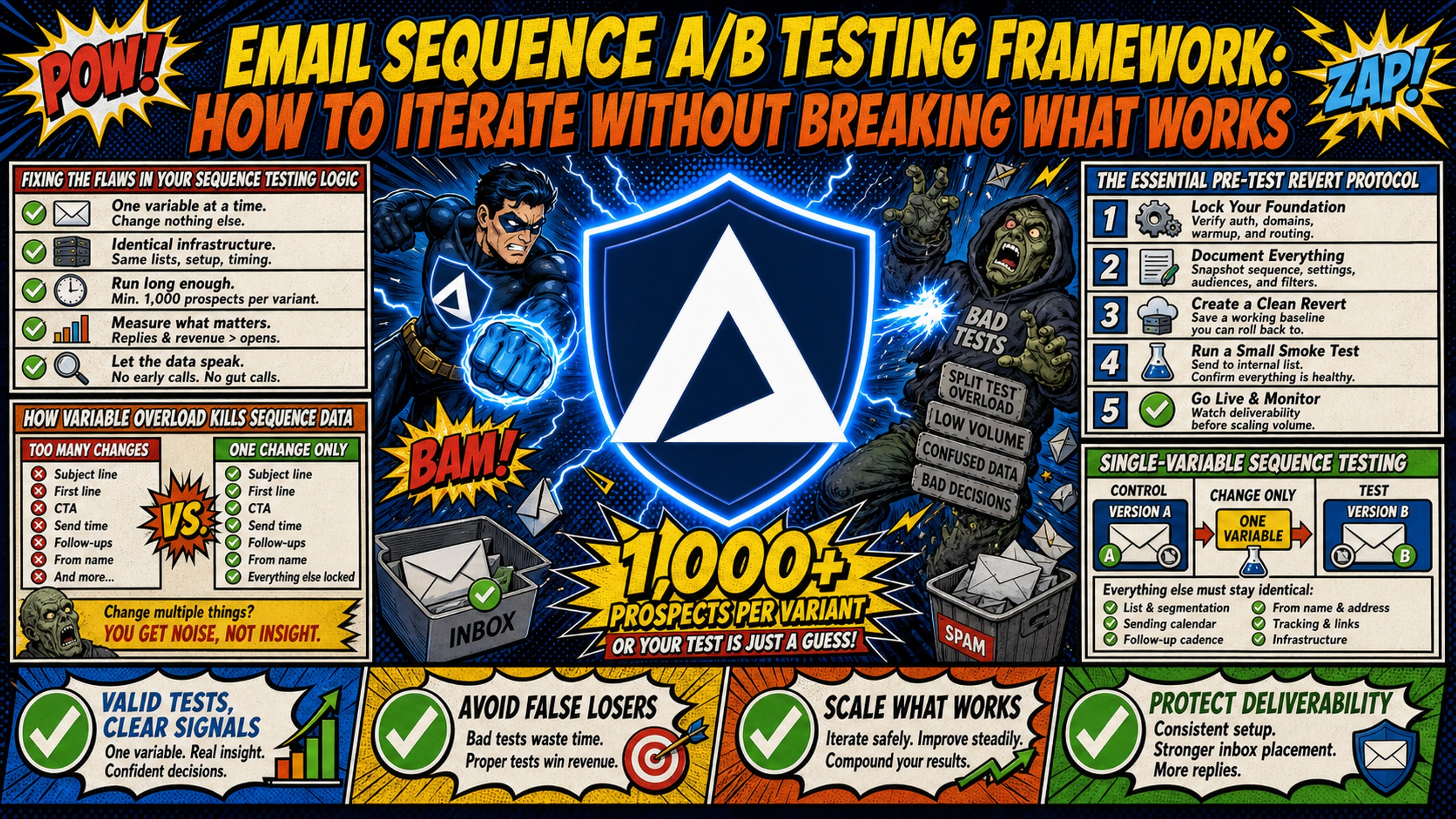
TL;DR: A cold email sequence A/B test is only valid when one variable changes and both arms sit on identical infrastructure. Run a minimum of 1,000 prospects per variant for open rate, reply rate, and positive reply rate tests, per Getlead's cold email testing guidance, and treat anything below that as directional only. Both variant domains need matching warmup age, identical SPF, DKIM and DMARC records, and dedicated IPs rather than a shared pool, because a contaminated shared IP suppresses delivery before copy is ever read. Hold the test until both arms complete the full sequence. Stop early only on deliverability triggers: bounce above 3%, or spam complaints above 0.1% against Google's 0.3% ceiling. Inframail provisions dedicated US-based IPs and automates DNS configuration on domain creation, which is what keeps infrastructure constant across both arms.
If you are running an A/B test on a shared IP pool, you are not testing your copy. You are testing the sending habits of every other user on that server. One bad actor flags the IP, inbox placement drops on your variant domain, and your "winning" subject line is really just the version that wasn't caught in spam that week.
Clean cold email sequence testing requires a disciplined approach: isolate one variable, set a real sample size threshold, and ensure the infrastructure under both variants is identical before a single email sends. This guide gives you that framework from the infrastructure layer up.
Fixing the flaws in your sequence testing logic
Two testing errors account for most bad sequence data: changing too many variables at once and cutting tests short before enough data accumulates.
How variable overload kills sequence data
The most common sequence testing mistake is changing the subject line, the first line, the call to action, and the follow-up interval all at once, then waiting three days to see which variant got more replies. When results differ, there is no way to tell which change caused the shift.
Test one variable per experiment, always. If Variant A changes the subject line, body copy, CTA, and send timing all at once compared to a control, you have not run a test. You have run a coin flip. Systematic infrastructure and testing discipline are what separate repeatable results from luck.
Variables you can isolate in sequence testing:
- Subject line: Test open rate impact. Keep body copy identical across both variants.
- First line / opener: Test engagement by varying the hook. Keep subject line and CTA identical.
- Body copy angle: Test pain point A vs. pain point B. Keep subject line and CTA identical.
- Call to action: Test a hard CTA vs. a soft CTA (covered in Inframail's CTA breakdown video). Keep all upstream copy identical.
- Send interval: Test a 2-day vs. a 4-day gap between steps. Keep copy identical across both arms.
Quickly validating tests lacking volume
When your target list is too small to hit statistical significance, track positive reply sentiment instead of reply rate percentages. Categorize replies by objection type, question type, or buying signal. A variant that generates more clarifying questions ("tell me more about X") is directionally stronger than one generating more rejections, even if the reply rate numbers are statistically close.
Use open rates as a micro-conversion signal for subject line tests when reply sample sizes are under 100. Open rate data accumulates faster than reply data, but a typical cold email sequence runs three to four weeks, per Oppora's cold email benchmarks, so open rate signals from early steps should not be treated as final results until the full sequence has completed across all enrolled prospects. It is not a definitive signal, but it tells you whether a subject line is getting attention before waiting weeks for reply volume to accumulate.
The essential pre-test revert protocol
Before launching any variant, run through this infrastructure checklist. Skipping it means your test data will be contaminated from the first send.
Infrastructure prerequisites (complete before launching any test):
- Equal warmup age: For a controlled domain-level comparison, warm both variant domains for the same duration and ramp them in parallel. Inframail's email warmup guide says new domains typically need 14–28 days of warmup, while brand-new domains may need 30–60 days before full-volume cold campaigns.
- Identical authentication: Both domains must have SPF, DKIM, and DMARC records correctly configured before any warmup starts. Inframail's cold email infrastructure guide shows how it automates SPF, DKIM, and DMARC configuration on setup, eliminating the risk of misconfigured records skewing test results across variant domains.
- Dedicated IP isolation: Both variant domains should send from dedicated IPs, not shared pools. If Domain A is on a shared IP affected by another user's spam complaints and Domain B is not, copy performance differences are infrastructure noise, not copy signal. Inframail's Unlimited Plan includes 1 dedicated US-based IP. The Agency Pack includes 3.
- Identical sending volume history: Both domains should have identical daily send ramp histories. A domain sending 50 emails per day for six weeks has a stronger reputation baseline than one sending 20 emails per day for two weeks.
Revert procedure:
- Document the control baseline before launching any variant. Record the control's last 7-day open rate, reply rate, bounce rate, and spam complaint rate in your test log. This becomes the performance snapshot you restore to if the variant fails.
- Preserve the control sequence by creating a named copy in your sending platform (Instantly or Smartlead) labeled "Control - [Test ID] - [Date]" before any variant modification. If the variant is stopped mid-test, you have a clean, unmodified control to revert to.
- Roll back in reverse order if a variant is stopped. First, reassign prospects from the variant campaign back to the control campaign. Second, reassign the variant domain pool back to the control inbox pool if IP or domain isolation was part of the test design. Third, delete or archive the variant sequence copy to prevent accidental sends.
- Confirm control health before re-enrollment. Send 10 to 20 test emails from the control domain pool to seed addresses, verify inbox placement, and check MXToolbox blacklist status. Once confirmed clean, re-enroll the reverted prospects into the control sequence starting at Step 1.
Single-variable sequence testing
The sections below cover how to define, build, and run a clean single-variable test across subject lines, body copy, CTAs, and send intervals.
Per-seat pricing creates friction when spinning up variant domains. Each new test domain on a per-seat platform adds a recurring inbox cost, which turns variant design into a budget discussion before the first email sends. Inframail's $129/month flat-rate covers unlimited inboxes, so adding variant domains costs only the domain registration fee ($5 to $16 per domain per year).
Defining a single testing variable
A single variable is one element of one step in the sequence. Changing the subject line of Step 1 is one variable. Changing the subject line of Step 1 and the body of Step 2 is two variables and two tests. Run them separately. Running clean tests compounds your institutional knowledge over time: every isolated variable you validate adds one confirmed insight to your playbook.
How to A/B test subject lines properly
Subject line tests measure one thing: open rate. Keep body copy, CTA, and send timing identical across both variants so any difference in open rate can be attributed only to the subject line. Run a minimum of 1,000 prospects per variant before comparing results, since smaller samples produce open rate differences too close to statistical noise to act on, per Getlead's cold email A/B testing guide.
Validating copy with A/B tests
Body copy tests measure reply rate and positive reply rate, not open rate. Keep the subject line identical so both variants receive the same proportion of opens. The only change between the control and variant should be the body copy angle: pain point A versus pain point B, or a case study opener versus a direct problem statement.
Use qualitative reply data to guide the next iteration. If Variant B generates more clarifying questions and fewer "not interested" replies than the control, roll it forward as the new control and test the next variable against it.
Setting optimal send intervals and follow-up timing
Interval tests measure whether timing between steps affects reply rate. A 2-day gap versus a 4-day gap between Step 1 and Step 2 is a valid single-variable test. Keep every other element identical. Track whether the shorter interval generates more replies, more spam complaints, or no measurable difference. Spam complaints above 0.1% are a warning sign, per Inframail's campaign health benchmarks. If a shorter interval is the only variable you changed, cadence is the likely cause.
Step-by-step workflow for Instantly and Smartlead
- Export your prospect list from Apollo in a randomized order using a spreadsheet randomization formula, alternating rows by company size or geography to prevent systematic bias.
- Split the CSV into two equal halves. Each half is one variant arm.
- Create two campaign copies in Instantly or Smartlead. Assign Variant A prospects to Campaign A and Variant B prospects to Campaign B.
- Assign campaigns to variant-specific inboxes. Each campaign should draw exclusively from its assigned domain pool to prevent IP cross-contamination.
- Export IMAP/SMTP credentials from Inframail as a CSV and import directly into Instantly or Smartlead. IMAP (Internet Message Access Protocol) and SMTP (Simple Mail Transfer Protocol) are the technical standards that allow your sending platform to connect to your inboxes. Inframail provisions credentials automatically, reducing manual DNS configuration time from 12+ hours for 50 domains to an automated process provisioned on domain creation, and reducing the manual entry errors that cause delivery failures mid-test.
For a complete walkthrough of connecting Inframail to Smartlead, this Smartlead integration guide covers each step from credential export through campaign activation.
Statistical significance thresholds for cold email volume
The thresholds below set the minimum sample sizes and confidence requirements needed before treating a cold email test result as actionable.
Sample size rules for sequence tests
Statistical significance in cold email means you have enough data to say the performance difference between two variants is more likely caused by the variable you changed than by random chance. At a 95% confidence level, cold email volume requirements are higher than most campaign managers expect.
The thresholds by metric type:
- Open rate test: Minimum 1,000 prospects per variant contacted. Getlead's cold email A/B testing guide puts it as at least 1,000 prospects per variant before treating a difference as real.
- Reply rate test: Minimum 1,000 prospects per variant. Median cold email reply rates around 3% produce very small absolute reply counts at low volumes, making 1,000 per variant the minimum for reliable results.
- Positive reply rate test: Minimum 1,000 prospects per variant. Positive reply rates are a fraction of total reply rates, making them the hardest metric to test with statistical validity, per Getlead's testing standards. A 3% versus 4% reply rate difference at 75 sends per variant translates to 2 or 3 replies per arm. The difference between 2 and 3 replies looks like a 50% lift but is statistical noise. Inframail's sending capacity guide explains how to calculate send volume by inbox count to plan test timelines before committing to a domain configuration.
A winning variant should show at least a 15% relative improvement over the control before being treated as a real result. A control reply rate of 3% means the variant must show at least 3.45% to count.
Confidence levels for low-volume campaigns
For lists under 2,000 prospects total, hitting the 1,000 per variant threshold on a reply rate test is structurally impossible. Treat results as directional signals, not conclusions. Track positive reply sentiment, objection categorization, and engagement depth (multi-email threads, follow-up questions) as supplementary data. Commit to a larger list build before running the next iteration. Do not declare a winner based on small absolute counts.
Validating early sequence results
Cutting a test after 20 sends because one variant got two quick replies is one of the most common sequence testing errors. Commit to the minimum sample size before the first email sends, and do not touch the test until both arms have reached the threshold. Reply rates take longer to stabilize than open rates because follow-up steps in the sequence continue generating responses days after initial send.
Defining control groups for clean email tests
The sections below cover how to structure split ratios, assign prospects without introducing bias, and account for external factors that shift performance on both arms simultaneously.
Control vs. variant split ratios
For head-to-head variable tests, use a 50/50 split. Equal sample sizes give both arms the same statistical weight and make result comparison straightforward.
For tests involving a risky new angle against a proven control, use an 80/20 split. Assign 80% of prospects to the known-performing control and 20% to the experimental variant. This protects the majority of your list from an unproven approach while still generating directional data. Once the variant shows promise at 20%, graduate it to a 50/50 head-to-head test with a fresh prospect segment.
Preventing bias in sequence testing
Randomize prospect assignment before the test starts, not after. If you assign all prospects from Company Type A to Variant A and Company Type B to Variant B, you are testing company type, not the variable you intended to change. Use a spreadsheet randomization formula to shuffle the list before splitting.
Preventing performance drift
Seasonal effects, holiday periods, and industry event calendars move performance on both arms at once. A test running through a major holiday week will produce skewed data regardless of copy quality. Running a test through Thanksgiving week, a major industry conference, or a Monday following a long weekend introduces environmental noise that copy changes cannot explain.
A true concurrent control group, a version of your proven baseline running during the same test window, tells you when external factors are distorting results. If both the control and variant drop 30% in the same week, the drop is environmental, not copy-driven. Keep a calendar of statutory holidays and major industry events, and pause tests during those windows.
Testing duration benchmarks for cold campaigns
Test duration requirements vary by sequence length and daily send volume, and underestimating either produces incomplete data before the analysis window closes.
Minimum test duration by sequence length
Match test duration to the length of the sequence being tested:
The ranges below assume the same 7-inbox, 84-campaign-email-per-day configuration documented in the send-delay section, which requires 23 to 24 days to enroll 2,000 prospects (1,000 per variant). Operators running more inboxes will enroll faster and can compress these windows proportionally.
- 4-email sequence: Typically 30 to 37 days at 1,000 prospects per variant, consistent with SalesHandy's general sequence guidance for SMB prospect sequences, which documents 4 emails over 14 to 21 days. At 84 campaign emails per day, enrollment of 2,000 total prospects takes 23 to 24 days. A 4-email sequence with typical 2-to-4-day inter-step intervals spans roughly 6 to 12 days from first send to final step for the last prospect enrolled, putting the full window at 30 to 37 days.
- 5-email sequence: Typically 32 to 42 days at 1,000 prospects per variant, consistent with the Mid-Market row, which gives 5 emails over 21 to 30 days. At 84 campaign emails per day, enrollment of 2,000 total prospects takes 23 to 24 days. A 5-email sequence spans roughly 8 to 16 days for the last prospect enrolled, putting the full window at 32 to 42 days.
- 7+ step sequence: Typically 45 to 55 days minimum at 1,000 prospects per variant, consistent with the 30-to-45-day window for enterprise-length sequences. At 84 campaign emails per day, enrollment of 2,000 total prospects takes 23 to 24 days. The final step triggers on Day 21 or later for the last prospect enrolled, meaning the full window runs 44 to 55 days before all arms have completed the sequence. Stopping early means late-sequence replies have not yet been captured for the earliest-enrolled prospects.
Mitigating data skew from send delays
Inframail's sending capacity guide puts each inbox's total daily limit at up to 50 emails per day, with 40 per day recommended, and reserves 70% of that capacity for warmup traffic, leaving 12 campaign emails per inbox per day as the safe campaign allocation. Sending 12 campaign emails per day per inbox across 7 inboxes (84 campaign emails per day total) with a 1,000-prospect-per-variant target (2,000 prospects across both arms) takes 23 to 24 days to enroll all prospects before any sequence step completes. Build this window into your test duration estimate.
When to conclude your A/B test early
Three conditions justify stopping a test before it hits the sample size threshold:
- Bounce rate on one variant exceeds 3%. A bounce rate of 0 to 1% is excellent for cold outbound, and 2% or above is a critical signal requiring immediate diagnosis, per Inframail's campaign health benchmarks. Above 3%, treat list quality as the primary suspect.
- Spam complaint rate on one variant exceeds 0.1%. Google's formal threshold is 0.3%, but reputation damage begins before that point. A variant triggering complaints above 0.1% should be paused immediately.
- A reply rate drop of 50% or more mid-campaign on one variant. A sharp mid-campaign reply drop usually signals deliverability degradation, not copy failure. Check MXToolbox blacklist status for the variant's sending domain before changing any copy.
Making the call: Deploy, refine, or kill a test
The decision framework below covers three distinct outcomes: rolling out a winner, continuing to iterate on an inconclusive result, and stopping a variant that is actively damaging deliverability.
Scaling rules for high reply rates
Once a variant crosses the statistical significance threshold and shows 15%+ relative improvement over the control, roll it out as the new control across your full sending infrastructure.
Next steps for stalled experiments
If both arms reach sample size with no statistically significant difference, the variable you tested is not a meaningful differentiator for this audience. That is a valid finding. Log it, move to the next variable in your testing queue, and do not re-test the same variable against the same audience unless you have a materially different hypothesis. Do not average the two variants and send a hybrid. A hybrid copy undoes the isolation you built into the test design and makes future iteration impossible to track.
Stopping tests that damage your metrics
If a variant is actively raising bounce rates or generating spam complaints above threshold, kill it immediately. Revert all prospects in that variant arm to the control sequence, document the decision in your test log with the metric that triggered the halt, and do not wait to confirm statistical significance before pausing a variant with active reputation damage.
Inframail's blacklist monitoring dashboard auto-submits delisting requests when a domain is flagged, with a 68.3% blacklist delisting rate within 48 hours, based on Inframail-reported data. That is a meaningful safety net when a test variant triggers unexpected deliverability issues mid-campaign.
Standardizing your email sequence test logs
The log structure below covers the six metrics to track per variant, the fields every test record should include, and a weekly cadence for reviewing and launching new tests.
Key metrics for sequence testing
Track these six metrics per variant for every test:
- Open rate (%): Subject line and deliverability signal.
- Reply rate (%): Total response rate, including negative replies.
- Positive reply rate (%): Replies indicating interest, excluding "not interested" responses.
- Bounce rate (%): Data quality and domain health indicator. Alert at 2%, diagnose and stop at 3%.
- Spam complaint rate (%): Audience fit and send-timing indicator. Alert threshold: 0.1%.
- Meetings booked: The conversion metric that connects sequence performance to pipeline.
Essential fields for your testing log
Use this template for every test you run. Copy it into a shared spreadsheet and update it weekly.
| Field | Notes |
|---|---|
| Test ID | Sequential number (e.g., SEQ-001) |
| Start date | Date first email in test sent |
| End date | Date test concluded (sample size hit or early stop) |
| Sequence tested | Sequence name and sending platform |
| Variable tested | Single element changed (e.g., Subject Line) |
| Control description | Brief description of control variant |
| Variant description | Brief description of test variant |
| Domain/IP setup | Confirm both arms run on equivalent infrastructure |
| Sample size (per arm) | Prospects contacted per variant |
| Open rate: control / variant | % |
| Reply rate: control / variant | % |
| Positive reply rate: control / variant | % |
| Bounce rate: control / variant | % |
| Spam complaint rate: control / variant | % |
| Meetings booked: control / variant | Count |
| Statistical significance | Yes / No / Directional only |
| Decision | Roll out / Iterate / Kill / Inconclusive |
| External factors | Holidays, events, deliverability incidents |
| Notes | Infrastructure changes, list quality observations |
Every test you run should be documented. This log becomes your institutional knowledge, and without it, you repeat tests you have already run.
Establishing a weekly testing cadence
Review test logs every Friday and launch new tests every Monday. This cadence gives each test a full business week of enrollment time and a clear decision point before the next experiment begins. When syncing results across a CRM like HubSpot and a sender like Smartlead, export reply data as a CSV each Friday and match records by email address to update the positive reply rate and meetings booked columns in your log.
For operators scaling from 50 to 200+ domains, Kidous Mahteme's cold email infrastructure video covers the full domain-to-sending workflow in detail.
Start testing on infrastructure that doesn't contaminate results
Inframail is a flat-rate Microsoft email infrastructure provider for campaign managers running cold email sequences at scale. It provisions dedicated US-based IPs, automates SPF, DKIM, and DMARC configuration on domain creation, and includes blacklist monitoring with a 68.3% delisting success rate within 48 hours. The flat-rate platform fee is $129/month for unlimited inboxes, so adding variant domains for a new test adds only domain registration costs, not a per-seat charge that grows with inbox count.
Sign up to Inframail and get started today.
FAQs
How many prospects do I need per variant before calling a winner?
A minimum of 1,000 prospects per variant for open rate tests, reply rate tests, and positive reply rate tests. Declaring a winner below these thresholds based on 2 or 3 absolute replies per arm is treating statistical noise as signal.
Can I run multiple A/B tests on the same sequence at the same time?
No. Running two tests simultaneously on the same sequence means any performance change could be caused by either variable, making both results unreliable. Test one variable at a time, wait for a conclusive result, update the control, then launch the next test.
What do I do if my target market is too niche to hit 1,000 prospects per variant?
Treat results as directional signals rather than statistical conclusions, and shift your evaluation to qualitative depth: categorize replies by objection type and buying signal rather than percentage reply rates. Grow the list before running the next iteration, and do not roll out a "winner" based on small absolute reply counts.
How do I protect deliverability and historical test data during a blacklist event mid-test?
Pause the affected variant arm immediately and preserve the raw send and reply data before making any changes to the sequence. Check MXToolbox blacklist status for the sending domain. Inframail's automated blacklist monitoring submits delisting requests on flagged domains with a 68.3% delisting success rate within 48 hours, based on Inframail-reported data. Once the domain is delisted and delivery confirms healthy, decide whether to resume the test from its paused state or restart with a fresh prospect segment on a clean domain.
How is the infrastructure cost structured when scaling test domains on Inframail versus Mailscale or Maildoso?
Mailscale does not publish pricing publicly and requires a sales call for a quote. Maildoso uses per-mailbox pricing from $2.50 per mailbox at 30 mailboxes, scaling to $0.49 per mailbox at 1,000 mailboxes. Inframail charges $129/month for unlimited inboxes, so additional test domains add only domain registration costs ($5 to $16 per year) with no increase to the platform fee.
What is the difference between domain reputation and IP reputation in the context of sequence testing?
IP reputation is the sending history attached to the IP address your mail leaves from. Domain reputation is the history attached to your sending domain. Mailbox providers weigh both, and the two can diverge: a clean domain sending from a contaminated shared IP still gets filtered. For A/B testing that matters because a shared IP can suppress delivery on one arm for reasons that have nothing to do with your copy, which makes the test structurally invalid. Dedicated IPs, as included in Inframail's Unlimited and Agency Pack plans, isolate IP reputation to your own sending behavior alone.
Key terms glossary
Statistical significance: The point at which the difference between two test variants is more likely caused by the variable tested than by random chance. In cold email, a 95% confidence level is the standard threshold.
Positive reply rate: The percentage of prospects who replied with interest (asking questions or requesting a call), excluding "not interested" responses. This is the most valuable and hardest to test metric in cold outbound.
Dedicated IP: An IP address assigned exclusively to one sender. Sending reputation on a dedicated IP is determined only by that sender's behavior, unlike a shared IP pool where another user's spam activity can damage your deliverability.
SPF / DKIM / DMARC: Three DNS authentication records that verify your sending domain to receiving mail servers. SPF authorizes which IP addresses can send on behalf of a domain, DKIM adds a cryptographic signature to each email, and DMARC tells receiving servers what to do when SPF or DKIM fails. All three must be correctly configured before warming a domain.
Domain warmup: The process of gradually increasing daily send volume from a new domain to build a positive sending reputation with mailbox providers before scaling to full campaign volume. Allow 14 to 28 days for previously warmed domains, and 30 to 60 days for brand-new domains.
Control group / holdout: A segment of prospects receiving the original, unmodified sequence during a test period. The control establishes the baseline against which the variant is measured and detects external performance drift unrelated to the variable being tested.