
What is a cold email template? Definition, anatomy & examples
A cold email template is a repeatable message structure with five core components (subject line, opener, value proposition, call-to-action, and signature) that
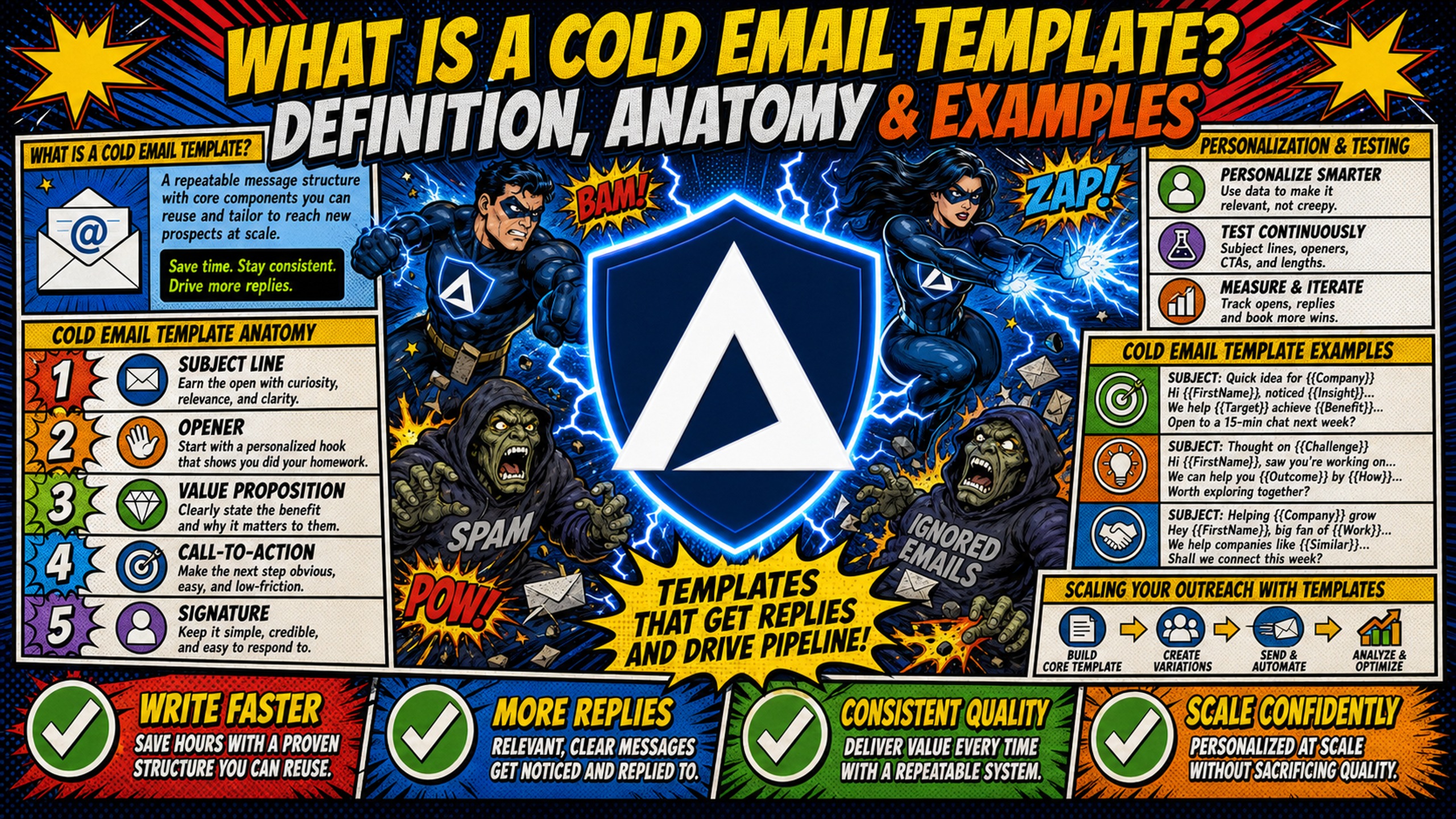
TL;DR: A cold email template is a repeatable message structure with five core components (subject line, opener, value proposition, call-to-action, and signature) that standardizes outreach while allowing for personalization. Unlike static scripts or untargeted blasts, templates use dynamic fields and trigger-based customization. Hunter's analysis of 34 million cold emails found the highest reply rate at 20 to 39 words, so keep first-touch templates short. Use a template when you send to more than one audience segment, and a fixed script only for a single, unchanging scenario. Template success also requires clean infrastructure, and Gmail requires SPF, DKIM and DMARC from senders of 5,000 or more messages a day.
Technical infrastructure, including DNS records, dedicated IPs, and domain health, plays a critical role in cold email deliverability alongside copy quality.
What is a cold email template?
A cold email template is a repeatable message framework that standardizes outreach while leaving room for signal-based personalization. Templates address the operational challenge of maintaining consistency and quality at scale. When you manage 50 to 200 domains across multiple clients, writing every email from scratch becomes impractical and unsustainable. Templates create consistency without sacrificing the personalization that drives replies.
Standardized cold email workflow: Templates reduce the cognitive load of high-volume email writing. You define the structure once (subject line framework, opener pattern, value prop placement, CTA formula), then fill in variable fields for each prospect, which is different from copying and pasting the same message to everyone. Cold email templates are frameworks, not scripts, built for customization rather than mass distribution. Templates also depend on infrastructure that scales without manual work, and automated DNS configuration eliminates 12+ hours of manual setup for 50 domains, including correct SPF/DKIM/DMARC records that otherwise require work across separate registrar panels.
Template usage by campaign goal: Different objectives require different template structures. A meeting-booking template emphasizes a low-friction CTA ("Worth a 15-minute call?"). A lead qualification template includes a qualifying question early ("Are you currently handling outbound in-house or working with an agency?").
An event invite template leads with urgency and a specific date. The framework stays consistent, but the emphasis shifts based on what you need the recipient to do next.
Cold email template anatomy
High-performing templates contain five core components. Each has a specific job in moving the recipient from open to reply.
The five-part structure: The five-part structure consists of a subject line that earns the open, a personalized opener that proves research, a value statement that ties a pain point to your offer, a low-friction CTA, and a signature that proves you're real. Keep first-touch emails short. Hunter's analysis of 34 million cold emails found the highest reply rate at 20 to 39 words.
Subject line and opener: The subject line earns the open. Use short, specific subject lines (30 to 50 characters), lowercase except for proper nouns, and reference a specific trigger when possible ("saw your Series B announcement" or "question about your SDR hiring"). The opener (first sentence) determines whether the recipient keeps reading. Signal-based openers (referencing hiring trends, tech stack changes, or recent company news) are recommended over generic compliments.
Value proposition: The value proposition explains what problem you solve and why it matters to this specific recipient. Lead with their pain, not your product features. Use one clear analogy per concept if needed, but avoid jargon.
Keep the body to two or three short sentences. Proof (a specific metric, customer name, or outcome) can appear here or in the CTA.
Formulas for email CTAs: The call-to-action asks for one specific next step. Direct, low-effort CTAs are more effective than vague ones because the recipient can answer with one word. Vague CTAs ("let me know your thoughts" or "happy to chat") tend to get ignored because they lack clear direction. Test these four formulas:
- Direct ask: "Worth a 15-minute call next week?"
- Permission-based: "Should I send over the case study?"
- Question-led: "Are you currently handling [specific function] in-house?"
- Specific use case: "Open to seeing how this works for [industry/role]?"
Add minimal signatures that prove you're real. A signature proves you're a real person when it lists your name, title, company, and one link maximum (such as a LinkedIn profile or company site), so the recipient can verify who is writing.
Leave out images, quotes, legal disclaimers, and multiple phone numbers, because they add spam triggers and make the email look like a mass send. Adding testimonials to your email signature can work in follow-ups, but keep the first-touch signature bare.
Personalization and testing for cold email templates
Templates become powerful when you add dynamic personalization and systematic testing.
Dynamic tags for personalization: Merge fields are placeholders that automatically populate with data from your CRM or CSV file at send time. Cold email platforms typically use similar syntax: {{first_name}}, {{company}}, {{custom_variable}}. Most templates use two to four variables, and using more can make the message feel fragmented and increase the risk of broken personalization when a field is empty.
Frameworks for A/B testing templates: Test one variable at a time (subject line, opener, or CTA), and track reply rate as your primary metric. Run each variant to a sufficient sample size, typically a few thousand contacts per variant. Segment cleanly so both variants go to the same ICP, industry, and company size.
Cold email template examples
These three examples show the five components in action, and the complete cold email outreach templates guide has more frameworks to adapt.
Example 1, hiring signal email:
Subject: question about your SDR hiring
Hi {{first_name}},
Saw {{company}} is hiring 3 new SDRs this quarter. Most teams at that stage face rising costs per meeting as they scale outbound.
[Company name] helps agencies spin up dedicated IP infrastructure so new reps ramp without hitting deliverability walls.
Worth a 15-minute call to see if it fits your hiring timeline?
Best, [Name] [Title], [Company] [One link]
This template uses a hiring signal as the trigger, a specific outcome (new reps ramping without deliverability walls) as the value statement, and a direct CTA tied to the recipient's timeline.
Example 2, expansion signal email:
Subject: {{company}} + outbound
Hi {{first_name}},
Noticed {{company}} recently expanded into {{industry}}. Teams entering new verticals typically face messaging challenges that can impact reply rates in the first few months while they figure out what resonates.
[Company name] can help with messaging frameworks adapted to {{industry}}.
Should I send over some resources?
Best, [Name]
This version leads with a pain point tied to a trigger event, offers a specific resource, and asks a permission-based question.
Example 3, partnership email:
Subject: {{company}} + infrastructure
Hi {{first_name}},
Outbound teams managing 50+ domains face distinct infrastructure and template challenges that differ from smaller-scale senders.
Worth a quick call to walk through the setup?
[Name]
Partnership and solution-focused emails need a clear value prop (what the recipient will gain), relevance to their current situation, and a low-friction next step.
Shared elements of the three templates: All three templates share common elements: a signal-based opener that proves research, a specific value proposition tied to the recipient's current situation, a low-friction CTA that requires minimal effort to answer, and a minimal signature. These templates only work when the technical infrastructure behind them is clean.
Scaling your outreach with templates
Templates become sequences, and sequences require field mapping and infrastructure that scales.
Outreach sequence structure: A sequence is a series of templates with escalating value and urgency. A basic three-step structure:
- First touch: Signal-based opener, one value prop, direct CTA
- Follow-up 1 (typically 3-4 days later): Add proof (case study, metric, customer name), repeat CTA
- Follow-up 2 (typically 5-7 days later): Address a common objection, offer a different CTA (resource instead of call).
Each template in the sequence builds on the previous one. The opener changes, but the core value prop stays consistent. Follow-up touches need their own subject lines, and good subject lines for follow-up emails lists 25 that keep the thread alive.
Field mapping for templates: Field mapping connects your template variables to CSV columns when importing to sending platforms. Upload your lead list as a .csv file with clearly labeled columns: "First_Name", "Company_Name", "Job_Title", and any custom fields. The platform substitutes the data at send time, and this lead-list import is separate from the inbox credential import described next.
Inbox credential import: Connecting your mailboxes to a sending platform is a separate import that uses a different CSV. This file holds IMAP/SMTP credentials for your inboxes, not lead data, and it involves no field mapping. With DNS records already configured, you export the credentials to CSV and import them to platforms like Instantly or Smartlead, and the infrastructure is operational. Manual DNS setup across multiple registrars can delay this workflow by hours or days.
Template refinement: Track reply rates by template in your sending platform and identify underperformers. Test one variable: change the opener, tighten the value prop, or swap the CTA.
Run the new variant to the same sample size used in A/B testing (typically a few thousand contacts per variant), then keep the winner and retire the loser. Review performance every 30 days or every 1,000 sends per template.
Common template mistakes that cost you replies
Template mistakes fall into two categories: copy errors and infrastructure gaps.
Stale email introductions: Stale openers ("I hope this email finds you well" or "My name is X and I work for Y") say nothing about why you are writing to this recipient. Replace them with signal-based openers that reference a specific trigger: a recent hire, a funding announcement, a tech stack change, or a piece of content the recipient published.
Static templates: Static templates without personalization read as mass blasts, so recipients ignore them. Use dynamic tags and signal-based triggers to show the email was written for this specific recipient.
Simple template structure: Overcomplicated templates hurt deliverability. Keep links to a minimum in your initial email, ideally one or none. Stick to plain text or minimal HTML.
Image-heavy layouts can be flagged by spam filters. Common high-risk structural patterns include all-caps subject lines, multiple exclamation marks, excessive links in the body, image-heavy HTML, and attachments in the first email.
Infrastructure costs at scale
Template performance depends on the infrastructure behind it. Copy only converts when it lands in the inbox, which is why email sequence deliverability matters as much as the template itself. Cost per inbox depends on provider, IP type, and domain volume, as the comparison below shows.
For 50 inboxes, Google Workspace Business Starter costs $420 per month on the Flexible Plan ($8.40 per user, month-to-month) or $350 per month on the Annual Plan ($7.00 per user, 12-month commitment). Inframail uses flat-rate pricing of $147/month for the Unlimited plan and $387/month for the Agency Pack. Maildoso uses per-mailbox pricing with tiered rates that decrease at higher volumes ($2.50 per mailbox at 30 mailboxes, $0.75 at 300 mailboxes, and $0.49 at 1,000 mailboxes).
Mailscale requires a sales call with no published pricing. Mailforge uses shared IP pools rather than dedicated infrastructure. Inframail includes dedicated US-based IPs, automated SPF/DKIM/DMARC configuration, and proactive blacklist monitoring. Domain costs ($5 to $16 per domain per year) and warmup tools (typically $15 to $50 per inbox per month) apply across all providers and are not reflected in these platform comparisons.
Get started with Inframail
Inframail is a flat-rate Microsoft email infrastructure provider built for agencies and outbound teams running 50 to 200 cold email domains. It automates SPF/DKIM/DMARC configuration across all domains, provides dedicated US-based IPs, and includes proactive blacklist monitoring with a 68.3% delisting success rate within 48 hours. The Unlimited plan is $147/month flat, regardless of inbox count.
Watch this case study video and learn how Inframail helped a client run cold email campaigns using its SMTP infrastructure, generate 2.06x more positive replies per dollar than Outlook while handling a third of their 70,000-email volume over two weeks, and close a $20,000 deal in the first month.
Sign up to Inframail and get started today.
FAQs
What's the difference between a cold email template and a script?
A template is a framework with variable fields that allows personalization at scale. A script is fixed, word-for-word copy built around a specific scenario. Templates adapt to different prospects. Scripts do not.
How many variables should a template include?
Two to four variables per template. More than four makes the message feel fragmented and increases the risk of broken personalization when a field is empty or formatted incorrectly.
Can I use the same template across different campaigns?
Yes, if the value proposition and CTA match the campaign goal. Adjust the opener and trigger reference for each audience segment to maintain relevance.
How often should I update my templates?
Review every 30 days or every 1,000 sends per template. Replace underperformers based on reply rate data compared to your baseline performance.
Do templates hurt deliverability?
No, if the infrastructure is clean. SPF, DKIM, and DMARC records must be configured correctly. Gmail's email sender guide requires SPF, DKIM and DMARC from senders of 5,000 or more messages a day to personal Gmail accounts, with enforcement ramping from November 2025. Dedicated IPs and warmup schedules matter more than template copy for deliverability.
How long does it take to warm up a new domain?
Most domains need 2 to 4 weeks of warmup. Inframail's guide to email warmup sequences recommends a minimum of 14 to 28 days to warm up new domains, starting from 2-5 emails per day. Ramp slowly, and ensure SPF/DKIM/DMARC pass before sending cold emails.
Key terms glossary
Cold email template: A repeatable message framework with fixed structural components (subject line, opener, value prop, CTA, signature) and variable fields for personalization.
Dynamic tag: A placeholder (e.g., {{first_name}}) in a template that automatically populates with recipient data from a CSV file or CRM at send time.
Field mapping: The process of connecting template variables to CSV columns when importing leads into a sending platform.
Sequence: A series of templates sent in a defined order with escalating value and urgency. The basic structure in this article uses 3 touchpoints over 8-11 days.
Reply rate: The percentage of delivered emails that receive a reply, calculated as replies divided by delivered emails.
Inbox placement rate: The percentage of delivered emails that land in the recipient's primary inbox rather than spam or promotions folders.
**SPF (Sender Policy Framework):** A DNS record that validates sending server IP addresses for your domain.
DKIM (DomainKeys Identified Mail): A cryptographic signature stored in the email header that verifies message integrity and proves the message wasn't altered in transit.
DMARC (Domain-based Message Authentication, Reporting and Conformance): A protocol that uses SPF and DKIM to check for domain alignment and specifies what action to take when authentication fails.
Dedicated IP: An IP address used exclusively by your sending domains, isolating your sender reputation from other users on shared IP pools.
Warmup schedule: A gradual ramp-up of sending volume over 2-4 weeks to build sender reputation for a new domain before launching cold outreach.
Blacklist: A real-time database of IP addresses or domains flagged for sending spam. Being listed blocks or filters your emails.
Blacklist delisting: The process of removing your IP or domain from a blacklist after fixing the underlying problem. Barracuda states removal requests are typically processed within 12 hours when submitted with a valid explanation. Spamhaus removals are governed by its removals policy and do not carry a published timeframe.