
Good subject lines for follow-up emails: 25 examples that work
High-converting follow-up subject lines rely on short, low-pressure copy that fits mobile screens and avoids spam trigger words. Keep subject lines concise and
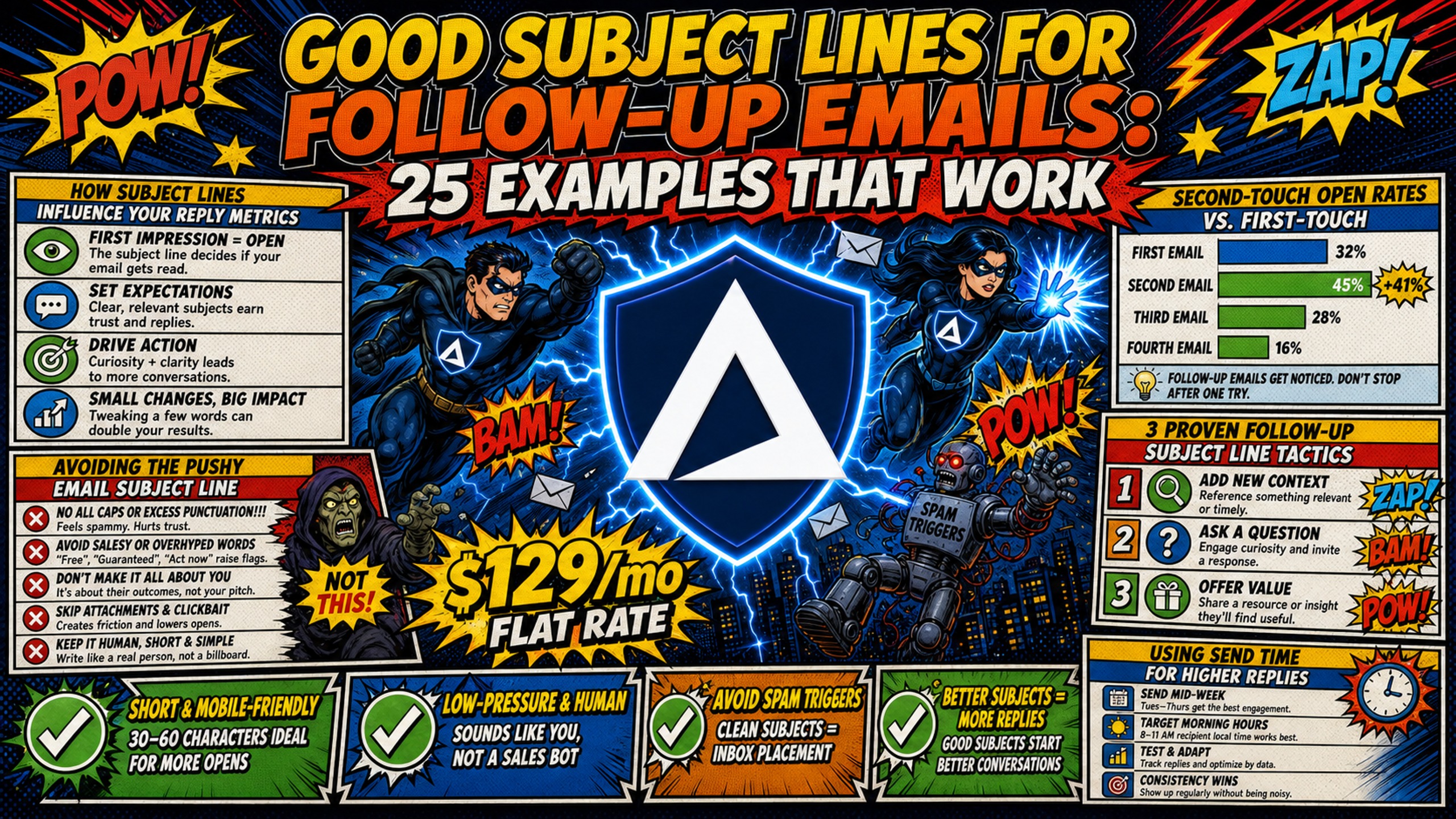
TL;DR: High-converting follow-up subject lines rely on short, low-pressure copy that fits mobile screens and avoids spam trigger words. Keep subject lines concise and front-load the most critical words to avoid truncation on mobile screens, and avoid fake "Re:" prefixes, which damage domain reputation fast. Copy quality is only half the equation. To maintain high reply rates across multi-touch campaigns, agencies need dedicated email infrastructure. Inframail provides unlimited inboxes on dedicated US-based IPs for a flat $129/month, eliminating the linear per-seat costs of Google Workspace and the reputation risks of shared IP pools.
Recipients decide whether to open an email based on signals like the sender name, subject line, and preview text. That entire decision collapses the moment your domain lands on a blacklist. A well-crafted subject line has limited impact if the email routes to spam.
This guide provides 25 copy-and-paste follow-up subject line examples organized by campaign stage, plus the technical deliverability rules that keep high-volume sequences out of spam across every touch.
How subject lines influence your reply metrics
Microsoft and Yahoo both run complaint feedback loops that report spam complaints back to individual senders. Microsoft's JMRP reports are redacted as of 2026 though, the sender address and message body are stripped, so the visibility is narrower than it used to be. Google is an exception, offering only aggregate complaint data through Postmaster Tools without identifying individual complainers. High open rates and replies signal quality mail. High delete-without-open rates or manual spam complaints signal low-quality mail, and those signals directly damage your domain's sender score and future inbox placement rate.
Second-touch open rates vs. first-touch
In many sequences, first emails often see strong open rates. Second-touch emails can generate significant cumulative replies as a proportion of total sequence responses. The copy on your follow-up needs to work effectively to convert opens into replies, not rely on familiarity alone.
The checklist below shows how subject line construction affects inbox placement before a single recipient opens the email.
Subject line deliverability checklist:
- Keep subject lines concise, shorter lines typically perform better on mobile screens
- Use punctuation sparingly
- Use exclamation marks conservatively when context justifies them
- Use title case or sentence case, never all-caps
- Place the main message early in the subject line in case of mobile truncation
- Avoid spam trigger words (see Table 1 in the traps section below)
Avoiding the pushy email subject line
Subject lines like "Did you see my last email?" or "URGENT: Need your feedback" can trigger negative responses that may lead to spam complaints. Each spam complaint counts against your domain, and maintaining low complaint rates is critical for deliverability. Pushy subject lines risk damaging that margin.
3 proven follow-up email subject line tactics
Three frameworks drive the majority of high-performing follow-up opens. Every example below maps to one of these.
Using send time for higher replies
Mid-week timing can improve follow-up visibility. Sending on optimal days helps keep your email relevant in an active inbox. Scheduling tools in Instantly and Smartlead rely on stable Simple Mail Transfer Protocol (SMTP) authentication to execute timed sends reliably, so infrastructure uptime directly affects campaign timing precision.
Referencing prior emails to increase open rates
Threading a follow-up to the original email creates a natural conversation bridge. When email clients chain messages properly, recipients can review context from prior messages, and your follow-up feels like part of an ongoing dialogue rather than a cold blast. Most cold email platforms can be configured to maintain proper threading headers on follow-ups when authenticated with valid SMTP credentials.
Highlighting value props after no-reply
The strongest follow-ups offer something new rather than bumping the thread. A specific resource, a short data point, or a direct question about a known pain point changes the tone from "chasing you" to "bringing you something useful," and it helps maintain engagement as a sequence extends.
Using day-of-week timing for email replies
The eight examples below use day, week, and timing references to create soft relevance and low-pressure asks.
Example 1: Writing subject lines for delayed replies
"quick question for Tuesday" - Names a specific day to create soft relevance and signals a brief ask rather than a long sales call.
Example 2: Scheduling your follow-up emails
"ideas for your Thursday" - Works well on Wednesday sends when prospects are planning their remaining week and the word "ideas" implies value.
Example 3: Reopening a stalled conversation
"new data for [company]" - Re-opens the conversation by promising fresh information, which often prompts replies from prospects who ignored a generic first email.
Example 4: Sending low-pressure check-ins
"quick window this week?" - Conversational and non-committal, it reduces the activation cost for the prospect to reply without implying a long presentation.
Example 5: Probing for project status
"still prioritizing [goal]?" - Addresses the prospect's business objectives directly and gives them an easy out, which generates more honest replies than a hard pitch.
Example 6: Offering value before the ask
"resource for [company]" - Positions the email as a value delivery rather than a request, creating goodwill before any meeting ask arrives.
Example 7: Sending soft follow-up reminders
"thought on this, [name]?" - Friendly, personalized, and concise enough to fit cleanly on mobile screens. The Inframail channel video on reply rate CTAs shows how pairing this style with a low-friction body copy increases conversion.
Example 8: Closing the loop on a stalled reply
"moving on from [goal]?" - A gentle takeaway close that signals this may be the final touch, which often prompts a fast reply from interested-but-busy prospects.
Connecting new emails to previous conversations
Threading preserves the In-Reply-To SMTP header to keep follow-ups inside the same conversation. Dynamic personalization inserts CSV merge tag data (company names, first names, custom fields) to make each email feel individually written. Both require reliable Internet Message Access Protocol (IMAP)/SMTP credentials, which Inframail provisions automatically and exports as a CSV for import into Smartlead or Instantly.
Example 9: Naming the prior topic in the subject line
"following up on [topic]" - Direct and transparent, it signals a continuation of a real prior conversation rather than a fresh cold blast.
Example 10: Using specific thread references
"regarding our last thread" - Professional framing that implies a prior exchange, which works especially well when IMAP threading is enabled.
Example 11: Using first names to connect
"[name] - quick question" - Putting personalization at the start of the subject catches attention in crowded mobile inbox previews. For B2B copy structures that pair with this, this cold email framework video covers positioning the ask effectively.
Example 12: Incorporating custom lead insights
"loved your post on [topic]" - Shows actual research and separates the sender from automated outreach, but only works when the insight is genuinely specific.
Example 13: Framing the follow-up as a clarification
"context on my last note" - Frames the follow-up as clarifying rather than repeating, without sounding demanding.
Example 14: Framing a company-to-company partnership
"[company] + [your company]" - Clear partnership framing sets expectations in the subject line itself so recipients know this is a B2B conversation.
Example 15: Probing challenges in follow-up emails
"solving [pain point] at [company]" - Highly targeted copy that depends on lead data quality from a provider like Apollo or ZoomInfo.
Example 16: Being transparent about the attempt count
"second attempt to connect" - Honest and direct, signaling a final polite effort before moving on.
High conversion follow-up email subject examples
These nine examples deliver measurable value in the subject line itself using concrete numbers, offers, and research hooks. For overall cold email strategy context, the Salesforge 2025 cold email breakdown shows value-led approaches can drive strong reply rates.
Example 17: Leading with a specific benefit in the subject line
"save $250/mo at [company]" - Concrete financial value removes ambiguity about what the email offers. For infrastructure cost benchmarks, Inframail's 2025 cost comparison provides current platform-by-platform data.
Example 18: Refreshing department email copy
"new copy for [department]" - Offers a specific, actionable upgrade. Replace the variable with "sales," "SDR," or "outbound" to increase specificity.
Example 19: Adding value to follow-ups
"free template for [company]" - Handing the prospect a ready-to-use asset shifts the interaction from a sales pitch to a service interaction.
Example 20: Sharing validated test results
"our test results for [niche]" - Uses data and social proof to build authority immediately.
Example 21: Sharing relevant industry reports
"2025 deliverability report" - Positions the sender as a practitioner sharing relevant research rather than pitching a product.
Example 22: Framing your value proposition
"flat-rate email setup" - Clear and direct. Inframail's flat-rate pricing ($129/month for unlimited inboxes) is a strong hook for prospects paying per-seat costs. The B2B cold email response rates guide covers reply-rate benchmarks by industry and follow-up count.
Example 23: Analyzing peer subject lines
"subject line audit for [company]" - A customized offer promising immediate, personalized feedback, which generates strong reply rates in agency and SaaS contexts.
Example 24: Using research-based hooks
"data on [competitor] strategy" - Triggers curiosity by offering competitive intelligence, which works well for prospects in fast-moving markets.
Example 25: Sending the final breakup email
"permission to close file?" - The classic takeaway close that drives replies from interested-but-busy leads. After this send, remove non-responders to protect domain health on future campaigns.
How to craft high-converting follow-ups
The three practices below cover sequencing logic, testing discipline, and personalization at scale.
Match subject lines to campaign stage
Subject lines must evolve across the sequence, not repeat the same angle. A standard four-step structure:
- Email 1 (Introduction): A specific, low-pressure hook based on the prospect's business context.
- Emails 2-3 (Value-add): A resource, data point, or direct question tied to a known pain point.
- Email 4 (Breakup): A soft takeaway close to prompt a final decision.
Vary the subject line at each stage so the prospect encounters a new angle rather than a repeated ask.
Draft subject lines for high open rates
Testing subject lines across a full domain list too early can generate spam complaints that damage sender reputation. A safer A/B testing workflow:
- Test variable subject lines on a warm segment of at least 1,000 contacts (minimum a few hundred per variant) from a single domain first to ensure statistical relevance.
- Monitor spam complaints and bounce rates during the test window.
- Roll out the winning line to the full active domain pool only after confirming complaint rates remain acceptably low.
Adapt subject lines for specific prospects
Dynamic personalization via CSV merge tags inserts company names, job titles, or custom research fields without manual editing per email. Export lead data from Apollo or ZoomInfo with a custom column, map it to a merge tag in your sending platform, and reference it in the subject line variable. Keep variables inside the 33-character mobile safe zone to avoid truncation.
Avoid these 5 common follow-up subject line traps
Table 1: Deliverability guardrails
| Avoid (spam trigger) | Use instead | Reason |
|---|---|---|
| "Urgent" | "Quick question" | Avoids artificial pressure signals |
| "Free" | "Complimentary" or omit | Reduces commercial filter triggers |
| "Guaranteed" | "Estimated" or "Validated" | Avoids overpromising filter flags |
| "Click here" | "Thoughts?" | Keeps CTA conversational |
| "Special promotion" | "Industry report" | Shifts focus to value-add copy |
Dedicated IPs isolate sending reputation from other senders on a shared pool. The dedicated IP vs shared IP breakdown covers how bad-neighbor exposure on shared pools causes inbox-placement drops, and why infrastructure choice directly affects how well the copy improvements above translate to inbox placement.
Avoiding stale follow-up threads
Sending "just checking in" repeatedly with no new value can frustrate prospects and may lead to spam flags. Every follow-up should add something new, a data point, a resource, or a direct question.
How to sound confident, not needy
Passive-aggressive copy like "I guess you're too busy" positions the sender as chasing rather than offering. Keep the tone professional, helpful, and direct. Acknowledge the lack of reply briefly, then move to a new value hook.
Why fake urgency hurts reply rates
Subject lines like "URGENT: Action Required" may spike initial opens, but they can generate unsubscribes and spam complaints once the prospect sees a standard pitch inside. Fake "Re:" prefixes carry similar risk: recipients can often tell when there is no actual parent thread, which damages trust and sender reputation. Even one domain blacklisted for this practice requires manual delisting effort that costs active campaign time. Inframail's automated delisting requests resolve 68.3% of flagged domains within 48 hours, but avoiding the trigger entirely is the better strategy.
Stop selling and start helping
Subject lines should promise a helpful resource or a direct answer to a problem, not a pitch for a 30-minute demo. The B2B cold email follow-up framework from the Inframail channel reinforces this: every touch after the first should add measurable value to the prospect's workday.
Essential tips for follow-up email subjects
The sections below cover cadence spacing, send timing, threading behavior, and the infrastructure that keeps multi-touch sequences running cleanly.
Recommended follow-up email cadence
A four-step sequence captures a significant portion of replies without overexposing a domain. In practice, spacing touches at Day 0, Day 3, Day 10, and Day 17 captures most available replies, after which additional follow-ups typically produce diminishing returns.
Inframail's flat-rate model ($129/month) keeps infrastructure costs fixed regardless of how many client domains run active sequences simultaneously. Compare that to Google Workspace at $350-420/month for just 50 inboxes, where each new client domain adds a direct line item to the infrastructure bill.
"So affordable that it will make your unit economics work, even for lower ticket b2b businesses like ours." - Verified user review of Inframail
Table 2: TCO (Total Cost of Ownership) comparison for 50 inboxes
| Cost variable | Google Workspace | Inframail |
|---|---|---|
| Platform fee | $350 - $420/mo | $129/mo |
| Domain costs (amortized) | Not included | ~$34/mo |
| Total monthly cost | $350 - $420/mo | $163/mo |
| Annual savings | Reference | $2,244 - $3,084 |
Note: Both platforms typically require external warmup tools (such as Warmbox or Lemwarm) not included in this comparison.
Recommended delay between follow-up emails
Space follow-up touches using the recommended 3-7-7 cadence (Day 0, Day 3, Day 10, Day 17) to avoid triggering ESP (Email Service Provider) rate limits and to prevent the prospect from losing context between messages. Sending faster signals automated spam behavior to receiving servers.
Updating subject lines in email sequences
Keep the same subject line for touches 1-3 when threading to maintain conversation context via the In-Reply-To SMTP header. Break the thread and start a fresh subject line at touch 4 (the breakup email) to signal a new angle. Threading via IMAP gives prospects the ability to scroll up and review the full conversation, which reduces the need to repeat context in body copy.
Impact of 'Re:' on follow-up rates
Genuine threaded replies, where the email client automatically prepends "Re:" via IMAP headers, are fine and maintain thread continuity. Manually typing "Re:" into a cold first-touch or unthreaded follow-up is different: this approach can be detected as inauthentic and may accelerate spam placement and domain blacklisting requiring manual delisting effort to resolve.
Best days to send follow-up emails
Wednesday and Thursday are the commonly recommended days for B2B follow-up sends, with Tuesday also performing well. By mid-week, most prospects have cleared Monday's priority tasks and are in active execution mode. By Thursday, they haven't mentally shifted to weekend mode. Avoid Monday, Friday, and weekends entirely for B2B sequences.
Inframail provisions each inbox with IMAP/SMTP credentials and exports them in CSV format for direct import into Instantly or Smartlead.
"This is genuinely the best cold email hosting software you can find for many reasons... high-volume sending with strong deliverability even on domains that typically face challenges." - Verified user review of Inframail
The flat-rate model removes the cost barrier to scaling multi-touch sequences across client portfolios. Per-mailbox competitors charge rates that compound with every new client domain, while Inframail's infrastructure spend stays fixed at $129/month regardless of inbox count.
Sign up to Inframail and start spinning up unlimited inboxes on dedicated US-based IPs today.
FAQs
Why is my follow-up email going to spam?
Your follow-up is most likely hitting spam due to shared IP contamination, missing Sender Policy Framework (SPF), DomainKeys Identified Mail (DKIM), and Domain-based Message Authentication, Reporting, and Conformance (DMARC) records, or a high spam complaint rate triggered by deceptive subject lines like fake "Re:" prefixes. Inframail provides dedicated IPs and automated DNS setup to address these infrastructure-level issues.
How long should a follow-up email subject line be?
Keep follow-up subject lines concise and front-load the most critical words to ensure visibility on mobile screens, where a significant portion of B2B emails are opened. Mobile email clients often truncate longer subject lines.
Does using 'Re:' in a follow-up subject line help open rates?
A genuine "Re:" generated by IMAP threading maintains conversation context. Manually typing "Re:" into an unthreaded cold email is different: receiving mail servers may detect the absence of proper threading headers, which can raise spam complaint rates.
Does Inframail include an email warmup tool?
No, Inframail focuses on providing flat-rate email infrastructure and automated DNS setup. External warmup tools like Warmbox or Lemwarm are required to warm new domains before launching cold campaigns, and are not included in the platform fee.
What are the best days to send follow-up emails?
Wednesday and Thursday are the commonly recommended days for B2B follow-up sends, with Tuesday also showing strong performance. Mid-week sends reach prospects when they've cleared early-week priority tasks and before they mentally shift toward the weekend.
How many follow-up emails should I send before stopping?
A four-step sequence (Introduction, Value-add 1, Value-add 2, Breakup) is commonly recommended for capturing strong reply rates. Each follow-up beyond the fourth typically adds diminishing returns on reply rate while potentially increasing spam complaint and unsubscribe risk, so stopping at four can protect domain health without sacrificing meaningful reply volume.
Key terms glossary
Dedicated IP: An IP address used exclusively by one sender, so the domain's sender reputation reflects only that sender's behavior and is not affected by other senders on a shared pool.
Flat-rate email infrastructure: A pricing model where a single monthly fee covers unlimited inboxes, preventing infrastructure costs from scaling linearly as domain count grows.
Threading: Keeping follow-up emails inside the same email conversation by preserving the In-Reply-To SMTP header, so recipients see a continuous thread rather than isolated messages.
Dynamic personalization: Using CSV merge tags to automatically insert lead-specific data (first names, company names, custom fields) into subject lines and body copy during a campaign send.
SPF/DKIM/DMARC: Three DNS authentication records that verify a sender's identity to receiving mail servers and protect domains from spoofing. Inframail configures all three automatically at domain setup.