
The future of cold email: trends SaaS founders need to know
Cold email still books meetings for SaaS founders, but the average reply rate is 3.43% in 2026, with top performers clearing 10%. Gmail and Microsoft now enforc
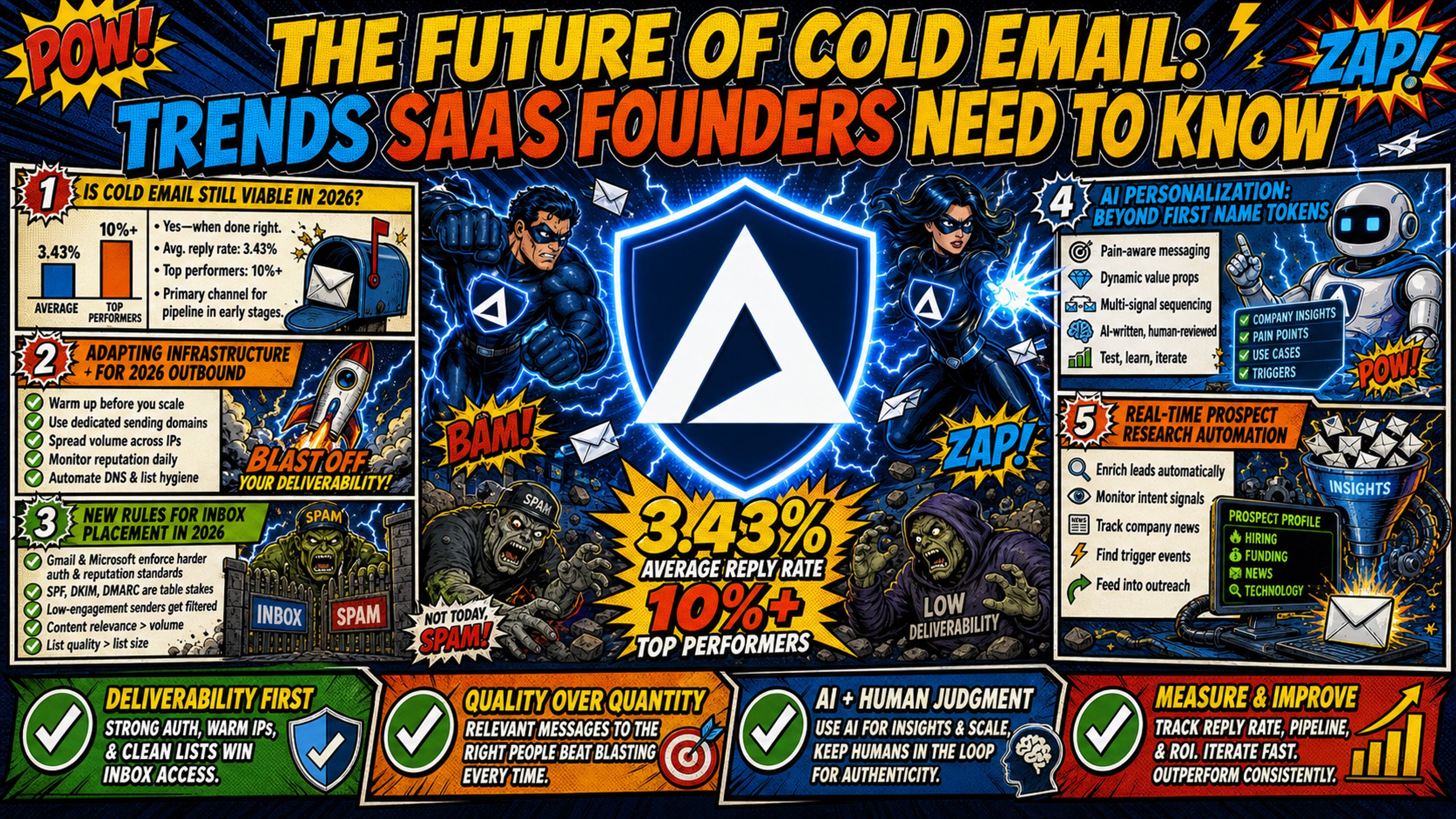
TL;DR: Cold email still books meetings for SaaS founders, but the average reply rate is 3.43% in 2026, with top performers clearing 10%. Gmail and Microsoft now enforce stricter authentication, a 0.3% spam rate threshold, and one-click opt-outs, and AI personalization works only with human oversight. GDPR allows B2B cold email under legitimate interest, not implied consent. Dedicated IPs, automated DNS setup, and flat-rate pricing (Inframail's platform fee is $147/month before domain and warmup costs) help protect deliverability and margin.
Cold email campaigns average a 3.43% reply rate in 2026, with top performers clearing 10%. The channel is not dead. It is just punishing senders who refuse to adapt.
Cold email still books meetings for SaaS founders, but the rules changed. Gmail and Microsoft now enforce stricter authentication, spam rate thresholds, and one-click opt-outs. AI personalization raises buyer expectations while also raising spam filter sensitivity. Founders who update their infrastructure, compliance practices, and personalization approach now will keep the channel working through 2026 and beyond.
Founder-led outbound adds another layer. When a founder sends their own cold email, every bounce, spam complaint, and blacklisted domain costs selling time that a small team can't spare. Bootstrapped founders also can't absorb infrastructure costs that grow with every inbox, so the sections below cover deliverability and predictable spend together.
Is cold email still viable in 2026?
Yes, but the channel rewards precision over volume. Cold email campaigns average a 3.43% reply rate in 2026. The top performers still clear 10%, but they do it with better infrastructure and tighter targeting, not higher send volume.
This shift means infrastructure quality is now a competitive advantage. Senders who treat their domains, IPs, and authentication as strategic assets will keep the channel profitable. Those who rely on shared IP pools and manual DNS work will watch their reply rates erode.
Adapting infrastructure for 2026 outbound
Shared IP pools work like carpool lanes where one bad actor flags the whole range. Dedicated IPs work like private lanes where your behavior alone determines reputation. On a shared pool, one bad actor spamming gets the entire IP range flagged, damaging deliverability for everyone on that pool, as Inframail's founder-led outbound playbook explains.
Inframail provides 1 to 3 dedicated US-based IPs depending on plan, with 1 dedicated IP on the Unlimited Plan and 3 on the Agency Pack. Your sending reputation stays isolated from other users, so one bad campaign does not poison your whole domain portfolio.
"I'm managing around 730 inboxes across 3 IPs, and the whole setup was surprisingly easy. Getting everything configured and uploaded into my warm-up tool was pretty straightforward, which saved me a lot of unnecessary hassle." - Verified user review of Inframail
New rules for inbox placement in 2026
Google and Microsoft now require bulk senders to keep spam rates below 0.3%. Google's sender guidelines say to keep spam rates reported in Postmaster Tools below 0.10% and to avoid ever reaching 0.30% or higher. Rates that high risk spam classification and loss of mitigation support.
Inbox placement rate is now the primary KPI, not send volume. Inframail reports 98%+ deliverability with proper infrastructure, based on platform monitoring data. Anything below 90% signals an authentication, list quality, or reputation problem.
AI personalization: beyond first name tokens
AI personalization raises reply rates when done well, but triggers spam filters when overused. The goal is human-like nuance, not 50 data points crammed into every email.
AI makes personalization fast, but without a deliverability-aware approach you'll see bounces, blocks, and inbox placement drops. Spam filters evaluate sending patterns, authentication, content similarity, link behavior, and sender reputation, not just words. When you generate hundreds of highly similar AI emails and blast them quickly from the same mailbox, filters detect statistical anomalies and treat the campaign like bulk spam, as toinbox.ai's deliverability analysis warns.
Filters react to sending patterns and sender reputation, and near-identical AI-generated emails sent in bulk get flagged. The solution is not to avoid AI. It is to use it for research and drafting while keeping human oversight on tone, pacing, and relevance.
Real-time prospect research automation
Tools that pull prospect data in real time (job changes, funding announcements, content engagement) give you the raw material for relevance. The key is to use that data to inform one specific, relevant sentence, not a paragraph of flattery.
For example, if a prospect just raised a Series A, reference the funding round and tie it to a specific pain point your product solves. Do not list five data points about their company. That reads as creepy and triggers spam filters.
Automating personalized email blocks
Automate the first line or a single value proposition block while keeping the rest of the email human-written. This balances scale with authenticity.
Use AI to generate 10 variations of an opening line based on prospect data, then pick the best one and edit it for tone. Keep the body and call-to-action in your own voice. This approach keeps emails feeling human while letting you scale research and drafting.
Founder-led outbound has an edge here. A founder editing the opening line brings product knowledge and credibility that an SDR template can't match. Use AI for research and first drafts, and keep the founder's own voice on the final message.
Avoiding AI over-personalization
Over-personalization reads as robotic and can trigger spam filters. Use this table to guide your AI-generated copy.
| Do | Don't |
|---|---|
| Reference one specific, recent data point | List 5 data points about the prospect |
| Use short sentences and plain language | Write long, complex sentences |
| Sound like a human wrote it | Use excessive flattery or hype |
| Edit AI output for tone and flow | Send AI output without review |
| Test one variable at a time | Change multiple elements at once |
New Gmail and Outlook rules for 2026
Senders who ignore these rules will see inbox placement drop. Here is what changed and what to do about it.
Google's new sender rules for 2026
If you send 5,000 or more emails daily to Gmail accounts, you must authenticate with SPF, DKIM, and DMARC, keep spam rates below 0.3%, and implement one-click unsubscribe, according to Google's bulk sender requirements.
SPF (Sender Policy Framework) verifies that your server is authorized to send email for your domain. DKIM (DomainKeys Identified Mail) adds a digital signature to prove the email was not altered in transit. DMARC (Domain-based Message Authentication, Reporting and Conformance) tells receiving servers what to do if SPF or DKIM fail.
According to Sendmarc's guide to Google's requirements, one-click unsubscribe requests must be processed within 48 hours. Most sending platforms handle this automatically, but your infrastructure must support it.
How to manage Microsoft auth rules
Microsoft began enforcing DMARC, SPF, and DKIM for high-volume senders to Outlook.com, Hotmail.com, and Live.com from May 5, 2025. Domains sending 5,000+ emails per day must publish a DMARC record with at least p=none and align it with either SPF or DKIM, per DMARC Report's guide to Microsoft's requirements.
Inframail automates SPF, DKIM, and DMARC configuration, so no manual DNS panel work is required. The platform provisions records automatically when you add a domain.
Avoiding the 0.3% spam rate penalty
Monitor spam complaints daily. If your rate approaches 0.3%, pause sends and clean your list. Remove hard bounces, unsubscribes, and anyone who has not engaged in 90 days.
Dedicated IPs help isolate reputation. If one campaign triggers complaints, it does not poison the whole IP pool. Inframail's dashboard tracks domain and IP health in real time, so you catch issues before they escalate.
"I send 4,000 emails a day, sometimes 7 days a week. All my domains are .info which aren't the best for deliverability and even then I'm still hitting ~99% deliverability across the board." - Verified user review of Inframail
How to implement one-click opt-outs
One-click unsubscribe requires a list-unsubscribe header in every email. Most sending platforms (Instantly, Smartlead, Lemlist) add this automatically. Verify that your infrastructure supports it and test the unsubscribe flow before launching a campaign.
Rising buyer expectations for cold outreach
Buyers now expect relevance, not volume. Template-based outreach fails because prospects can spot a mass email in seconds.
Why template-based outreach fails in 2026
Buyers receive dozens of cold emails daily. Generic templates get ignored or marked as spam. Relevance is the only differentiator.
A template that says "I noticed you're in SaaS" does not cut it anymore. Buyers expect you to reference something specific about their business, their role, or a recent company event. That level of relevance requires research, either manual or AI-assisted.
How buyer behavior affects inbox placement
When buyers mark emails as spam, sender reputation drops. High-quality, relevant outreach protects inbox placement. Low-quality, template-based outreach damages it.
This is why buyer expectations and deliverability are now linked. Send emails people want to receive, and your inbox placement rate stays high. Send generic blasts, and your reputation tanks.
Cross-channel sequences boost conversion
Cold email works better when paired with LinkedIn touches or calls. A multi-channel sequence increases reply rates without increasing email volume.
For example, send a cold email, wait 3 days, then send a LinkedIn connection request with a personalized note. Common alternatives include sending the connection request and first email on Day 0, a follow-up email on Day 3-5, and a LinkedIn message on Day 7-10. Reference the email in your LinkedIn message. This approach increases touchpoints without triggering spam filters.
How compliance shifts impact cold email ROI
Compliance is no longer optional. GDPR, CAN-SPAM, and CASL all shape how cold email must be run, and non-compliance risks fines and deliverability damage.
GDPR compliance for cold email
GDPR allows B2B cold email under Article 6(1)(f), the legitimate interest basis. GDPR does not recognize "implied consent" for cold email. Instead, you can email business professionals in the EU without prior consent if you can demonstrate a genuine business reason, such as a prospect's email address being publicly available in a business context and your message being relevant to their role, according to smartlead's compliance guide.
You must include an opt-out mechanism and honor GDPR opt-out requests immediately. You must also document your legitimate interest assessment for each campaign.
Adapting cold email to CAN-SPAM and CASL
CAN-SPAM requires accurate headers, subject lines, and a valid physical postal address in every email. The opt-out mechanism must stay functional for at least 30 days after the email goes out.
CASL requires express or implied consent before sending commercial electronic messages to Canadian recipients. Implied consent exists for publicly conspicuous business email addresses used in a business capacity.
Update your DNS records for deliverability
SPF, DKIM, and DMARC records are now required by both regulators and email providers. Inframail automates this setup. When you add a domain, the platform creates and publishes the records automatically. No DNS panel access required.
Customer testimonials report setting up 10 inboxes in 2 minutes, which removes DNS work as a bottleneck when adding new domains.
How to protect your sending reputation
A blacklisted domain kills reply rates mid-campaign. Proactive monitoring and fast response are the only defense.
Managing IP health for 2026 outbound
Dedicated IPs give you full control over sender reputation. Shared pools expose you to other users' behavior. Inframail provides 1 to 3 dedicated US-based IPs depending on plan, plus a deliverability monitoring dashboard that tracks domain and IP health in real time.
The dashboard shows blacklist status, authentication alignment, and domain health in real time. You see blacklist issues before your clients do.
Automated authentication setup
Inframail automates SPF, DKIM, and DMARC configuration. When you add a domain, the platform creates the records and publishes them to your DNS provider. No manual panel work required.
This eliminates 12+ hours of manual DNS setup for 50 domains. It also removes the risk of typos or misconfigurations that break authentication.
Proactive blacklist monitoring and recovery
Inframail reports a 68.3% blacklist delisting success rate within 48 hours, based on platform monitoring data. The platform monitors blacklists and auto-submits delisting requests when domains are flagged.
Proactive monitoring catches issues before clients notice. If a domain gets flagged, you know within hours, not days. Fast response minimizes downtime and protects reply rates.
How to stabilize your email spend
Flat-rate pricing protects margin as domain count scales. For 50 inboxes, Google Workspace Business Starter costs $420/month at $8.40 per user on the Flexible Plan. Inframail's platform fee is $147/month flat.
| Provider | Cost (50 inboxes) | IP Type | Setup Speed |
|---|---|---|---|
| Inframail | $147/month + domains | Dedicated (1-3 IPs) | Near-instant |
| Google Workspace | $420/month | Shared Google IPs | Manual DNS |
| Maildoso | $2.50/mailbox at 30 mailboxes, decreasing to $0.49/mailbox at 1,000 mailboxes (custom quantities available) | Proprietary SMTP infrastructure with automatic IP rotation and replacement | 10-15 min |
| Mailforge | $150/month (50 × $3/mailbox on monthly billing) | Shared IP pool (not dedicated IPs per mailbox) | 3-5 min |
Domain costs ($5-16/year) and warmup tools ($15-50/month per inbox) apply on both sides and are not included in this comparison.
For 50 inboxes, Inframail costs $181/month in total (including amortized domains) versus $350-420/month on Google Workspace. That saves $169-239/month, or $2,028-$2,868 annually. That is margin you can reinvest in data, copy, or headcount.
For a bootstrapped founder, this gap matters more than it does for a funded team. Per-seat pricing grows with every inbox you add, while a flat platform fee keeps infrastructure spend predictable as founder-led outbound scales. That leaves more of a limited budget for data, copy, and your first sales hire.
Get started with Inframail
Inframail is a flat-rate Microsoft email infrastructure provider for agencies and founder-led SaaS teams running 50-200 cold email domains. The platform fee is $147/month (before domain and warmup costs), and it includes 1-3 dedicated US-based IPs and automated SPF, DKIM, and DMARC configuration.
In this case study video, see how Inframail helped a client Potion send high volumes of cold emails at a cost that made outreach viable, maintain strong deliverability with 20–35% positive reply rates, and generate 4–5 sales with over 10x ROI.
Sign up to Inframail and get started today.
FAQs
Will AI replace manual cold email completely?
No. AI improves research and personalization, but human oversight is still required for strategy, tone, and deliverability decisions. Fully automated campaigns read as spam and get flagged.
How often do Gmail and Microsoft change deliverability rules?
Major changes happen roughly once per year. Gmail and Microsoft both updated sender requirements in 2025. Monitoring official sender guidelines quarterly is a practical cadence.
What inbox placement rate should I target in 2026?
Target 98% or higher. Inframail reports 98%+ deliverability with proper infrastructure, based on platform monitoring data. Anything below 90% signals an authentication, list quality, or reputation problem.
Do I need dedicated IPs for cold email now?
Dedicated IPs are strongly recommended for senders managing 50+ domains. Shared pools expose your reputation to other senders' behavior. Inframail includes 1-3 dedicated US-based IPs depending on plan.
How long does domain warmup take with current standards?
Plan for 2-3 weeks of gradual volume increases. External warmup tools like Warmbox or Lemwarm typically cost $15-50 per inbox per month. Inframail does not include built-in warmup.
Can founder-led outbound work on a bootstrapped budget?
Yes, if the infrastructure cost stays predictable. Inframail's platform fee is $147/month flat, domains cost $5-16 per year, and external warmup tools typically cost $15-50 per inbox per month. Founders who send their own outreach should budget for all three line items before adding inboxes.
Key terms glossary
Inbox placement rate: The percentage of sent emails that land in the primary inbox rather than spam or promotions. The primary deliverability KPI for 2026.
Sender reputation: A score assigned by email providers based on sending history, spam complaints, and authentication. Determines whether emails reach the inbox.
Domain warmup: The process of gradually increasing send volume on a new domain to build trust with email providers. Typically takes 2-3 weeks.
SPF, DKIM, and DMARC: Three authentication protocols that verify sender identity and prevent spoofing. Required by Gmail and Microsoft for bulk senders in 2025.
Dedicated IP vs. shared pool: A dedicated IP is used only by your domains. A shared pool mixes your sending with other users, so their behavior can affect your reputation.