
Professional reminder email format: structure and components
A high-converting reminder email includes: a professional greeting, context line, singular CTA, and sign-off, kept between 50 and 90 words to match how busy B2B
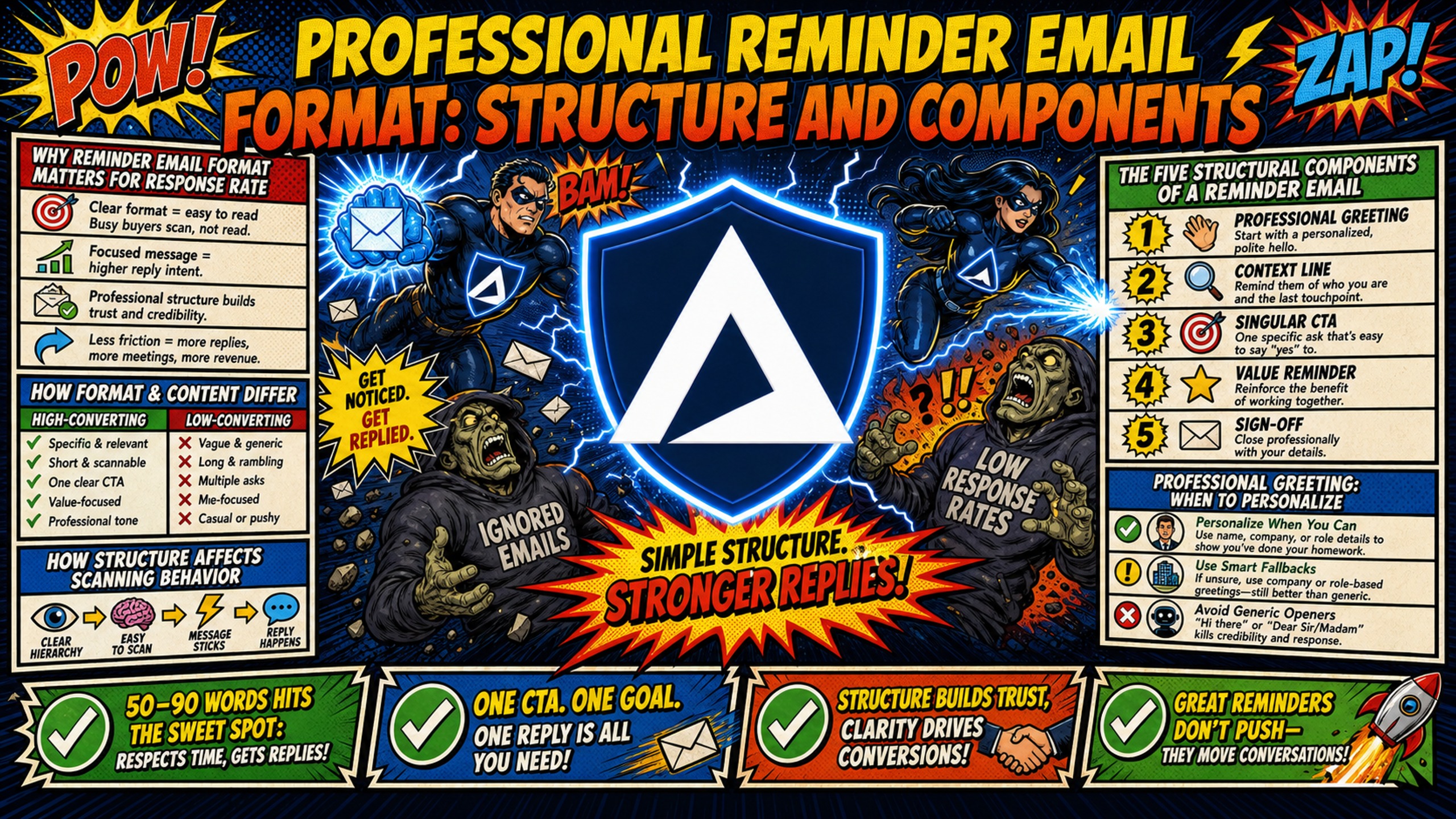
TL;DR: A high-converting reminder email includes: a professional greeting, context line, singular CTA, and sign-off, kept between 50 and 90 words to match how busy B2B professionals scan their inboxes. Format alone does not drive response rates. Without properly configured SPF, DKIM, and DMARC records on a dedicated IP, even a perfectly structured reminder lands in spam. Agencies running 50 or more cold email domains can cut infrastructure costs from $350-420/month on Google Workspace to approximately $163/month using Inframail's flat-rate unlimited plan, protecting margins as client count grows.
A perfectly formatted reminder email cannot get a response if it lands in the spam folder. Most agencies blame their copy when follow-up emails get ignored, but the bottleneck is often split between two problems: a format that buries the ask and an infrastructure that fails to deliver the message to the inbox at all. This guide covers both, giving you the structural blueprint for a high-converting reminder email and the technical foundation that makes it work at scale.
Why reminder email format matters for response rate
Response rate is a margin metric for outbound agencies. If your reminder emails do not convert, you book fewer meetings, your clients see weaker results, and churn risk climbs. B2B cold email response rates vary across high-volume outreach campaigns, but performance improves on well-structured follow-up sequences when format and deliverability infrastructure are both functioning correctly.
Format influences whether a busy professional engages or deletes during initial scanning. A reminder email that opens with lengthy preamble before stating the ask tends to underperform regardless of how polished the copy is. The cold email infrastructure monitoring guide for agency owners makes clear that deliverability health and campaign performance are inseparable, because a format issue and a deliverability issue produce the same surface-level symptom: no response.
How format and content differ
Format refers to the visual and structural layout of an email: the sequence of components, the word count, the position of the CTA, and the technical envelope carrying the message. Content refers to the specific words chosen within that structure. Both matter, but format creates the conditions for content to work.
The technical envelope is where most high-volume outreach fails. SPF (Sender Policy Framework), DKIM (DomainKeys Identified Mail), and DMARC (Domain-based Message Authentication, Reporting, and Conformance) are DNS records that authenticate your sending domain. Inframail automates SPF, DKIM, and DMARC configuration on domain addition, removing the DNS panel work that manual setups require.
| Metric | Industry standard | Inframail benchmark |
|---|---|---|
| Inbox placement rate | Varies by sender | 98%+ (site-reported) |
| Blacklist delisting success | Variable | 68.3% auto-delisting |
| Setup time (50 domains) | Hours to days | Minutes (10 inboxes in ~2 min) |
How structure affects scanning behavior
Business professionals typically do not read emails linearly. Nielsen Norman Group's F-shaped reading research shows that users first scan horizontally across the top of the content area, make a second shorter horizontal scan further down, then scan vertically down the left side. Critical information placed below the fold or buried in dense paragraphs often gets missed.
For reminder emails, this means placing the context and the ask early in the message, with no preamble.
Bad structure (buried ask):
Hi Sarah, I hope this email finds you well and that you had a great weekend.
I wanted to reach out because I sent over the proposal last Tuesday and
wanted to see if you had a chance to review it. Let me know your thoughts
when you can. Thanks so much!
Good structure (visible ask):
Hi Sarah,

Following up on the proposal I sent Tuesday the 28th.

Are you able to share feedback by Thursday at noon so the team
can incorporate changes before Friday's build?

Thanks,
James
The 50-90 word framework tends to keep the entire email visible on a single mobile screen, matching the F-shaped scan path. Anything longer forces the recipient to scroll, and most will not.
The five structural components of a reminder email
A high-converting reminder email follows five components in sequence. Each component has a specific function, and keeping them in this order typically improves clarity and response rate.
- Professional greeting: Sets relationship tone in one line using first-name personalization. In modern B2B outreach, "Hi [First Name]" is preferred over "Dear Mr./Ms. [Last Name]."
- Context line: References the previous interaction in one sentence with a specific date. "Following up on the proposal I sent Tuesday the 28th" anchors the recipient's memory without sounding accusatory.
- The ask: A singular, direct CTA. Emails with a single CTA tend to outperform those with multiple requests by reducing the recipient's choices to yes or no.
- Deadline or timeline: Creates polite urgency with a specific date and an operational reason. "By Thursday at noon to hit the Friday launch" outperforms "sometime this week."
- Sign-off: Name, title, and one contact method. No logos, social icons, or multiple links competing with the CTA.
Professional greeting: when to personalize
Personalization in B2B outreach operates at the greeting level as a baseline, not an enhancement. Sales email automation tools used at scale insert first-name tokens as standard, but personalization beyond the name requires data quality checks to avoid sending "Hi [First Name]" to a cold list with missing fields.
Spam filters also evaluate personalization signals. High-volume sends with no personalization tend to read as bulk mail to both filters and recipients.
First-name vs. formal greeting
"Hi [First Name]" is the correct choice for modern B2B outreach. "Dear Mr./Ms. [Last Name]" reads as formal or transactional and reduces the perceived warmth of a follow-up. The exception is industries with formal communication norms, such as legal or financial services, where "Dear [Last Name]" remains appropriate. For agencies running outreach across multiple client verticals, configuring greeting style at the template level saves meaningful time. Connecting Inframail to Smartlead with exported IMAP/SMTP credentials applies these template rules consistently across every inbox in the account.
Generic greetings to avoid
Generic greetings like "To Whom It May Concern," "Dear Customer," and "Hello there" kill reply rates because they signal a mass send rather than a message written for the recipient specifically. In cold outreach, that signal reduces the recipient's reason to engage before they have read a single word of the body.
Writing the context line
The context line is a common weak point in reminder emails. Senders often skip it entirely, assuming the recipient remembers the previous email, or over-explain with unnecessary history. For agencies managing campaigns across multiple client accounts, getting this right at the template level prevents wasted sends at scale.
Reference the original request
Reference the previous interaction in one factual phrase: "Following up on the proposal I sent Tuesday" or "Circling back on the campaign brief we discussed last week." Avoid accusatory framing like "I still haven't heard back" because it shifts tone from professional to frustrated. The context line provides orientation to help the recipient place the reminder.
Include date or timeframe
Adding a specific date helps the recipient place the reminder in context. "Our call on Thursday the 28th" is more recoverable than "our recent call" when a prospect is evaluating multiple vendors in parallel. Specific dates reduce ambiguity and can make a response more likely.
Keep it to one sentence
Any information beyond identifying the previous interaction belongs in the body of the original email, not the reminder. A two-sentence context line pushes the ask further down and can reduce visibility for recipients scanning quickly.
Making the ask clear and specific
The ask is the structural centerpiece of the reminder. Everything else in the email exists to deliver the recipient to this one sentence in the right frame of mind to act on it.
Direct vs. passive language
Compare: "Let me know if you want to chat sometime" (passive) with "Are you available for a 10-minute call Thursday at 2 PM EST?" (direct). The direct version reduces the decision to a single binary choice: accept or decline. The passive version creates multiple choices: whether to chat, when to chat, and what format the conversation takes.
Single ask vs. multiple requests
Multiple requests in a reminder cause decision paralysis. Adding a second ask forces the recipient to prioritize between requests, which tends to delay or prevent a response entirely. Choice-overload research shows that reducing the number of options people face increases the odds they act on any one of them (Iyengar & Lepper, 2000 and Chernev, Böckenholt & Goodman, 2010), and that principle applies to reminder emails where the recipient faces one binary decision rather than several competing ones. For reminder emails specifically, where the relationship is already established, a single focused ask is typically more effective.
Reply-required vs. FYI asks
FYI reminders, where the recipient only needs to read and not reply, benefit from a clear close. Use "No action needed on your end" or "This is just a heads-up" at the ask position so the recipient knows immediately they are not being asked to decide anything.
How to include deadlines without sounding pushy
A deadline in a reminder email works when it is grounded in a real operational reason and stated once. In a 50-90 word email, a repeated deadline consumes word count that belongs to the ask and the operational reason behind it.
Specific date vs. relative timeframe: Research on implementation intentions shows that linking an action to a specific time or cue improves follow-through compared to a vague intention. Applied to reminder emails, "By Friday at 5 PM EST" gives the recipient a concrete action-time pairing, while "sometime this week" leaves them to determine when and whether to act. Agencies running cold email infrastructure at scale across dozens of client campaigns need templates that perform consistently, and specific dates are more likely to produce that result than vague timeframes.
Explaining why the deadline matters: Give the recipient one logical reason: "to hold your launch slot," "to process before the billing cycle closes," or "to give the team time before Thursday's kickoff." A reason that sounds invented, such as "limited availability" with no specifics, reduces trust instead of creating urgency.
When to skip the deadline entirely: Omit the deadline in three scenarios:
- Early-stage relationship-building sequences where urgency would undermine trust
- High-value accounts where presumptive pressure risks damaging the deal
- FYI reminders where no decision is required
The deadline earns its place only when it reflects a real operational constraint.
Annotated reminder email examples
Each template below uses the five-component structure and stays within the 50-90 word limit. Annotations identify each component and its contribution to response rate.
Example 1: Client deliverable reminder
[GREETING] Hi Sarah,
[CONTEXT] Following up on the creative brief I sent over Monday the 28th.
[ASK] Are you able to share your feedback by Thursday at noon so the team can incorporate changes before the Friday build?
[DEADLINE] Thursday at noon works as the cutoff to hit the Friday launch date.
[SIGN-OFF] Thanks, James | Lead Strategist | james@agency.com
Structure: first-name greeting establishes appropriate register, context anchors the previous interaction with a specific date (reducing cognitive load vs. vague references), ask is a direct time-bound binary question, deadline states the operational reason without pressure, sign-off is clean with one contact method that does not compete with the CTA.
Example 2: Meeting confirmation reminder
[GREETING] Hi Marcus,
[CONTEXT] Just confirming our call scheduled for Thursday, August 8th at 2 PM EST.
[ASK] Does that time still work for you, or would you prefer to reschedule?
[DEADLINE] If Thursday does not work, let me know by Wednesday so I can adjust the calendar.
[SIGN-OFF] Looking forward to it, Kate | kate@agency.com
Structure: the ask is a binary yes/no that eliminates scheduling friction and positions the sender as organized rather than chasing.
Example 3: Payment or invoice reminder
[GREETING] Hi David,
[CONTEXT] Reaching out about Invoice #1042, sent on July 28th for $3,200.
[ASK] Could you confirm the payment status or share an expected payment date?
[DEADLINE] Our accounts team processes payment records on Fridays, so a response before Friday morning would be helpful.
[SIGN-OFF] Thank you, Laura | Finance | laura@agency.com
Structure: neutral, factual framing at every component avoids accusatory tone while providing a clear operational reason for the deadline.
Common reminder email format mistakes
Formatting errors at scale cost agencies disproportionately more than a single missed response. When the same structural mistake runs across 200 domains and thousands of sends, the lost response rate compounds into real revenue impact. For infrastructure setup and template consistency recommendations, the cold email infrastructure costs comparison covers how platform choice affects operational leverage across client campaigns.
Four format mistakes that kill response rates:
- Burying the ask in long paragraphs: Placing the CTA in the third or fourth sentence of a six-line paragraph puts it below the F-pattern scan zone for most recipients. The ask should appear early after the context line, not buried after justifications and pleasantries.
- Apologizing excessively: "Sorry to bother you" and "I know you're busy" tend to reduce authority and signal the sender is not confident the email deserves a response. They also add word count that pushes the ask further down the screen. As shown in how cold email senders structure campaigns at high volume, authority and directness in the first line drive higher engagement than hedged, apologetic openers.
- Skipping the context line: Sending a reminder with no reference to the previous interaction forces the recipient to dig through their inbox to place the follow-up in context. Most will not. The context line is the bridge that connects the reminder to the permission established by the original email.
- Using vague subject lines: "Quick question," "Checking in," and "Just following up" typically provide no information value. Context-rich subject lines like "Re: Campaign brief | Feedback due Thursday" or "Following up: Invoice #1042" tell recipients exactly what the email contains before they open it.
For agencies evaluating whether Maildoso's shared IP deliverability or Maildoso alternatives better fit their infrastructure needs, the deliverability gap between shared and dedicated IP sending affects reminder email performance the same way it affects initial outreach: inbox placement rate determines whether the format ever gets seen.
Agencies running high-volume campaigns on Inframail's dedicated IP infrastructure report consistent inbox placement results across domain extensions.
Proofreading checklist: before you hit send
- Word count is between 50 and 90 words
- One and only one CTA present
- Context line references a specific previous interaction with a date or timeframe
- Greeting uses the recipient's first name (no generic openers)
- Deadline includes a specific date and the operational reason for it
- Subject line contains specific context (not "Quick question" or "Checking in")
- Sign-off includes name, title, and one contact method only
- Opening line contains zero apology language ("Sorry to bother" removed)
- Template previewed on 375px mobile screen and displays without horizontal scroll
- SPF, DKIM, and DMARC records are configured on the sending domain
Infrastructure setup checklist: domain purchase to credential export
- Purchase or transfer domains through Inframail's platform at $5-16/year per domain.
- Automated DNS configuration runs immediately, configuring SPF, DKIM, and DMARC records without DNS panel access.
- Provision Microsoft email inboxes under dedicated US-based IP addresses, unlimited per plan.
- Export IMAP/SMTP credentials to CSV directly from the platform dashboard.
- Import credentials into Instantly or Smartlead using Inframail's integration guide.
- Monitor domain and IP health through the deliverability dashboard, with auto-delisting requests submitted on blacklist flags.
The cost difference between this workflow and a per-inbox alternative is significant at scale. Note that warmup tools are separate and typically cost $15-50/month per inbox. Confirm warmup availability and cost with any platform before committing to a plan, as built-in warmup features vary by tier across providers.
| Inbox count | Google Workspace cost | Inframail cost (platform + amortized domains) | Monthly savings |
|---|---|---|---|
| 50 inboxes | $350-$420/mo | $163/mo | $187-$257/mo |
Maildoso's per-mailbox pricing on shared IP pools and Mailscale's per-inbox model both scale linearly with client growth, compressing agency margins the same way Google Workspace does. Inframail's flat-rate model holds at $129/month whether the account runs 50 or 500 inboxes, creating a fixed infrastructure cost line that does not move as client count grows.
The dedicated IP advantage compounds this further. With a shared IP pool, your deliverability depends on the sending behavior of every other user on that range. One bad actor gets the entire IP flagged.
Inframail's Unlimited Plan ($129/month) includes one dedicated US-based IP, and the Agency Pack ($327/month) includes three, so your sending reputation is isolated to your own campaigns. Your reminder email format choices, not someone else's spam run, determine your inbox placement rate.
For a detailed breakdown of how flat-rate pricing compares to per-mailbox models across more platforms, the Mailreef vs. Inframail comparison covers infrastructure fit for agencies at different domain volumes. Sign up to Inframail and get started today.
A reminder email that follows the five-component structure and stays within the 50-90 word limit gives the ask the best possible chance of being read. That work only pays off when the message reaches the inbox, which depends on correctly configured SPF, DKIM, and DMARC records on a dedicated IP. Structure and infrastructure are both required: one determines whether the ask gets seen, the other determines whether the email gets delivered.
FAQs
How long should a reminder email be?
Keep the reminder between 50 and 90 words. This range matches the F-shaped scanning behavior that Nielsen Norman Group's eye-tracking research identified in how people scan on-screen text, and keeps the entire email visible on a single mobile screen without scrolling.
When should I send a reminder email?
Many practitioners recommend sending the first reminder 3 days after the initial email, and scheduling it for mid-week mornings in the recipient's time zone. These windows tend to produce higher open rates in B2B outreach sequences based on industry benchmarking data.
How many reminders is too many?
Commonly recommended limits range from 3 to 5 reminders before pausing a cold outreach sequence (Prospeo), though some practitioners run sequences as long as 4 to 7 depending on the campaign and vertical. Beyond that range, response rates tend to drop and unsubscribe rates may climb, both of which can affect sender reputation on your dedicated IP.
Should I change the subject line on a reminder?
Keep the same subject line to preserve thread context and allow the recipient to find the full conversation history easily. Change the subject line only if the original had a near-zero open rate, which signals that the subject itself was the barrier rather than the content or timing.
Key terms glossary
SPF (Sender Policy Framework): A DNS record that specifies which mail servers are authorized to send email on behalf of your domain. Misconfigured SPF causes authentication failures that push emails to spam.
DKIM (DomainKeys Identified Mail): An email authentication method that adds a digital signature to outgoing emails, allowing receiving servers to verify the message was not altered in transit.
DMARC (Domain-based Message Authentication, Reporting, and Conformance): An email authentication protocol that uses SPF and DKIM results to determine whether an email is legitimate and what action the receiving server should take if it is not.
Dedicated IP: An IP address used exclusively by a single sender, meaning your sending reputation is completely isolated from other users and controlled solely by your own campaign behavior.
Flat-rate pricing: A billing model where a single monthly fee covers unlimited usage, preventing infrastructure costs from scaling linearly as client count or inbox volume grows.