
Future of cold email outreach: AI personalization & deliverability trends
Cold email in 2026 rewards two things at once, personalization depth and authenticated, isolated sending infrastructure. Woodpecker's analysis of more than 20 m
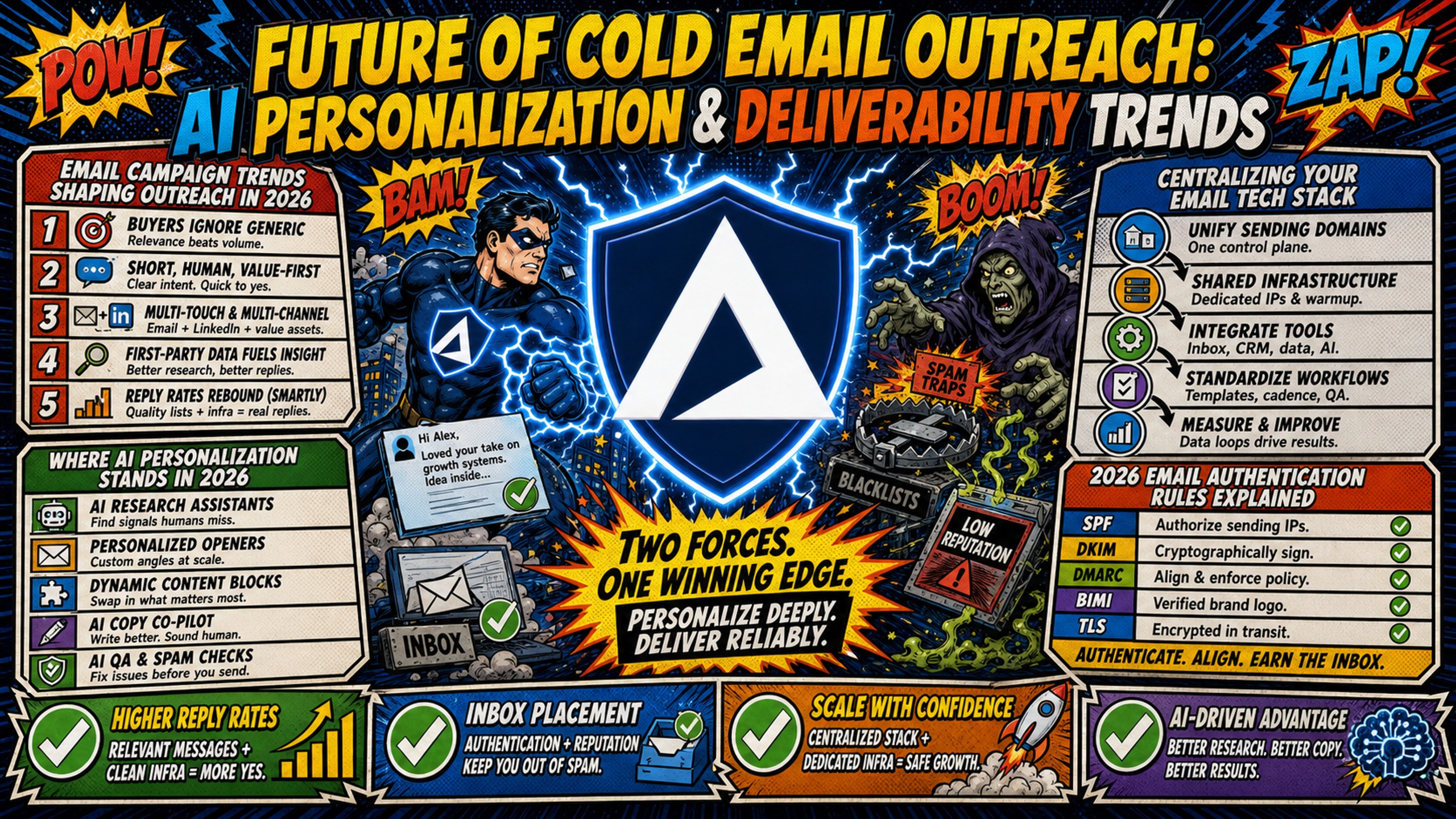
TL;DR: Cold email in 2026 rewards two things at once, personalization depth and authenticated, isolated sending infrastructure. Woodpecker's analysis of more than 20 million emails puts advanced personalization at 17-18% reply rates against 7-9% for basic templates, while the B2B average sits near 3.4%. None of that lands without authentication, and Google requires SPF, DKIM and DMARC from senders of 5,000 or more messages a day to Gmail, with temporary and permanent rejections for non-compliant traffic from November 2025. Inframail charges $147/month for unlimited inboxes versus $420/month for 50 Google Workspace Business Starter seats on the Flexible Plan, before domains and warmup.
Backlinko and Pitchbox's 2019 analysis of 12 million outreach emails finds that personalized message bodies lift reply rates by 32.7% over generic outreach.
The gap is not copy. It is about whether your infrastructure supports the volume and authentication standards that mailbox providers now enforce.
Campaign managers planning budgets for the next 12-24 months face a clear split: invest in AI personalization on fragmented, shared-IP infrastructure and watch deliverability collapse, or consolidate both under a dedicated-IP foundation that keeps costs flat as domain count scales.
Email campaign trends shaping outreach in 2026
Three trends are reshaping cold email operations over the next 12-24 months: centralization of the tech stack, tightening authentication rules from mailbox providers, and AI personalization that moves reply rates. Teams that treat these as separate problems will struggle. Teams that consolidate them under a single infrastructure layer will launch campaigns faster and keep deliverability stable as volume grows.
Centralizing your email tech stack
Most campaign managers juggle multiple platforms daily: a sending platform like Instantly or Smartlead, a warmup tool like Warmbox or Lemwarm, an inbox admin panel, a domain registrar, and a deliverability testing tool.
Context-switching between these tools burns time and makes root-cause diagnosis harder when a campaign underperforms. Managing multiple integrations can slow down launches and make it harder to catch blacklist warnings early.
2026 email authentication rules explained
Per Google's email sender guidelines, email senders of roughly 5,000 or more messages a day to personal Gmail accounts must pass both SPF and DKIM and publish a DMARC record, and Google asks them to keep the spam rate reported in Postmaster Tools below 0.10% and never reach 0.30%. Per Microsoft's own announcement, Microsoft applies the same 5,000-a-day threshold to Outlook.com, Hotmail.com and Live.com, and requires SPF and DKIM to pass plus a DMARC record at minimum p=none aligned with one of them.
Here is what each record does:
- SPF (Sender Policy Framework): Lists which IP addresses can send email on behalf of your domain. Prevents spoofing.
- DKIM (DomainKeys Identified Mail): Adds a cryptographic signature to outgoing emails so receiving servers can verify the message was not altered in transit.
- DMARC (Domain-based Message Authentication, Reporting, and Conformance): Tells receiving servers what to do if SPF or DKIM checks fail, and sends you reports on authentication results.
Google began enforcing these requirements in February 2024, and its sender guidelines FAQ confirms that from November 2025 non-compliant traffic faces disruptions including temporary and permanent rejections. Manually configuring these records across 50+ domains creates a launch bottleneck, covered in full in the automate DNS records section below. Inframail automates all three authentication records with zero manual DNS panel work, so domains are ready to send as soon as they are purchased.
Where AI personalization stands in 2026
AI personalization has moved past merge fields like {{firstName}} and {{company}}. Modern tools read prospect context, including recent funding announcements, job changes, published content, and podcast appearances, and generate first lines that reference that context directly.
The performance gap is the most consistent finding in the public data. Woodpecker's analysis of 20+ million emails puts advanced personalization at 17-18% reply rates against 7-9% for basic templates.
Hunter's 2026 report on 31 million emails finds that sequences carrying two or more custom attributes reply at 5.6% against 3.6% for sequences with none, measuring the same effect at the attribute level across a different population.
The two studies disagree on magnitude and agree on direction. Depth of research moves reply rates, and it moves them further than anything else either study tested.
None of it survives bad infrastructure. AI-generated volume sent on shared IPs or misconfigured DNS lands in spam before a prospect sees the opener, which turns the personalization spend into waste rather than investment.
Why published reply rates disagree by a factor of ten
Reply-rate benchmarks for cold email run from under 1% to 18%, and most of that range is denominator, not performance. The number depends entirely on what it was divided by.
Belkins' 2026 study of 7.5 million cold emails sent in 2025 recorded 34,393 unique replies, a 0.45% rate. That figure is low because the study divides replies by every email sent, including unopened messages, auto-replies, and out-of-office responses, rather than by the emails that were read.
Backlinko and Pitchbox's study of 12 million outreach emails puts the average response rate to outreach emails at 8.5%, drawing from a different population and a different denominator. Hunter's 2026 report puts the average cold email reply rate at 4.5%.
All three are correct for what they measured. A campaign can honestly report 5% against openers and 0.45% against total sends in the same week, which is why any vendor benchmark is only meaningful when the denominator is stated next to it.
Pick one denominator and hold it across every campaign. Replies divided by total sends is the harder number and the more useful one, because it determines how many inboxes a given meeting target requires.
AI tactics that move cold email reply rates
The trends above describe where the industry is heading. This section covers what to actually do. These are the tactics that separate teams clearing the advanced-personalization ceiling from teams stuck near the 3.4% B2B average.
AI openers that reference real context
The highest-impact use of AI in cold email right now is generating first lines that reference something specific and verifiable about the prospect. Instead of "I noticed your company is growing," the tool pulls a recent funding round, a product launch, or an executive hire and turns it into something like "Saw the Series B announcement last week. How are you planning to scale the SDR team?"
The subject line and opening sentence carry disproportionate weight. Backlinko and Pitchbox found personalized subject lines lift reply rates by 30.5% and personalized message bodies by 32.7%. Hunter's 2026 report adds a behavioral dimension, reporting that 67% of decision makers say personalization using publicly available information makes them more likely to reply.
Inframail's analysis of email opener psychology treats the first line as inbox triage. Prospects need only a couple of seconds to judge whether an opener reads as another sales pitch. To learn more about the gap, you can read Inframail's guide on personalized vs generic email openers.
| Study | Sample | Denominator | Generic | Personalized |
|---|---|---|---|---|
| Hunter 2026 | 31M emails | Campaign recipients | 3.6% | 5.6% (two custom attributes) |
| Woodpecker | 20M+ emails | Campaign recipients | 7-9% | 17-18% |
| Backlinko and Pitchbox | 12M emails | Emails sent | 8.5% average | +32.7% lift with personalized body |
| Belkins 2026 (2025 sends) | 7.5M emails | Emails sent | 0.45% average | Not segmented |
Scaling AI content without losing impact
The risk with AI-generated personalization is that it starts to feel templated at scale. When every email opens with "Congrats on the recent funding," prospects recognize the pattern and discount the whole message.
The data supports keeping a human in the loop. Hunter's 2026 report found manually edited sequences reply at 5.2% against 4.4% for fully automated ones, an 18% difference measured across 31 million emails, and sequences sent to 21-50 recipients reply at 6.2% against 2.4% for sequences sent to 500 recipients.
Four practices hold quality as volume grows:
- Build prompt libraries with variable inputs pulling different signals: funding, hiring, product launches, published content.
- Use AI for research and a human for a tone pass before the send.
- Batch-generate by segment, whether industry, role, or trigger event, so quality can be reviewed before launch.
- Rotate templates on a schedule, cycling in new signals and angles when reply rates start to drop.
Keeping a human in the loop caps how many personalized emails one person can produce. Holding total volume while keeping batches small means sending across more inboxes, which is the point where per-inbox pricing starts deciding what is operationally feasible.
Where AI personalization still falls short
AI personalization has hard limits. It cannot fix bad list quality, warm a domain, or repair sender reputation. Outdated data produces confident, specific, wrong openers, and a flagged IP sends AI-generated content to the same spam folder as a generic blast.
Volume is the second limit. Crossing roughly 5,000 messages a day to personal Gmail addresses moves a sender into Google's bulk-sender tier, and Google's guidelines state that a sender who meets that threshold is permanently considered a bulk sender. AI makes it easy to cross that line months before the authentication infrastructure is ready to support it.
Timing is the third. Litmus's email warmup guide puts warmup at four to eight weeks or more before a new domain or IP reaches full send volume, and no AI personalization budget committed before the infrastructure is warm buys openers nobody reads.
Infrastructure health is the prerequisite for AI agents to work. Without proper DNS configuration and warmup, AI-generated volume fails at the deliverability layer before the personalization ever gets a chance to perform.
Flat-rate pricing versus per-seat at 50 to 200 inboxes
Google Workspace Business Starter costs $8.40 per user per month on the Flexible Plan (month-to-month, no commitment). For 50 inboxes, that is $420/month. Scale to 200 inboxes and you are at $1,680/month before you spend a dollar on AI tools or warmup.
Inframail charges $147/month flat whether you create 50 or 500 inboxes. At 50 inboxes, that is $273/month in platform savings, or $3,276 annually. Domain costs ($5-16/year each) and warmup tools ($15-50/inbox/month) apply on both sides and are not included in this comparison.
| Provider | 50 Inboxes | 100 Inboxes | 200 Inboxes |
|---|---|---|---|
| Inframail | $147/mo | $147/mo | $147/mo |
| Google Workspace | $420/mo | $840/mo | $1,680/mo |
2026 deliverability compliance rules explained
AI personalization is useless if emails do not reach the inbox. Per Gmail's email sender guidelines, Gmail moved from deferrals to permanent rejections in November 2025, and the trend is toward stricter enforcement, not looser. Here is what changed and what it means for cold email operations.
Gmail and Outlook sender guidelines
The key requirements for bulk senders (5,000+ emails/day):
- SPF and DKIM required, DMARC required for bulk senders
- Spam complaint rate below 0.1%, never exceeding 0.3%
- One-click unsubscribe for marketing emails
How to avoid shared IP blacklisting
Shared IP pools work like carpool lanes where you are affected by other drivers. One bad actor spamming gets the whole range flagged, and your deliverability drops even if your content is clean. Shared IPs are common with low-cost email service providers (ESPs), and Spamhaus lists IP addresses, not individual senders, so one bad actor in the pool can take delivery down for everyone on it. Spamhaus itself advises senders whose provider assigns multiple customers within the same IPv6 /64 block to ask for a dedicated /64 and move mail service to a non-shared range.
Inbox providers score both the sending domain and the sending IP, and the two reputations are linked. An IP with a history of spam complaints or blocklist appearances pulls down everything sent through it, whatever the content says. Moving to a dedicated IP is the most reliable long-term fix for teams experiencing contamination from shared infrastructure, because it isolates your sending reputation from other users entirely.
Inframail includes 1 dedicated US-based IP on the Unlimited Plan ($147/month) and 3 on the Agency Pack ($387/month). Dedicated IPs work like private lanes where your sending behavior alone determines reputation. Inframail's blacklist monitoring reports a 68.3% delisting success rate within 48 hours when issues do occur.
Dedicated IP costs for 2026
Dedicated IPs are not always included in base pricing. Here is how costs compare across providers:
| Provider | Dedicated IP Included | IP Count | Additional Cost |
|---|---|---|---|
| Inframail | Yes | 1-3 | Included |
| Mailforge | No | Shared pool | N/A |
| Infraforge | No (paid add-on) | Add-on | $99/month per IP |
Infraforge charges from $4 per mailbox per month on annual billing with a 10-mailbox minimum, and prices dedicated IPs as a $99 per IP per month add-on billed quarterly. Inframail includes 1-3 dedicated IPs in the flat monthly rate, which makes the total cost more predictable as you scale.
Mailforge uses a shared IP pool distributing mailbox accounts among millions of businesses, which keeps costs low but exposes senders to reputation contamination from other users. Inframail's dedicated IPs isolate reputation, which matters when you are running 50+ domains across multiple client accounts.
Infrastructure consolidation: fewer tools, faster setup
The operational trend for 2025-2026 is consolidation. Fewer tools means faster launches, easier troubleshooting, and less context-switching when diagnosing deliverability issues.
Reducing tool bloat for faster setup
When a campaign underperforms, checking five dashboards to find root cause wastes time. Inframail consolidates domain management, inbox provisioning, and deliverability monitoring into one platform, so when a domain gets flagged, you see it in the same dashboard where you provisioned the inbox.
What gets consolidated:
- Domain health monitoring (blacklist status, reputation score)
- IP health tracking (dedicated IP performance)
- DNS configuration status (authentication records)
- Inbox provisioning and credential management
You still need a sending platform and a warmup tool, but the infrastructure layer is unified.
Warmup costs and timelines
Inframail does not include built-in warmup. External tools like Warmbox and Lemwarm cost $15-50 per inbox per month, and Litmus puts a standard IP or domain warm-up at four to eight weeks before a new sender reaches full volume.
The DFY package includes free warmup, which removes this cost layer for teams that want a done-for-you setup. For teams managing warmup in-house, Inframail's automated DNS setup means warmup can start immediately after domain purchase. There is no waiting for manual DNS configuration before you can plug the inbox into your warmup tool.
Automate DNS records for cold email
Manual DNS configuration for 50 domains takes 12+ hours. You log into each registrar's DNS panel, create SPF, DKIM, and DMARC records, wait for propagation, and test each domain before you can start warmup. This is the bottleneck that delays campaign launches and makes agencies look slow compared to competitors.
Inframail's automated DNS configuration means campaigns launch in hours instead of days. For a campaign manager managing multiple client accounts, this speed difference directly impacts how fast you can onboard new clients and start generating meetings.
Budgeting for your 2026 email infrastructure
Where should the money go first? This section provides a prioritized budget framework based on what actually changes reply rates.
Secure your deliverability stack first
Priority one is dedicated IPs and automated DNS configuration. This comes before AI tools, before advanced sending platforms, before anything else, because unauthenticated sends do not reach the inbox at all.
The three budget priorities in order:
- Dedicated IP infrastructure: Isolates your sender reputation from other users. Inframail includes 1-3 dedicated IPs in the flat rate.
- Automated DNS configuration: Eliminates the manual bottleneck that delays launches. Inframail handles authentication records automatically.
- Deliverability monitoring: Catches blacklist issues before clients notice. Inframail's dashboard monitors domain and IP health with automated delisting requests.
Test AI personalization in controlled pilots
Priority two is a controlled pilot before scaling AI spend. Here is how to structure a pilot:
- Start with 50-100 inboxes on dedicated IPs with authentication already passing.
- Pick one segment, whether industry, role, or trigger event, and test AI personalization against the current generic baseline.
- Measure replies against total sends rather than against openers, so the number is comparable to the study figures above.
- Scale what works and kill what does not before rolling it across every campaign.
Inframail's flat-rate pricing at $147/month for unlimited inboxes makes this infrastructure foundation affordable compared to per-seat alternatives like Google Workspace, which costs $420/month for 50 inboxes on the Flexible Plan, before domains and warmup, which apply on both sides.
Teams that nail the basics clear the B2B average. Inframail's cold email reply rate benchmarks put that average near 3.4%, with 5.5% or better landing in the top quartile and advanced personalization reaching 9-15%.
Reducing cost per inbox at scale
The total cost of ownership for cold email infrastructure includes platform fees, domain costs, and warmup tools. Here is the 12-month projection at three inbox tiers:
| Provider | 50 Inboxes (12 mo) | 100 Inboxes (12 mo) | 200 Inboxes (12 mo) |
|---|---|---|---|
| Inframail | $1,548 | $1,548 | $1,548 |
| Google Workspace | $5,040 | $10,080 | $20,160 |
Platform fees only. Domain costs ($5-16/year each) and warmup tools ($15-50/inbox/month) are additional on all sides.
At 200 inboxes, Inframail costs $1,548/year versus $20,160/year on Google Workspace. That is $18,612 in annual savings, which covers a lot of AI personalization tools and warmup costs. The flat-rate model means cost per inbox drops as volume grows: $2.58/inbox at 50 inboxes, $0.65/inbox at 200 inboxes.
Stress test your stack before you scale
The final section covers measurement and stress testing. Before you commit to an infrastructure provider or scale AI personalization spend, verify that your stack can handle the volume and deliverability requirements.
Measure baseline inbox placement rates
Measure your current inbox placement rate across all active domains before making changes. Use deliverability testing tools to track what percentage of emails land in inbox versus spam versus promotions tab.
Inframail reports deliverability above 98%. Materially below that means authentication, reputation, or list quality issues to fix first before you scale AI personalization.
Model your per-inbox infrastructure costs
Calculate your current per-inbox cost by dividing total infrastructure spend (platform fees, domains, warmup tools) by active inbox count. Then project that cost at 50, 100, and 200 inboxes.
For flat-rate providers like Inframail, cost per inbox decreases as volume grows. For per-seat providers like Google Workspace, cost per inbox stays flat. Maildoso prices per mailbox, publishing 30 mailboxes at $75 a month, 300 at $225 and 1,000 at $499, with custom mailbox quantities available outside the standard tiers. It publishes no 50-mailbox or 200-mailbox tier, so a like-for-like comparison at those counts is not possible from its public pricing.
Run the numbers at your target scale before committing. If you plan to grow from 50 to 200 inboxes over the next 12 months, the flat-rate model saves thousands annually.
How to stress test sending stacks
Before committing to an infrastructure provider, run these stress tests:
- Send increasing volume across dedicated IPs. Start at 20 emails/day per inbox and ramp to 50-100/day over 2 weeks. Monitor for deliverability drops.
- Monitor blacklist status daily. Use the provider's dashboard or external tools like MXToolbox to check if any IPs or domains get flagged.
- Test DNS propagation speed. Purchase a new domain and measure how long it takes before you can start warmup. Set your own pass mark before you test, then hold every vendor to it.
- Verify CSV export integration. Export IMAP/SMTP credentials to CSV and import into your sending platform (Instantly or Smartlead) without manual editing.
- Check support response time. Submit a support ticket and record how long the first substantive response takes. Any provider handling production infrastructure should respond within one business day.
Start sending on dedicated infrastructure today
Inframail is a flat-rate Microsoft email infrastructure platform for agencies and sales teams managing 50-200 cold email domains. It automates SPF, DKIM, and DMARC configuration, provisions unlimited inboxes at $147/month, and includes 1-3 dedicated US-based IPs per plan. Inframail reports a 98%+ deliverability rate and a 68.3% blacklist delisting success rate within 48 hours.
Inframail provisions Microsoft inboxes only. Teams that need Google Workspace sending addresses should not use it. Run a pilot on 50 inboxes to verify these numbers independently before committing to a larger deployment.
Check out this case study and watch how Inframail helped a client run cold email infrastructure reliably for more than a year across multiple domains, generate strong response volume without platform issues, and close $42,000 in new sales in just four weeks.
Sign up to Inframail and get started today.
FAQs
What is the future of cold email outreach?
Cold email is moving toward signal-based personalization, where AI tools research specific prospect context before each send, combined with stricter authentication enforcement from Gmail and Outlook. Reply rates depend heavily on denominator. The gap between the floor and ceiling is infrastructure health, list quality, and personalization depth, in that order.
Will AI replace manual cold email personalization?
AI handles research and first-draft personalization, but human review still matters for tone and relevance. Personalization is the largest single lever in the data. Woodpecker's analysis of more than 20 million emails describes advanced personalization as roughly a 2x difference over basic templates.
How are deliverability requirements changing in 2026?
Gmail and Outlook now require authentication records for bulk senders (5,000+ emails/day), and spam complaint thresholds are tighter at 0.1%. Dedicated IPs and automated DNS configuration are becoming baseline requirements, not differentiators.
Should I switch to a consolidated infrastructure platform now?
Consider switching if you manage 50+ domains or your infrastructure costs are scaling linearly with inbox count on a per-seat plan. Inframail's flat rate of $147/month for unlimited inboxes provides $273/month in platform savings versus Google Workspace at 50 inboxes, before domain and warmup costs.
What's the ROI timeline for AI personalization tools?
Reply-rate movement shows up fastest on infrastructure that is already authenticated and warm, which is why dedicated IPs and automated DNS come before AI tool spend.
Key terms glossary
AI personalization: Using AI to research prospect context (funding announcements, job changes, published content) and generate first lines that reference those specific details.
Deliverability requirements: The authentication and engagement standards mailbox providers enforce to determine inbox placement. Gmail and Outlook now require SPF, DKIM, and DMARC for bulk senders, with spam complaint thresholds below 0.1%.
Infrastructure consolidation: Combining domain management, inbox provisioning, and deliverability monitoring into fewer platforms. Consolidation reduces context-switching and makes root-cause diagnosis faster when campaigns underperform.
Dedicated IP: An IP address used exclusively by one sender, isolating reputation from other users. Inframail includes 1 dedicated US-based IP on the Unlimited Plan and 3 on the Agency Pack.
Sender reputation: The trust score mailbox providers assign based on authentication, spam complaints, and engagement. Dedicated IPs protect sender reputation from contamination by other users on shared pools.