
Cold email vs spam vs warm email: What's the difference?
: Cold email is researched outreach to a business prospect with no prior contact, spam is bulk email sent without proper authentication or consent, and warm ema
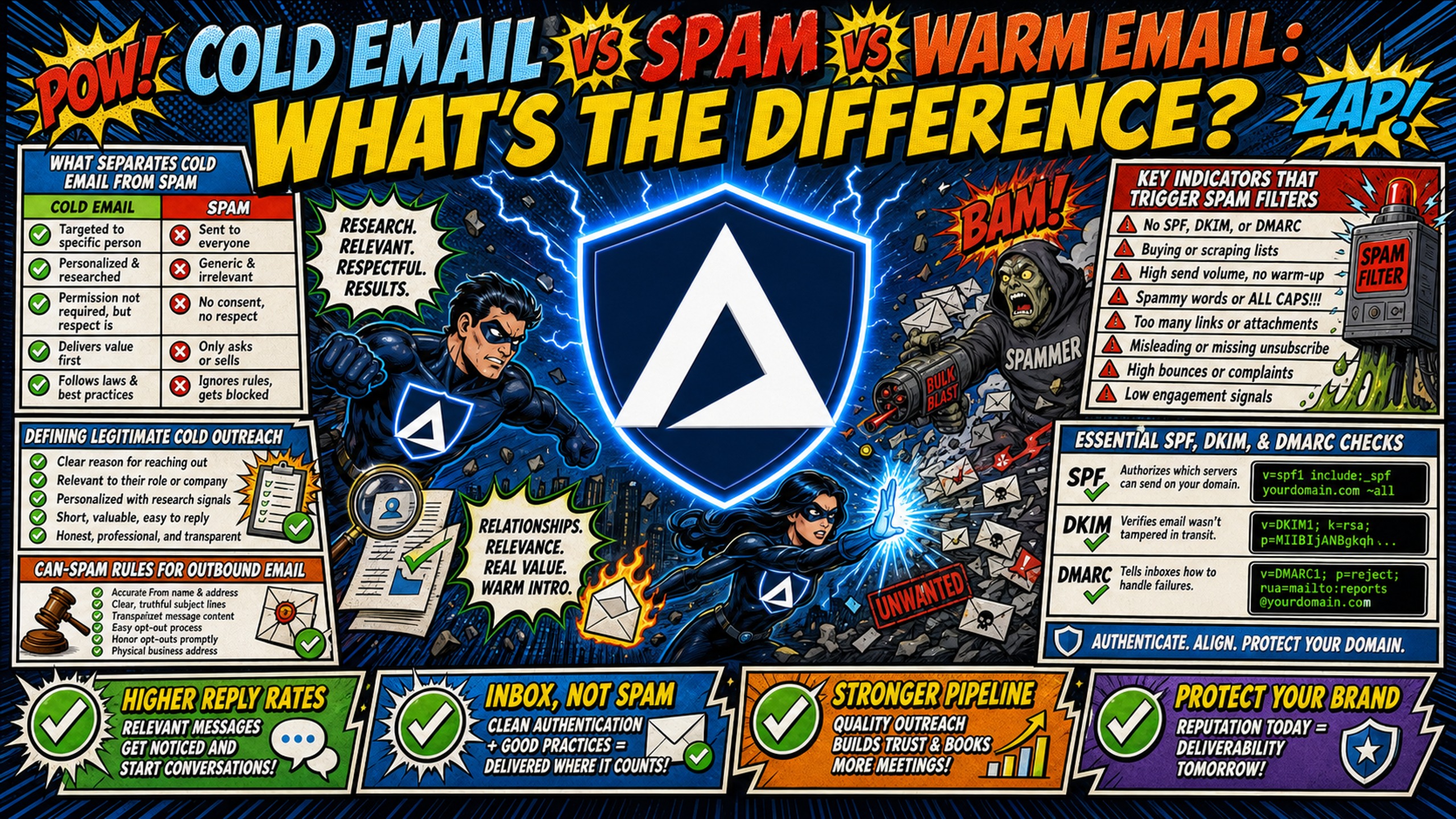
TL;DR: Cold email is researched outreach to a business prospect with no prior contact, spam is bulk email sent without proper authentication or consent, and warm email goes to contacts with prior engagement such as a reply, download, or opt-in. Cold email is not spam by default, and the line is technical and legal, not editorial: CAN-SPAM requires opt-outs honored within 10 business days, and Canada's CASL requires consent before the first message. Cold and warm email carry identical authentication requirements, so the real difference is margin for error, and warm marketing mail trades lower complaint rates for its own filtering risk as bulk or gray mail. Gmail and Outlook both require senders above 5,000 messages a day to pass SPF, DKIM, and DMARC, so authenticate every domain, keep bounce rates under 1%, and send from a dedicated IP at scale.
Most senders think spam is defined by what they write, but email providers define it by how they send. If your outreach lands in spam folders despite compliant copy, the problem is infrastructure: missing DNS authentication, dirty lists, or shared IP contamination. The line between cold email vs spam is a technical threshold, not a matter of opinion or copy style.
| Criterion | Cold email | Spam | Warm email |
|---|---|---|---|
| Legal compliance | Typically includes opt-out | Often lacks opt-out | Permission-based, opted in |
| List source | Researched B2B prospects | Often purchased, scraped | Existing contacts, subscribers |
| Personalization | Typically researched, targeted | Generic blast, minimal targeting | Relationship-based, contextual |
| Response rate | Varies with personalization depth | Near zero | Higher base, prior engagement |
| Infrastructure | SPF/DKIM/DMARC required. Dedicated IP recommended at scale | Missing or failed authentication, often on shared or unknown IPs | SPF/DKIM/DMARC required (same as cold). Dedicated IP recommended at scale |
| Risk level | Inbox delivery suffers above a 0.1% spam complaint rate, and sharply at 0.3% or higher, or with missing DNS authentication | Very high. Blacklisting and delivery failures are common outcomes | Lower, because prior consent reduces complaint rates and filter scrutiny |
What separates cold email from spam
Cold email is generally understood as unsolicited outreach to a prospect with no prior relationship or contact with you or your company. In a B2B context, that typically means researched, relevant messages sent to a business email address, targeting a specific person with a specific business problem, while mass spam often involves high-volume sends with minimal targeting or personalization.
Defining legitimate cold outreach
What separates legitimate cold outreach from spam comes down to three conditions: the recipient was identified as a relevant fit, the email follows applicable regulations for their jurisdiction, and the sender is clearly identified with a working opt-out mechanism. In practice, that breaks into these specific requirements:
- Business relevance: the message addresses a problem the recipient plausibly has, based on their role, company, or industry.
- Personalization: the email references something specific about the recipient, not a generic template blasted to thousands.
- Accurate sender identification: the From name, domain, and reply address are real and match the sender.
- Clear opt-out mechanism: every email includes a visible, working way to opt out.
- Opt-out honored promptly: removal requests are processed within 10 business days, with no fees or extra steps required.
- CAN-SPAM compliance: the message meets the FTC's CAN-SPAM requirements, covered below.
Key indicators that trigger spam filters
Several technical and legal factors can route outbound email to spam folders regardless of copy quality. This section covers the compliance rules and DNS requirements most commonly responsible for filtering failures.
CAN-SPAM rules for outbound email
Commercial email in the US is generally governed by CAN-SPAM, which typically requires accurate header information, honest subject lines, identification as an ad where applicable, a valid physical postal address, an opt-out mechanism honored within 10 business days, and monitoring of third parties acting on your behalf. CAN-SPAM generally operates on an opt-out model, so prior permission is not required to send the first email in the US. Canada is different. CASL requires consent before sending a commercial electronic message, and penalties for the most serious violations reach $1 million for individuals and $10 million for businesses. Implied consent lasts up to two years from an existing relationship, or six months from an inquiry or application.
Essential SPF, DKIM, and DMARC checks
Three DNS records are widely considered essential for legitimate cold email. SPF typically authorizes which servers can send email for your domain, DKIM adds a digital signature to verify message integrity, and DMARC ties both checks together and tells receiving servers how to treat authentication failures. DMARC can also provide reporting mechanisms so domain owners can monitor email handling. Missing or misconfigured DNS records are commonly cited as spam triggers, and elevated bounce rates can trigger filters and damage sender reputation. If you are unsure whether your domains pass these checks today, Inframail's help center walks through how to tell if your campaign emails are going to spam and which metrics count as healthy.
How recipient actions flag your email
Spam complaints, low open rates, and high bounce rates are a feedback loop. If recipients cannot find an easy opt-out, they mark your emails as spam instead, and enough spam reports train the provider to filter future sends automatically. Mailbox providers notice elevated complaints and low engagement, and your emails start landing in junk or stop getting delivered. Gmail's email sender guidelines require senders of more than 5,000 messages a day to pass SPF, DKIM, and DMARC and to keep spam rates below 0.3% and asks them to stay under 0.10%. Outlook's new requirements apply the same 5,000-a-day authentication threshold, and since May 5, 2025 it rejects non-compliant high-volume mail outright with a 550 5.7.515 error rather than routing it to Junk.
What prior engagement actually changes
Prior engagement changes recipient behavior, not the rules mailbox providers apply. This section covers what warm senders genuinely gain, and the bulk-mail filtering that only warm senders face.
Why prior contact earns better filter treatment
Warm emails reach people who have already engaged with your company, such as subscribers, trial users, or past customers. The mechanism is recipient behavior rather than a softer rule: recipients who recognize the sender complain less and reply more, and complaint rate is the signal mailbox providers act on. Gmail's email sender guidelines require senders above 5,000 messages a day to keep spam rates below 0.3% and ask them to stay under 0.10%, and a recognized sender finds that threshold easier to hold. The filter rules themselves do not relax for warm senders.
Permission levels for cold vs warm email
Email permission comes in two types: implied consent (an existing business relationship, such as a past purchase or inquiry) and explicit consent (a confirmed opt-in). Cold email typically has neither, which is exactly why technical compliance matters so much more for cold senders.
Warm email generally operates on at least implied consent, giving providers a stronger trust signal. The infrastructure requirements are identical on both sides, but the margin for error is wider for warm senders because recipient behavior confirms the relationship.
When to warm a contact instead of cold emailing them
The practical question for an operator is which list a contact belongs on, and consent status usually answers it. A contact who filled in a form, replied to an earlier thread, or attended a webinar already carries an engagement record, so routing them into a cold sequence wastes that signal and adds complaint risk to a cold domain. Under CASL, an inquiry or application creates implied consent for six months and an existing business relationship for two years, which means Canadian contacts move from the warm list back to the cold list on a clock.
Three signals should move a contact off the cold list:
- A reply: any direct response to a previous send, including a referral or a decline with a future date.
- A form fill or download: a gated asset, a webinar registration, or a demo request.
- A paid or trial relationship: current customers, lapsed customers, and expired trials.
Keep the two motions on separate infrastructure. A complaint spike on a cold campaign degrades the reputation of whatever domain and IP carried it, so running renewals, onboarding, and billing mail from the same domain as cold outreach puts revenue mail behind a cold-email reputation. Separate domains, and separate dedicated IPs at volume, keep that exposure contained.
What warm email does not get a pass on
Opt-in does not exempt a sender from filtering. Microsoft assigns every inbound message a bulk complaint level from 0 to 9, and bulk mail that recipients actively subscribed to is scored on the same scale as any other promotional send. When a message meets the configured bulk threshold the default action moves it to the Junk Email folder, and administrators can now route lower-scoring bulk mail to a separate Promotions folder instead of the inbox. Warm senders also carry a requirement cold senders do not: Gmail requires marketing and subscribed messages above 5,000 a day to support one-click unsubscribe through the List-Unsubscribe header, not just a link in the footer.
Reply rate benchmarks by email type
Reply rates vary significantly depending on whether a contact has prior engagement with your brand. The table below compares cold email, warm email, and spam across benchmarks and the key drivers behind each.
| Email type | Reply rate benchmark | Key driver |
|---|---|---|
| Cold email | 1-3% with no personalization, up to 15-25% on signal-based campaigns | Personalization depth, targeting quality |
| Warm email | No directly comparable benchmark published | Measured on opens and clicks, not replies |
| Spam | Near zero | No relevance, no authentication, no consent |
The comparison stops being apples to apples at this row. Cold email reply rates are heavily benchmarked because a reply is the goal, and Instantly's 2026 benchmark report, covering a year of 2025 platform sending, puts the average at 3.43%, with 5.5% at the top quartile and 10.7% or better for the top 10% of senders. Opt-in programs are built and measured on opens and clicks instead, so a published warm reply rate comparable to those figures does not exist. Treat any single warm-versus-cold reply rate comparison with suspicion, because the two numbers are almost never measured the same way.
Identifying spam indicators in your sequences
Knowing what a compliant sequence looks like, and what signals mark it as spam, makes the difference between consistent inbox placement and a damaged sender profile. This section covers both.
Anatomy of a compliant cold email
A compliant cold email contains these required elements:
- Accurate sender name and domain: the From field matches a real person or company at a real domain.
- Clear, honest subject line: the subject reflects the actual content of the message.
- Physical postal address: a valid street address appears in the footer.
- Working unsubscribe link: one click opts the recipient out, honored promptly.
- Proper authentication: SPF, DKIM, and DMARC records configured correctly.
- Identification as commercial message where applicable: if the primary purpose is commercial, identify it as an advertisement.
Identifying common spam email red flags
So is cold email spam by default? No, but these red flags push it there fast:
- Purchased lists: See the purchased lists section below for why these damage sender reputation immediately.
- Misleading subject lines: Deceptive subjects are commonly flagged and may violate regulations.
- Missing unsubscribe link: Required under federal law.
- Missing physical address: Another regulatory requirement, not a style choice.
- Excessive images: Emails containing only images or too many images with little text can be flagged. Microsoft's anti-spam protection lists image-only content among the message characteristics associated with spam.
- URL shorteners: Microsoft lists URL shorteners among the message content characteristics associated with spam because they obscure the destination URL.
- Spam formatting: All-caps text, bright fonts, broken HTML, and missing unsubscribe options combine to signal spam behavior. Microsoft also flags embedded scripts under the same content criteria.
Evaluating your sender reputation
Damaged sender reputation means even compliant emails get filtered. Check your domain and IP against major blacklists, monitor bounce rates weekly, and run deliverability tests before launching new sequences, because damaged domain reputation routes even legitimate emails to junk folders. Inframail's deliverability monitoring dashboard tracks blacklist status continuously and auto-submits delisting requests when a domain gets flagged.
Is your cold email risking a blacklist?
Blacklist risk builds from predictable mistakes: spam-trigger subject lines, purchased lists, and generic outreach. This section covers each one and what to do about it.
Subject line rules that keep filters happy
Subject lines trigger filters when they use all caps, excessive punctuation, misleading claims, or classic spam trigger words. Spam filters typically analyze more than keywords, examining suspicious links, all-caps text, and missing unsubscribe options. A compliant subject line reads like a colleague wrote it: Question about your SDR hiring. A non-compliant one reads like a billboard: FREE!!! 10X YOUR PIPELINE TODAY.
Risks of using purchased email lists
Purchased lists often contain outdated, invalid, or spam trap addresses, and the result is typically a high bounce rate that damages sender reputation immediately, often before the campaign sends a thousand messages. Building lists from a verified B2B database and running verification before the first send is a recommended safe path at volume, a process Inframail's founder walks through in this video on why you should verify your email list before sending.
Risks of non-personalized outreach
Generic, non-personalized outreach may get marked as spam more often because recipients see no relevance in the first line. Inframail's analysis of personalized vs generic email openers shows how reply rates move with research depth, and its guide to cold email opener mistakes covers the specific first-line errors that kill engagement. Personalization lifts reply rates, but the primary risk of skipping it is low reply rates, not just spam complaints.
Warning signs of a damaged sender profile
Sender reputation damage often shows up in metrics before a formal blacklist event. This section covers the early signals to monitor and what to do when they appear.
Avoiding inbox placement penalties
Inbox placement penalties happen when providers route your messages to spam or promotions tabs instead of the primary inbox. Warning signs are sudden drops in open and reply rates with no copy or targeting changes. Inframail's video on how to get your cold emails delivered covers the diagnostic steps, and the 32 ironclad rules to never land in spam tutorial maps the full prevention checklist.
Avoiding domain and IP blacklisting
Blacklisting means your domain or IP is added to a blocklist and email providers refuse to deliver your messages. When an IP is shared, the sending reputation is shared too, so your deliverability depends on everyone else sending from that IP. Dedicated IPs give one sender exclusive control over an IP address and its sender reputation. At higher volumes, a dedicated IP gives you full ownership of your sender reputation with no exposure to other senders' behavior. Inframail includes 1 dedicated US-based IP on the Unlimited Plan and 3 on Agency Pack, so your sending behavior alone determines your reputation.
Impact of spam flags on email deliverability
Once flagged, future sends face heavier scrutiny, and recovery takes time. The compounding effect of high bounce rates, spam complaints, and eventually blacklisting means even your legit emails start landing in junk folders. Waiting it out does not work. You have to fix the root cause.
Fixing sender reputation after a ban
The tactical recovery path runs through five steps: identify the root cause (list quality, volume, or missing authentication), fix DNS records, clean the list, reduce send volume, and submit delisting requests. Each blacklist operator sets its own removal requirements. Spamhaus, for example, requires the removal request to come from the ISP responsible for the listed IP and never charges a fee for removal. Inframail's platform auto-submits delisting requests on your behalf with a 68.3% success rate within 48 hours, removing the slowest manual step from the process.
How to keep your outreach out of spam folders
Staying out of spam folders is a function of list quality, DNS configuration, sending cadence, and identification requirements. This section covers each in the order they typically need to be addressed.
Refining your prospect list quality
Verify every email address before the first send, remove invalid addresses, and target researched prospects instead of scraped lists. Keep bounce rates under 1%. At 2% and above, deliverability is already in trouble: Inframail's help center classifies 0-1% as excellent and 2% or higher as critical. A clean list is the cheapest deliverability insurance you can buy.
Configuring DNS for inbox placement
Manual DNS setup means logging into registrar panels, creating SPF, DKIM, and DMARC records by hand, waiting for propagation, and testing, a process that burns 12+ hours across 50 domains and introduces the configuration errors that trigger filters. Inframail configures SPF, DKIM, and DMARC records automatically with no DNS panel access required, and exports IMAP/SMTP credentials to CSV for import into Instantly or Smartlead, with the Smartlead integration guide covering the CSV credential import step by step. One customer running high daily volume reports the results hold up under real load:
"I send 4,000 emails a day, sometimes 7 days a week. All my domains are .info which aren't the best for deliverability and even then I'm still hitting ~99% deliverability across the board." - Verified user review of Inframail
Safe sending cadence for new domains
New domains need a warmup period before any cold send. Warm up a new or inactive domain by starting with low volume and gradually increasing over several weeks, since sudden spikes in sending volume can trigger spam placement. New domains need about 14 days of warmup before any campaign send, starting around 10 emails daily and scaling up gradually. Inframail does not include built-in warmup (external tools add real cost on top, and Warmbox publishes per-inbox pricing from $15 a month on annual billing), but the DFY package includes warmup, and Inframail's help center covers how to warm up your inboxes after migrating. For scaling math, this breakdown shows how teams send 100,000 emails daily without hitting spam.
Mandatory identification and unsubscribe links
Accurate sender identification, a physical postal address, and a working unsubscribe link are non-negotiable for legitimate cold email. These are CAN-SPAM requirements enforced per message, not best practices you can skip when a client pushes for a fast launch. If a stakeholder pressures you to send before domains finish warming or before records are verified, the deliverability cost lands on your reply rates, not theirs.
Start sending cold email that stays in the inbox
Inframail is a flat-rate Microsoft email infrastructure platform built for agencies and SDR teams running cold email at scale. It provisions dedicated IP addresses, configures SPF, DKIM, and DMARC automatically on every domain, and monitors blacklist status continuously with a 68.3% delisting success rate within 48 hours.
The Unlimited Plan is $147/month for unlimited inboxes and the Agency Pack is $387/month, with domains at $5 to $16 each per year, both plans covering dedicated IPs, automated DNS setup, and IMAP/SMTP credential export for tools like Instantly and Smartlead.
Watch this case study video and learn how Inframail helped a client run cold email outreach with reliable, cost-effective infrastructure for over a year, generate consistent responses and build sales momentum, and report $42,000 in new sales over just four weeks.
Sign up to Inframail and get started today with automated DNS setup and dedicated IPs that keep your campaigns in the legitimate category.
FAQs
Is cold email legal in the US and Canada?
Cold email is generally legal in the US under CAN-SPAM when it includes accurate sender information, a physical address, and a working unsubscribe link honored promptly. Canada's CASL requires consent before sending commercial electronic messages, making unsolicited cold email far more restricted, with penalties for the most serious violations reaching $1 million for individuals and $10 million for businesses.
Can I send cold email to purchased lists?
No. Purchased lists contain outdated addresses, spam traps, and invalid contacts, often producing high first-send bounce rates that immediately damage sender reputation. Sending to them risks blacklisting and regulatory violations.
How many cold emails can I send per day safely?
New domains should start at low volumes, typically 15-20 emails per day, and ramp up over 3-4 weeks, since sudden volume spikes can cause spam placement. Established domains can send higher volumes if bounce rates stay low.
What happens if my domain gets blacklisted?
Email providers refuse to deliver messages from blacklisted domains. Recovery requires fixing the root cause, cleaning the list, and submitting delisting requests to each operator. Each operator sets its own removal requirements: Spamhaus, for example, requires the request to come from the ISP responsible for the listed IP and never charges a fee. Inframail's platform auto-submits delisting requests on your behalf with a 68.3% success rate within 48 hours.
Do I need permission to send cold email?
In the US, prior permission is generally not required under CAN-SPAM, but you must honor opt-out requests promptly. In Canada, CASL requires consent before sending commercial electronic messages.
Key terms glossary
Cold email: Unsolicited outreach to a prospect with no prior contact, typically sent to a business email address with a relevant, personalized message.
Spam: Bulk email typically sent without proper authentication or consent, often to purchased lists with misleading content.
Warm email: Outreach to contacts with prior engagement, such as a reply, download, or opt-in.
SPF: Sender Policy Framework, a DNS record that typically authorizes which servers can send email for a domain.
DKIM: DomainKeys Identified Mail, a DNS record that signs messages to verify integrity.
DMARC: Domain-based Message Authentication, Reporting, and Conformance, a DNS record that tells receiving servers how to handle failed authentication.
Bounce rate: The percentage of sent emails that fail to deliver. Rates of 0-1% are considered excellent, while 2% or higher is critical and signals list quality problems.
Dedicated IP: An IP address used exclusively by one sender, isolating reputation from other senders.
Shared IP pool: An IP address shared by multiple senders, where one sender's behavior can affect everyone's reputation.
Blacklist: A list of domains or IPs flagged for spam behavior, causing email providers to block delivery.
Bulk mail (gray mail): Newsletters, promotions, and marketing messages recipients opted in to receive. Legitimate mail, but scored for filtering separately from spam.
Bulk complaint level (BCL): A Microsoft score from 0 to 9 indicating how closely a message resembles bulk mail. Messages at or above the configured threshold are treated as bulk and moved to Junk by default.