
Best Mailscale Alternatives: Cold Email Infrastructure Compared
Compare Mailscale alternatives for cold email infrastructure across pricing, DNS automation, deliverability, setup speed, and agency TCO at 50, 100, and 200 inboxes.
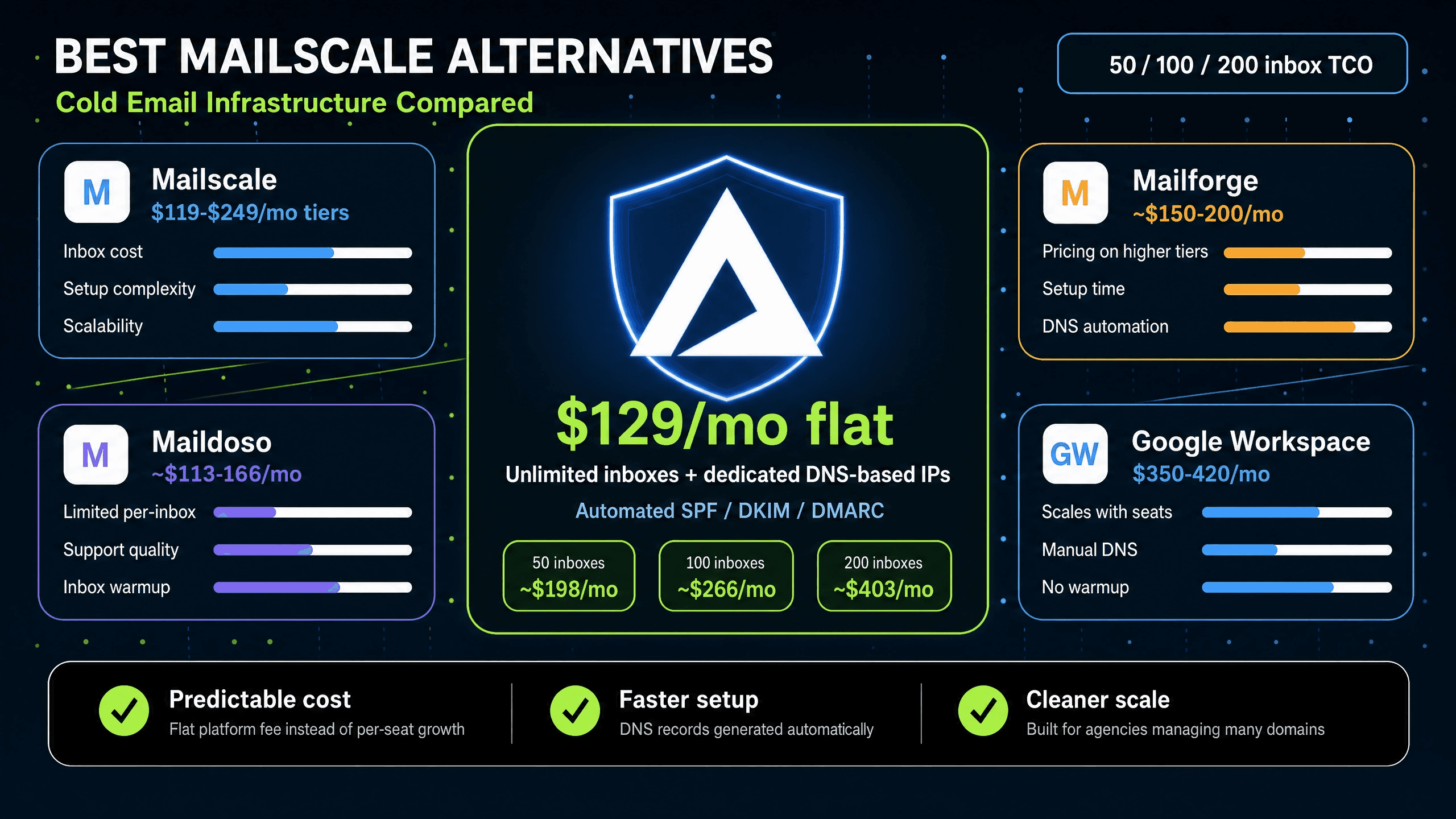
TL;DR: Mailscale uses tiered pricing that can create cost jumps when you exceed plan limits. For agencies running 50-200 domains, tier boundaries can constrain growth. Inframail charges $129/month flat for unlimited inboxes on dedicated US-based IPs, with automated SPF/DKIM/DMARC configuration. At 50 inboxes, that's $217-287/month cheaper than Google Workspace. This guide compares Mailscale with Inframail, Maildoso, Mailforge, and Google Workspace so you can choose based on real cost and deliverability data, not marketing copy.
When your agency scales from 50 to 150 inboxes, your infrastructure costs shouldn't triple. Yet per-inbox pricing models do exactly that. Most cold email infrastructure platforms promise to automate your setup but hide the true cost of scaling behind per-seat fees and shared IP pools.
We calculated the total cost of ownership for 50, 100, and 200 cold email inboxes across five platforms. The results show why per-inbox pricing is a margin killer for growing agencies, and why the platform you pick today directly determines whether you can afford to hire your first junior account manager next quarter.
Mailscale is positioned as a cold email infrastructure platform with tiered pricing. For an agency starting at 10-20 inboxes, it offers an entry-level option to support basic sending needs.
Automating DNS and inbox provisioning
According to Prospeo's Mailscale pricing analysis, Mailscale offers tiered plans from $79 to $249/month for 15-200 inboxes. It handles DNS record creation, reducing one friction point from the traditional manual setup process. Warmup is not included, so you'll need an external tool at $15-50/month per inbox. Inframail also does not offer native warmup (though our DFY Email Campaign Setup package includes free warmup).
Who Mailscale is built for and where it falls short
The tiered pricing model makes sense at low volumes. The problem surfaces as you scale.
According to available pricing data, tiers break down as follows: Solopreneur at $79/month (up to roughly 10-15 inboxes), Business at $119/month (up to 50 inboxes), Enterprise at $249/month (up to 200 inboxes), and Unlimited at $1,000+/month. Exceed your tier's inbox limit and you upgrade to the next plan in full. At 51 inboxes, that means jumping from $119/month to $249/month. For a 7-platform infrastructure cost comparison, Mailscale's total cost lands at approximately $119/month for 50 inboxes before domain costs and warmup. These tier boundaries add cost at every growth milestone.
The tables below break down pricing structure, included features, and estimated monthly spend for each platform at the most common inbox tiers.
Mailscale pricing tiers at a glance
Tier | Monthly price | Inbox limit | Warmup included |
|---|---|---|---|
Solopreneur | $79/month | ~10-15 inboxes | No |
Business | $119/month | Up to 50 inboxes | No |
Enterprise | $249/month | Up to 200 inboxes | No |
Unlimited | $1,000+/month | Unlimited | No |
Exceed your tier's inbox limit and you upgrade to the next plan in full.
How inbox growth impacts your margins
When you exceed tier limits, you may face tier upgrades that increase your monthly platform fee. Google Workspace Business Starter at $7-8.40 per user per month hits even harder: 100 inboxes costs $700-840/month and 200 inboxes reaches $1,400-1,680/month.
Why flat-rate pricing beats per-inbox fees
Inframail's Unlimited Plan charges $129/month regardless of whether you run 50 inboxes or 500. At 50 inboxes with approximately $34/month in amortized domain costs, your total infrastructure spend is $163/month. That is $217-287/month cheaper than Google Workspace at the same scale. Our Maildoso pricing breakdown illustrates how per-inbox models from competing platforms follow the same compounding pattern.
Calculating your true infrastructure costs
True infrastructure cost includes four line items: platform fee, domain costs ($5-16/year per domain), warmup tool ($15-50/month per inbox if required externally), and your sending platform. Neither Mailscale nor Inframail includes native warmup, which means external warmup costs apply to both platforms.
The following tables compare key features and costs across the platforms most commonly evaluated alongside Mailscale.
Table 1: Inframail, Mailscale, and Maildoso compared
Feature | Inframail | Mailscale | Maildoso |
|---|---|---|---|
Price (50 inboxes) | $129/mo + domains | ~$119/mo + domains | ~$113-166/mo |
Pricing model | Flat-rate unlimited | Tiered | Per-inbox |
IP infrastructure | Dedicated US-based IP | Shared pool | Shared pool |
Setup speed | Near-instant | 10-15 min | 10-15 min |
Warmup included | No (external required) | No | No |
Table 2: Inframail, Mailforge, and Google Workspace compared
Feature | Inframail | Mailforge | Google Workspace |
|---|---|---|---|
Price (50 inboxes) | $129/mo + domains | ~$150-200/mo | $350-420/mo |
Pricing model | Flat-rate unlimited | Volume-based | Per-seat |
IP infrastructure | Dedicated US-based IP | Shared pool | Native platform |
Setup speed | Near-instant | ~3 min | Variable |
Warmup included | No (external required) | Partial | N/A |
Watch Mailreef vs Mailscale vs Inframail for a direct infrastructure breakdown comparing dedicated servers and shared pools in practice.
Reducing DNS setup time with Inframail
Inframail automates the full DNS configuration stack. Purchase a domain through the platform or transfer an existing one, and the platform configures SPF, DKIM, and DMARC records automatically without requiring DNS panel access. Our setup tutorial walks through the complete workflow from domain purchase to live inbox. Customer testimonials report provisioning 10 inboxes in 2 minutes, compared to 12+ hours required to manually configure 50 domains across Namecheap or GoDaddy.
Managing Maildoso for high volume
Maildoso runs on shared IP infrastructure, meaning your sending reputation depends on the behavior of every other sender in the pool. Our Maildoso deliverability review shows that Maildoso offers both monthly and quarterly billing. Maildoso does not include a built-in warmup tool, which adds $15-50/month per inbox externally. We detail the full cost picture in our Maildoso alternatives guide.
Mailforge and Google Workspace at scale
Mailforge uses a shared and rotating IP pool, so you don't get the reputation isolation that dedicated IP setups provide. It includes partial warmup functionality, but deliverability consistency can vary on shared infrastructure at scale.
Google Workspace Business Starter runs $7-8.40 per user per month on monthly plans. At 200 inboxes, you're paying $1,400-1,680/month for email hosting before domain costs, warmup, and your sending platform. For an agency billing $2,000 per client, 200 inboxes on Google Workspace can consume up to 84% of a single client's retainer in infrastructure costs alone.
The data below reflects published benchmarks and independent testing results for each platform covered in this guide.
Deliverability benchmarks across platforms
We report 9.5/10 on Mail-Tester and 88% inbox placement via GMass testing for Inframail using dedicated US-based IPs. We provide spam detection guidance to help you understand what healthy metrics look like in practice.
IP pool strategies for cold email
Shared IP pools work like carpool lanes where every driver affects everyone else's travel time. When senders in the pool hit spam traps or generate complaint spikes, the entire IP range can be affected, and your campaigns may take the hit alongside theirs. As the Mailtrap shared vs dedicated IP analysis explains, "your email deliverability rate doesn't depend only on your behavior, it's affected by everyone else sending from that IP." Dedicated IPs put your sending reputation entirely under your own control. Watch our dedicated IP vs shared IP breakdown for a clear side-by-side walkthrough of how the two models affect real campaign outcomes.
Reducing blacklist risk in cold email
Inframail's deliverability monitoring dashboard tracks domain and IP health, auto-submits delisting requests when domains are flagged, and uses "phantom redirects" to hide domain redirects from ESPs. Our Microsoft blacklist recovery guide shows how to handle flagged domains and prevent future blocks. Our cold email infrastructure guide covers how these deliverability metrics interact with sending volume.
Manual configuration of 50 domains across GoDaddy or Cloudflare requires logging into each DNS panel, creating SPF records, adding DKIM selectors, configuring DMARC policies, waiting for propagation, and testing each domain with Mail-Tester. Automated platforms cut that process to minutes for the entire batch.
Automated SPF/DKIM/DMARC setup and faster client onboarding
Inframail handles the full DNS record stack automatically at domain purchase or transfer. No DNS panel access required. Our FAQ confirms we can provision domains in approximately 3 minutes, and the platform generates IMAP/SMTP credentials automatically for each inbox after provisioning. The direct outcome is that client onboarding setup time shrinks from a multi-hour DNS configuration project to a fraction of the time, reclaiming hours for sales calls and campaign optimization. One Inframail user describes the operational shift:
"I personally have over 1,000 email accounts with Inframail for one flat price. Adding all those records would have probably taken dozens of hours. Instead all records were added within 10 minutes." - Verified user review of Inframail
When a domain's inbox placement rate drops, automated provisioning means you can spin up replacement domains immediately rather than waiting 24-48 hours for manual DNS propagation. Our monitoring guide covers how to set up alert systems that flag deliverability drops before clients notice them.
Our sending capacity calculator helps you determine the right plan tier based on your inbox count and volume targets.
50 inbox TCO
Platform | Platform fee | Domain costs | Total monthly |
|---|---|---|---|
Inframail Unlimited | $129/mo | ~$34/mo (50 domains) | $163/mo |
Mailscale Business | $119/mo | ~$42-63/mo | $161-182/mo |
Google Workspace | Per-seat | Per-seat | $350-420/mo |
Inframail saves $217-287/month versus Google Workspace at 50 inboxes, equating to $2,604-3,444 annually.
100 inbox TCO
Platform | Platform fee | Domain costs | Total monthly |
|---|---|---|---|
Inframail Unlimited | $129/mo | ~$68/mo (100 domains) | $197/mo |
Mailscale Enterprise | ~$249/mo | ~$84-125/mo | $333-374/mo |
Google Workspace | Per-seat | Per-seat | $700-840/mo |
At 100 inboxes, Mailscale pushes you into the $249/month Enterprise tier. The gap between Inframail and Google Workspace widens to $503-643/month, or $6,036-7,716 annually.
200 inbox TCO
Platform | Platform fee | Domain costs | Total monthly |
|---|---|---|---|
Inframail Unlimited | $129/mo | ~$267/mo (200 domains) | $396/mo |
Mailscale Enterprise | ~$249/mo | ~$167-267/mo | $416-516/mo |
Google Workspace | Per-seat | Per-seat | $1,400-1,680/mo |
At 200 inboxes, Inframail costs approximately $396/month total. Google Workspace costs $1,400-1,680/month. That $1,004-1,284/month difference ($12,048-15,408 annually) is the cost of whether a $50-60k junior account manager is affordable or not.
The sections below cover how Inframail's pricing structure, setup workflow, and billing terms address the operational constraints agencies run into when scaling cold email infrastructure.
Flat-rate unlimited inbox pricing
The Unlimited Plan at $129/month covers unlimited inboxes under 1 dedicated US-based IP with priority support, a free AI deliverability consultant, and access to a 545M+ contact B2B database on annual plans. The Agency Pack at $327/month (or $228/month annual) adds 2 more dedicated IPs (3 total) for agencies running higher send volumes across multiple client campaigns. Neither plan charges per inbox, meaning your infrastructure bill stays flat whether you're managing 50 domains or 500.
5-minute DNS and inbox setup workflow
We support Instantly, Smartlead, and SalesHandy through CSV export of IMAP/SMTP credentials. The workflow is: purchase or transfer domain, auto-configure DNS, provision inboxes, export credentials as CSV, import to your sending platform. Our Smartlead integration guide walks through each step. For any platform not on the official list, Inframail works with any service that supports IMAP and SMTP connections.
Watch Jackson Williams book 6 calls daily with Inframail for a real agency operator walkthrough of the sending setup workflow.
Scale your domains month-to-month
Inframail offers month-to-month billing with no contracts. This lets you run a 10-20 domain pilot on real client campaigns before committing your full infrastructure. No quarterly commitment requirements, no setup fees, no surprise charges at checkout.
"Zero issues since. Rock-solid infrastructure, sharp support, genuinely dependable. Highly recommended." - Verified user review of Inframail
Real agency deliverability metrics
The 2026 cold email provider ranking independently evaluates where Inframail sits relative to the current field. One important trade-off to acknowledge: Inframail does not include native email warmup, so you'll need an external warmup tool like Warmbox or Lemwarm unless you use our Done-for-you (DFY) Email Campaign Setup package at $3,497 one-time or $499/month, which includes free domain warmup alongside a dedicated cold email coach, 2,500 verified contacts, and a sending platform.
"InfraMail makes it remarkably easy to purchase domains, configure them correctly, create inboxes, and initiate warm-up immediately. The level of automation is exceptional and clearly designed for serious operators." - Verified user review of Inframail
Inframail's Unlimited Plan gives you flat-rate infrastructure at $129/month, dedicated US-based IPs, automated SPF/DKIM/DMARC configuration, and no per-inbox fees, whether you're running 50 domains or 500. If you're spending more than $163/month on email infrastructure for 50 inboxes, you're paying more than you need to. Sign up to Inframail and get started today.
Does Mailscale charge per inbox?
Yes, Mailscale uses tiered pricing starting at $79/month (up to roughly 10-15 inboxes) through $249/month (up to 200 inboxes). Exceed a tier's inbox limit and you upgrade to the next plan in full. Inframail charges a flat $129/month regardless of inbox count.
How long does migrating from Mailscale to Inframail take?
Domain transfers to Inframail complete quickly, and DNS records auto-configure on provisioning. Standard DNS propagation requires 24-48 hours before domains are fully operational for sending. Our Maildoso to Inframail migration guide applies the same process for any platform migration.
What are Inframail's deliverability benchmarks?
Inframail reports 9.5/10 on Mail-Tester and 88% inbox placement rate tested via GMass using dedicated US-based IPs. We provide inbox health monitoring guidance to help you track your own campaign metrics.
Does Inframail require a contract commitment?
No, Inframail offers month-to-month billing on all plans with no contract required, letting you pilot 10-20 domains on real campaigns before scaling. Annual plans reduce the Unlimited rate to $90.30/month.
How fast does Inframail provision new email domains?
Inframail provisions domains and auto-configures DNS records in approximately 3 minutes, with customer testimonials reporting 10 inboxes operational in under 2 minutes. Our 1,000 daily cold emails setup demonstrates the full workflow with a live timer.
Does Mailscale include warmup tools?
No, Mailscale does not include email warmup on any paid tier. You'll need an external warmup tool at $15-50/month per inbox for both Mailscale and Inframail, unless you use Inframail's DFY Email Campaign Setup package where warmup is included. When comparing TCO, factor warmup costs into both platforms and weigh against Inframail's flat-rate cost advantage at scale.
Cold email infrastructure: The technical setup of domains, servers, and mailboxes configured specifically for sending outbound outreach campaigns.
Dedicated IP address: A unique internet protocol address assigned exclusively to one sending account, protecting its reputation from other senders.
Inbox placement rate: The percentage of sent emails that successfully land in the recipient's primary inbox rather than the spam folder.
SPF/DKIM/DMARC: Technical DNS records that authenticate your sending domain to prevent spoofing and improve email deliverability.
Total cost of ownership (TCO): The complete financial cost of running email infrastructure, including platform fees, domain purchases, and warmup tools.
Shared IP pool: An IP address shared among multiple senders, meaning your deliverability can be affected by other users' sending behavior.
Email warmup: The process of gradually increasing sending volume on a new email account to build a positive sender reputation with ESPs.