
What is the best subject line for email? The science behind open rates
The best subject line for cold email is short (2-4 words), written in sentence-case, and built to look like a message from a colleague, not a marketing campaign
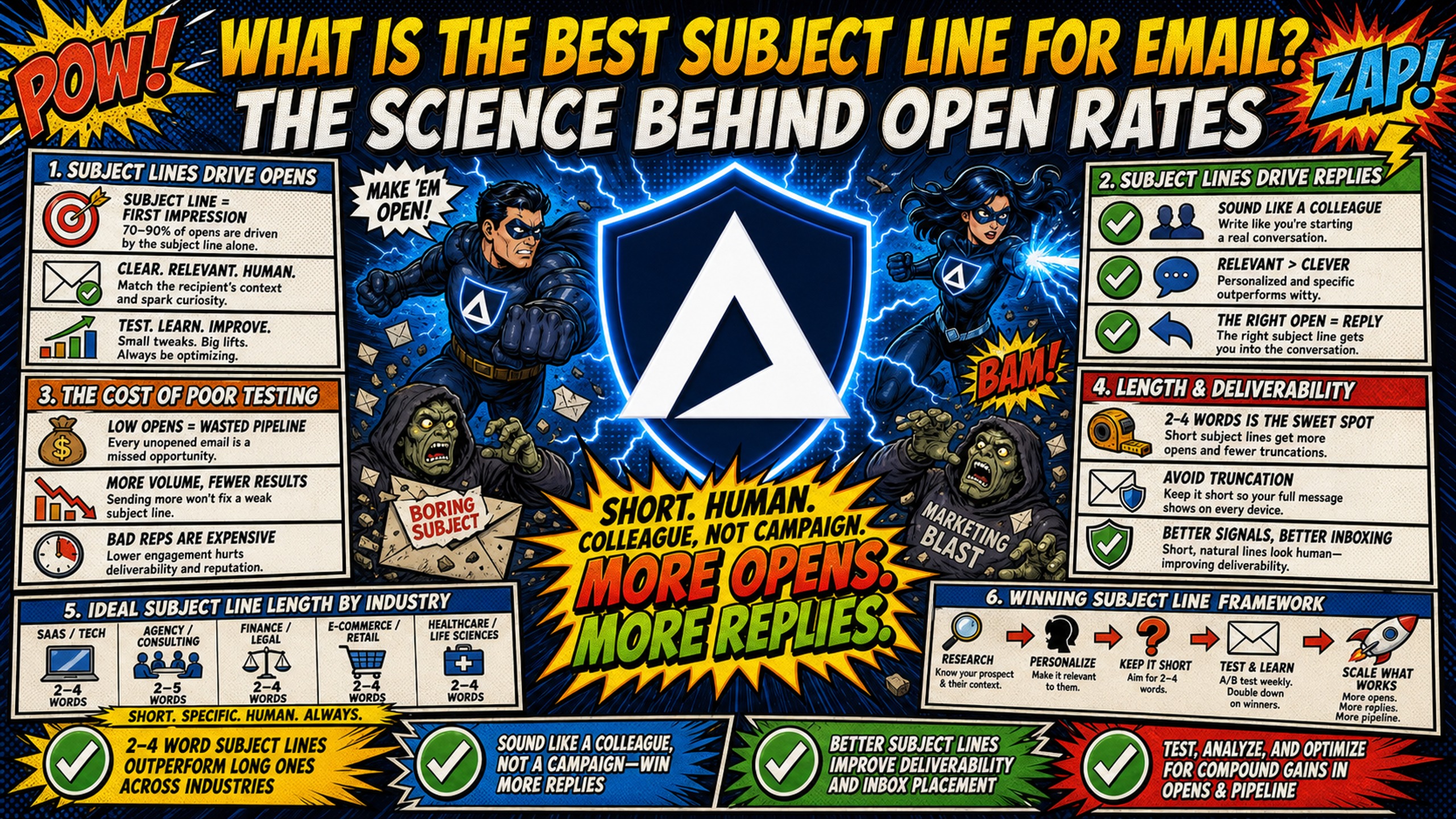
TL;DR: The best subject line for cold email is short (2-4 words), written in sentence-case, and built to look like a message from a colleague, not a marketing campaign. A Belkins analysis of 5.5 million cold emails found that 2-4 word subject lines achieve a 46% open rate. But subject line copy is only half the equation. Without clean SPF, DKIM, and DMARC records on a dedicated IP, even a perfectly written subject line lands in the spam folder. Infrastructure is the prerequisite. Copy is the multiplier.
Most campaign managers spend hours refining subject line copy while ignoring the shared IP pool quietly routing their emails straight to spam. Open rates are often decided in the DNS panel, not the copywriting doc.
This guide covers the statistical data behind high-performing subject lines and explains why a solid sending infrastructure is the real bottleneck that determines whether anyone reads your copy at all.
The direct link between subject lines and opens
Subject line copy, technical deliverability, and user behavior all intersect in the brief moment a prospect spends scanning their inbox. Improving any single variable in isolation produces diminishing returns. The relationship between the three determines whether your campaign generates meetings or disappears entirely.
How subject lines drive reply rates
The KPI you optimize for depends entirely on your campaign type. Marketing teams track clicks, conversions, and revenue per send because broad engagement signals audience health. Cold outreach teams need to track reply rates because a reply means a real conversation, the only outcome that converts to revenue.
| Feature | Cold outreach (B2B) | Marketing (B2C) |
|---|---|---|
| Primary KPI | Reply rate | Conversion/revenue per send |
| Tone | Plain, internal | Varies by campaign |
| Casing | Sentence-case | Varies by campaign |
| Goal | Start a conversation | Drive a click or purchase |
B2B cold email subject lines perform best when they mimic internal business communication. A subject line like "quick question" or "intro" triggers lower psychological resistance than "EXCLUSIVE OFFER: 50% Off This Week Only." For practical examples of this approach, the top B2B subject line examples from Chris Bussing all share this plain, direct style.
Cost of poor subject line testing
Rigorous A/B testing requires volume. If you're testing 10 subject line variations across 50 inboxes on Google Workspace Business Starter, your infrastructure alone costs $420/month at the current $8.40 per user per month rate. That's before sending platform fees, domain costs, or warmup tools.
The same 50 inboxes on Inframail's Unlimited Plan cost $129/month flat, plus approximately $34/month in amortized domain costs, for a total of $163/month. That's a saving of $257/month, or $3,084 annually, from infrastructure costs alone, before warmup tools on either side. Flat-rate pricing removes the cost penalty for running large, statistically meaningful tests.
How subject line length impacts deliverability
Email clients and spam filters both analyze subject line length at the point of delivery. Lines that are too long get truncated, reducing clarity, while lines stuffed with filler words often trigger algorithmic flags. Length is a deliverability variable, not just a copywriting preference.
Email subject line length by industry
B2B subject lines perform best in the 2-4 word range. You can reference the Inframail infrastructure cost breakdown for context on how domain volume maps to testing capacity.
Subject line length across devices
Desktop email clients display roughly 60-80 characters before truncation, while mobile screens cut off at 35-40 characters depending on the device and app. Mobile inboxes display the first 33 to 50 characters of a subject line, typically 2-4 words. Apple Mail has become a dominant email client globally, which means mobile truncation is now the default reading environment you're designing for.
A subject line of 6+ words on mobile often loses its most important phrase at the cut-off point. The first 33 characters need to carry the entire message on mobile devices, typically just 2-4 words, which is why ultra-short lines built around a single hook consistently outperform longer, clause-heavy constructions in cold outreach.
Ideal subject line length for cold email
The Belkins dataset is unambiguous: 2-4 word subject lines produce a 46% open rate, the strongest result across all length buckets studied. The average cold email open rate sits around 27-28%, with published benchmarks ranging from 21% to 60% depending on the source and measurement methodology, making the 2-4 word range a material improvement over the baseline. Examples that perform consistently: "quick question," "idea for [Company]," or simply a prospect's first name followed by one direct word.
Short subject lines look like messages from known contacts. Spam filters process them differently from promotional copy, and recipients make faster open decisions when there is less text to process.
Cognitive biases that boost email open rates
Human beings process their inbox using pattern recognition built over years of experience. Subject lines that match familiar, trusted patterns get opened. Those that trigger known warning signs get deleted or reported.
Why curiosity gaps increase email opens
A curiosity gap is the psychological space between what someone knows and what they want to know. Subject lines that create a gap without fully resolving it generate a compulsion to open. "Saw your post on X" creates curiosity about which post and why it matters. The subject line promises relevant, specific information without revealing it.
If the body copy does not close the gap the subject line opened, the email reads as clickbait. B2B buyers are quick to punish that mismatch, and a subject line that overpromises relative to its body damages trust and reply rates regardless of how many opens it generates. Watch the cold email writing breakdown for a practical view of how to pair a curiosity-driven subject with a body that delivers on the promise.
Using scarcity to boost open rates
Scarcity subject lines ("last chance," "only 3 spots left") work in B2C but carry significant risk in B2B cold outreach. Spam filters flag urgency language, and B2B prospects are skeptical of artificial scarcity from an unknown sender. If the scarcity claim is not genuine, it reads as manipulation, increasing spam complaint rates and damaging your domain reputation over time.
The safer approach in cold outreach: reference real, time-bound context. "Saw your hiring push this quarter" implies genuine relevance and creates a soft urgency without triggering filter flags or eroding trust.
Matching subject lines to user needs
Aligning your subject line to a prospect's immediate operational problem outperforms generic hooks on both open rates and reply rates. A subject line that references a known pain point signals that the email contains something directly relevant and reduces the mental cost of opening. The Belkins 5.5M email study found that reply rates jump from 3% to 7% when relevant personalization is in place, showing that contextual personalization drives meaningful engagement.
Why social proof increases email opens
Referencing a mutual connection, a named customer in the prospect's industry, or a recognizable brand outcome in your subject line transfers trust before the email body is read. "How [Similar Company] cut their DNS setup time" works because the prospect assigns the credibility of the named company to your message.
Social proof subject lines perform best when the referenced name or result is specific and verifiable. Vague references ("worked with a company like yours") carry no trust signal and are easily dismissed.
Proven phrases that boost email open rates
Specific word choices have a measurable impact on whether a subject line reads as personal outreach or bulk mail.
Words that drive email open rates
Verified high-performing subject line terms include "question" and "quick". Belkins data shows question-framed subject lines achieve a 46% open rate, and a prospect's first name, which Belkins research associates with an 11-percentage-point lift over non-personalized subject lines (46% vs 35%). These words signal low effort to open, high relevance, and personal origin, three elements that beat any promotional headline.
Spam filter red flags in subject lines
The camouflage approach is the standard that professional cold email operators now use. A camouflage subject line mimics internal, human-written communication to avoid triggering both algorithmic spam filters and the learned skepticism of experienced B2B buyers.
Common spam filter red flags include:
- Spammy words: "free," "guaranteed," "winner," "act now," "limited time offer"
- Excessive punctuation: Multiple exclamation marks (!!!) or question marks (???)
- ALL CAPS text: Any phrase in full capitals within the subject line
- Promotional structure combined with hype: Discount language alone does not increase spam rates. Data from InboxEagle shows emails with discount language land in spam at 21.7% versus 22.7% without it, and specific numeric language like "% off" performs below baseline at 20.46%, making it safer than vague promotional phrasing.
The real risk is stacking: using 3+ trigger words together elevates spam risk by 25%, and pairing them with hype formatting pushes emails into spam territory 70% of the time. The Zeffy deliverability guide explains how spam filters analyze both subject line and body content for trigger patterns, meaning a clean subject line combined with a spammy body still triggers flags. Domains that repeatedly hit these trigger patterns accumulate reputation damage over time, with inbox placement rates declining as filter algorithms build a negative signal history for the sending domain. The 32 spam-avoidance rules cover the full interaction between copy choices and filter behavior.
How sender reputation impacts email opens
Copy quality is entirely irrelevant if the email never reaches the inbox. The technical layer, SPF, DKIM, and DMARC records, combined with the IP address your email originates from, determine inbox placement before any human judgment occurs.
Why sender reputation drives openings
SPF (Sender Policy Framework) verifies that the email originates from an IP address authorized by the domain owner. Without a valid SPF record, receiving servers treat the message as suspicious by default. DKIM (DomainKeys Identified Mail) adds a cryptographic signature confirming the message was not altered in transit, while DMARC ties both together, aligning them with the visible "From" domain and specifying how receiving servers handle authentication failures.
The combined impact is significant. Google and Yahoo now require SPF, DKIM, and a DMARC policy for bulk senders, and domains without full authentication routinely see the majority of their sends filtered before any human judgment occurs.
Domain health checklist:
- SPF record: configured and published in DNS
- DKIM: signature active and matching the sending domain
- DMARC: policy set at minimum to "p=none" for monitoring, progressing to "p=quarantine" then "p=reject" as reputation is established
- Dedicated IP: isolated from shared sending pools
- Blacklist monitoring: active with automated monitoring and assisted delisting requests
Inframail automates this entire setup. The platform configures SPF, DKIM, and DMARC records automatically with no DNS panel access required, removing the need to manually configure DNS records across every domain in your sending infrastructure. The Inframail cold email deliverability walkthrough shows the full process from domain purchase through credential export.
Why emails hit spam folders
Shared IP pools present a specific, measurable risk. When inbox providers evaluate incoming email, the IP address is the first checkpoint. If you're sending from a shared IP pool, another sender's spam behavior can gradually contaminate your IP's reputation through no fault of your own. Repeated poor sending practices on the same pool erode inbox provider trust over time until placement rates begin to collapse. Your carefully written subject line never gets evaluated because the IP it arrives from is already flagged.
As covered in the cold email deliverability rules for 2026, shared IP contamination is one of the most common causes of sudden deliverability drops that look like subject line or copy problems on the surface. The Maildoso deliverability review details how shared IP architectures create this contamination risk in practice.
Inframail provides 1 dedicated US-based IP on the Unlimited Plan and 3 dedicated IPs on the Agency Pack. Your sending reputation is determined solely by your own sending behavior, not by the activity of other users on a shared pool.
Ideal send frequency benchmarks
Sending too many emails per inbox per day is one of the fastest ways to damage domain health. The Lead Gen Jay analysis of 100K daily sends identifies 50 emails per inbox per day as the safe upper limit, with 30-50 as the standard operating range cited across industry guides. Inframail's own sending capacity guide recommends 40 total daily emails per inbox using a 70/30 warmup-to-campaign split, which translates to approximately 12 campaign sends per inbox per day, a more conservative figure than the industry-cited upper limit. The 30-50 range used in the calculations below reflects Lead Gen Jay's industry-level benchmarks rather than Inframail's specific recommendation.
At 30-50 emails per inbox per day, inbox requirements scale directly from sending volume: 3,000 daily sends require a minimum of 60 inboxes at the upper limit of 50 sends per inbox, or up to 100 inboxes at the conservative 30-send limit (a direct application of the verified formula: target daily volume ÷ per-inbox send limit = inboxes needed). On per-seat pricing, that's $504-840/month on Google Workspace at the current $8.40 rate. On Inframail's flat-rate model, that's $129/month regardless of inbox count (warmup tools are separate and typically add $15-50/month per tool on either side).
How list quality drives open rates
High bounce rates are a direct signal to inbox providers that your list quality is poor. When more than 2% of emails hard bounce, spam filter algorithms assign lower trust scores to the sending domain, affecting inbox placement for every subsequent send, including emails to valid, engaged contacts. Verified, clean lists protect the infrastructure investment, and the Inframail spam metrics guide outlines the acceptable bounce thresholds for maintaining domain health.
How to run A/B tests for higher email open rates
Subject line testing produces reliable data only when controlled correctly. Running two versions simultaneously across a divided list, with everything else held constant, generates clean signal. Running multiple changes at once produces noise.
Setting up cold email A/B tests
A clean A/B test isolates one variable: the subject line. Body copy, send time, list segment, and sending domain must remain identical across both variants. The Inframail infrastructure monitoring guide recommends maintaining consistent sending volumes per inbox during test periods to avoid domain health fluctuations that could confound results.
Calculating ideal email sample sizes
Statistical significance at a 95% confidence level requires sufficient volume to rule out random variation. A common practice recommends at least 1,000 recipients per variant as a baseline, with larger samples of several thousand per variant providing stronger confidence, though the precise volume required depends on your baseline open rate and the minimum detectable effect you want to measure. For agencies managing 50-100 inboxes at 30-50 sends per inbox per day, daily sending capacity ranges from 1,500 to 5,000 emails. A 1,000-recipient-per-variant minimum across two variants can be reached in as little as one to two days at maximum capacity, or over several days at conservative send rates, depending on inbox count and per-inbox limits. Flat-rate infrastructure makes this kind of sustained testing economically viable because adding inboxes does not increase the monthly platform fee.
Essential metrics for email performance
Apple's Mail Privacy Protection (MPP) changes what open rate data actually means. When "Protect Mail activity" is enabled, Apple routes email through a proxy server that preloads the message and fires the tracking pixel automatically, inflating open rates regardless of whether a human ever opened the email.
Apple Mail has become the dominant email client globally, which means a significant portion of recorded opens may be proxy-triggered rather than human-triggered. Reply rate is the more reliable measure of actual engagement because MPP does not affect reply tracking. Prioritize reply rate over open rate when evaluating subject line performance.
Common subject line errors hurting open rates
Most subject line mistakes fall into two categories: word choices that trigger algorithmic spam filters, and formatting patterns that signal bulk promotional mail to both filters and recipients.
Identify subject line spam triggers
The standard spam trigger list includes words like "free," "guaranteed," "winner," "act now," "100% free," and "no cost." These words appear consistently in the training data that spam filter algorithms use to classify promotional bulk mail. Including even one in a cold email subject line raises the probability of a spam folder placement, especially when combined with other risk signals like a young domain or high send volume.
Formatting mistakes that trigger filters
Casing changes how a subject line reads at a glance. A subject line written in sentence-case ("Quick question about your outbound stack") looks different from Title-Case or ALL CAPS subject lines in a cluttered inbox, reading as personal rather than promotional, which is the visual signal cold outreach aims to produce.
The Belkins B2B cold email subject line study found that casing produced only marginal open rate differences across title-case, lowercase, and ALL CAPS variants. No single casing style produced a decisive performance advantage over the others in that dataset. The practical consideration is the underlying mechanism: sentence-case reads as personal rather than promotional, which is the visual signal cold outreach aims to produce. Test casing as a single isolated variable on your own list to get data specific to your campaigns rather than relying on any single industry average.
Avoiding deceptive subject line tactics
Using fake "Re:" or "Fwd:" prefixes to imply an existing thread is a deceptive tactic that generates spam complaints at a higher rate than honest subject lines, and spam complaints are the fastest way to damage domain reputation permanently. The cold email legality and compliance guide covers CAN-SPAM and GDPR compliance requirements for cold email, including guidance on misleading subject lines.
Key insights on high performing subject lines
The following benchmarks and data points consolidate the key performance indicators covered in this guide: open rate ranges by industry, A/B test sizing, and the distinction between shallow and contextual personalization.
Cold email open rate benchmarks by industry
Cold email open rates across major B2B industries, assuming clean lists, proper authentication, and dedicated IP infrastructure, typically fall in these ranges:
- SaaS and technology: 20-28%
- Professional services: 22-30%
- Agencies (marketing, lead gen): 18-25%
- Financial services: 15-22%
- Recruitment and staffing: 25-35%
Determining your ideal A/B test sample size
A practical approach is to ensure each variant reaches at least 1,000 contacts before drawing conclusions, with several thousand per variant as the threshold for stronger confidence, and to limit the number of variants running simultaneously so your sending volume is sufficient to reach those thresholds within a reasonable test window. The inbox count needed to reach these volumes at 30-50 sends per inbox per day is the core infrastructure planning input, making flat-rate inbox provisioning a direct enabler of rigorous testing.
Evidence on personalized subject lines
The personalization data reveals an important distinction between name-based personalization and genuine contextual personalization. Generic name-drop personalization ("Hey {{FirstName}}, thought this might interest you") signals no genuine research into the recipient's situation and is processed by experienced B2B buyers as a template, not a personal message. The Belkins dataset indicates that generic personalized approaches do not outperform non-personalized subject lines, suggesting that shallow name-drop personalization adds no measurable advantage over a well-written plain subject line.
Hyper-personalization works differently. Emails with advanced personalization tied to specific triggers, industry pain points, or recent company events achieve reply rates of 17-18%, according to Klenty cold email research (more than ten times the approximately 1% reply rate seen with generic templates, according to Woodpecker cold email research, and significantly outperforming first-name-only personalization that typically sees 1.5-2%, according to data from Woodpecker and Sendr.ai). A subject line like "Congrats on the Series B, saw you're building out your sales team" demonstrates genuine research and context. As practitioners note in the AI-powered cold email scaling discussion, contextual personalization requires the right data infrastructure to execute at scale.
Get the infrastructure right first
Subject line testing at scale requires infrastructure that does not penalize you for adding inboxes. Inframail provides unlimited inboxes at $129/month with automated DNS configuration, dedicated IPs, and built-in deliverability monitoring. Sign up to Inframail and get started today.
FAQs
What is the optimal subject line length for cold email?
Data from a Belkins study of 5.5 million cold emails shows 2-4 words yields a 46% open rate, the highest bracket measured. Desktop clients vary by application (Gmail displays up to around 70 characters while Outlook shows approximately 50) and mobile screens truncate earlier still, typically cutting off at 33-43 characters depending on the device and app.
Does capitalization affect email open rates?
Sentence-case subject lines mimic personal, human-written emails, which reduces psychological resistance and avoids promotional pattern recognition in the inbox. Test casing as an isolated variable on your own list to measure the specific impact for your campaigns.
How many punctuation marks should a subject line contain?
Keep punctuation to a maximum of 3 marks per subject line. Spam filter algorithms flag excessive punctuation, particularly multiple exclamation marks (!!!) or question marks (???), as signals associated with bulk promotional mail.
How does Apple MPP affect open rate data?
Apple's Mail Privacy Protection (MPP) routes email through a proxy server that preloads the message and fires the tracking pixel automatically, inflating recorded open rates regardless of whether a human ever opened the email, which makes reply rate the more reliable engagement signal for cold outreach.
What is the difference between a dedicated IP and a shared IP for cold email?
A dedicated IP is used exclusively by one sender, so your email reputation is determined entirely by your own sending behavior. A shared IP pool ties your reputation to every other sender on that server, meaning another user's spam activity can contaminate your deliverability over time without any action on your part. When a bad actor hits spam traps or generates high complaint rates, it can contaminate the entire IP range, and every sender on that pool may absorb the damage gradually.
How do SPF, DKIM, and DMARC affect inbox placement?
Google and Yahoo now require SPF, DKIM, and a DMARC policy for bulk senders. Domains without full authentication routinely see the majority of their sends filtered, and without all three records properly configured, even a perfectly written subject line on a clean list will land in spam.
Key terms glossary
Camouflage subject line: A subject line designed to mimic internal, human-written business communication so it appears like an email from a colleague rather than a marketing campaign. The goal is not to be loud or clever, but to blend in, capturing attention by looking like it belongs in the inbox. This increases open rates by reducing the psychological resistance B2B prospects apply to obvious outreach.
Pattern interrupt: A copywriting technique that creates a visual distinction from surrounding emails in an inbox (such as using sentence-case when most promotional subject lines use Title-Case) so the email reads as personal rather than promotional at a glance.
Dedicated IP: An internet protocol address used exclusively by one sender, protecting their email domain reputation from contamination by other senders on a shared pool.
SPF (Sender Policy Framework): A DNS record that specifies which IP addresses are authorized to send email on behalf of a domain, verified by receiving mail servers as the first authentication checkpoint.
DKIM (DomainKeys Identified Mail): A cryptographic signature added to outgoing emails that confirms the message has not been altered in transit, providing message integrity proof that SPF alone cannot supply.
DMARC: A DNS policy that ties SPF and DKIM together, aligns them with the visible "From" domain, and tells receiving servers how to handle messages that fail authentication checks. The standard progression is p=none (monitoring), then p=quarantine, then p=reject as domain reputation is established.