
What Is Sender Reputation? How Cold Email Platforms Actually Measure It
Learn what sender reputation is, how cold email platforms measure it across Gmail and Outlook, and which domain, IP, authentication, complaint, and engagement signals matter.
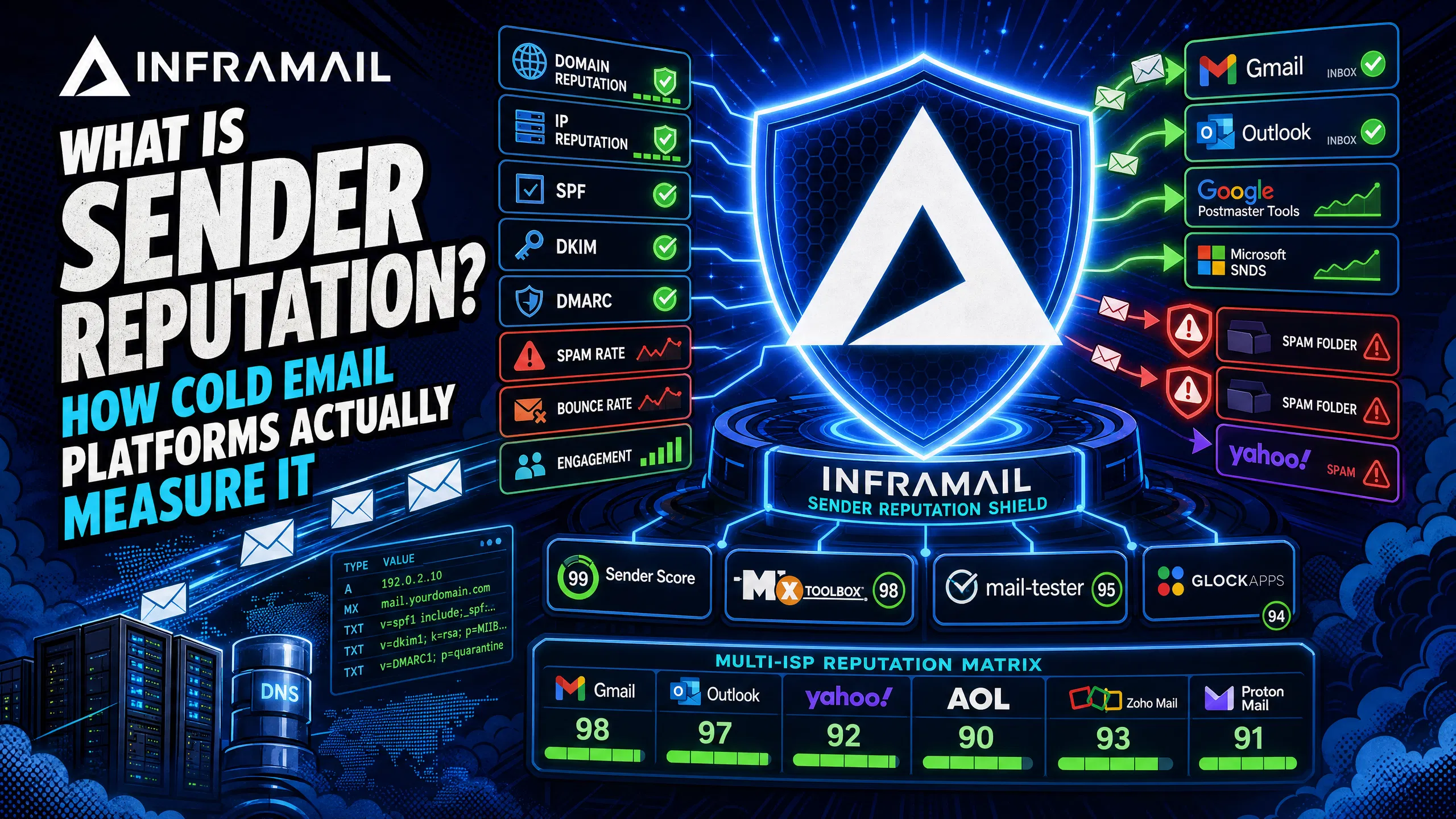
TL;DR Sender reputation isn't a single score. It's a composite judgment made independently by every mailbox provider, combining your domain reputation, IP reputation, authentication pass rates, complaint rates, and engagement signals. Gmail uses Postmaster Tools to surface spam rate and authentication data. Microsoft uses SNDS to score IP behavior. A "good" reputation means different things across ISPs and changes with send volume. You can't rely on one third-party score to tell you the full picture, and authentication alone doesn't guarantee inbox placement.
When you're managing 50-200 cold email domains and a campaign drops from 85% inbox to 60% overnight, your first question is "what happened to our reputation?" You're trying to fix a multi-variable system by looking at a single metric. We built this guide to break down exactly what sender reputation measures, how Gmail and Outlook calculate it differently, and what signals actually move the needle.
The sections below break down the two main components ISPs use when forming that judgment.
It's a composite, not a score
Sender reputation measures how trustworthy a sending identity appears to a mailbox provider. Providers use that measurement to decide whether your email reaches the inbox, the spam folder, or gets rejected at the connection. The important point is that each mailbox provider sets its own rules about what trust means, and the signals they weight vary significantly from one to the next.
There is no universal sender score. Gmail calculates reputation differently from Outlook, which calculates it differently from Yahoo. A domain with strong Gmail delivery can simultaneously land in Outlook spam. Relying on one number from a third-party tool like Sender Score tells you something about your standing, but it doesn't tell you how Microsoft's filters are treating your IP this week.
Reputation is a calculation involving engagement rates, complaint patterns, list quality, sending consistency, authentication, and dozens of other signals. Those signals break into two distinct tracks: domain reputation and IP reputation.
Domain reputation vs. IP reputation
Domain reputation is tied to the domain in your "From:" address. It's portable, following your domain when you change sending IPs or switch email providers. It reflects your sending history, authentication pass rates, engagement patterns, and abuse complaint volume. Because it's linked to your brand identity, it accumulates over time and is harder to rebuild once damaged. Our dedicated IP vs. shared IP video covers why domain reputation now dominates placement decisions at modern ISPs.
IP reputation is the trust score assigned to the specific IP address your emails originate from. It acts as the initial gatekeeper: before a message is evaluated for content, the receiving mail server checks whether it's willing to accept traffic from that IP. On a shared IP pool, another sender's spike in complaints can damage the IP's standing even when your own behavior is clean.
The key distinction: IP reputation determines whether your message gets accepted at the connection. Domain reputation determines where it lands once accepted. Modern providers, including Gmail, weight domain reputation more heavily than IP reputation in final placement decisions.
Each major mailbox provider uses its own tools and signals to evaluate senders. The breakdowns below cover what each provider tracks and where to find that data.
How Gmail measures sender reputation
Gmail surfaces reputation data through Google Postmaster Tools, which provides domain-level and IP-level ratings for DKIM or SPF authenticated messages. The original Postmaster Tools version has been retired, and the updated version focuses on a tighter set of metrics tied directly to inbox placement.
The key metric is spam rate, the percentage of your emails that recipients mark as spam. Google's published concern threshold is 0.10%. Above 0.30% puts your sending domain at serious risk of delivery failures. Our help center guide on spotting spam and healthy metrics walks through how to read these signals in practice.
Beyond spam rate, Postmaster Tools tracks:
Authentication pass rates for SPF, DKIM, and DMARC
TLS encryption rate for emails sent in transit (TLS should be implemented, though opportunistic STARTTLS may fall back to plaintext if the receiving server cannot negotiate TLS)
For cold email at volume, DKIM is non-negotiable. Our SPF, DKIM, and DMARC setup video shows how Inframail auto-configures all three records across multiple inboxes simultaneously, with every domain getting authentication configured in under 10 minutes.
"Adding all those records would have probably taken dozens of hours. Instead all records were added within 10 minutes... Adding over 1,000 accounts literally took a couple of button clicks." - Verified user review of Inframail
How Microsoft/Outlook measures sender reputation
Microsoft takes a more IP-centric approach through its Smart Network Data Services (SNDS). Unlike Postmaster Tools, SNDS centers its data on IP addresses and ranges rather than domain-level signals, making it primarily useful for senders who control dedicated IP space.
SNDS provides:
Traffic volume per sending IP
Spam complaint rate from Outlook users
Spam trap hits, which flag sending to known trap addresses
Filter verdict showing how Microsoft's SmartScreen classified your messages (color-coded as green, yellow, or red)
Reputation status as green (good), yellow (warning), or red (poor)
The junk mail complaint data is the most operationally important SNDS metric. It scores your IP based on how many messages Microsoft's spam filters flagged, giving you a direct signal into how their systems perceive your sending behavior. For campaign managers running high-volume cold email, checking SNDS regularly alongside Postmaster Tools gives you a two-ISP view of your standing.
"Outstanding deliverability backed by personable, professional support. 1 on 1 with co-founder was extremely helpful to learning more about deliverability and proper infrastructure set up." - Verified user review of Inframail
Reputation is built from several distinct signal categories, each weighted differently depending on the provider and sending context.
Authentication is the entry ticket, not the destination
SPF, DKIM, and DMARC connect your sending IP to your domain. Without them, receiving servers can't verify whether a message genuinely came from the domain it claims to represent. But authentication is a prerequisite, not a guarantee of inbox placement.
SPF authorizes which IP addresses can send email on behalf of a domain, and receiving servers check whether the sending IP appears in that domain's SPF record. DKIM adds a cryptographic signature to outgoing messages, confirming the message hasn't been altered in transit. DMARC ties SPF and DKIM together and tells receiving servers what to do when messages fail authentication (monitor, quarantine, or reject).
Fully authenticated domains tend to see higher inbox placement rates, but domain reputation, list quality, and content all influence the final folder. Authentication gets you past the first filter. Everything else determines where the message lands. Watch how deliverability rules changed in 2026 for a current breakdown of what ISPs now require at minimum.
Engagement, complaint rates, and bounce rates
Authentication establishes identity. Behavioral signals establish trust. The signals ISPs weigh most heavily include:
Spam complaint rate: Keep this below 0.10% for Gmail. Even a single high-complaint send window can depress domain reputation for days.
Hard bounce rate: Sending to invalid addresses signals poor list hygiene. Hard bounces damage both IP and domain reputation because they indicate you're sending to addresses that no longer exist or never opted in.
Engagement patterns: Opens, replies, and forwards are positive signals. No engagement over time raises red flags for ISPs protecting their users.
Sending volume consistency: Large spikes in volume from a new domain or IP are a classic spam pattern. ISPs don't flag volume itself, they flag sudden increases that don't match an established sending history. Gradual ramp-up is expected, which is why inbox warmup exists. Our guide on post-migration inbox warmup covers the ramp schedule in detail.
"InfraMail makes it remarkably easy to purchase domains, configure them correctly, create inboxes, and initiate warm-up immediately. The level of automation is exceptional and clearly designed for serious operators." - Verified user review of Inframail
No single tool tells the complete story. The monitoring stack that gives you full coverage combines ISP-native tools with third-party checks:
Tool | What it measures | Best for |
|---|---|---|
Spam rate, auth pass rates, Gmail domain/IP status | Gmail deliverability | |
IP reputation, complaint rate, filter results | Outlook deliverability | |
IP reputation score 0-100 | Cross-ISP IP monitoring | |
Authentication, SpamAssassin, RFC formatting | Pre-send technical check | |
Blacklist monitoring, DNS record validation | Blacklist alerts | |
Inbox placement across Gmail, Outlook, Yahoo | Cross-ISP placement testing |
Run Mail-Tester before launching any new domain to check authentication configuration, SpamAssassin scoring, and RFC formatting. Address any authentication or formatting flags before sending. Check Google Postmaster Tools weekly and pull SNDS data when you see Outlook placement drop. Use GlockApps for point-in-time placement tests when diagnosing an underperforming campaign. A high third-party Sender Score doesn't mean Gmail and Microsoft aren't filtering your mail, so use native ISP tools as your primary reference.
For campaign managers running multiple client accounts, understanding how to calculate your sending capacity relative to your inbox count is the operational complement to reputation monitoring.
The infrastructure layer under your campaigns determines how much reputation headroom you have. Dedicated IPs isolate your sending behavior from other senders on shared pools, and our automated DNS configuration provisions SPF, DKIM, and DMARC across all your domains so authentication gaps don't become the weak point in your reputation foundation. Sign up to Inframail and get started today.
What is the difference between domain reputation and IP reputation?
Domain reputation is tied to your "From:" address domain and persists across different sending IPs or providers. IP reputation is tied to the specific IP your emails originate from and acts as the connection-level gatekeeper before domain reputation determines folder placement.
Does passing SPF, DKIM, and DMARC guarantee inbox placement?
No. Authentication confirms your sending identity but doesn't determine folder placement. Complaint rates, bounce rates, engagement patterns, and list quality all influence whether an authenticated email lands in the inbox or spam folder.
What spam rate threshold should I stay below for Gmail?
Gmail's published threshold for concern is 0.10% spam rate. Above 0.30% puts your sending domain at serious risk of delivery failures.
Can a high Sender Score from Validity override Gmail or Outlook filtering?
No. A high Sender Score indicates good IP reputation but doesn't override ISP-specific filtering. Gmail and Outlook each apply their own algorithms, so always check Postmaster Tools and SNDS directly rather than relying solely on third-party scores.
Sender reputation: The composite trust score ISPs assign to a sending identity, calculated from domain reputation, IP reputation, authentication signals, and behavioral data.
Domain reputation: The trust score linked to your "From:" address domain, portable across IPs and providers, built from long-term sending history and engagement patterns.
IP reputation: The trust score assigned to a specific sending IP address, acting as the connection-level filter before domain reputation determines inbox or spam placement.
SPF (Sender Policy Framework): A DNS record that specifies which IP addresses are authorized to send email on behalf of a domain.
DKIM (DomainKeys Identified Mail): A cryptographic signature added to outgoing emails to verify message integrity and sender authenticity.
DMARC (Domain-based Message Authentication, Reporting, and Conformance): A policy layer that ties SPF and DKIM together, instructing receiving servers how to handle messages that fail authentication checks.
Spam complaint rate: The percentage of recipients who click "report spam" on a given email. Gmail's published concern threshold is 0.10%.
Hard bounce: A permanent delivery failure caused by an invalid or non-existent email address, which signals poor list hygiene to ISPs and damages sender reputation.
Inbox warmup: The process of gradually increasing sending volume from a new domain or IP to build positive sending history before scaling to full campaign volume.