
Reminder email examples: 30+ templates for every situation
Sending reminder emails can help recover revenue and book meetings, but scaling these sequences may inflate your software bills. Research shows a single well-ti
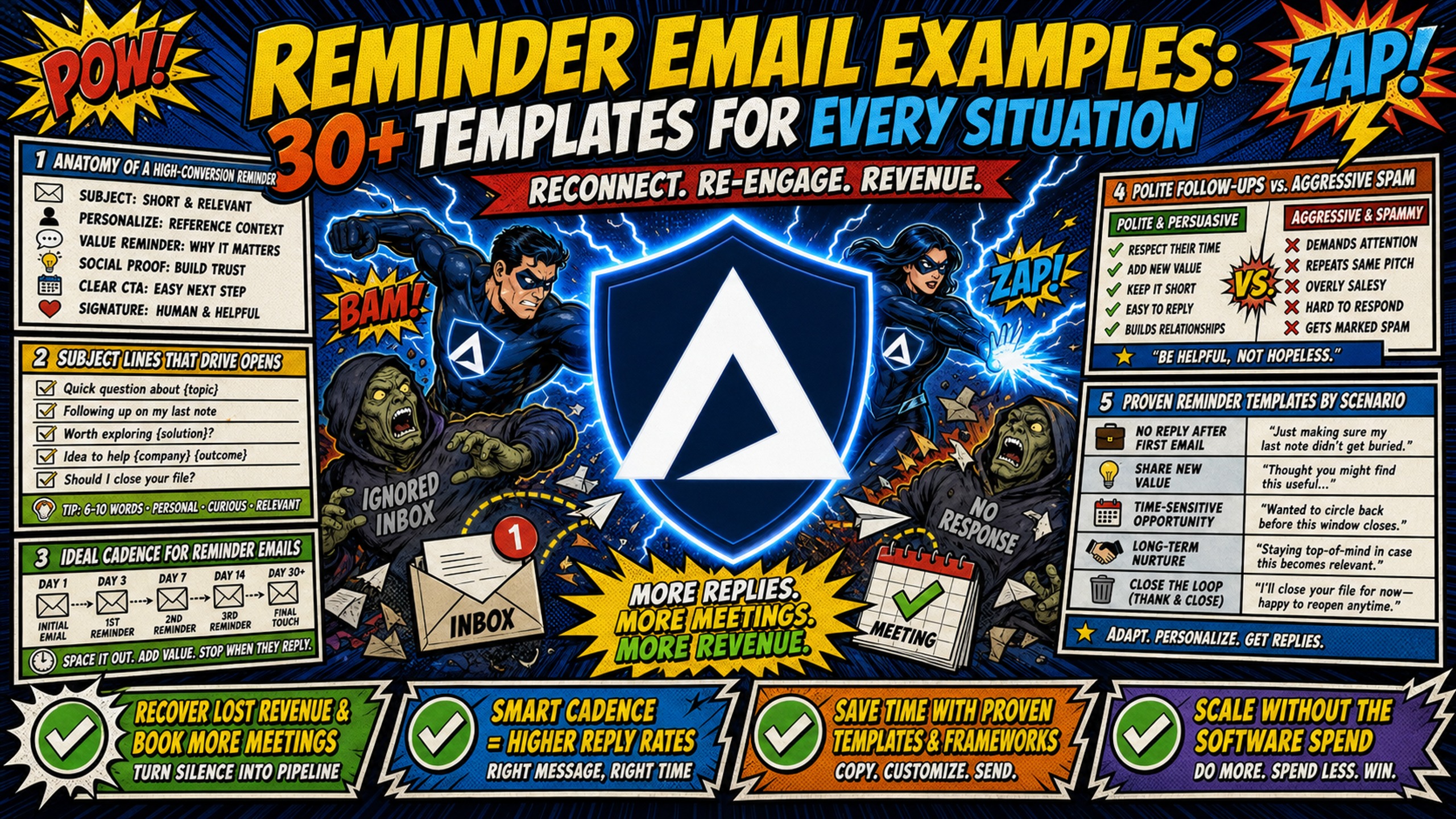
TL;DR: Sending reminder emails can help recover revenue and book meetings, but scaling these sequences may inflate your software bills. Research shows a single well-timed follow-up captures most of the reply-rate lift. Each additional follow-up after the second shows diminishing, then negative, returns. To prevent those sequences from eroding your margins, flat-rate infrastructure like Inframail's $129/month unlimited inbox plan keeps costs predictable as your agency grows. Dedicated IPs and automated SPF, DKIM, and DMARC setup support deliverability at scale.
A single follow-up email rarely recovers an unpaid invoice or books a ghosted prospect. Cold email data shows a single well-timed follow-up can boost replies by up to 50%. Each additional email after the second shows sharply diminishing returns, and a third follow-up can drop response rates. The problem is operational: per-inbox pricing models can make costs scale quickly as your agency grows.
This guide provides over 30 copy-and-paste reminder email templates organized by business scenario. It also breaks down the unit economics of automated follow-up sequences so you can protect your agency's net margin while executing these campaigns at scale.
The anatomy of a high-conversion reminder email
A high-conversion reminder email does three things: states why you're writing in the first line, asks for exactly one action, and closes without applying pressure. Keep the body concise, and strip out anything that doesn't serve those three goals.
Subject lines that drive opens
Subject lines determine whether your sequence runs at all. Follow these four rules:
- Keep it short: Short subject lines load fully on mobile and reduce cognitive load for the reader.
- Use a prefix label: Tags like
[Action Required],[Reminder], or[Invoice #1042]can signal context before the recipient opens. - Match the tone to the sequence stage: Early reminders typically use neutral language while later reminders may adopt a firmer tone, and your subject line should reflect that progression.
- Avoid clickbait phrasing: Vague teaser lines may trigger spam filters and erode sender reputation over time. Relevant specificity typically outperforms vague intrigue, as Kidous Mahteme covers in his reply-rate CTA breakdown.
Ideal cadence for reminder emails
The research on follow-up timing points to one clear pattern. Send the first reminder two to three days before or after the trigger event, the second five to seven days later, and a final reminder after that.
Data shows the first follow-up can boost reply rates by up to 50%, making it the highest-leverage step in any sequence. The second follow-up adds roughly 3% lift, and a third can drop response rates by 30%, so cadence structure matters more than raw volume of touches.
| Sequence step | Effect on reply rate |
|---|---|
| First follow-up | Up to 50% lift over initial email |
| Second follow-up | Approximately 3% additional lift |
| Third follow-up | Can reduce response rates by ~30% |
The data suggests diminishing returns set in quickly after the first follow-up. A two-email sequence (initial plus one follow-up) captures the majority of available replies in most B2B contexts.
Polite follow-ups vs. aggressive spam
The difference between a helpful nudge and spam is permission and tone. Aggressive follow-ups may stack pressure, repeat the same ask word-for-word, and use false urgency, while polite-but-direct follow-ups typically acknowledge the recipient's time, reference the specific context, and offer a clear path forward. Respectful language that acknowledges context typically performs better than language that emphasizes repeated attempts.
Proven reminder email template examples by scenario
Each template below uses bracketed placeholders (for example, [Invoice Number] and [Meeting Link]) so you can drop them directly into your sending platform, replacing every bracket before sending.
Drafting a polite payment follow-up
Template 1 (Pre-due friendly) Subject: [Invoice #] due [Date] Body: Hi [First Name], quick heads-up that invoice [Invoice Number] for [Amount] is due on [Date]. You can pay here: [Payment Link]. Let me know if anything looks off.
Template 2 (Day-of reminder) Subject: Payment due today - [Invoice #] Body: Hi [First Name], invoice [Invoice Number] for [Amount] is due today. Here's the direct link to pay: [Payment Link]. Reply here if you have any questions.
Escalating invoices after second notice
Template 3 Subject: Second notice - Invoice [#] overdue Body: Hi [First Name], I sent a reminder about invoice [Invoice Number] on [Date]. It's now [X days] past due. Please process payment at [Payment Link] by [New Date] to avoid a late fee.
Template 4 Subject: Invoice [#] - action needed Body: Hi [First Name], invoice [Invoice Number] for [Amount] remains unpaid. I've reached out twice and want to resolve this quickly. Please reply or pay at [Payment Link] by [Date].
Escalating unpaid fees
Template 5 Subject: Unpaid retainer - [Month] Body: Hi [First Name], the [Month] retainer fee of [Amount] has not been received as of today. Please process payment at [Payment Link] or reply with an expected payment date.
Template 6 Subject: Final notice - retainer [Month] Body: Hi [First Name], this is a final notice for the outstanding [Month] retainer of [Amount]. If payment is not received by [Date], work on your account will pause. Pay here: [Payment Link].
Drafting late fee notices for clients
Template 7 Subject: Late fee applied - Invoice [#] Body: Hi [First Name], because invoice [Invoice Number] is [X days] past due, a late fee of [Amount] has been added per our agreement. The new total is [New Amount]. Pay here: [Payment Link].
Template 8 Subject: Updated invoice [#] with late fee Body: Hi [First Name], I've attached an updated invoice [Invoice Number] reflecting the late fee outlined in our contract. The balance is now [New Amount], due by [Date]. Let me know if you have questions.
Fixing failed recurring client payments
Template 9 Subject: Payment failed - action required Body: Hi [First Name], the scheduled payment of [Amount] on [Date] did not go through. Please update your payment details at [Link] or reply to arrange an alternative.
Template 10 Subject: Billing issue - [Company Name] Body: Hi [First Name], we hit an issue processing your [Date] payment of [Amount]. It looks like a card issue. Update your details here: [Link] to keep your account active.
Invoice reminder email examples
The templates in this section follow a tone progression: friendly for upcoming invoices, direct for overdue ones, and firm for anything past 30 days.
Payment due in 7 days templates
Template 11 Subject: Invoice [#] due [Date] Body: Hi [First Name], a quick reminder that invoice [Invoice Number] for [Amount] is due on [Date]. View and pay here: [Payment Link]. Reach out if anything needs clarifying.
Template 12 Subject: Upcoming payment - [Amount] Body: Hi [First Name], your payment of [Amount] for [Service/Month] is due in 7 days on [Date]. No action needed if you have autopay set up. Otherwise, use this link: [Payment Link].
Final notice before payment deadline
Template 13 Subject: Final reminder - Invoice [#] due tomorrow Body: Hi [First Name], invoice [Invoice Number] for [Amount] is due tomorrow, [Date]. Pay here: [Payment Link]. A late fee applies after this date per our agreement.
Template 14 Subject: Last chance - payment due [Date] Body: Hi [First Name], one final heads-up before tomorrow's due date. Invoice [Invoice Number] totaling [Amount] can be settled at [Payment Link]. Reply if you have any concerns.
7-day late payment notice templates
Template 15 Subject: Invoice [#] is 7 days overdue Body: Hi [First Name], invoice [Invoice Number] for [Amount] is now 7 days past due. Please pay at [Payment Link] or reply with an expected payment date.
Template 16 Subject: Overdue - Invoice [#] Body: Hi [First Name], I'm following up on invoice [Invoice Number] from [Date]. The balance of [Amount] is now 7 days past due. Pay here: [Payment Link].
30-day past-due invoice templates
Template 17 Subject: Invoice [#] - 30 days outstanding Body: Hi [First Name], invoice [Invoice Number] for [Amount] is now 30 days past due. Please arrange payment immediately at [Payment Link] or contact me to discuss a resolution.
Template 18 Subject: Urgent - overdue balance [Amount] Body: Hi [First Name], the [Amount] balance on invoice [Invoice Number] has been outstanding for 30 days. This requires your immediate attention. Pay at [Payment Link] or reply today.
Templates for Net 30 payment requests
Template 19 Subject: Invoice [#] - Net 30 terms Body: Hi [First Name], please find invoice [Invoice Number] for [Amount] attached. Payment is due within 30 days of receipt per our agreed terms. Pay at [Payment Link].
Template 20 Subject: Net 30 invoice - [Project Name] Body: Hi [First Name], this is the invoice for [Project Name] totaling [Amount]. Per our Net 30 agreement, payment is due by [Date]. Link: [Payment Link].
Ready-to-use reminder email templates
These meeting reminder templates are built for one job: reducing no-shows. Meeting reminder automation can reduce no-shows by 30-50%, according to Instantly.ai's analysis of reminder email sequences, making it a measurable ROI lever for agencies running client-facing calls.
Templates for 24-hour meeting notices
Template 21 Subject: Reminder - our call tomorrow at [Time] Body: Hi [First Name], confirming our call tomorrow, [Date] at [Time] [Timezone]. Join here: [Meeting Link]. Reply if you need to reschedule.
Template 22 Subject: Tomorrow - [Meeting Topic] at [Time] Body: Hi [First Name], looking forward to our [Meeting Topic] discussion tomorrow at [Time]. Use this link to join: [Meeting Link]. See you then.
1-hour pre-meeting reminder templates
Template 23 Subject: Starting in 1 hour - [Meeting Name] Body: Hi [First Name], your [Meeting Name] starts in one hour at [Time]. Join here: [Meeting Link]. Let me know if you're running late.
Template 24 Subject: 1-hour heads-up - our call today Body: Hi [First Name], a quick reminder that our call is in one hour. Here's the join link: [Meeting Link]. See you shortly.
Sample emails for rescheduled meetings
Template 25 Subject: Rescheduled - new time for our call Body: Hi [First Name], our original meeting has been rescheduled to [New Date] at [New Time]. Here's the updated calendar invite: [Link]. Reply to confirm this works.
Template 26 Subject: Updated invite - [Meeting Topic] Body: Hi [First Name], I've updated our [Meeting Topic] meeting to [New Date] at [New Time]. New link: [Meeting Link]. Let me know if this creates a conflict.
Client no-show email sequences
Template 27 Subject: Missed our call today Body: Hi [First Name], I was on for our [Time] call but didn't see you join. Happy to reschedule at a better time. Here's my calendar: [Scheduling Link].
Template 28 Subject: We missed you - quick reschedule? Body: Hi [First Name], we had a call scheduled today that didn't connect. No problem at all. Pick a new slot here: [Scheduling Link] and I'll send a fresh invite.
Recurring meeting reminder templates
Template 29 Subject: Weekly sync - [Day] at [Time] Body: Hi [First Name], a quick reminder about our recurring weekly sync tomorrow at [Time]. Join link: [Meeting Link]. Reply if the standing time no longer works.
Template 30 Subject: Monthly check-in - [Month] Body: Hi [First Name], our monthly check-in for [Month] is scheduled for [Date] at [Time]. Link: [Meeting Link]. Send over any agenda items beforehand if helpful.
Sales and consultation reminder templates
This section covers sales, demos, and consultation contexts, where the goal shifts from logistics management to revenue recovery. The framework stays the same as every other scenario: clear reference, single ask, low friction.
Proven templates for sales reminders
Template 31 Subject: Following up - [Topic] Body: Hi [First Name], circling back on my last note about [Topic]. Is this still something you're exploring? Happy to answer any questions or send more detail.
Template 32 Subject: Quick follow-up from [Your Name] Body: Hi [First Name], following up on my earlier email. If timing isn't right, no worries. If it is, I'd love to find 15 minutes to connect. Here's my calendar: [Link].
Sales demo reminder email templates
Template 33 Subject: Demo tomorrow - [Product/Service] Body: Hi [First Name], confirming your [Product/Service] demo tomorrow at [Time]. Join here: [Link]. Let me know what outcomes you want to focus on and I'll prep accordingly.
Template 34 Subject: Your demo starts in 1 hour Body: Hi [First Name], your demo for [Product/Service] starts in one hour at [Time]. Link: [Meeting Link]. Reply if anything comes up.
Automated consultation reminder scripts
Template 35 Subject: Consultation confirmed - [Date] at [Time] Body: Hi [First Name], looking forward to our consultation on [Date] at [Time]. Here's the link: [Meeting Link]. Come with your top three questions and we'll work through them.
Template 36 Subject: Reminder - consultation tomorrow Body: Hi [First Name], a quick reminder about your consultation tomorrow at [Time]. Join via this link: [Meeting Link]. Reply anytime if you need to adjust.
Appointment cancellation email templates
Template 37 Subject: Appointment cancelled - reschedule? Body: Hi [First Name], I noticed your [Date] appointment has been cancelled. Happy to find a new time that works. Here's my scheduling link: [Link].
Template 38 Subject: Cancellation received - [Meeting Topic] Body: Hi [First Name], I've processed the cancellation for [Date] at [Time]. If you'd like to reschedule, pick a new slot here: [Scheduling Link]. No pressure either way.
Drafting effective retainer renewal emails
Retainer renewal reminders can help agency owners protect recurring revenue before a client relationship quietly lapses. A common approach is to send the first notice 30 days before the retainer period ends, a second reminder at 7 days, and a final notice on the day itself. Keep all reminders focused on outcomes delivered during the current period rather than the transaction.
Handling 30-day retainer renewal notices
Template 39 (30-day retainer renewal) Subject: [Client Name] retainer - renews in 30 days Body: Hi [First Name], your [Service] retainer with [Agency Name] renews on [Date]. No action needed if you'd like to continue at the same terms. If you'd like to adjust scope before renewal, reply here and I'll send over the updated agreement.
Template 40 (30-day renewal with results summary) Subject: Renewal notice - [Service] retainer Body: Hi [First Name], a heads-up that your [Service] retainer renews in 30 days on [Date]. This period we delivered [Result/Milestone]. If you'd like to review scope or terms before then, reply and I'll schedule a quick call.
Writing effective 7-day retainer renewal reminders
Template 41 (7-day retainer renewal) Subject: [Client Name] retainer renews in 7 days - [Plan Name] Body: Hi [First Name], your [Service] retainer renews in one week on [Date]. The amount of [Amount] will be invoiced on that date per our agreement. Reply if you'd like to talk through anything before then.
Template 42 (7-day renewal with scope note) Subject: One week until retainer renewal - [Service] Body: Hi [First Name], [Service] retainer renews in 7 days. Based on progress this period, we're on track to [Milestone/Outcome] in the next cycle. Reply if you'd like to expand or adjust scope before renewal.
Sending final retainer renewal reminders
Template 43 (day-of retainer renewal) Subject: Retainer renews today - [Client Name] Body: Hi [First Name], your [Service] retainer renews today. I'll send the invoice to [Email Address] shortly. Reply if anything has changed on your end and I'll hold the invoice until we've spoken.
Template 44 (same-day renewal with next-cycle preview) Subject: Renewal day - [Service] retainer Body: Hi [First Name], today marks the start of another [Service] cycle. Here's what's planned for the next period: [Priority 1], [Priority 2], [Priority 3]. Invoice is on its way. Reply with any questions.
Handling retainer lapse notices
Template 45 (retainer lapse warning) Subject: [Service] retainer lapses [Date] Body: Hi [First Name], your [Service] retainer is set to lapse on [Date]. If you'd like to continue, reply here or sign the renewal agreement at [Link]. Happy to walk through options if scope needs adjusting.
Template 46 (final lapse notice) Subject: Final notice - retainer ending [Date] Body: Hi [First Name], if we don't hear back by [Date], your [Service] retainer will close and active work will pause. To renew, sign here: [Link]. Reply if you'd like to discuss a different arrangement before then.
Reactivating lapsed retainer clients
Template 47 (lapsed client win-back) Subject: Still interested in [Service]? Body: Hi [First Name], it's been [X months] since your [Service] retainer ended. We've since added [New Capability/Result] for similar clients. If the timing is better now, reply and I'll send over a fresh proposal.
Template 48 (lapsed client re-engagement) Subject: Picking up [Service] again? Body: Hi [First Name], your [Service] retainer has been inactive since [Date]. If you're ready to restart, I can have an updated agreement over to you within 24 hours. Reply here or book a call: [Scheduling Link].
Strategic follow-up templates for cold prospects
The first follow-up in a cold outreach sequence can drive up to 50% more replies than the initial email alone, making sequence structure more important than any single message. The Inframail follow-up walkthrough covers structuring cold outreach campaigns.
Day 3: cold email reminder templates
Template 49 Subject: Re: [Original Subject] Body: Hi [First Name], circling back in case my earlier note got buried. [One-line value statement]. Worth a quick 15 minutes to explore? Here's my calendar: [Link].
Template 50 Subject: Following up - [Topic] Body: Hi [First Name], wanted to follow up on my note from [Date] about [Topic]. Happy to address any questions or share a relevant example. Let me know if this is on your radar.
7 day follow-up email templates
Template 51 Subject: Still relevant? - [Topic] Body: Hi [First Name], I know you're busy. Checking if [Pain Point/Topic] is still a priority for you. If yes, I can share how [Company] typically handles it. One line reply is enough.
Template 52 Subject: One more try - [Value Prop] Body: Hi [First Name], I'll keep this short. [Specific Result] for agencies like yours running [X] inboxes. If this is relevant, 15 minutes would cover it. Calendar: [Link].
14-day reminder email samples
Template 53 Subject: Last note on [Topic] Body: Hi [First Name], one final reach-out on [Topic]. If the timing isn't right, no pressure at all. If you'd ever like to revisit, my calendar is always open: [Link].
Template 54 Subject: Re: [Original Subject] - closing the loop Body: Hi [First Name], I've reached out a few times on [Topic] and don't want to keep your inbox busy if it's not relevant. If circumstances change, you know where to find me.
Final break-up email template
Loss aversion can drive response rates on break-up emails. When a prospect hears "I'm closing your file," it may trigger a real decision rather than passive deferral. The cadence data in this article shows reply-rate lift drops sharply after two emails in a general cold sequence. Break-up emails apply to a specific sub-scenario: prospects who have opened your emails multiple times but haven't replied. Prior engagement signals interest rather than disqualification, which justifies extending to three to four total touches before closing the file.
Template 55 Subject: Closing your file Body: Hi [First Name], I'm going to close your file on my end. If you'd ever like to revisit [Topic], feel free to reach back out. Wishing you well with [relevant goal].
Template 56 Subject: Moving on - [Topic] Body: Hi [First Name], I'll stop following up on [Topic] after this note. If the timing was just off, I'm happy to reconnect down the line. Either way, best of luck with [Goal/Project].
Ghost re-engagement email templates
Template 57 Subject: Did I lose you? Body: Hi [First Name], we were in conversation about [Topic] and then things went quiet. Happy to start fresh if something changed. Otherwise, here's my calendar if you'd like to pick things back up: [Link].
Template 58 Subject: Picking up where we left off Body: Hi [First Name], I noticed we had a good conversation about [Topic] before things got quiet. Curious if you made a decision or if the timing is better now.
Proven reminder email scripts for busy clients
The templates below cover webinars, contract deadlines, and document requests. Each is ready to drop into your sending platform with minor field adjustments.
24-hour webinar reminder templates
Template 59 Subject: [Webinar Name] is tomorrow at [Time] Body: Hi [First Name], a reminder that [Webinar Name] starts tomorrow at [Time] [Timezone]. Join link: [Webinar Link]. Add it to your calendar here: [Calendar Link].
Template 60 Subject: Tomorrow - your spot at [Webinar Name] Body: Hi [First Name], you're registered for [Webinar Name] tomorrow at [Time]. Join here: [Link]. We'll cover [Key Topic 1] and [Key Topic 2]. See you there.
Contract expiration reminder email templates
Template 61 Subject: Contract expires [Date] - renewal Body: Hi [First Name], your contract for [Service] expires on [Date]. To continue uninterrupted, please review and sign the renewal here: [Link]. Reply with any questions.
Template 62 Subject: Renewal needed - [Agreement Name] Body: Hi [First Name], the [Agreement Name] agreement is up for renewal on [Date]. I've attached the updated terms. Sign at [Link] or reply to schedule a review call.
Missing client document requests
Template 63 Subject: Missing documents - [Project Name] Body: Hi [First Name], we're still waiting on [Document Name] to move forward on [Project Name]. Can you send that over by [Date]? Reply to this email or upload it here: [Link].
Template 64 Subject: Action needed - onboarding documents Body: Hi [First Name], we're missing a few items to complete your onboarding: [Item 1], [Item 2]. Please send them over by [Date] so we can keep things on schedule.
Adapting email samples to your workflow
The steps below cover two practical adjustments that improve how these templates perform inside a real sending setup.
Using tokens for custom email fields
Sending platforms like Instantly and Smartlead support merge tags that personalize at scale. Common tokens include {{first_name}}, {{company_name}}, {{invoice_amount}}, and {{meeting_link}}. Set a fallback value for every token so a missing field doesn't send incomplete greetings to your contact list. For integration guidance, see how to connect Inframail to Smartlead.
A/B testing subject lines for open rates
Test one variable at a time: subject line length, use of a prefix label, personalization token, or question format. Flat-rate infrastructure matters here because consistent infrastructure setup can support more reliable testing environments. Consistent sending volume across dedicated IPs may help provide cleaner data to act on.
"InfraMail makes it remarkably easy to purchase domains, configure them correctly, create inboxes, and initiate warm-up immediately. The level of automation is exceptional and clearly designed for serious operators; it removes friction and allows you to focus on execution rather than setup." - Verified user review of Inframail
Best practices for sending reminder emails
The guidelines below cover send frequency, deliverability compliance, and when automation becomes necessary for agencies managing sequences at scale.
Optimizing reminder send frequency
A common practice is to space reminder emails at least 48 hours apart, and consider staggering send times rather than firing all emails at once.
Deliverability and compliance:
Automated sequences require proper authentication on every sending domain. Google, Yahoo, and Microsoft each require SPF, DKIM, and DMARC for domains sending more than 5,000 messages per day, and non-compliant mail may be rejected or filtered. Inframail handles this automatically, configuring all three records during domain setup without any manual DNS panel access, which is the critical detail for the infrastructure monitoring guide covering agencies at scale. Domains that accumulate spam complaints or carry poor IP reputation face blacklisting risk independently of authentication status, a pattern the Inframail Microsoft blacklist guide covers in detail.
Self-service friction audit:
Before sending any reminder, verify these four elements:
- Does the email include a direct payment link or scheduling link?
- Is there exactly one call to action?
- Is the subject line concise and free of clickbait?
- Is the sender domain authenticated with SPF, DKIM, and DMARC?
Automating your follow-up sequences
Manual follow-ups do not scale for agencies managing 50 or more domains. Automation solves both the volume problem and the missed-follow-up risk, but only if the infrastructure layer supports it reliably.
| Metric | Manual process | Automated (Inframail + sending platform) |
|---|---|---|
| Initial DNS setup (50 domains) | 8-16+ hours active work | Automated SPF/DKIM/DMARC setup |
| Infrastructure cost (50 inboxes) | $350-420/month (Google Workspace) | $163/month (Inframail + domains) |
| Deliverability risk | Manual DNS configuration | Automated authentication |
| Scalability from 50 to 200 inboxes | Cost scales to $1,400/month | $129 plan + scaled domain costs |
For 50 inboxes, the infrastructure cost comparison shows Google Workspace Business Starter at $7 per user per month costs $350 per month on annual billing. Inframail's Unlimited Plan at $129 per month, plus approximately $34 per month in amortized domain costs, brings the total to $163 per month. That's a $187 to $257 per month saving (before warmup tools, which are separate on both sides).
At 200 inboxes, Google Workspace costs $1,400 per month, while Inframail's plan stays at $129 per month plus scaled domain costs (approximately $136 per month for 200 domains), bringing the total to roughly $265 per month, a savings of over $1,100 per month in infrastructure costs.
One Inframail user described exactly how this performs in practice:
"This is genuinely the best cold email hosting software you can find for many reasons... The automation and execution-focused design help serious operators manage infrastructure without manual DNS panel work." - Verified user review of Inframail
Inframail provisions unlimited inboxes with IMAP/SMTP credentials on dedicated US-based IPs. Export credentials to CSV, import them into Instantly or Smartlead, and the full sequence library is ready to send.
Refining your reminder email tone
An effective tone across automated sequences is polite-but-direct. State the context in the first line, make one ask, and close without pressure. Keep body copy concise at every stage and let the cadence do the escalation work, not the language.
Sign up to Inframail and get your first unlimited inbox set up today.
FAQs
What is the ideal cadence for reminder emails?
Send the first reminder two to three days after the trigger event, the second five to seven days later, and a final one after that. Research shows the first follow-up can lift reply rates by up to 50%, while each additional touch after the second shows diminishing returns. Cadence structure matters more than total volume of touches.
Why are my reminder emails going to spam?
Common triggers for emails going to spam include missing or improper email authentication (SPF, DKIM, or DMARC), poor sender reputation, low engagement rates, suspicious formatting, triggering content, or unclean email lists with high bounce rates. Google, Yahoo, and Microsoft each require proper authentication for any domain sending more than 5,000 messages per day, and non-compliant mail may be rejected or filtered. Inframail's infrastructure monitoring guide covers DNS authentication and health checks for agencies managing sending domains at scale.
How many reminder emails should you send before stopping?
For cold prospect sequences, a single well-timed follow-up captures most of the reply-rate lift, and a third email can reduce response rates. A two-email sequence (initial plus one follow-up) is the baseline for most contacts. For prospects who have opened your emails multiple times but haven't replied, a third or fourth touch is reasonable before closing the file. For payment sequences, three to four touches before escalating to a different channel is common practice.
How does Inframail help agencies scale reminder email sequences?
Inframail provisions unlimited inboxes at a flat rate of $129 per month, versus $350 to $420 per month on Google Workspace for 50 inboxes. Automated SPF, DKIM, and DMARC setup supports deliverability across all sending domains, and dedicated US-based IPs keep your sending reputation isolated from other senders.
What is a break-up email and when should you send it?
A break-up email signals that you're closing the conversation, which may trigger loss aversion and drive replies. For prospects with no engagement at all, send it after two to three touches, since reply rates decline after that point. For prospects who previously engaged and then went silent, three to four touches before the break-up email is reasonable, as prior engagement signals interest rather than disqualification.
Key terms glossary
SPF (Sender Policy Framework): A DNS record that lists which mail servers are authorized to send email from your domain.
DKIM (DomainKeys Identified Mail): A cryptographic signature attached to outgoing messages that helps verify email authenticity.
DMARC (Domain-based Message Authentication, Reporting and Conformance): A policy that tells receiving servers what to do with mail that fails SPF or DKIM checks.
Dedicated IP: An IP address assigned exclusively to one sender, isolating your sending reputation from other senders.
Flat-rate pricing: A fixed monthly fee regardless of inbox count, as opposed to per-seat pricing that scales linearly with the number of inboxes.
DNS (Domain Name System): The system that translates domain names into IP addresses and stores configuration records like SPF, DKIM, and DMARC that control email authentication.
IMAP (Internet Message Access Protocol): A protocol that allows email clients to access messages stored on a mail server, keeping emails synchronized across multiple devices.
SMTP (Simple Mail Transfer Protocol): The protocol used to send outgoing email messages from a client to a server or between mail servers.