
Migrating from Google Workspace to Microsoft cold email: agency playbook & zero-downtime strategy
Migrating cold email infrastructure from Google Workspace to Microsoft 365 does not require campaign downtime. By executing a structured 14-day parallel run, ag
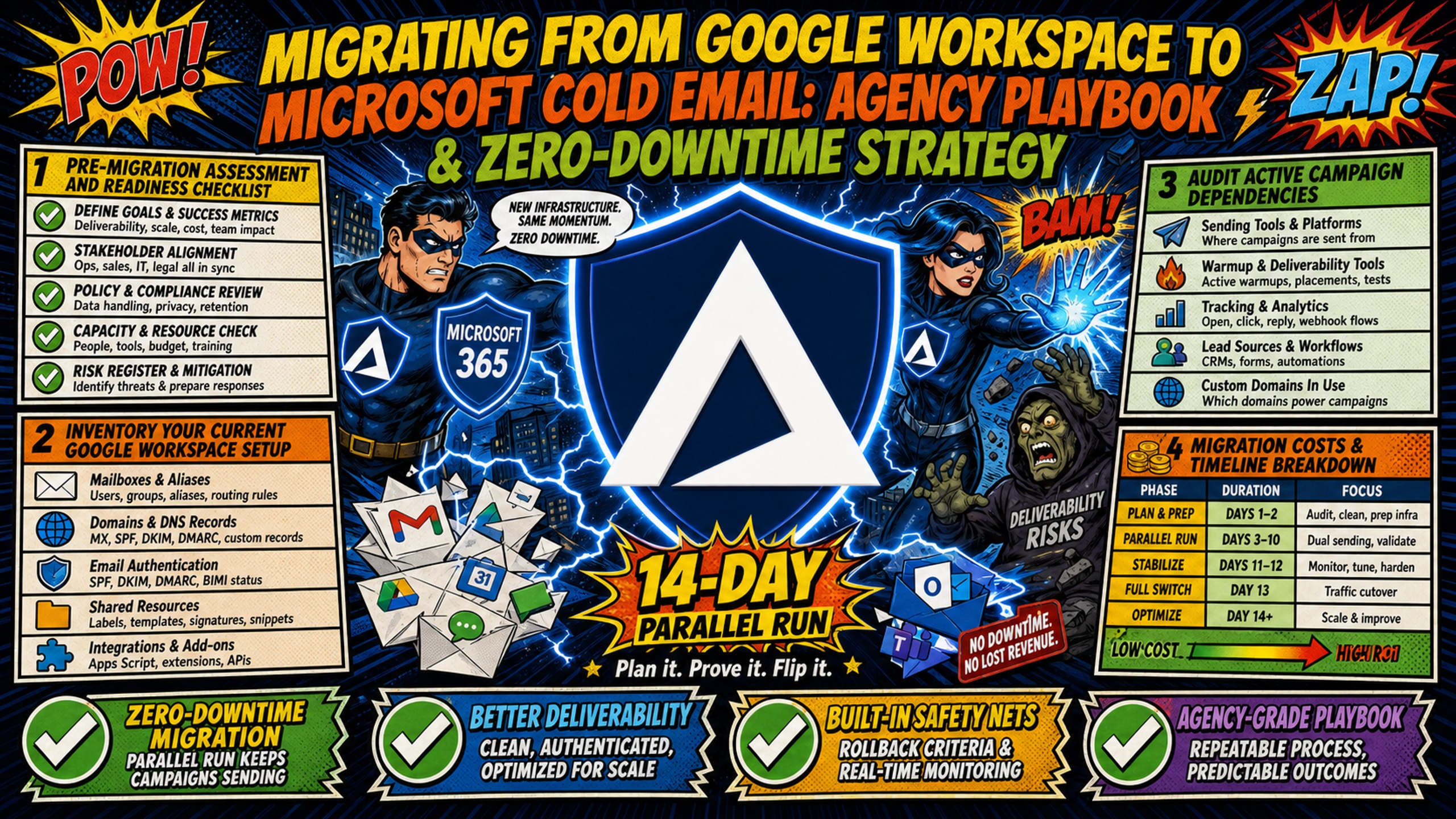
TL;DR: Migrating cold email infrastructure from Google Workspace to Microsoft 365 does not require campaign downtime. By executing a structured 14-day parallel run, agencies can protect active campaigns while moving to flat-rate infrastructure. Google Workspace costs $350 to $420 monthly for 50 inboxes, scaling linearly as client count grows. Inframail provides unlimited inboxes on dedicated US-based IPs for a flat $129 per month, saving agencies over $2,200 annually per 50 inboxes on infrastructure, before separate warmup tooling. This playbook details the pre-migration checks, DNS configuration steps, and cutover sequences needed to protect deliverability and client trust throughout.
For an agency running 100 cold email inboxes, Google Workspace costs up to $840 per month. That is over $10,000 annually spent on basic email seats before purchasing a single domain or warmup tool. Agency founders often delay migrating cold email infrastructure because they fear campaign downtime will trigger client churn. This guide provides a zero-downtime playbook to move from Google to Microsoft while protecting active campaigns, with Inframail handling the DNS automation that usually takes hours of manual panel work.
This playbook is written for two people: the founder approving the switch, and the operations lead executing it. Sections on cost and client communication are for the former, Weeks 1 and 2 for the latter.
Pre-migration assessment and readiness checklist
Cold email infrastructure migration is different from a general IT migration. The entire focus is on maintaining sender reputation and campaign continuity, not on moving calendars or shared drives.
Migrating cold email infrastructure without a plan leads to paused campaigns, broken tracking links, and sudden deliverability drops.
Clients notice the gap in lead volume, which increases churn risk and damages agency credibility.
The fix is to keep old Google Workspace accounts active during the transition while new Microsoft accounts complete warmup and begin handling live traffic.
For the full 14-day period, legacy and new environments run simultaneously, so there is no day with zero sending capacity.
Inframail automates the creation of the new Microsoft environment on dedicated IPs, allowing the operations team to focus on campaign sequencing rather than manual DNS panel work.
The four-step readiness checklist below covers the complete setup sequence.
Inventory your current Google Workspace setup
Document every active domain, inbox credential, and daily sending volume in a migration master sheet before touching any DNS record. This sheet becomes the control document for the entire 14-day process. Use Inframail's sending capacity guide to size the new Microsoft plan before provisioning begins. The same guide also plans for three inboxes per domain, so a 50-inbox setup requires approximately 17 domains, not 50. Plan domain purchases off that ratio, not one domain per inbox.
| Column | What to record |
|---|---|
| Domain | Full domain name (e.g., outreach-agency.com) |
| Active inboxes | Count per domain |
| Daily send volume | Average emails per inbox per day |
| Warmup status | Complete, in-progress, or not started |
| Sending platform | Instantly.ai, Smartlead, or other |
Audit active campaign dependencies
Map every integration point that will break if credentials change without warning. Critical dependencies include:
- Sending platform API connections (Google OAuth tokens tied to accounts that will be decommissioned)
- Custom tracking domains (CTDs, your own dedicated domain used to track email opens and link clicks, acting as a proxy for sender reputation)
- Webhook triggers connected to CRM pipelines or Zapier automations that fire on reply or bounce events
Smartlead field mapping is covered in Inframail's Smartlead integration guide. Before connecting either tool, enable SMTP and IMAP for each account in the Microsoft Admin Console. This step must be completed before importing credentials into Instantly or Smartlead.
Migration costs and timeline breakdown
The financial case for migrating strengthens significantly as inbox count scales.
Table 1: Total cost of ownership comparison (monthly)
| Inbox count | Google Workspace cost | Inframail cost (platform + domains) | Monthly savings |
|---|---|---|---|
| 50 inboxes | $350-$420/mo | ~$152/mo ($129 platform + ~$23 domains) | $198-$268/mo |
| 100 inboxes | $700-$840/mo | ~$176/mo ($129 platform + ~$47 domains) | $524-$664/mo |
| 200 inboxes | $1,400-$1,680/mo | ~$221/mo ($129 platform + ~$92 domains) | $1,179-$1,459/mo |
Domain costs are based on Inframail's published rate of $16.44/year per .com domain, with domains provisioned at three inboxes per domain per Inframail's sending capacity guidance: approximately 17 domains for 50 inboxes ($23/month), and 67 domains for 200 inboxes (~$92/month). Warmup tools are separate on both sides, typically $15-$50/month per inbox depending on the tool (Warmbox, Lemwarm, or similar), and are not included in this comparison.
Google Workspace Business Starter pricing is $7 per user monthly on annual plans and $8.40 on flexible monthly billing. Savings figures in the table use the Google Workspace cost range. Prose savings figures in the cost analysis section use the Google cost midpoint for comparison.
14-day timeline overview:
- Days 1-7 (recommended): Provision Microsoft 365 inboxes on dedicated US-based IPs (provisioning itself takes minutes with Inframail's automation), configure DNS, and allow time for DNS propagation and inbox warmup ramp to begin. Actual timing varies based on domain count, DNS propagation speed, and warmup tool ramp rate.
- Days 8-13: Run parallel sends, pilot a portion of campaigns on Microsoft, and migrate remaining volume gradually
- Day 14: Keep the Google Workspace subscription active until all in-flight sequences have cleared, then cancel billing only after confirming no active replies remain. Canceling billing removes Gmail access, so do not disable the subscription while sequences are still mid-flight.
Defining criteria for migration rollbacks
Set clear numeric triggers before Day 1 so the team can act without debate during a live campaign. Use these benchmarks as a starting point:
- Rollback trigger: New inbox bounce rate exceeds 2% during the pilot phase
- Warning threshold: Bounce rate between 1.5% and 2% over any 48-hour window requires immediate volume reduction
- Complaint rate warning: Complaint rate at or above 0.1% requires immediate volume reduction. Rates above 0.1% harm inbox placement before the hard threshold is reached.
- Complaint rate limit: At or above 0.3% complaint rate, pause new Microsoft sending entirely and revert to Google volume
Keep legacy Google Workspace accounts active as a failover for the full 14-day period. Do not cancel the subscription or remove DNS records until Day 14 verification passes.
Week 1: Deploying new Microsoft email environments
Week 1 is the deployment and preparation phase. No active campaign traffic moves to the new Microsoft environment during this period. The goal is to have infrastructure provisioned, DNS authenticated, and inboxes warming before any cold email is sent.
Day 1-2: Deploy Microsoft 365 foundations
Provision the new Microsoft 365 tenant and connect it to Inframail's unlimited inbox provisioning interface, as shown in this inbox setup demo. Inframail's flat-rate model at $129/month eliminates the per-seat licensing cost that Google Workspace replicates at scale.
Steps to complete on Days 1-2:
- Sign up for Inframail's Unlimited Plan ($129/month) or Agency Pack ($327/month for 3 dedicated IPs) at inframail.io
- Purchase domains through the Inframail platform ($16.44/year for .com, $9.44/year for .info)
- Enable SMTP and IMAP in the Microsoft Admin Console for each account. This is a per-account step separate from Inframail's automated DNS configuration, and must be completed before credentials are imported into Instantly or Smartlead.
- Export generated IMAP/SMTP credentials from Inframail as a CSV file, ready for bulk import
Day 3-4: Pre-configure DNS for zero downtime
DNS authentication is a common stall point in infrastructure migrations. Manual configuration for 50 domains requires logging into individual DNS panels, copying SPF (Sender Policy Framework), DKIM (DomainKeys Identified Mail), and DMARC (Domain-based Message Authentication, Reporting, and Conformance) TXT records for each domain, waiting for propagation, then testing individually. That process takes several hours when done by hand.
Table 2: Google Workspace vs. Microsoft 365 DNS for cold email
| Feature | Google Workspace | Microsoft 365 via Inframail |
|---|---|---|
| SPF record | include:_spf.google.com (multiple nested lookups) | include:spf.protection.outlook.com (fewer nested lookups) |
| DKIM selectors | Single selector | Two CNAME records (selector1._domainkey and selector2._domainkey) |
| DMARC alignment | Requires SPF and DKIM configuration per domain | Must enable custom domain signing manually |
| DNS panel access required | Yes | No (Inframail configures automatically) |
Critical Microsoft-specific step: Microsoft 365 does not DKIM sign outbound mail from custom domains by default. Microsoft's documentation is explicit: no DKIM signing occurs for outbound mail from custom domains until it is configured, and DKIM passes DMARC validation only if the signing domain and the From address domain align. Custom domain DKIM signing must be enabled in Microsoft 365 Defender (Email Authentication, then DKIM, then select the domain and enable). Inframail automates the SPF, DKIM, and DMARC DNS record configuration, but the Defender toggle to activate custom domain signing is a separate manual step in the Microsoft portal. The SPF, DKIM, DMARC setup video covers the full configuration process.
Allow up to 48 hours for DNS propagation before treating records as confirmed.
Day 5-7: Continue inbox warming ramp
Inbox warming begins on Day 1 when inboxes are first provisioned. Days 5-7 continue the ramp as DNS propagation confirms and sending volume builds.
Inframail does not include a built-in warmup tool. Warming new Microsoft inboxes requires an external tool such as Warmbox or Lemwarm, typically priced at $15-$50/month per inbox. Plan for this as a separate line item during the migration period.
A standard schedule, detailed in Inframail's inbox warming guide, starts at 10 warmup emails per inbox per day and scales progressively toward 20+ per day over 14 days before full-volume cold campaign traffic routes through the new addresses. New Microsoft 365 domains have no sending history, so a gradual ramp protects reputation while the domain establishes a pattern. This ramp is not optional.
Establish your current deliverability baseline
Before running any parallel sends, record current Google Workspace deliverability metrics so the team has a benchmark for Week 2 comparison. Key metrics to document:
- Average daily bounce rate per domain (target: under 2%)
- Reply rate per active campaign sequence
- Current blacklist status across all active domains
Run pre-migration metrics through Inframail's campaign health diagnostic guide to establish a documented baseline before Week 2 pilot sends begin. Inframail's published deliverability rate is 98%+. The platform's blacklist monitoring achieves a 68.3% delisting success rate within 48 hours.
Week 2: Migrating active sending sequences
By Day 8, new Microsoft inboxes will have completed approximately 7 days of warming, reaching the midpoint of the 14-day ramp. They are partially warmed and ready for low-volume pilot traffic only, not full campaign volume. This week is about phased cutover and monitoring, not a hard switch.
Day 8-9: Pilot low-volume campaign moves
Select a small portion of active campaigns, focusing on the lowest-volume sequences, and route them to the new Microsoft inboxes. Monitor for 48 hours before expanding volume. Key metrics to watch every 12 hours during the pilot:
- Bounce rate: Alert threshold at 1.5%, rollback trigger at 2%
- Reply rate: Flag any meaningful drop versus the Google baseline documented in Week 1
- Complaint rate: Warning at 0.1% (reduce volume immediately), hard pause at or above 0.3% (revert all sending to Google)
Meanwhile, keep all active Google Workspace campaigns running at full volume. Shared IP pools work like carpool lanes: one bad actor on the same IP range gets the whole block flagged, and every sender absorbs the reputational damage.
Inframail's dedicated IPs work like private lanes where sending behavior alone determines ESP trust. The Unlimited Plan includes 1 dedicated US-based IP and the Agency Pack includes 3, so sending reputation is not affected by other users on a shared IP pool. This is a structural difference from competitors like Maildoso, whose shared IP pool means sending reputation is influenced by other tenants on the same range.
Day 10-11: Export suppression lists and campaign history
Export all unsubscribe lists, blacklisted domains, and campaign history from the sending platform before updating any sending account credentials.
In Instantly.ai: Navigate to Email Accounts, select the Google-connected accounts, and export campaign reports as CSV before importing new Microsoft credentials.
In Smartlead: Export the contacts view and campaign history before switching credentials. Then upload the Inframail-generated CSV to the Email Accounts section and Smartlead auto-detects IMAP and SMTP columns.
Import all unsubscribes and opt-out records to the new sending accounts before any campaign traffic flows through them. Re-mailing someone who already opted out triggers spam complaints, which is the fastest way to damage deliverability on the new Microsoft IP.
Day 12-13: Switching high-volume campaigns
With the pilot showing clean metrics, begin shifting the remaining campaign volume to Microsoft inboxes progressively across Days 12-13, with the cutover completing on Day 14:
- Early migration phase: Move approximately half of remaining campaigns. Update custom tracking domains in Smartlead or Instantly to point to the new Microsoft-connected accounts. When switching sending infrastructure, custom tracking domains typically require updating CNAME records and re-verification in your sending platform to ensure tracking functions properly with the new mailbox credentials.
- Final migration phase: Move the remaining campaigns. Maintain a small portion of Google Workspace sending capacity as a buffer for late-arriving replies in active sequences. Smartlead CSV field mapping, plus Instantly and Apollo connection steps, are documented in the Microsoft IP integrations guide.
Day 14: Wrapping up legacy account access
On Day 14, stop all active sending from Google Workspace accounts and run a final deliverability check on the new Microsoft environment. Do not cancel the Google Workspace subscription immediately. Consider maintaining Google Workspace accounts in a limited capacity for several days post-migration to catch any late replies from sequences that were mid-flight during the cutover. Once you confirm no active traffic remains, cancel the subscription to stop billing.
Keep domain registrations active even after closing email accounts. Letting domains expire while old contact lists still hold those addresses creates bounce events that can affect the new IP's reputation.
Client communication and reputation protection during cutover
The following steps cover how to communicate the transition to clients and protect inbox reputation during the cutover window.
Setting client expectations for migration
If the parallel run executes cleanly, most clients will never notice the transition. For any client who asks, or for proactive communication, use this framing:
"We're upgrading our email sending infrastructure to dedicated IP addresses on Microsoft's cloud platform. This change improves inbox placement rates and gives us faster response times when any domain health issue is detected. Active campaigns will continue uninterrupted throughout the upgrade."
This framing focuses on deliverability improvement and reputation protection, not on cost savings or provider changes.
Protecting inbox reputation during cutover
Inframail's deliverability monitoring dashboard tracks domain and IP health during the cutover window. The platform monitors blacklist events and auto-submits delisting requests, achieving a 68.3% delisting success rate within 48 hours. If a Microsoft IP is flagged during the first days of active sending, Inframail's Microsoft blacklist recovery guide walks through the Office 365 delisting request process step by step.
"InfraMail makes it remarkably easy to purchase domains, configure them correctly, create inboxes, and initiate warm-up immediately. The level of automation is exceptional and clearly designed for serious operators." - Verified user review of Inframail
Deciding when to notify your clients
- Silent migration (preferred): Pilot metrics on Days 8-9 show clean bounce rates and stable reply rates. Do not notify clients. The migration is operationally invisible.
- Proactive notification: If the pilot shows a notable reply rate decline on any client-specific campaign sequence, notify that client proactively using the framing above before they ask.
- Emergency notification: If rollback triggers are hit and traffic reverts to Google, notify clients that a scheduled infrastructure upgrade was paused and will resume the following week. Do not frame it as a failure.
Rollback procedure
Pause all Microsoft-connected campaigns in Instantly or Smartlead, re-activate Google Workspace campaigns at previous volume, then update MX records at the domain registrar to point back to Google's mail servers. MX record changes take effect immediately in the registrar but DNS propagation can take up to 48 hours to complete, which is exactly why Google accounts must remain active throughout the full 14 days.
Post-migration audit for peak inbox health
The steps below cover the checks, cost analysis, and setup efficiencies to confirm the migration completed successfully.
Post-migration inbox health check
Run a full deliverability audit across all new Microsoft domains 7 days after cutover completes:
- Verify SPF, DKIM, and DMARC alignment using a tool like MXToolbox
- Check each domain against major blacklists (Spamhaus, Barracuda), and monitor sending IP reputation through Microsoft SNDS
- Review bounce rate trend across Days 14-21 to confirm it stays below 2%
- Compare reply rates on Microsoft-sent campaigns to the pre-migration Google baseline
Inframail's deliverability campaign health guide lists the metric thresholds that confirm healthy infrastructure on the new Microsoft environment.
"One of the best mailbox infra vendors I have ever used super easy and quick setup and support is practically 24/7 with at max a 2min wait to get a question answered." - Verified user review of Inframail
Note: Inframail support is available 16 hours a day, 7 days a week from real people, not 24/7. Response times reflect an individual experience and may vary.
Post-migration cost impact analysis
For an agency that completes the switch from 100 Google Workspace inboxes to Inframail, the monthly infrastructure bill drops from $700-$840 to approximately $176 (platform plus amortized domain costs for 34 domains at three inboxes per domain, excluding warmup tooling, which is separate at $15-$50/month per inbox on both sides). This represents monthly savings of approximately $594, calculated against the Google Workspace cost midpoint of $770/month, or roughly $7,128 annually. At 200 inboxes, monthly savings reach approximately $1,319, or roughly $15,828 annually, enough to fund a part-time operations hire or expand domain count by 20+ with no additional platform cost.
For agencies running multiple clients, the flat-rate model means adding a new client with 20 domains does not change the infrastructure bill at all. A cross-platform infrastructure cost comparison covers where Inframail's flat-rate model becomes cheaper than per-mailbox competitors such as Mailforge and Maildoso as inbox count scales.
Cut setup time with automated DNS provisioning
Manual DNS setup for 50 domains requires logging into registrar panels, creating individual TXT records, waiting for propagation, and testing each record individually, a process that can take several hours of operational work. Inframail's automated DNS configuration brings that down to minutes, as demonstrated in the inbox setup walkthrough. Customer testimonials on the platform report spinning up 10 inboxes in approximately 2 minutes, with all SPF, DKIM, and DMARC records auto-configured.
Agencies evaluating options can compare setup automation between the two platforms in the Mailreef vs. Inframail breakdown. The cold email infrastructure rankings video scores each platform on setup speed and deliverability.
Switch cold email infrastructure without downtime
Inframail is a flat-rate Microsoft email infrastructure platform built for agencies running 50 to 200 cold email domains. The Unlimited Plan provides unlimited inboxes on a dedicated US-based IP for $129/month, with automated SPF, DKIM, and DMARC configuration handling what would otherwise take several hours of manual DNS panel work. Warmup tooling is a separate cost, typically $15-$50/month per inbox, and is not included in the platform fee. Blacklist monitoring flags domain and IP issues and auto-submits delisting requests, achieving a 68.3% delisting success rate within 48 hours.
Sign up to Inframail and get started today.
FAQs
Can I migrate without pausing active campaigns?
Yes. By running a 14-day parallel strategy where new Microsoft inboxes warm up while legacy Google inboxes continue sending at full volume, there is no day with zero active sending capacity. Campaign traffic shifts gradually from Google to Microsoft across Days 8-13, with the legacy system fully active as a fallback until Day 14 verification passes.
How long should the parallel run last?
A 14-day parallel run is the minimum recommended period. Inbox warming begins on Day 1 alongside provisioning and runs through the full 14 days. Low-volume pilot sends begin at Day 8 on partially warmed inboxes, with full campaign volume shifting to Microsoft as the warmup ramp completes on Day 14. Legacy Google accounts remain active as a rollback option throughout.
How do I manage deliverability during migration?
Monitor bounce rates per domain every 12 hours during the Days 8-9 pilot phase, with a warning threshold at 1.5% and a rollback trigger at 2%. Inframail's deliverability monitoring dashboard flags blacklisted domains and auto-submits delisting requests, achieving a 68.3% delisting success rate within 48 hours.
What are the domain warmup requirements after transfer?
All migrated domains must complete a 14-day warmup protocol on the new Microsoft infrastructure before launching high-volume cold campaigns. Use an external tool such as Warmbox or Lemwarm ($15-$50/month per inbox), starting at 10 warmup emails per inbox per day and scaling progressively toward 20+ before routing high-volume cold traffic.
Key terms glossary
SPF (Sender Policy Framework): A DNS TXT record that specifies which mail servers are authorized to send email on behalf of a domain. RFC 7208 limits SPF evaluation to 10 DNS lookups total. Both providers consume several of those 10 permitted lookups. Microsoft's include chain is typically shorter, leaving more headroom for additional senders.
DKIM (DomainKeys Identified Mail): An email authentication method that adds a digital signature to outgoing emails, proving the message was not altered in transit. Microsoft 365 requires two CNAME records (selector1._domainkey and selector2._domainkey), and custom domain signing must be manually enabled in Microsoft 365 Defender. No DKIM signing occurs for outbound mail from custom domains until this step is completed.
DMARC (Domain-based Message Authentication, Reporting, and Conformance): A protocol that uses SPF and DKIM results to determine email authenticity and tells receiving servers what to do when checks fail. Published as a TXT record at _dmarc.yourdomain.com.
Dedicated IP: An IP address used exclusively by a single sender, so sending reputation is entirely under that sender's control. Inframail's Unlimited Plan includes 1 dedicated US-based IP and the Agency Pack includes 3.
Parallel run: A migration strategy where the legacy email system and the new email system operate simultaneously during a transition period, preventing any gap in sending capacity. This playbook recommends a 14-day parallel run window.
Custom tracking domain (CTD): A sender-owned domain used to track email opens and link clicks, acting as a proxy between the recipient and the sender's tracking system. When switching sending infrastructure, CTDs require updating CNAME records and re-verifying the domain in your sending platform to ensure tracking functions correctly with the new mailbox credentials.
Inbox placement rate: The percentage of sent emails that arrive in the recipient's primary inbox rather than the spam or promotions folder. Inframail's own campaign health guidance treats 80% or higher inbox placement as healthy. Inframail's published deliverability rate is 98%+.