
How to Migrate Cold Email Infrastructure Between Providers Without Losing Campaigns
Learn how to migrate cold email infrastructure between providers using a parallel migration plan, warmup schedule, DNS validation, and updated Inframail cost comparisons.
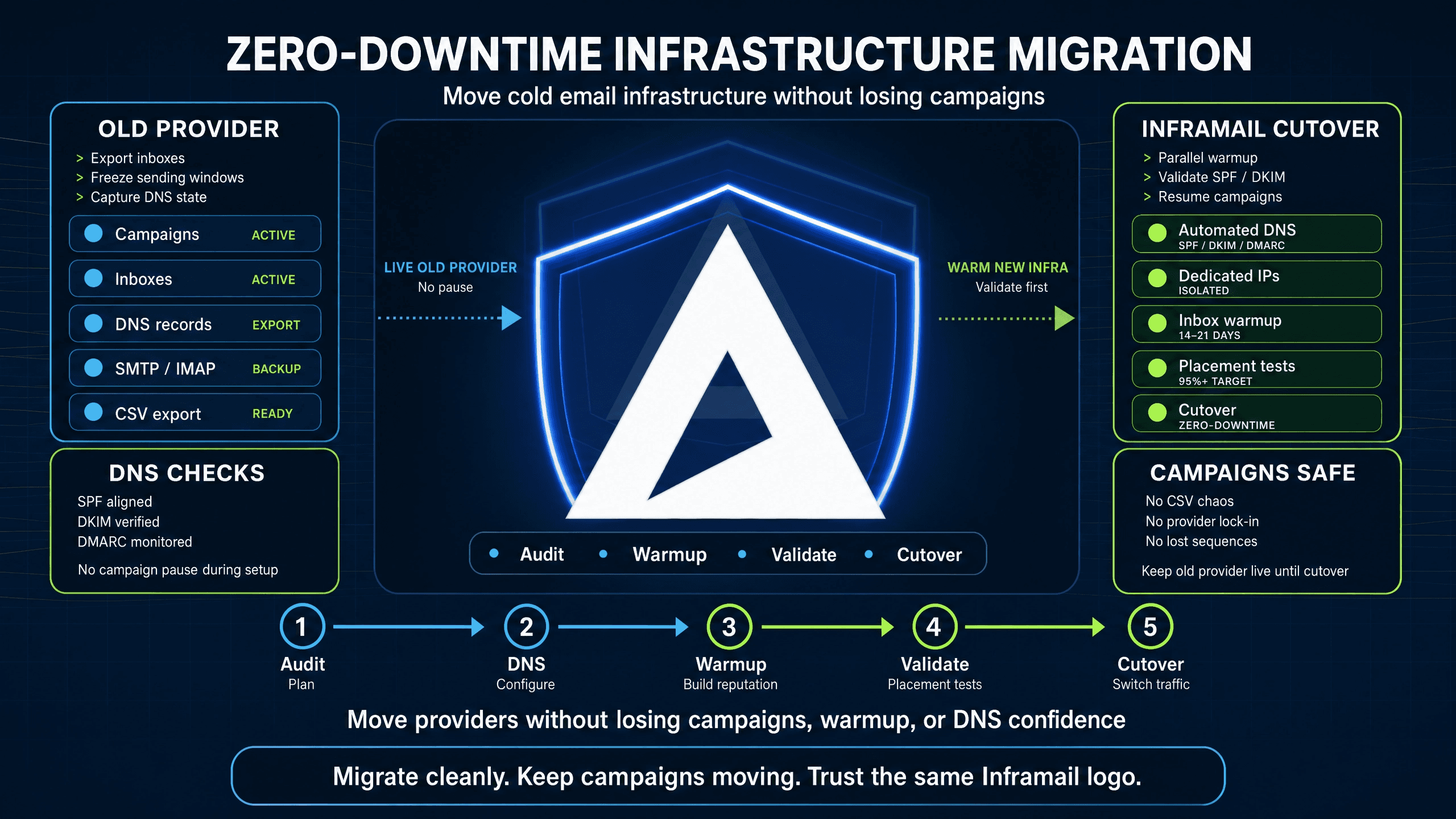
TL;DR: A parallel migration approach lets you keep active campaigns live on your old provider while warming up new inboxes for 14 to 21 days on a flat-rate platform. Inframail automates SPF, DKIM, and DMARC setup and provides dedicated US-based IPs for $129/month, saving approximately $187 to $257/month per 50 inboxes compared to Google Workspace. With the right approach, most agencies avoid stopping their campaigns entirely. What matters is having a structured plan before you start.
Operations managers often delay migrating cold email infrastructure because they worry about deliverability issues that could trigger client churn. The real risk is not the migration itself. It is running one without a structured plan, skipping warmup on new inboxes, or letting DNS errors sit undetected for 48 hours while active campaigns continue sending.
This guide covers every step of a parallel migration approach, from auditing your current stack to validating inbox placement after the switch. It is designed for agency operations teams managing 50 to 200 client domains, not generic IT mailbox migrations.
This section covers the audit steps your team needs to complete before any infrastructure changes begin.
Before you touch a single credential or purchase a single domain, you need a complete picture of what you are moving. Skipping this step increases the risk of data loss, broken sequences, and missed deliverability baselines.
Inventory all active campaigns and build your migration spreadsheet
Build a master migration spreadsheet logging every active sequence: the sending domain, daily sending volume, client variable mappings (such as {{company_name}} and {{contact_email}}), current inbox placement rate, current provider, target inbox count, and a go-live status column. This spreadsheet becomes your tracking document for the migration process.
Verify mailbox health and export requirements
Check every active sending domain through MXToolbox to confirm blacklist status before moving anything. Domains with resolved blacklist issues can start fresh on new infrastructure, but if the same flagged domain moves over without remediation, past violations tied to that domain identity can still affect deliverability at the ESP level.
Also confirm your current provider exports IMAP (Internet Message Access Protocol, the standard for retrieving emails) and SMTP (Simple Mail Transfer Protocol, the standard for sending emails) credentials in CSV format, since your sending platform (Instantly.ai or Smartlead) requires this for bulk import. Inframail's CSV export generates this file automatically from the Update tab, and you can confirm which platforms work with Inframail before you begin.
How to map your migration timeline
A typical migration timeline covers 14 to 21 days. The initial days cover your audit and domain purchase phase. DNS provisioning takes 5 to 60 minutes for configuration plus 24 to 72 hours for full propagation depending on your registrar's TTL settings. The core warmup period runs 14 to 21 days with parallel sending. Full transition happens once new inboxes pass your deliverability benchmarks.
This section covers the migration approaches available and how to schedule the transition to keep campaigns running throughout.
Parallel vs. phased migration strategies
A phased migration typically moves clients one at a time, fully cutting over each before touching the next, while a parallel migration keeps both systems running simultaneously and routes traffic to new infrastructure after validation completes. The parallel approach works better for agency operations running multiple active clients, because service interruptions create escalations you want to avoid.
Scheduling pauses to protect campaigns
Stagger sending schedules so no single domain exceeds 50 emails per day during the warmup window. Mailboxes completing a full 14-day warmup achieve higher inbox placement in their first month of outreach compared to inboxes that shorten the warmup process.
The following steps cover the full migration sequence from credential export through to campaign handoff.
1. Export credentials from current provider
Log into your current provider (Google Workspace, Maildoso, or another platform) and export all active user accounts with their IMAP and SMTP credentials. If 2-factor authentication is active on Google accounts, you need app-specific passwords rather than the account password. Document every account in your master spreadsheet before proceeding.
2. Streamline domain infrastructure setup
You can purchase new domains directly through Inframail at $5 to $16 per year, or transfer your existing domains to our platform. For detailed walkthroughs of switching from other providers, see the Maildoso to Inframail migration guide and Mailreef to Inframail migration guide, which cover the domain transfer process step by step.
3. Speed up DNS setup for new domains
You lose hours here every month if you configure DNS manually. Manual configuration takes 12+ hours across 50 domains, not counting propagation time. Inframail automates SPF, DKIM, and DMARC record creation with no manual DNS panel work required.
Watch our 2-minute DNS setup walkthrough to see SPF, DKIM, and DMARC configuration happen automatically. DNS records still need 24 to 48 hours to fully propagate globally after configuration completes.
4. Import IMAP credentials to sending platform
Export your Inframail inbox credentials as a CSV file from the dashboard using the Export Tool, then bulk-import them into Instantly.ai or Smartlead. For the full integration setup, follow the Inframail to Smartlead integration guide. Configure the new accounts in your sending platform so both old and new inboxes can operate during the transition period.
5. Warm up migrated email accounts and manage warmup tool handoff
You will need an external warmup tool such as Lemwarm or Warmbox, because we focus on infrastructure provisioning rather than warmup automation. A common warmup schedule across a 14 to 21-day window follows this pattern: during the first third of the warmup period, send 5 to 10 mock emails per inbox per day. Through the middle third, increase to 10 to 20 per day. In the final third, increase to 15 to 25 per day. Complete the full warmup cycle before routing live cold outreach to new inboxes.
When moving inboxes from your old warmup tool to a new one, start with lower volume and ramp gradually. Your domain identity carries forward when you migrate, so past sending behavior on that domain may still influence deliverability, and the new dedicated IP needs its own warmup cycle before full-volume sending. IP warmup typically requires 4 to 8 weeks (28 to 56 days) depending on volume and engagement.
6. Migrate active campaigns without data loss
Before decommissioning old accounts, copy email templates, custom variables, and lead lists to the new sending accounts in your platform. Update lead list mappings to the correct new IMAP accounts in Instantly or Smartlead. Keep old accounts accessible for at least one week post-migration as a rollback option in case of unexpected issues.
Once DNS has propagated and warmup is underway, the steps below confirm your new inboxes are ready before live traffic moves over.
Test DNS and inbox placement
After DNS propagation completes (typically 24 to 48 hours), run every new domain through Mail-Tester. We report 9.5/10 Mail-Tester scores across tested domains. Lower scores warrant investigation before live sending begins. Then run a GlockApps inbox placement test targeting Gmail, Outlook, and Yahoo. Target 85% or above before routing live campaigns. If placement is lower, extend warmup before going live. You can review how to identify when campaign emails go to spam using Inframail's health check documentation.
Monitor campaign status during week one
Cap new inboxes at 30 to 50 emails per day for the first two weeks of live sending. Monitor reply rates, bounce rates, and open rates in your sending platform dashboard regularly. Any bounce rate above 3% on a specific domain warrants immediate investigation via MXToolbox and Inframail's cold email infrastructure monitoring guide.
This section covers the most common issues teams run into during a provider switch and how to address each one.
Typical timeline for infrastructure migration
Phase | Typical timeline | Key actions |
|---|---|---|
Audit and purchase | Initial days | Master spreadsheet, MXToolbox checks, domain registration |
DNS provisioning | 5-60 min setup + 24-72 hr propagation | Auto-SPF/DKIM/DMARC, await propagation |
Parallel sending | Days 1 to 7 | Add Inframail credentials to sending platform, split traffic |
Full warmup window | 14 to 21 days, starting from inbox provisioning | Ramp warmup volume, continue parallel sending |
Full cut-over | After benchmarks pass | 100% traffic to Inframail, old accounts on standby |
Decommission | 1-2 weeks post-cutover | Shut down old accounts after observation window |
Avoiding delivery drops and fixing common errors
Ramp sending volume on new inboxes gradually after the warmup period ends. Sudden spikes from zero to full volume are a strong spam filter signal, so increase new accounts gradually while reducing old account volume. The Inframail sending capacity guide provides specific guidance on calculating sending limits per plan.
The most common DNS error during migration is multiple conflicting SPF records on the same domain. Domains should have only one SPF TXT record, so merge all authorized sending sources into a single record using multiple include: directives. For DKIM, allow full propagation time after adding the key before testing to avoid false failures. For IMAP credential rejections, verify that IMAP access is enabled in your source account settings and that you are using an app-specific password if 2-factor authentication is active.
Unit economics of migration costs
Here is the total cost of ownership (TCO) comparison for migrating from Google Workspace to Inframail's flat-rate model. Google Workspace Business Starter runs $8.40 per user per month on monthly billing (or $7 per month on annual billing), while Inframail's Unlimited Plan costs $129/month flat for unlimited inboxes plus $5 to $16 per domain per year:
Inbox count | Google Workspace (monthly billing) | Inframail + domains | Monthly savings |
|---|---|---|---|
50 inboxes | $420/month | $163/month | $257/month |
100 inboxes | $840/month | $213/month | $627/month |
200 inboxes | $1,680/month | $313/month | $1,367/month |
To estimate your own savings, take your current per-seat cost, multiply it by your total inbox count, and subtract $129/month plus $5 to $16 per domain per year for Inframail.
Zero downtime migration strategy and client communication
The parallel framework keeps your old provider running campaigns while your new Inframail inboxes warm up in the background. When you switch traffic after warmup completes, your old system remains available as a fallback if issues arise. This reliability is why agencies who test alternatives return to Inframail, as Paul Balogh found:
"We spent months hunting for a reliable cold-emailing stack. After repeated failures with another provider, we trialled two options, Inframail and a competitor. We chose the competitor. A month later, we switched back to Inframail. Zero issues since. Rock-solid infrastructure, sharp support, genuinely dependable." - Verified user review of Inframail
Before migration begins, communicate with clients about the infrastructure upgrade, emphasizing that the transition is designed to minimize service disruption and that the process will complete within your planned timeframe. Proactive communication helps prevent questions about campaign performance during the migration window.
Sign up to Inframail and provision your first domains quickly. Our automated DNS setup eliminates manual configuration work, and flat-rate pricing at $129/month means your infrastructure costs stay fixed whether you run 50 or 500 inboxes.
How long does it take to migrate 50 domains to Inframail?
Customers report purchasing or transferring 50 domains and completing DNS setup in under 10 minutes using Inframail's automated configuration tool. DNS propagation after setup typically takes 24 to 48 hours, but the active configuration work itself takes minutes rather than hours.
Do I need to pause my active campaigns while switching providers?
No. Run a parallel migration where active campaigns continue on your old provider while your new Inframail inboxes complete a 14 to 21-day warmup period. Cut over traffic once new inboxes pass a GlockApps inbox placement score of 85% or above.
What happens to my IP reputation when I switch providers?
Your IP reputation does not transfer between providers. Your domain reputation carries over, but the new dedicated IP needs its own warmup cycle before full-volume sending. IP warmup typically takes 4 to 8 weeks (28 to 56 days) depending on volume and engagement, and applies to every infrastructure migration regardless of provider.
How do I know when my new inboxes are ready for live campaigns?
Run a Mail-Tester check targeting a score of 9+/10 and a GlockApps inbox placement test showing 85% or above across major providers. Both checks passing is your green light to route live campaign traffic to the new inboxes.
Dedicated IP: A unique internet protocol address assigned exclusively to your sending account, ensuring your email reputation is not affected by other senders on a shared pool.
DNS configuration: The process of setting up domain records (SPF, DKIM, DMARC) to prove to email providers that you own the domain. Inframail configures all three automatically in minutes.
Parallel migration: A transition strategy where you keep your old email infrastructure active while simultaneously setting up and warming up your new infrastructure, eliminating downtime between systems.
Warmup period: A 14 to 21-day process of gradually increasing email sending volume on new inboxes to build a positive sender reputation with spam filters before full-volume outreach begins.
Inbox placement rate: The percentage of successfully delivered emails that land in the recipient's primary inbox rather than the spam or promotions folder, measured via tools like GlockApps.
SPF/DKIM/DMARC: Three DNS-based email authentication standards that prove to receiving mail servers that your emails are legitimate and authorized to send from your domain. Inframail configures all three automatically.
IMAP (Internet Message Access Protocol): The standard protocol for retrieving emails from a mail server, allowing you to access messages across multiple devices while keeping them stored on the server.
SMTP (Simple Mail Transfer Protocol): The standard protocol for sending emails from your email client to a mail server and between mail servers for delivery.
TCO (Total Cost of Ownership): The complete cost of a technology solution including not just the platform fee but also associated costs like domains, integrations, and ongoing maintenance.