
How to choose email tracking software: A 7-step buyer's guide
If you manage an outbound team and your pipeline depends on cold email, choose tracking software that uses custom tracking domains rather than shared pixels. St
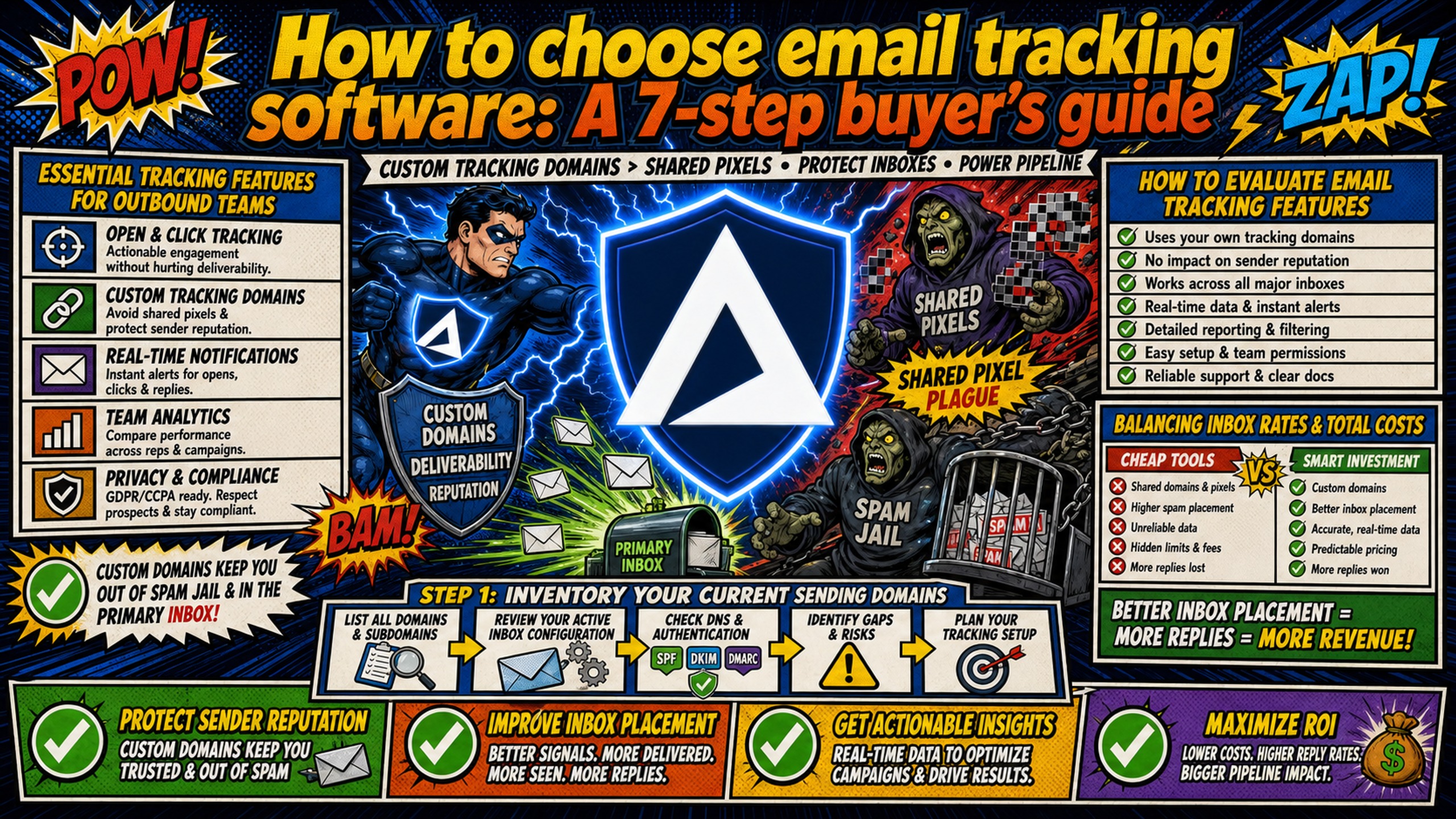
TL;DR: If you manage an outbound team and your pipeline depends on cold email, choose tracking software that uses custom tracking domains rather than shared pixels. Standard tracking pixels trigger spam filters and damage deliverability. To protect your sender reputation and margins, pair your tracking tools with flat-rate email infrastructure. Many tracking tools support custom CNAME tracking domains, but support is inconsistently disclosed and the feature is frequently gated to higher plan tiers, so verify which tier includes it before evaluating the feature list.
Shared tracking pixels route every open through a domain the sender does not control, and that domain's reputation is shared with everyone else on the platform. The tracking feature that feels essential for coaching the team actively works against the inbox placement rate that determines whether the team hits quota.
Open and click data helps coaches improve SDR messaging, but standard tracking implementations trigger spam filters and inflate infrastructure costs. This guide provides a 7-step framework to select tracking software that preserves deliverability and protects outbound margins.
Essential tracking features for outbound teams
Open tracking, click tracking, and reply tracking each carry different deliverability risks and different coaching value. The technical implementation is what determines whether your tracking tool helps SDRs improve or pushes domains toward the spam folder.
How to evaluate email tracking features
The technical flow of a standard tracking pixel starts with a tiny invisible image embedded in the email. When the recipient's email client loads remote content, that asset request fires and records an open event. The problem is where that request points.
The custom tracking domain approach replaces that shared subdomain with a CNAME record pointing to a subdomain the sender controls (for example, track.yourdomain.com). When a recipient clicks a link, the request resolves through the sender's own domain, logs the event, and redirects to the destination URL. Ask the vendor how HTTPS is handled on that subdomain, whether the certificate is issued automatically or you supply it through a CDN, and confirm the redirect is never served over plain HTTP.
The deliverability gap between these two implementations is measurable. Open tracking data is unreliable rather than merely imprecise. Apple's proxy prefetch generates open events with no human behind it, per Postmark's open tracking analysis and Email on Acid's tracking pixel breakdown, which is why many teams prioritize inbox placement and positive reply rate over raw open rate.
Inbox providers like Google and Microsoft, along with enterprise security gateways, factor link-domain reputation into their spam scoring. When heavy-volume or abusive senders on the same platform get that shared tracking domain blocklisted, every message using it inherits the penalty.
Balancing inbox rates and total costs
A drop in inbox placement rate translates directly to fewer emails reaching prospects, fewer replies, fewer meetings booked, and a higher cost-per-meeting. The economic trade-off is straightforward. A custom tracking domain costs a plan tier upgrade at most, while a shared-domain blocklisting costs campaign performance across every inbox sending through it.
That damage lands at the domain level, not the IP level. The Spamhaus Domain Blocklist is a list of domain names with poor reputation, and it lists domains only, with no IP addresses included. Filters check it during content inspection by looking up the domains that appear in the mail headers and body, including URLs. A tracking link is one of those URLs, so a shared tracking domain is judged on the combined behavior of every sender routing clicks through it.
Step 1: Inventory your current sending domains
Before evaluating any tracking software, audit the existing infrastructure. Tracking tools behave differently across 10 inboxes versus 100 inboxes, and the audit reveals which tracking implementations are safe to run at your scale.
Review your active inbox configuration
Document how many inboxes are active, how many domains they sit on, and which sending platform connects them. More inboxes per domain means more sending activity per reputation unit, so shared tracking pixels create a larger blast radius when a domain gets flagged. Inframail's sending capacity guide explains how inbox count maps to daily send limits and what that means for tracking data volume.
Audit your monthly sending expenses
Calculate current infrastructure spend using Google Workspace's Flexible Plan rate of $8.40 per user per month as the baseline. At 50 inboxes that is $420/month, at 100 inboxes $840/month, and at 150 inboxes $1,260/month, before domain registration ($5 to $16 per year) and warmup tools ($15 to $50 per inbox per month).
Step 2: Identify your non-negotiable tracking needs
The biggest mistake during vendor evaluation is treating every tracking feature as equally important. Focus the scorecard on features that directly impact pipeline rather than reporting dashboards that feel impressive but do not improve meetings booked.
Metrics that actually predict SDR performance
Focus on metrics that directly drive pipeline decisions: positive reply rates and meeting-booked rates. Open rates are increasingly unreliable for two reasons.
Apple introduced Mail Privacy Protection (MPP) in September 2021 with iOS 15, announced in June 2021. Apple's proxy servers preload all images, including invisible tracking pixels, before the user does anything, per Apple's Mail Privacy Protection support documentation. If your audience skews toward Apple Mail users, you will see inflated open rates that do not reflect actual engagement. Positive reply rate is the primary metric for SDR coaching, with click rate treated as a directional signal, not a definitive measure of human engagement.
Assessing vendor stability and risk
A tracking vendor going dark mid-quarter is a real operational risk. Run these three due diligence checks before signing any contract:
- Funding and revenue transparency: Ask for verifiable ARR or MRR data backed by publicly documented and dated growth claims. Inframail's January 2024 milestone reaching approximately $430k ARR is an example of a publicly dated, verifiable growth claim rather than a self-reported homepage figure.
- Independent review presence: Check Trustpilot and G2 for verified reviews. Zero reviews after two or more years in market is a significant trust deficit. Inframail carries a 4.5/5 rating on Trustpilot.
- Support SLA documentation: Confirm the vendor publishes a specific uptime figure with written compensation terms if that figure is breached.
Requirements scorecard template
Use this scorecard to rank vendors on the six criteria that predict whether tracking software will protect pipeline without inflating costs. Assign each vendor a score from 1 to 10 for each criterion, multiply by the weight, and total the weighted scores. Deliverability carries the highest weight (25) because a tracking tool that damages inbox placement directly reduces meetings booked, while vendor stability and compliance carry lower weights (15 and 10) because they represent risk rather than daily performance impact.
Table 1: Decision criteria
| Evaluation criterion | Weight | Evidence required |
|---|---|---|
| Deliverability / inbox rate | 25 | Live pilot data across 10-20 test inboxes |
| Total cost of ownership | 20 | Platform + domains + warmup + sending platform at 50/100/150 tiers |
| Setup speed and scalability | 15 | Demo provisioning 10 domains in under 5 minutes |
| Integration with sending tools | 15 | CSV export to Instantly/Smartlead confirmed, IMAP/SMTP documented |
| Vendor stability and support | 15 | 3 to 5 referenceable customers, written support SLA |
| Compliance and security | 10 | SOC 2 roadmap with timeline, data residency documentation |
Step 3: Evaluating dedicated tools against native stacks
The decision between tracking built into the sending platform versus a dedicated tracking tool depends on campaign volume and CRM complexity.
Use cases for built-in email tracking
Native tracking inside Instantly or Smartlead works for simple campaigns under 20 domains with single sequences and basic CRM needs. The trade-off is that native tracking typically uses the vendor's shared tracking domain, reintroducing shared-domain deliverability risk at the exact point teams are trying to protect inbox placement. The Inframail-Smartlead integration guide covers the CSV export and IMAP credential setup for teams combining infrastructure with native sending platform tracking.
Selecting tools for high-volume outbound
Dedicated tracking tools are worth evaluating when campaigns run across 50 or more domains, involve multi-touch sequences, or require deep Salesforce attribution. At this scale, custom tracking domains become non-negotiable. HubSpot's Salesforce sync documentation confirms HubSpot checks for updated tracking information approximately every 15 minutes, a latency that dedicated API-based tracking tools can reduce for real-time pipeline reporting.
TCO: Native vs. third-party tools
The table below compares Google Workspace Flexible Plan costs against Inframail's Unlimited Plan flat rate across three inbox tiers: 50, 100, and 150 inboxes.
Table 2: Total cost of ownership (TCO) calculator
| Inbox count | Google Workspace cost (Flexible, Business Starter, $8.40/user) | Inframail cost (Unlimited Plan, flat) | Monthly savings | Annual savings |
|---|---|---|---|---|
| 50 inboxes | $420/month | $129/month | $291/month | $3,492/year |
| 100 inboxes | $840/month | $129/month | $711/month | $8,532/year |
| 150 inboxes | $1,260/month | $129/month | $1,131/month | $13,572/year |
Domain registration ($5 to $16 per year) and warmup tools ($15 to $50 per month per inbox) apply on both sides and are not reflected in this comparison.
Step 4: How to rank vendors by performance data
Marketing claims are easy to make. Hard deliverability data determines whether tracking software helps or hurts pipeline numbers.
Assessing sender reputation risks
Table 3: Deliverability risk matrix
| Tracking method | Technical implementation | Spam risk level | Impact on sender reputation |
|---|---|---|---|
| Shared tracking pixel | Vendor's shared subdomain (track.provider.com) | High | Reputation tied to all other senders on the same domain |
| Custom tracking domain (CNAME) | Sender's own subdomain via CNAME record | Low | Reputation isolated to sender's own behavior |
| No tracking (reply-only) | No pixel or redirect inserted | Low (from tracking implementation) | Tracking-related reputation risk is removed, but overall sender reputation still depends on sending volume, domain age, and list quality |
Shared tracking domains contain links from thousands of senders, and one spammer on the same domain poisons the entire range.
Hidden costs of email tracking
Three cost categories that appear only after the contract is signed:
- Overage charges: Volume caps with per-thousand overage fees above the plan limit
- Custom domain add-ons: CNAME-based tracking gated to higher-tier plans only
- API access fees: Real-time Salesforce sync requiring an API tier not included in the base plan
How named tracking tools handle custom domains
The shared-versus-custom-domain criterion documented earlier applies directly to dedicated tracking tools, not just sending platform native tracking.
Table 4: Named tracking tool comparison
| Tool | Tracking domain type (shared or custom CNAME) | Custom domain available | Plan tier required for custom domain | Pricing transparency |
|---|---|---|---|---|
| Mailsuite/Mailtrack | Shared tracking domain | Yes | Mailsuite tier only, from $5.99/user/month | Free tier and paid tiers published |
| Saleshandy | Both (shared default, custom CNAME optional) | Yes | Not stated in documentation | Paid plans published |
| HubSpot Sales Hub | Both (shared default, custom CNAME optional) | Yes | Available on Starter and above | Published on pricing page, Enterprise requires sales call |
Custom tracking domain support is not consistently disclosed. Of three widely used tracking tools, only two publish where the feature sits: Mailsuite/Mailtrack includes it on the Mailsuite paid tier only from $5.99/user/month, and HubSpot requires Sales Hub Starter or above, per their sales email tracking documentation. Saleshandy documents the feature in its help center page but does not list it in their published plan comparisons, so the only way to confirm availability is to ask. The practical rule is that free tiers put you on the vendor's shared tracking domain, and anything above free usually does not, but you should verify it against the vendor's documentation rather than the pricing page.
Tools that gate custom tracking domains to higher plan tiers reintroduce shared-domain risk for teams on entry-level plans. This makes plan tier as important as the feature's existence when evaluating tracking tools against the deliverability criteria established in this guide. Inframail publishes its full pricing with no sales call required: $129/month for the Unlimited Plan and $327/month for the Agency Pack.
Comparative scorecard for email tools
The table below compares Inframail, Maildoso, and Mailscale across pricing transparency, setup speed, IP type, warmup inclusion, and review ratings.
Table 5: Comparative scorecard for email infrastructure
| Feature | Inframail | Maildoso | Mailscale |
|---|---|---|---|
| Pricing model | $129/month flat, unlimited inboxes | Per-mailbox monthly tiers: $2.50/mailbox (30) to $0.49/mailbox (1,000) | Not published, requires a sales call |
| Setup speed | Customer testimonials report 10 inboxes operational in 2 minutes | 10 to 15 minutes per domain | Not confirmed |
| IP type | Dedicated US-based (1 or 3, plan-dependent) | Shared infrastructure with automatic IP rotation | Not confirmed |
| Warmup included | External tool required | 80/day warmup allowance shown, managed warmup unconfirmed | Not available |
| Review rating | 4.5/5 Trustpilot | 213 G2 reviews | Over 55 G2 reviews |
Maildoso includes automatic IP rotation, but Inframail's dedicated vs. shared IP approach means sending reputation is not affected by other users on shared IP pools. Mailscale offers lead discovery and AI copywriting, but its opaque pricing requires a demo call whereas Inframail posts $129/month publicly.
Step 5: Run a 30-day pilot with 10-20 inboxes
Never roll out new tracking software to the entire team without a structured pilot. Thirty days gives ESPs enough sending history to classify a domain consistently. Google's sender guidelines advise increasing volume slowly and avoiding sudden spikes without prior sending history. The first one to two weeks also show inflated metrics from bot activity and Mail Privacy Protection pre-loads rather than genuine human engagement, so true deliverability trends only surface in weeks three and four.
Steps to configure your test environment
- Provision 10 to 20 test inboxes on a separate domain pool from the main production infrastructure to keep pilot data clean.
- Configure custom tracking domains for each test domain using CNAME records. Manual DNS configuration across GoDaddy or Namecheap panels can take 15 to 30 minutes per domain as a working estimate. Customer testimonials report Inframail completing SPF, DKIM, and DMARC setup for 10 inboxes in 2 minutes, without manual DNS panel access. The tracking CNAME is added separately in your DNS host, following your tracking vendor's instructions.
- Import IMAP/SMTP credentials to Instantly or Smartlead via CSV export. Inframail generates these automatically at inbox provisioning.
- Set up a control group of 10 to 20 inboxes on the old infrastructure with no new tracking software.
A control group isolates the tracking tool as the variable being tested, so any deliverability change can be attributed to the tracking implementation rather than seasonal ESP filter changes or domain age effects.
Key performance indicators for pilot success
- Inbox placement rate: A working target of 85% to 92%. Any drop from the pre-pilot baseline indicates the tracking implementation is adding deliverability risk.
- Blacklist flags: Check against major lists, including Spamhaus, at least weekly throughout the 30-day window. Any flag requires immediate diagnosis of whether the cause is shared tracking domain contamination or sending behavior. The Inframail spam and health guide covers how to read these metrics correctly.
- CRM data accuracy: Confirm that open and click events log to the correct contact records in Salesforce without creating duplicate activity records or misattributing engagement to the wrong contacts.
Establishing your pilot test protocol
Each inbox can send up to 50 emails per day, though Inframail's sending capacity guide recommends 40, split roughly 70% warmup and 30% campaign. That works out to about 12 campaign emails per inbox per day. At a 20-inbox pilot that is 240 campaign emails per day.
Monitor deliverability weekly using Mail-Tester scores rather than relying on the tracking tool's own reporting. Compare pilot inbox placement rates against the control group weekly, and do not expand rollout until the pilot group consistently matches or beats the control group. The cold email infrastructure monitoring guide covers the full health check and alert protocol for managing this at scale.
Step 6: Link email tracking to revenue outcomes
Tracking software is a cost VP Sales and the CFO will question. The only way to defend it is to show a direct line from tracking data to meetings booked.
How tracking data speeds up SDR coaching
Click data identifies which subject lines and CTAs generate engagement before a reply is received. SDR coaches can identify high-performing templates within weeks rather than waiting for enough reply data to reach statistical significance.
Audit tracking accuracy for SDRs
Verify the tool is not reporting false positives from security scanners. Microsoft Defender for Office 365 scans URLs before a message is delivered and detonates any link without a valid reputation in the background. That scanning happens whether or not the recipient ever opens the email.
The test is simple. Send a test email to a spam analysis tool and check whether a click event registers immediately on delivery. If it does, the tracking tool is logging scanner activity rather than human engagement, and Apple's proxy preloads all images on delivery, compounding the problem for audiences with significant Apple Mail usage (see Step 2 for the full MPP explanation). Use positive reply rate as the primary SDR coaching metric and treat open and click rates as directional signals only.
Prove infrastructure value to the CFO
Tracking-tool selection and infrastructure selection belong in the same buying decision because shared tracking pixels and per-seat sending infrastructure compound the same deliverability and cost problem at the domain level.
Frame the switch as infrastructure spend per meeting booked. Switching 100 inboxes from Google Workspace ($840/month) to Inframail ($129/month flat) saves $711/month, or $8,532 annually. Domain registration ($5 to $16 per year) and warmup tools ($15 to $50 per month per inbox) apply on both sides and are not reflected in this comparison. The Inframail vs. Google Workspace breakdown runs the full per-seat versus flat-rate math for teams building this CFO-facing case. Those savings reinvested in warmup tools, list acquisition, or additional SDR headcount directly improve your pipeline capacity without increasing infrastructure spend.
Step 7: Negotiate based on seat count and volume
Tracking vendor contracts vary as much as their pricing models. The negotiation approach and exit criteria a team locks in before signing determine whether the vendor relationship stays workable as campaign volume grows.
Negotiating tiered pricing models
Per-seat tracking vendors respond to two negotiation levers: committed inbox count and committed annual term. Locking in a 12-month contract typically earns a discount on per-seat rates. Pushing for CNAME-based custom tracking domain support without a plan upgrade is a non-monetary negotiation win worth pursuing in every per-seat contract discussion. Inframail's flat-rate model eliminates this negotiation entirely: $129/month whether the team runs 50 inboxes or 500.
Essential contract clauses and exit criteria
Bring these three clauses to whoever signs the contract: data ownership with export rights in a standard format at any time, an uptime SLA that states the vendor's specific uptime figure in writing, with compensation terms if it is breached, and termination for convenience if deliverability standards defined in the pilot are not met in production.
Define exit triggers before signing: inbox placement rate falling below 85% for two consecutive weeks, any blacklist flag that the vendor fails to remediate within 48 hours of notification, or tracking sync failures that constitute a breach of the vendor's documented uptime SLA without written remediation within the SLA's stated response window.
How to spot high-risk email tracking partners
Not every tracking vendor represents an acceptable operational risk. These signals identify platforms whose architecture or business practices create ongoing deliverability or contract exposure before a commitment is made.
Red flags for sender reputation
Any vendor whose tracking links always point to a shared vendor domain, regardless of plan tier, has shared-domain contamination built into the product architecture. Spamhaus DBL lists domains rather than IP addresses, so a listing cannot be resolved by changing sending IP, and every sender routing links through that domain inherits the penalty.
Avoid vendors that will not tell you which domain their tracking links resolve to, or that cannot point that domain at a subdomain you control. A tracking redirect is evaluated on the reputation of the domain in the URL, which is separate from the authentication on your sending domain. SPF, DKIM, and DMARC protect the From address. They do nothing for a tracking link pointing at someone else's domain.
Avoiding fly-by-night email vendors
Look for verifiable third-party evidence of stability: independent press coverage of funding or partnerships, review counts on Trustpilot or G2, and documented support response times. Inframail's Microsoft enterprise partnership, announced in January 2024, is the type of publicly documented credibility signal that carries weight during vendor evaluation. The ultimate cold email infrastructure guide from Inframail's founder explains how the Microsoft infrastructure layer works and what that means for deliverability reliability.
Hidden fees and opaque pricing
Vendors that require a "Get a Quote" call before disclosing pricing use information asymmetry as a sales tactic. The time spent extracting a number from vendors that hide pricing is itself a hidden cost. The Maildoso alternatives comparison documents how per-mailbox pricing creates cost exposure as team size grows, while flat-rate pricing at $129/month eliminates that variability and makes budget planning straightforward.
Key considerations for choosing tracking software
These questions cover the most common decision points that outbound teams encounter when evaluating, piloting, or switching email tracking tools.
Can I track emails without pixel tracking?
Yes. Reply-only tracking automatically captures and categorizes incoming prospect responses, giving SDR teams real-time visibility into who replied and what action to take next, without relying on pixel or redirect-based open and click data. This approach carries reduced deliverability risk from the tracking implementation itself because there is no shared-domain pixel for spam filters to flag. The limitation is no open or click data, so SDR coaching relies entirely on reply rate.
If your inbox placement rate is currently below 85%, switching to reply-only tracking is often the fastest way to recover deliverability without infrastructure changes.
How long should a tracking software pilot run?
Thirty days, and the reason is that the first half of the window is unreadable. Weeks one and two carry inflated open and click counts from Mail Privacy Protection preloads and from security scanners checking links before delivery, so early numbers describe automated traffic more than they describe prospects. Weeks three and four are where the signal appears, once inbox providers have enough sending history to classify the domain consistently.
A shorter pilot captures startup conditions rather than steady-state performance. If a deadline forces a two-week read, treat it as a smoke test for setup and CRM logging accuracy, not as a deliverability verdict. See Step 5 for the full protocol, including the control group and the weekly checks.
The cost case for custom tracking domains
Standard tracking pixels cost less upfront but create deliverability debt that compounds with every campaign. Inframail's Unlimited Plan costs $129/month for flat-rate infrastructure, including automated DNS configuration and a dedicated US-based IP, which protects the inbox placement rate that determines whether your team hits quota. Custom tracking domain support is a feature your tracking vendor controls, and as Table 4 shows, it is frequently gated to a paid plan tier.
Get started with flat-rate email infrastructure
Inframail is a Microsoft-based email infrastructure platform built for outbound teams and agencies running 50 to 200 cold email domains. The Unlimited Plan covers unlimited inboxes, automated SPF/DKIM/DMARC configuration, and one dedicated US-based IP for $129/month flat.
Domain registration ($5 to $16 per year) and warmup tools apply separately and are not included in the platform fee. Inframail runs on Microsoft infrastructure and does not support Google Workspace inboxes. Inframail carries a 4.5/5 rating on Trustpilot and documented 98%+ deliverability, with a 68.3% blacklist delisting success rate within 48 hours. Check out this case study video to see how Inframail helped one user close 4 clients in their first month.
Sign up to Inframail and get started today.
FAQs
Does email tracking hurt deliverability?
Yes, because standard tracking pixels on shared vendor domains trigger spam filters and lower inbox placement rates, but using a custom tracking domain configured via a CNAME record isolates your reputation and removes that shared-domain risk.
How much does it cost to set up custom tracking domains?
Custom tracking domains rarely carry a separate line-item fee, but they are frequently gated to a higher plan tier, which is the real cost. Manual DNS configuration requires creating records in the DNS panel followed by a propagation window of up to 72 hours before the tracking subdomain is active and verifiable, per Saleshandy's custom tracking domain setup guide. Inframail automates this setup as part of the $129/month flat-rate plan, covering SPF, DKIM, and DMARC records without manual DNS panel access. The tracking CNAME is added separately in your DNS host, following your tracking vendor's instructions.
How many inboxes do I need for a tracking software pilot?
A pilot of at least 10 to 20 inboxes over a full 30-day window gives a baseline read on deliverability trends while limiting exposure to a small portion of the sending infrastructure, though larger teams should size the pilot at 10 to 20 percent of total active inboxes to ensure the sample reflects real campaign conditions.
Why are open rates unreliable for SDR coaching?
Apple Mail Privacy Protection (MPP) causes Apple's servers to preload tracking pixels before the user interacts with the email, inflating reported open rates. See Step 2 for full detail.
Key terms glossary
Custom Tracking Domain (CTD): A unique subdomain (for example, track.yourdomain.com) configured via a CNAME record that replaces the tracking vendor's shared domain, protecting sender reputation by isolating tracking activity to a domain under the sender's control.
CNAME Record: A DNS record type that maps an alias name (the custom tracking subdomain) to a true domain name (the tracking vendor's infrastructure), used in email tracking to align tracking links with the sender's own domain.
Inbox Placement Rate: The percentage of sent emails that land in the recipient's primary inbox rather than the spam or promotions folder, the primary deliverability metric for outbound teams.
Mail Privacy Protection (MPP): Apple's iOS 15 feature that routes email content through Apple proxy servers, preloading all images including tracking pixels before the user opens the email, per Apple's Mail Privacy Protection support documentation, which inflates open rate reporting and makes open-based metrics unreliable for SDR coaching.
SPF/DKIM/DMARC: Three DNS-based email authentication standards. SPF authorizes which servers can send on behalf of a domain, DKIM attaches a cryptographic signature to outgoing mail, and DMARC instructs receiving servers on how to handle authentication failures.
Total Cost of Ownership (TCO): The complete infrastructure cost including platform fees, domain registration, warmup tools, and sending platform subscriptions, calculated across a defined inbox count tier to enable accurate vendor comparison.