
How to A/B test email openers for higher reply rates
To A/B test email openers, change only the opener, keep the subject line, body, send time and list identical, and run for at least 7 days. At a 5% baseline repl
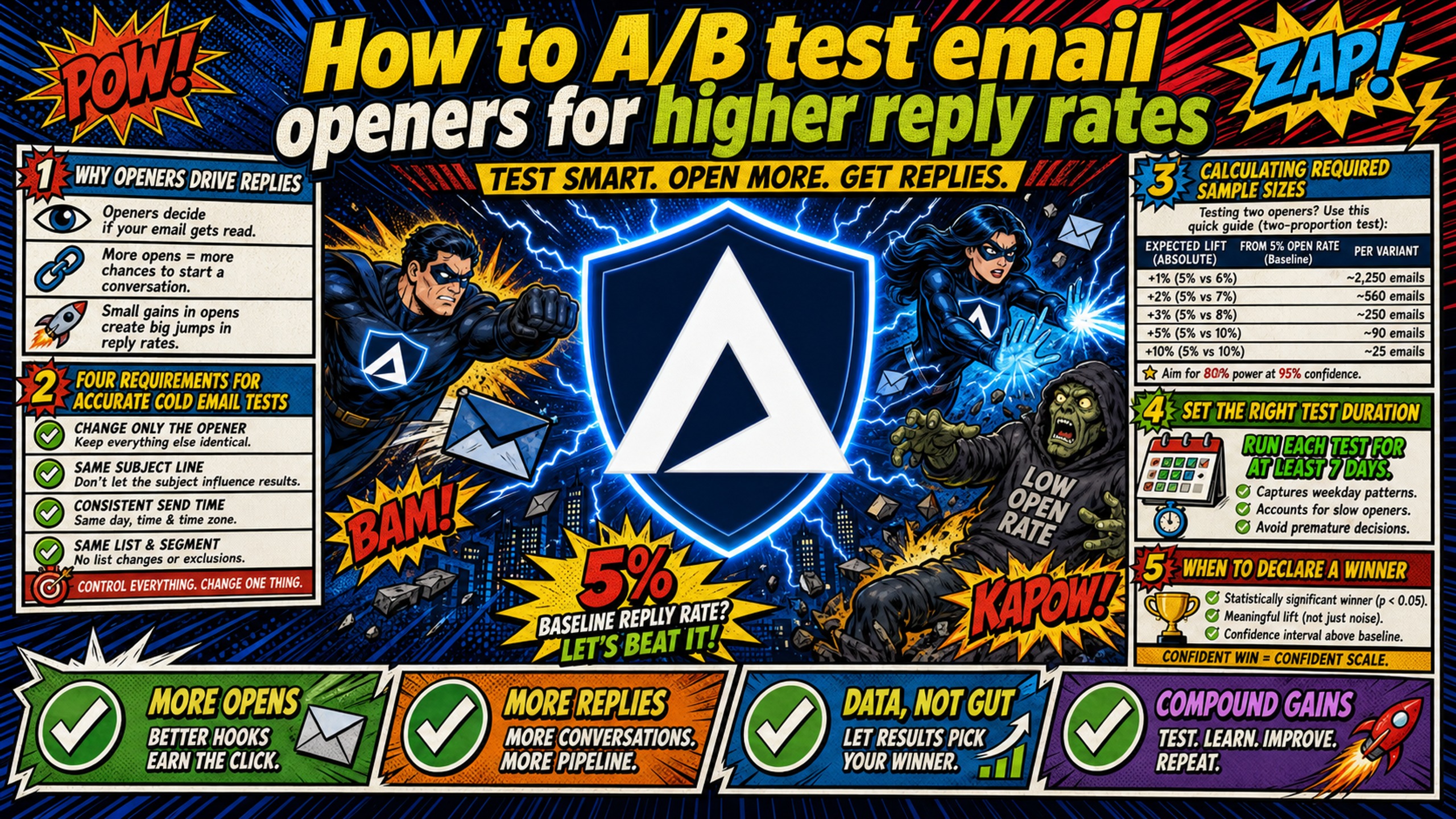
TL;DR: To A/B test email openers, change only the opener, keep the subject line, body, send time and list identical, and run for at least 7 days. At a 5% baseline reply rate, 500 sends per variant only detects differences of about 5 percentage points, and a 2-point lift (5% to 7%) needs about 2,209 sends per variant. Because cold email reply rates average 4.5% (Hunter, 31 million emails sent in 2025), keep tests to 2 or 3 variants, such as an icebreaker, a value hook and a no-opener control, and judge the winner on positive reply rate (interested replies per delivered email) at 95% confidence. Instantly (up to 26 variants per step) and Smartlead (equal split by default) both run the split, but confirm SPF, DKIM and DMARC are passing first, or deliverability gaps will look like copy wins.
Most cold email A/B tests fail before they start because the opener changes alongside the subject line, send time, and domain health. You're testing four variables and calling it one. A 2-percentage-point lift (5% to 7%) sounds small until you calculate what it means across 10,000 sends per month, which could translate to roughly 200 extra conversations that often come down to the first line of your email. But you can't trust that lift if half your test emails landed in spam because your DNS records weren't configured correctly.
Why email openers determine reply rates
The opener is the first sentence or two after the subject line, before any body copy, and it sets context, signals relevance, and determines whether the reader continues or deletes. A well-placed micro-story in your cold email opening can work as a pattern interrupt that draws the reader in and makes your message memorable, according to Sendr's analysis of opening lines.
Openers work because they answer the reader's immediate question: "Why should I care about this email?" Small copy changes produce measurable shifts in engagement. Subject lines with two custom attributes achieve a 14% higher open rate than those with one (40.2% vs 35.4%), per Hunter's State of Cold Email report, and the same logic likely applies to openers, which also prove you researched the prospect before asking for their time.
Test openers before scaling a campaign, when reply rates plateau, or when launching a new ICP or offer. Avoid testing during warmup periods or immediately after blacklist events, because deliverability variance will skew your results and you'll blame the copy for an infrastructure problem.
Four requirements for accurate cold email tests
The following four conditions must be in place before any opener test can produce trustworthy results.
Calculating required sample sizes
B2B cold email reply rates are low. Hunter's analysis of 31 million cold emails sent in 2025 found a 4.5% average reply rate, with sales outreach sequences at 3%. At rates that low, 500 sends per variant only detects large differences, which you can confirm with Evan Miller's sample size calculator. Smaller samples produce false winners because random variance overwhelms the actual signal.
The sends required depend on your baseline reply rate and the size of the lift you are trying to detect. Use this reference table when planning volume:
| Expected lift (at 5% baseline) | Type | Approximate sends per variant |
|---|---|---|
| 10% relative (5% → 5.5%) | Relative | ~31,231 |
| 20% relative (5% → 6%) | Relative | ~8,155 |
| 2 percentage points (5% → 7%) | Absolute | ~2,209 |
| 5 percentage points (5% → 10%) | Absolute | ~432 |
Figures calculated using the standard two-proportion formula at 95% confidence and 80% power, with a 5% baseline reply rate. Use a sample size calculator for your specific baseline and target lift.
The takeaway: if your list can't support at least 2,209 sends per variant, your results will be directional only unless the difference between variants is 5 percentage points or more. Consolidate to fewer variants to concentrate volume, or use a calculator like Evan Miller's calculator above to confirm your target before launching.
Set the right test duration
Run tests for a minimum of 7 days regardless of when you hit your target send volume. This removes day-of-week effects and one-off spikes from the data. If you're testing colder audiences with longer sequences, extend toward 14 days so the full sequence can play out. Declaring a winner after 48 hours ignores the reality that B2B prospects check email differently on Monday versus Friday.
When to declare a winning opener
Use 95% confidence (p-value of 0.05) as your threshold, meaning a 5% risk of calling a winner when there is no real difference. A 90% confidence level carries a 10% risk of a false winner when variants actually perform the same, which is too high for decisions that affect your active pipeline.
In practical terms, if Opener A gets 30 replies from 600 sends (5%) and Opener B gets 42 replies from 600 sends (7%), a significance calculator like Evan Miller's chi-squared tool will show that result is not statistically significant at 95% confidence (p ≈ 0.145). To detect that 2-percentage-point absolute lift reliably, you would need approximately 2,209 sends per variant. Keep in mind that statistical significance doesn't eliminate all risk, so retest big winners before rolling them out everywhere.
Isolate openers to improve reply rates
Change only the opener. Keep the subject line, body copy, send time, and list identical across all variants.
| Pitfall | What happens | How to fix |
|---|---|---|
| Changing subject line and opener together | You can't tell which change drove the lift | Test one variable per campaign |
| Testing during warmup | Deliverability variance skews results | Complete warmup before testing |
| Uneven list quality across variants | Better list produces false winner | Randomize lead assignment |
| Declaring winner too early | Random variance looks like signal | Wait for your target send volume and at least 7 days |
Infrastructure matters here because misconfigured DNS sends some variants to spam while others hit the inbox, and you'll mistake a deliverability problem for a copy problem. If Opener A lands in the inbox and Opener B lands in spam due to a missing DMARC record, Opener A will appear to win when the real variable was DNS health, not copy. Inframail automates SPF, DKIM, and DMARC setup, which eliminates 12+ hours of manual DNS setup for 50 domains, per Inframail's infrastructure guide, and removes DNS misconfiguration as a confounding variable.
SPF lets a domain authorize, in DNS, which servers may send mail using its name, per RFC 7208. DKIM adds a cryptographic signature that lets the receiver confirm the sending domain took responsibility for the message and that the signed content hasn't changed since it was signed, per RFC 6376. DMARC bridges the gap by requiring alignment between the authenticated domain and the From header domain, per RFC 7489.
Inframail's flat-rate $129/month Unlimited plan gives you a dedicated US-based IP with automated SPF, DKIM, and DMARC setup (domains run $5-$16/year each, and external warmup tools at $15-50/month per inbox are additional), according to Inframail's infrastructure overview.
Setting up Instantly for cold email split testing
Here is how to configure, distribute, and measure opener variants inside Instantly.
Configuring your A/B test sequence
Instantly's A/Z testing lets you test different subject lines and email body copy across campaigns so you can identify the best performers, and you can create up to 26 variants per step.
- Create a new campaign or edit an existing one in Instantly.
- In the sequence builder, click "Add variant" to create up to 26 versions of the email.
- Write a different opener for each variant, keeping subject line, body copy, CTA, and send time identical.
- Save the campaign without launching yet.
Available analytics for variants include Sent, Opened, Replied, Clicked, and Opportunities, and by default the system balances variant usage over the entire lifetime of a campaign.
Configuring auto-optimize
In Campaign Options, go to Advanced Options, then "Auto optimize A/Z testing," and select reply rate as the winning metric, according to Instantly's A/Z testing documentation. When enabled, the auto-optimize feature analyzes variant performance and deactivates lower-performing versions based on your defined winning metric (such as reply rate, click rate, or open rate).
Disable auto-optimize during the initial test period until you reach your target send volume per variant (use a sample size calculator) and at least 7 days of data. You want equal distribution across all variants for the full test, so leave it off and roll out the winner manually.
Measuring opener impact on reply rates
Open Campaign Analytics and filter by variant. Compare reply rate (replies divided by delivered emails) across all variants, and export the data to CSV if you need to run your own significance calculation outside Instantly. Track both total reply rate and positive reply rate for each variant, because a high total reply rate that includes angry opt-outs is not a winning opener.
How to set up opener tests in Smartlead
The steps below cover how to build, allocate, and evaluate opener variants inside Smartlead.
Defining your email opener variations
Smartlead's A/B testing guide gives you three distribution modes: an equal split (the default), manual percentage allocation at the sequence variant level, and AI percentage distribution.
- Create a new campaign in Smartlead.
- In the sequence builder, add multiple email variants.
- Change only the opener in each variant, keeping everything else identical.
- Smartlead's manual and AI percentage distribution support up to 10 variants (manual percentages must be set in multiples of 10%). Each variant needs sufficient lead volume to produce meaningful data. A 1,000-lead list supports 2 variants at 500 sends each. At a 5% baseline reply rate, 500 sends per variant can only detect very large absolute differences (5 percentage points or more), so use a sample size calculator to confirm your list can support the lift you are trying to detect.
Mapping leads to A/B test groups
The default settings will be "Manual Distribution" and "Split the variant percentage equally," so click "Save Manual Distribution."
If you use Smartlead's AI percentage distribution, you set a winning metric (reply rate, positive reply rate, click rate, or open rate) and a Lead Sample Percentage between 10% and 80%, which is the share of your list used for testing before the winner goes to the rest. Don't confuse the two, because the sample percentage controls how many leads are risked on the test, not which variant wins.
Evaluating cold email opener metrics
Open the campaign's analytics and review results by variant. Smartlead's analytics break down performance by sequence step and variant, per Smartlead's email optimization guide, so calculate reply rate manually (replies divided by delivered emails) and compare across variants, exporting results to CSV for significance testing if needed. Monitor bounce rate and spam complaints across all variants during the test, and if one variant's bounce rate climbs well above the others while they remain stable, pause that variant and investigate whether a spam trigger in the opener is causing the issue before resuming.
| Feature | Instantly | Smartlead |
|---|---|---|
| Native A/B testing | Yes, A/Z testing with up to 26 variants | Yes, up to 10 variants |
| Automatic distribution | Yes, balanced by default | Equal split by default, with manual percentage allocation and AI distribution also available |
| Auto-optimize feature | Yes, stops underperformers automatically | AI percentage distribution with a 10-80% lead sample |
| Winning metric options | Reply rate, click rate, open rate | Reply rate, positive reply rate, click rate, open rate |
| Setup complexity | Low, click "Add variant" | Low for equal split (default). Manual percentage mode requires multiples of 10%, capped at 10 variants |
Whichever platform you use, the inbox credentials feeding your test come from your infrastructure layer. Inframail exports IMAP/SMTP credentials to CSV that import directly into both platforms, and the Inframail to Smartlead integration guide walks through the connection step by step.
3 opener hooks worth A/B testing, plus a control
Below are three opener types and a control variant, each suited to a different testing scenario.
Validating cold email hook variants
Before committing volume to a test, check each opener for specificity, relevance, and absence of fluff. A cold email icebreaker is the opening 1-2 sentences that prove you researched the prospect, and the best ones reference a specific trigger: a post they published, company news, a hiring signal, or a shared pain point, according to Miniloop's icebreaker examples. Keep icebreakers to one or two sentences and let the rest of the email handle the pitch.
Split testing custom icebreakers
Custom icebreakers reference a prospect's recent activity or company news. Example structure: "I saw your post on remote team culture last week, especially the part about asynchronous trust." Test 2 to 3 icebreaker variants against each other: one referencing a LinkedIn post, another a funding announcement, a third a product launch, keeping the rest of the email identical. Custom icebreakers work because they prove you researched the prospect before sending, according to Miniloop's icebreaker examples.
How to A/B test pattern interrupts
A cold email pattern interrupt is an opening line that breaks the reader's expectation of what a cold email usually says, creating curiosity or recognition instead of the reflex to archive, per SalesTarget's guide. Unexpected lines like "This is awkward, but..." raise eyebrows because they hint at a real human moment or a bold ask, per AiSDR. Test one pattern interrupt against a straightforward icebreaker, knowing that pattern interrupts carry higher risk (some prospects find them gimmicky) but can produce higher reward when they land with the right audience.
How to A/B test value hooks
Value hooks lead with a specific outcome or number relevant to the prospect. Example: "We helped (similar company) book 30 meetings in 60 days using (method)." The "Similar Client" story builds empathy and social proof simultaneously by painting a picture of a client who was in a situation similar to your prospect's, per Sendr's opening lines guide. Test a value hook against an icebreaker and the control, and value hooks work best when the outcome is specific and verifiable and the "similar company" matches your prospect's size, industry, and problem profile.
Benchmarking against a no opener variant
Include a control variant with no opener or a generic opener like "I hope this email finds you well." This establishes your true baseline. If your custom openers can't beat the control, they're not adding value and you should test different hooks. The control also protects you from declaring a winner when all variants underperform your current baseline.
How to evaluate your email opener performance
The following criteria and metrics determine whether a test has produced a reliable winner.
Identifying winning email openers
A winning opener typically meets three criteria: reply rate lift over the control with 95% confidence (for example, 5% to 7%, a 2-point absolute lift, set before launch), positive reply rate lift (not just total replies including opt-outs and angry responses), and consistency across the full test period. Don't declare a winner based on three strong days followed by eleven flat days, because that's variance, not signal. For baselines under 2%, only test for large absolute differences. Going from 2% to 4% needs about 1,138 sends per variant.
Distinguishing reply and positive rates
Reply rate counts every human who wrote back, while positive reply rate counts only the ones who wrote back with interest, and the gap between them is where deals are won or lost, per Underfive's metric guide. Tag each reply by type (positive, referral, objection, not now, unsubscribe, out of office) and count positive and qualified neutral replies toward your effective reply rate. If you optimized on total reply rate alone, you could double down on a variant that generates complaints and quietly kill the campaign that was booking meetings, so positive reply rate is the metric that predicts pipeline.
How to fix flawed email sample sizes
If you can't reach your target sends per variant, you have three options. First, add leads or extend the test until you hit the threshold. Second, consolidate variants from five down to two or three. Third, accept that your results are directional only and treat them as hypotheses for the next test.
Small lists make statistical significance impractical. A 200-lead list split across three variants would give you roughly 66 sends per variant, which is far too small to detect even a large absolute lift, and Bloomreach's email A/B testing guide recommends at least 1,000 recipients per variant for open rate tests and 5,000+ for click tests. In that case, run the test anyway but don't make permanent decisions based on the results.
A 3-week opener testing plan
This section lays out a three-week execution plan for running an opener test from setup to deployment.
Week 1: Setting up cold email split tests
Days 1-2: Define your test hypothesis and identify 2 to 3 variants, including a no-opener control (for example, custom icebreaker vs value hook vs control).
Days 3-4: Verify DNS records (SPF, DKIM, DMARC) are configured correctly by checking your domain registrar's DNS panel or using a DNS lookup tool. If you're using Inframail, a domain purchased through the platform can be provisioned with full SPF/DKIM/DMARC records and an active inbox, with credentials exporting directly to Instantly or Smartlead, according to Inframail's infrastructure overview. If you're on Google Workspace or Microsoft 365, manually verify that all three records are published and passing before launching your test.
Days 5-7: Create sequences in Instantly or Smartlead with variants. Click "Add variant" to create a new version of the email, per Instantly's A/Z testing documentation, and leave auto-optimize off until the test concludes.
Week 2: Launch and monitor
Days 8-9: Launch the campaign and begin sending, confirming that lead distribution is even across all variants. 500 sends per variant can only detect large absolute differences (roughly 5 percentage points or more) at a 5% baseline reply rate. A 10% relative lift (a move from 5% to 5.5%) requires approximately 31,231 sends per variant. Use a sample size calculator to set your target before launch.
Days 10-12: Monitor daily metrics: bounce rate, spam complaint rate, and deliverability parity across variants. A sudden, sharp drop in open rate is an immediate warning sign that your emails are heading to spam, per Learnybox's open rate benchmarks, so watch for divergence between variants.
Days 13-14: Document any variants showing early underperformance but do not stop them yet.
Week 3: Evaluating A/B test results
Days 15-18: Run the test to at least 7 days, or longer if needed to reach your target send volume per variant and remove day-of-week effects. If you hit your sample size threshold before day 7, continue running to day 7 to capture weekday variance. If you have not reached your target volume by day 7, extend the test until you do.
Days 19-20: Calculate statistical significance using a calculator like Evan Miller's. Use 95% confidence (p-value of 0.05) as your threshold, and declare a winner only if both sample size and confidence thresholds are met. If no variant reaches significance, treat the results as directional and plan a larger follow-up test.
Day 21: Deploy the winning opener to your full campaign. Document learnings: which variant won against the control, by what margin (reply rate and positive reply rate lift), and impact on meeting bookings. Plan your next test hypothesis for subject line, body copy, or CTA.
The infrastructure side of this workflow is where campaign managers often lose hours.
"I cannot explain how easy inframail is to use. You just buy your domains in the software, and the software sets EVERYTHING up for you with a push of a button. SPF, DKIM, DMARC. Everything. It is quite literally the easiest setup you will ever experience." - Verified user of Inframail
For deeper reading on adjacent pieces of the testing stack, see Inframail's guides on B2B cold email response rates, cold email infrastructure monitoring, and getting off the Microsoft blacklist if a test domain gets flagged mid-campaign.
Get your cold email infrastructure in place
DNS misconfiguration is one of the easiest confounding variables to remove from an opener test. Inframail automates SPF, DKIM, and DMARC setup across all provisioned domains so DNS health stops being a reason your results are unreliable. The Unlimited plan is $129/month and includes one dedicated US-based IP (domains run $5-$16/year each, and external warmup tools at $15-50/month per inbox are additional).
Watch this case study video and see how Inframail helped a client scale to 1,500+ inboxes with responsive support and reliable infrastructure, contributing to a six-figure cold email deal worth around $100,000.
Sign up to Inframail and get started today.
FAQs
How many opener variants should I test at once?
Test 2 to 3 variants at once. More variants dilute sample size and extend test duration: a 1,500-lead list split across 5 variants would give only 300 sends per variant, while splitting across 3 variants would give 500 per variant. At a 5% baseline reply rate, 500 sends can only detect very large absolute differences (5 percentage points or more), so confirm your target lift against a sample size calculator before choosing your variant count.
Can I test openers and subject lines together?
No. Test one variable per campaign, because changing the subject line and opener together makes it impossible to tell which change drove the lift. Run separate tests for each variable.
What reply rate lift means the test worked?
A 2-percentage-point absolute lift (for example, 5% to 7%) with 95% confidence requires approximately 2,209 sends per variant, which is a reasonable target if your list can support it. A 10% relative lift (5% to 5.5%) requires approximately 31,231 sends per variant, which most campaign lists cannot support, so use a sample size calculator to confirm what your list can detect before designing the test. For baselines under 2%, test for larger absolute differences because detecting small relative lifts requires impractically large samples.
Do I need different openers for different industries?
Yes, but treat industry assumptions as hypotheses, not rules. Build separate variants per industry segment and let the test data decide, since hook performance varies by audience and offer.
How often should I retest winning openers?
Retest when reply rates decline materially from the winner's established baseline, or when you enter a new ICP or offer. Opener effectiveness decays as prospects see the same hooks repeatedly, so keep a backlog of new variants ready.
Key terms glossary
Email opener: The first sentence or two after the subject line, before any body copy. The opener sets context and determines whether the reader continues or deletes.
Statistical significance: A result that would be unlikely if the variants actually performed the same. At 95% confidence, the risk of a false winner is 5%. Use 95% confidence (p-value of 0.05) as the threshold for cold email A/B tests.
Sample size: The number of emails sent per variant in an A/B test. At a 5% baseline reply rate, 500 sends per variant can only detect large absolute differences (roughly 5 percentage points or more). A 10% relative lift (5% to 5.5%) requires approximately 31,231 sends per variant at 95% confidence and 80% statistical power. Use a sample size calculator to determine the right number for your baseline and target lift.
Control variant: The baseline version of your email with no opener or a generic opener. All test variants are compared against the control to measure lift.
Positive reply rate: Interested or qualified replies as a percent of delivered emails. Positive reply rate matters more than total reply rate because it predicts meeting bookings.