
Google Workspace Alternative for Cold Email: When to Switch
Discover when to switch from Google Workspace to dedicated cold email infrastructure. Compare costs, deliverability, and migration strategies for 50-500 inboxes.
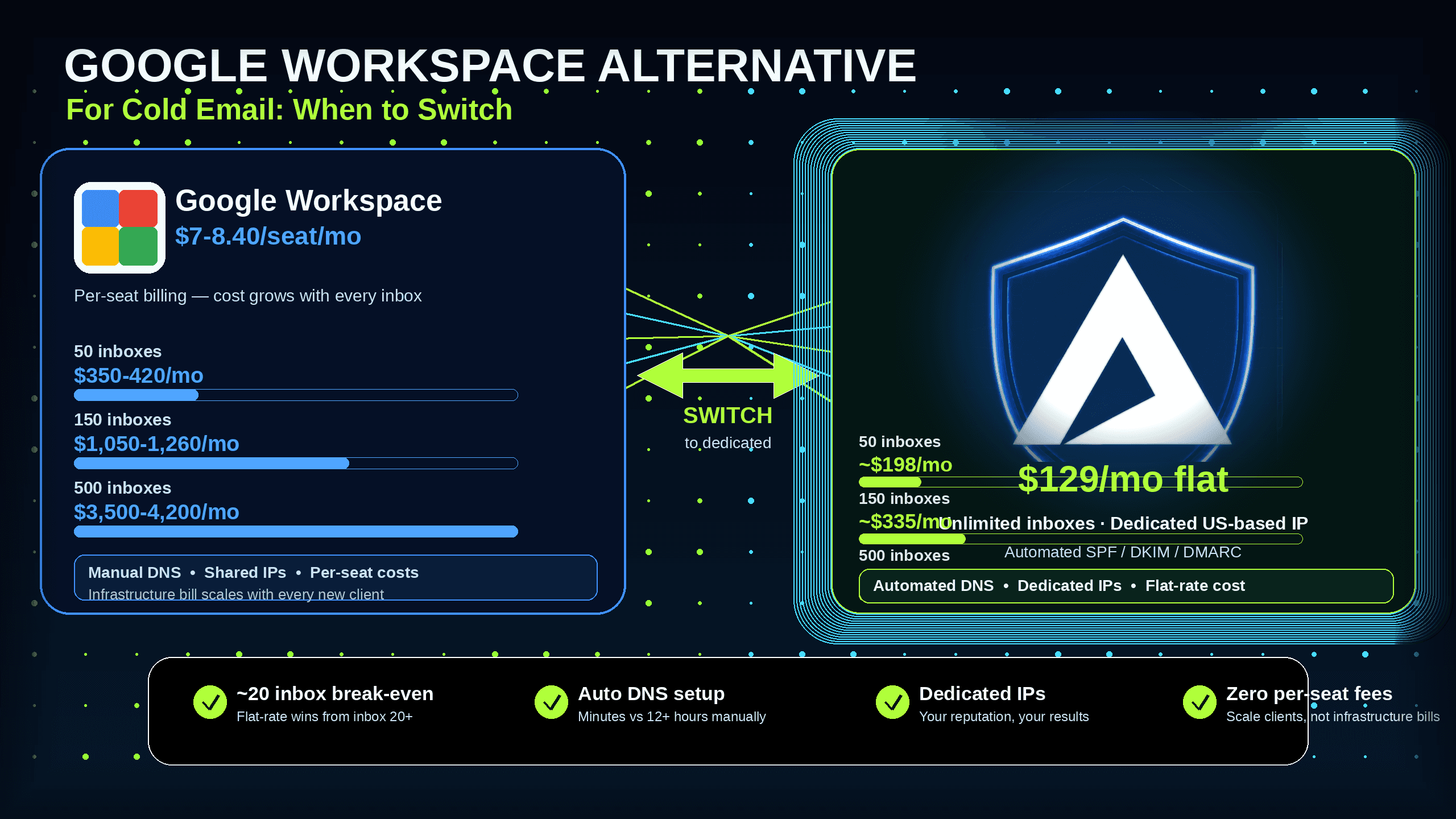
Updated July 13, 2026
TL;DR:
Google Workspace Business Starter costs $8.40 per inbox per month on flexible billing, meaning 150 inboxes run $1,260/month on infrastructure alone. Inframail's flat-rate Unlimited Plan charges $129/month for unlimited inboxes on a dedicated US-based IP, cutting infrastructure spend by over $800/month at the 150-inbox mark. Dedicated IPs isolate your sending reputation so only your behavior determines inbox placement, unlike shared IP pools used by Mailforge and Maildoso. Automated SPF, DKIM, and DMARC configuration reduces 12+ hours of manual DNS panel work to minutes across 50 domains. The financial break-even sits at approximately 20 inboxes in year one once domain costs are factored in. At 20+, dedicated flat-rate infrastructure is the clear cost winner.
Most agency founders scale their client list only to find net margins shrinking because email infrastructure bills grow at the same rate as revenue. Paying Google Workspace Business Starter at $8.40 per seat per month for 100 cold email inboxes means spending $840 monthly on infrastructure before purchasing a single domain or warmup tool. This article breaks down the exact unit economics of when to switch, compares the leading cold email infrastructure alternatives, and outlines a zero-downtime migration strategy to protect active campaigns.
Google Workspace vs. dedicated mail servers
Google Workspace is built for internal team collaboration: shared drives, video calls, and calendar sync. Cold email infrastructure is the combination of domain names, dedicated mail servers, IP addresses, and DNS records configured specifically to send outbound B2B campaigns. These two use cases require entirely different technical foundations.
Deliverability is the percentage of sent emails that land in the recipient's primary inbox rather than the spam folder. Google routes outbound email through shared IP pools where many different senders share the same sending reputation. As the noisy neighbor problem in shared IP pools explains, if another sender on your shared range engages in spammy behavior, it can trigger a blocklist entry affecting your campaigns with zero warning. Dedicated mail servers isolate your sending reputation entirely.
What changes when you migrate infrastructure
Moving from Google Workspace to dedicated cold email infrastructure means trading collaboration features (Drive, Meet, Docs) for automated SMTP and IMAP credentials built solely for sending. The operational model shifts from managing individual user accounts with storage quotas to managing domain-level inboxes provisioned in bulk and exported as credentials to a sending platform like Smartlead or Instantly.
The practical gain is speed and cost control. The practical trade-off is losing native Google integrations and needing external inbox warmup tools. For agencies running 50+ domains purely for cold outreach, Google Workspace's collaboration features are irrelevant to the job, and paying for them per seat is a direct margin tax.
Why Inframail supports Microsoft only
Inframail builds on Microsoft's cloud platform because it provides sending IP reputation backed by Microsoft's cloud infrastructure for high-volume B2B outreach. In May 2025, Microsoft rolled out stricter authentication requirements, including mandatory DMARC policies for domains sending more than 5,000 emails per day. These updates align with Google and Yahoo's sender guidelines introduced in late 2023 and 2024. Inframail's Microsoft deliverability guide covers both the compliance requirements and remediation steps when domains are flagged. The limitation worth noting plainly: Inframail is Microsoft infrastructure only, with no Google Workspace support.
When to stay with Google Workspace
An agency with fewer than approximately 20 inboxes that relies heavily on Google Drive, Docs, and Meet may find Google Workspace the more practical choice at that scale. Per-seat cost at very low inbox counts is comparable to flat-rate alternatives, and the collaboration tools have real operational value for small teams that use them daily. The switch to dedicated cold email infrastructure makes financial and operational sense when per-seat infrastructure cost is consuming an unsustainable share of client billings, when DNS setup is eating hours every week, or when deliverability drops have triggered client complaints tracing back to shared IP contamination.
Calculating your true cost per inbox
The total cost of ownership (TCO) covers every line item: platform subscription fees, domain registration, warmup tools, and DNS configuration labor. The break-even analysis shows the tipping point arrives at approximately 20 inboxes in year one once domain costs are factored in. At 30 inboxes, the math shifts decisively toward flat-rate infrastructure.
Domain costs below are amortized at $8/year per domain, the mid-range of Inframail's $5-16/year platform pricing. At market registrar rates of $12-17/year, Inframail's total would be higher but Google Workspace costs remain unchanged. Warmup tools are separate on both sides and excluded from this baseline comparison.
Scale | Google Workspace | Inframail | Monthly savings |
|---|---|---|---|
50 inboxes | $350-420/mo | $163/mo ($129 + ~$34 domains) | $187-257/mo |
150 inboxes | $1,050-1,260/mo | $229/mo ($129 + ~$100 domains) | $821-1,031/mo |
500 inboxes | $4,200/mo (monthly) or $3,500/mo (annual) | $462/mo ($129 + ~$333 domains) | $3,038-3,738/mo |
Warmup tools: Separate cost on both sides. Standalone warmup tools run $15-50/month per inbox on either infrastructure provider. Sending platforms handle warmup differently: Instantly's Starter plan at $85-94/month includes unlimited warmup, while Smartlead's Base plan at $39/month treats warmup as a paid add-on at $59/month.
![Break-even cost chart: Google Workspace vs Inframail at 0-500 inboxes][image_breakeven_chart]
Hidden fees beyond subscription costs
Three cost categories rarely appear in headline comparisons:
Domain registration: $5-16/year per domain through Inframail's platform, or $12-17/year at standard registrars. At 50 domains, budget $250-850/year depending on registrar and domain extension.
External warmup tools: Required for standard Inframail plans. Inframail's Done-For-You campaign setup includes free domain warmup for founders who prefer managed onboarding.
Manual DNS setup labor: Setting up 50 domains manually requires logging into the DNS provider for each domain, adding SPF, DKIM, and DMARC records. At 10-20 minutes per domain, that is 8-17 hours of configuration work per 50-domain batch. Inframail automates this with instant DNS configuration.
When infrastructure costs eat margins
Agency net margins typically sit at 15-20%. Google Workspace's per-seat pricing creates a direct link between client growth and infrastructure cost growth. Adding 30 domains for a new client at $8.40/seat adds $252/month in infrastructure spend before sending a single email. Flat-rate pricing breaks that link entirely, so adding clients does not compound the infrastructure bill.
Inbox placement: Google vs. Inframail
Inframail reports a 98%+ deliverability rate across its monitored domain base. The mechanism is IP isolation: dedicated IPs mean only your sending behavior determines the IP's reputation. On the Unlimited Plan, each account gets one dedicated US-based IP. On the Agency Pack, accounts get three.
Shared IP pools expose every sender on the block to other senders' behavior. One bad actor triggering a spam filter can lead to blocklisting of the entire IP range by receiving servers. Mailforge distributes mailbox accounts across a shared IP pool used by millions of businesses, meaning inbox placement rate depends partly on strangers' sending habits.
Recovering domains after blacklisting
Even with dedicated IPs, blacklist events happen. Inframail's deliverability monitoring dashboard tracks domain and IP health continuously. When a domain is flagged, the platform auto-submits delisting requests and achieves a 68.3% blacklist delisting success rate within 48 hours across monitored domains.
Inframail's spam detection metrics guide covers the specific thresholds that indicate a campaign is in trouble before client complaints arrive.
Automating DNS for faster scaling
DNS configuration is the process of creating SPF, DKIM, and DMARC records to authenticate a domain and authorize sending. Manual configuration for 50 domains takes 12+ hours of DNS panel work plus propagation time. Inframail's automated setup handles all three record types in minutes, covering the SPF, DKIM, and DMARC setup for 10+ inboxes in approximately 2-3 minutes per batch.
![Inframail dashboard showing automated DNS records setup for cold email domains][image_dns_auto_config]
Dedicated IP vs. shared pools
Shared IP pools work like carpool lanes: one driver's behavior affects everyone using the same lane. One bad actor on a shared pool gets the entire range flagged. Dedicated IPs function like private lanes where your sending behavior alone determines reputation.
The tables below compare the four main cold email infrastructure options on the criteria that matter at agency scale.
Pricing and setup
Platform | IP type | Cost (50 inboxes) | Cost (150 inboxes) |
|---|---|---|---|
Inframail | Dedicated (1-3) | $163/mo (platform + domains) | $229/mo |
Maildoso | Shared pool | Starting at $100/mo | ~$135-180/mo |
Mailforge | Shared pool | $150/mo | $450/mo |
Infraforge | Dedicated servers | ~$299/mo | ~$699/mo |
Infrastructure features
Platform | DNS setup | Setup speed | Warmup included |
|---|---|---|---|
Inframail | Automated | ~2-3 min per 10 inboxes | No (external required) |
Maildoso | Automated | 10-15 min | Paid add-on |
Mailforge | Automated | Minutes | Varies by plan |
Infraforge | Automated | ~5 min | Yes (built-in) |
For a deeper look at per-mailbox cost curves, the Maildoso alternatives guide and Zapmail vs. Inframail breakdown cover pricing at different volume tiers.
"We spent months hunting for a reliable cold-emailing stack. After repeated failures with another provider, we trialled two options, Inframail and a competitor. We chose the competitor. A month later, we switched back to Inframail. Zero issues since. Rock-solid infrastructure, sharp support, genuinely dependable. Highly recommended." - Verified user review of Inframail
Step 1: Pilot with 20 domains and run a deliverability audit
Start with a pilot batch of 20 domains rather than migrating the entire infrastructure at once. Purchase or transfer 20 domains, allow automated DNS configuration to complete, and run a small test campaign to a clean seed list segment before committing active client campaigns. During the pilot, monitor three metrics: inbox placement rate (target 85%+), reply rate on test sequences, and blacklist status for the pilot domains. The inbox warmup guide covers specific warmup steps for newly provisioned inboxes.
Step 2: Migrate existing domains or start fresh
Two paths exist when moving domains:
Transfer existing domains: Preserves accumulated domain age and positive sender reputation tied to the domain name. Note that changing the underlying IP requires a warmup period to establish the new IP's reputation, even if the domain has years of history.
Purchase fresh domains: Costs $5-16/year through Inframail. Choose this path when existing domains carry compromised reputation or negative deliverability history. Fresh domains eliminate inherited reputation baggage but require a minimum 14-day warmup before sending at full volume.
The Maildoso to Inframail migration guide and Mailreef to Inframail migration guide document the transfer process in detail for agencies moving from competing platforms.
Step 3: Update sending platform credentials
Once inboxes are provisioned, Inframail generates IMAP and SMTP credentials for each inbox automatically. Export these credentials to a CSV file with standard columns (email address, username, password, IMAP host, SMTP host, port settings) and import directly into your sending platform. Both Smartlead and Instantly support bulk CSV import of IMAP credentials, making the Smartlead integration a straightforward operation once the CSV is exported.
Data migration: what stays and goes
Data type | Transfers? | Notes |
|---|---|---|
Domain name | Yes | Carries with domain registration |
DNS records | Yes (auto-configured) | SPF/DKIM/DMARC rebuilt automatically |
Sending credentials | Yes (new) | Export via CSV, import to sending platform |
Inbox placement history | Partial | Domain reputation transfers, IP reputation resets |
Received emails | No | Stays with old provider |
Campaign templates | No | Typically stored in sending platform |
Avoiding downtime during migration
Run old and new infrastructure in parallel for 14 days. Keep active client campaigns on existing Google Workspace inboxes while warming up new Inframail inboxes with low-volume test sends. Only migrate active campaigns to the new credentials once pilot inboxes show clean deliverability metrics across the full warmup window. This overlap eliminates the scenario where a campaign goes dark during a DNS propagation delay.
Four concrete steps protect active campaigns during the transition:
Pause new launches: Consider pausing new campaign launches on Google Workspace inboxes during DNS propagation for new Inframail domains (propagation typically completes within 4-8 hours, though up to 48 hours is possible).
Complete warmup: Allow the full 14-day warmup before sending any active client sequences through new inboxes.
Rotate incrementally: Update credentials in the sending platform 20-25% at a time rather than all at once.
Monitor daily: Track reply rates and deliverability metrics closely during the first weeks post-migration to catch placement issues early.
Avoiding long-term vendor lock-in
Inframail publishes pricing directly: $129/month for the Unlimited Plan and $327/month for the Agency Pack, with month-to-month billing available. Annual billing drops the Unlimited Plan to $90.30/month, roughly a 30% discount on the platform fee. For agencies evaluating capacity needs before committing, the plan selection guide covers the math by inbox count and sends-per-day target. There is no requirement to book a sales call to see pricing and no long-term contract required to start.
50 inboxes: margin impact
Google Workspace Business Starter costs $350-420/month at $7-8.40 per seat for 50 inboxes. Inframail runs approximately $163/month ($129 platform plus estimated domain costs at $8/year per domain). The monthly savings of $187-257 fully cover the Inframail platform fee. For an agency billing clients $2,000-3,000/month for cold email services, that savings represents 6-12% of billings returned to gross margin. The financial break-even on the Inframail platform fee occurs at approximately 20 inboxes in year one once domain costs are factored in.
150 inboxes: breaking the per-seat trap
At 150 inboxes, per-seat pricing creates significant margin pressure. Google Workspace at $8.40/seat runs $1,260/month before domains, warmup tools, or sending platform costs. Inframail at $229/month (platform plus amortized domain costs) produces savings of $821-1,031/month. That reclaimed margin can potentially fund additional operational resources or tools for the agency. At this scale, per-seat pricing directly blocks the ability to reinvest in growth.
500 inboxes: flat-rate infrastructure advantage
At 500 inboxes, Inframail's flat $129/month platform fee keeps total infrastructure at approximately $462/month (platform plus estimated domain costs). Mailforge's per-mailbox model at $3/mailbox/month on annual billing translates to ~$1,500/month for 500 mailboxes. Google Workspace at this scale on monthly billing hits $4,200/month, or $3,500/month with annual commitment. The Inframail infrastructure cost comparison covers the full pricing curves across seven platforms for agencies building their own cost models.
"For years, I considered running cold email campaigns but consistently held back due to a lack of technical knowledge and confidence... After diving into the platform and consuming extensive educational content from Kidous, everything changed. The learning curve became manageable, my confidence grew, and I am now successfully sending thousands of cold emails per day while generating high-quality leads. The results have exceeded my expectations." - Verified user review of Inframail
For agencies ready to break free from per-seat pricing and scale cold email without scaling costs, sign up to Inframail and get started today with the Unlimited Plan at $129/month. Founders who prefer fully managed setup can choose the Done-For-You email campaign setup, which includes domain warmup, sending platform configuration, one-on-one coaching, and the first batch of 2,500 contacts.
What are the main alternatives to Mailforge?
The primary alternatives are Inframail, which offers flat-rate pricing at $129/month for unlimited inboxes on dedicated IPs, Maildoso with shared IP pools and per-mailbox pricing starting at $2.50/mailbox, and Infraforge with dedicated servers at $4/mailbox/month plus a $99/month add-on for dedicated IPs.
How does Mailforge pricing compare to its competitors?
Mailforge charges $3 per mailbox per month on annual billing. Inframail charges a flat $129/month for unlimited inboxes, and Maildoso charges per-mailbox tiers ranging from $2.50/mailbox at 30 mailboxes down to $0.50/mailbox at 1,000 mailboxes.
What are the key features of Mailforge?
Mailforge provides a distributed email infrastructure routing mailboxes through a shared IP pool, with automated domain setup that configures DNS records in approximately 3 minutes. It carries a 4.7/5 rating on G2 across 81 reviews, with consistent praise for fast setup and some notes on deliverability variability tied to shared IP infrastructure.
Is Mailforge easy to set up and use?
Yes, Mailforge offers automated domain setup handling DNS records quickly, and users report setup times of approximately 3 minutes per batch. Domain registration costs are separate from the mailbox subscription and must be managed through an external registrar.
What do user reviews say about Mailforge's support and reliability?
Users on G2 rate Mailforge 4.7/5 and cite fast setup consistently as a positive, with some reviews noting deliverability variability linked to shared IP pools. For a direct comparison of how shared pool deliverability compares to dedicated IP performance for cold email, independent video reviews on cold email infrastructure cover the implications in detail.
What is the migration timeline for moving from Google Workspace to Inframail?
DNS propagation takes 24-48 hours after records are configured, and new inboxes require a 14-day warmup before sending at full campaign volume. Plan for a 16-18 day total migration window when running old and new infrastructure in parallel, as covered in the inbox warmup post-migration guide.
What happens to existing domain reputation when changing infrastructure providers?
Domain reputation is tied to the domain name itself, so the domain's age and sending history carry over on transfer. Changing to a new dedicated IP address requires approximately 14 days of warmup to build that specific IP's reputation with receiving servers, even when the domain name has a positive prior history.
How do I verify deliverability is working on new Inframail inboxes?
Run a parallel test campaign using a small seed list segment (200-400 contacts) during the warmup period and track inbox placement rate, reply rate, and bounce rate against the thresholds in Inframail's spam detection metrics guide. Healthy benchmarks are an inbox placement rate above 85% and a bounce rate below 3%.
Cold email infrastructure: The combination of domain names, dedicated mail servers, IP addresses, and DNS records configured specifically to send outbound B2B campaigns, distinct from collaboration tools like Google Workspace designed for internal communication.
TCO (total cost of ownership): The complete financial cost of running an email stack, covering platform subscription, domain registration, external warmup tools, sending platform fees, and labor hours spent on configuration and monitoring.
Deliverability: The percentage of sent emails that land in the recipient's primary inbox rather than the spam folder or bounce back. A rate above 85% is generally considered healthy for cold outreach at scale.
DNS configuration: The process of creating SPF, DKIM, and DMARC records in a domain's DNS settings to authenticate the sender. Manual configuration takes 10-20 minutes per domain. Automated tools like Inframail reduce this to seconds per domain.
Warmup: The process of gradually increasing the daily sending volume of a new email inbox over 14 days to build a positive sender reputation with email service providers before launching full-volume campaigns.
Dedicated IP: An IP address assigned exclusively to a single sender account, meaning that sender's behavior alone determines the IP's reputation. Contrasts with shared IP pools where multiple senders share the same IP and can affect each other's deliverability.
Noisy neighbor effect: The deliverability risk created when senders on a shared IP pool trigger spam filters or blacklists that affect all other senders on the same IP range, regardless of those senders' own sending practices.