
Email subject for asking questions: 15 templates that encourage replies
Question-based subject lines drive higher open and reply rates by creating an open loop the recipient feels compelled to close, known as the Zeigarnik effect. Q
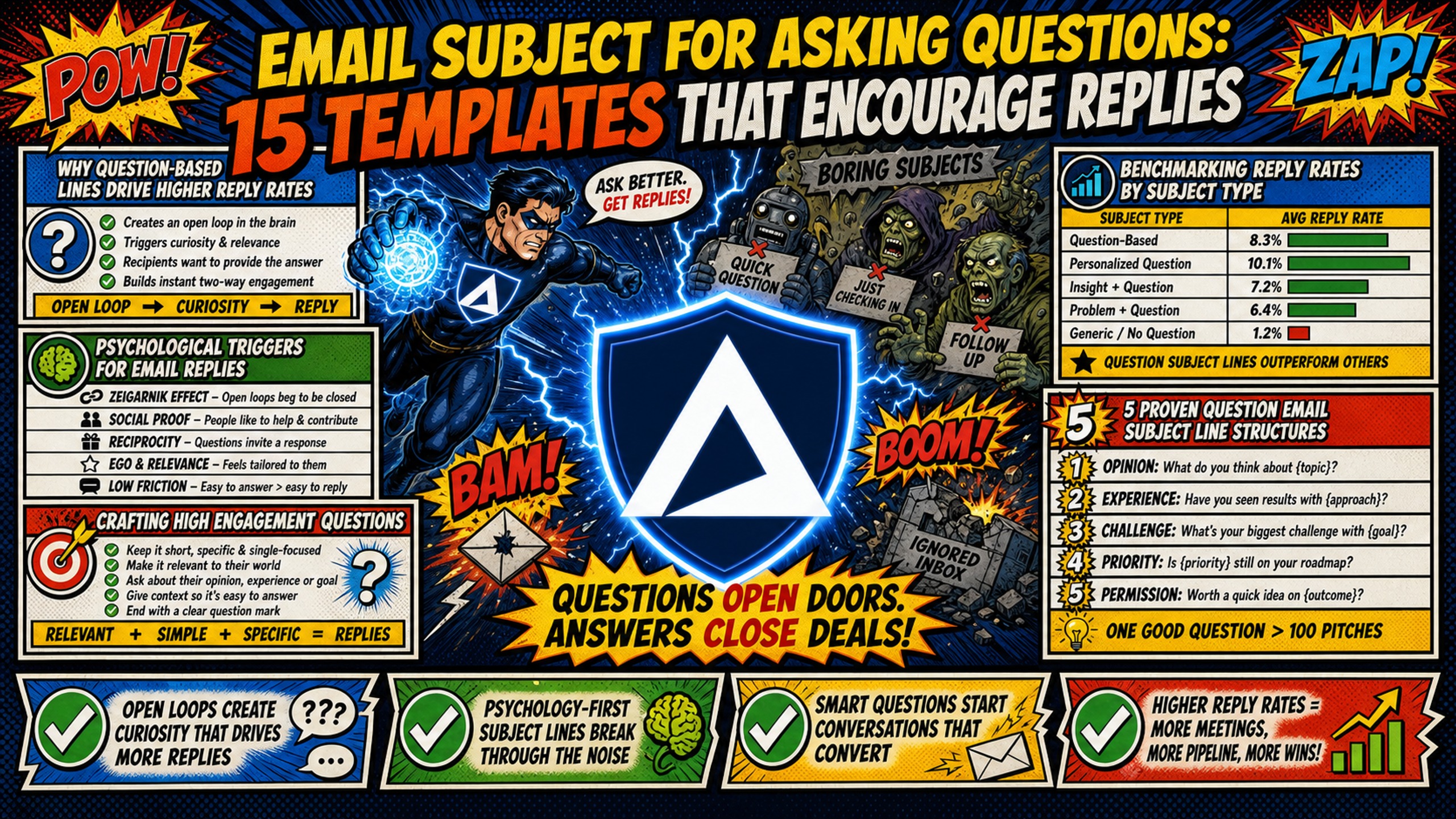
TL;DR: Question-based subject lines drive higher open and reply rates by creating an open loop the recipient feels compelled to close, known as the Zeigarnik effect. Question marks paired with spam trigger words like "free" or "urgent" increase filter risk in high-volume campaigns. Dedicated IP infrastructure isolates your sending reputation so a flagged domain doesn't contaminate your entire client portfolio. Inframail provides flat-rate Microsoft email infrastructure with automated SPF/DKIM/DMARC configuration and 1 dedicated US-based IP at $129/month for unlimited inboxes, so you scale question-based campaigns without per-seat costs or DNS bottlenecks. The Agency Pack at $327/month includes 3 dedicated IPs.
A single question in your subject line can either double your reply rate or land you in spam. The difference isn't the question mark itself. It's whether the question feels specific enough to be relevant to the recipient, and whether your infrastructure is clean enough to deliver it reliably at scale.
This guide covers 15 proven question email subject line templates organized by structure type, the psychological mechanics behind each, and the deliverability safeguards required to run them at volume across 50 or more sending domains.
Why question-based subject lines drive higher reply rates
Question-based subject lines outperform statement-based alternatives in B2B outreach because they shift the recipient from passive reader to active participant, requiring cognitive engagement rather than passive scrolling. This section breaks down the psychological mechanics and benchmarking data that explain why questions consistently drive higher reply rates.
Modern B2B inboxes are full of pitches. A well-structured question changes the dynamic because it puts the recipient in the driver's seat, asking them to evaluate something rather than absorb a claim.
Psychological triggers for email replies
The core mechanism is the Zeigarnik effect, which describes how the brain allocates more attention to incomplete tasks than completed ones. Open-ended subject lines create an open loop, and the recipient's mind works to resolve it by opening the email.
The curiosity gap operates on the same principle. It sits in the space between what the reader knows and what they want to know, and a well-framed question exploits that gap without revealing the answer upfront. The key is that the question must feel personally relevant, not just generically curious.
Crafting high engagement questions
Not all question subject lines carry the same risk profile. Curiosity-driven questions pull on intrigue and work best in low-volume, tightly targeted sequences. Context-driven questions reference the prospect's specific situation and scale more safely into higher-volume B2B campaigns. The table below maps each type to its practical use case.
Professionalism vs. gimmick matrix
| Subject line type | Example | Best used for | Risk level |
|---|---|---|---|
| Curiosity-driven | "Quick question for you?" | Low-volume, highly targeted outreach | High (gimmicky if overused) |
| Context-driven | "Question regarding [Project Name] timeline?" | High-volume B2B campaigns, enterprise sales | Low (professional and relevant) |
Relevance to the prospect's context consistently outperforms creative phrasing in open-rate performance. A question tied to something visible in the prospect's company or role will outperform a generic curiosity hook at scale. Chris Bussing's subject line breakdown covers eight tested structures worth reviewing for additional B2B context.
Benchmarking reply rates by subject type
The most important predictor of whether a question gets answered is the effort required to respond.
Questions that take seconds to answer get fast replies. Questions that require research or a lengthy explanation get deferred. That single insight should shape how you write every question-based subject line in this guide.
5 proven question email subject line structures
These five structures balance professional clarity with psychological pull, making them safe to deploy at scale without triggering spam filters or sounding gimmicky. Each template is designed to work in mid-to-high-volume B2B campaigns where deliverability and relevance must remain consistent across hundreds of sends.
Template 1: Direct question email templates
Template 1: Quick question about [Specific Goal]?
Direct questions work because busy decision-makers can immediately assess whether the email is worth their time. The bracket signals personalization without requiring a custom subject line for every contact. "The Best B2B Cold Email for 2025 (Copy This Template Today)" shows the full sequence structure, including subject line selection, for direct-question approaches in B2B outreach.
Template 2: Workflow inquiry subject lines
Template 2: "How do you handle [Process] at [Company]?"
This structure targets operational pain points and signals genuine curiosity about the recipient's workflow. It works particularly well for campaigns selling tools or services that slot into an existing process, because the question itself frames the problem the sender solves.
Template 3: Binary decision prompts
Template 3: Quick question: [Metric A] or [Metric B] this quarter?
Framing a question as a two-option choice reduces cognitive load dramatically. Instead of asking the recipient to generate a free-form answer, you give them two options that are easy to process quickly. Binary questions or simple requests that require minimal cognitive work tend to perform well in cold email, and this structure applies that principle directly to the subject line.
Template 4: Setting email response deadlines
Template 4: Quick question before [Event/Date]?
Soft urgency tied to a real event, such as a renewal window, a product launch, or a hiring cycle, creates a natural reason to reply without applying pressure. Tying urgency to a specific, verifiable event keeps the subject line clean and avoids the spam triggers that manufactured urgency phrases trigger.
Template 5: Crafting subject lines for quick replies
Template 5: Quick question about [Topic]: yes or no?
This triage-ready format lets the recipient answer without fully reading the email body. The structure works because it signals a low time commitment and frames the response as a single word, making it one of the fastest reply structures in B2B cold email.
5 curiosity-gap question templates to boost replies
Curiosity-gap templates rely on information asymmetry rather than explicit relevance, making them more engaging but riskier in bulk sends where deliverability is sensitive to copy patterns. Deploy these structures in low-to-mid-volume sequences with clean infrastructure and tight targeting, and avoid pairing them with spam trigger words.
Template 6: Using information gaps
Template 6: Seen the latest [Industry Trend] data?
This works by implying the recipient may have missed something relevant to their role. The curiosity gap compels a click to find out what data you're referencing. Balance curiosity with professional clarity by making sure the email body immediately delivers on the implied promise.
Template 7: Using surprise questions to boost replies
Template 7: Still using [Common Industry Practice] at [Company]?
Challenging the status quo works because it forces the recipient to consider whether their current approach is sub-optimal. The question implies you have evidence they don't, creating an information asymmetry that drives opens.
Template 8: Debunking common beliefs
Template 8: Why [Common Strategy] slows [Company] down?
The word "why" signals a data-backed explanation is coming. This structure sets up a contrarian angle and works best when you have a specific, verifiable claim to deliver in the first two lines of the email body. Without that, the subject line reads as clickbait.
Template 9: Niche pain point questions
Template 9: Running into [Specific Technical Bottleneck] at [Company]?
This template speaks directly to day-to-day operational friction. For outbound campaign managers, "Running into DNS setup delays at [Company]?" hits a real pain point. The more specific the bottleneck, the higher the perceived relevance.
Template 10: Identifying prospect pain points
Template 10: Is [Specific Tool] holding [Company] back?
Naming a specific tool the prospect uses can increase relevance in B2B outreach, as tools are visible via their job postings, LinkedIn stack, or intent data from Apollo or ZoomInfo. The question immediately feels researched rather than mass-produced when it references their actual tech stack.
5 conversational email subject lines that convert
Conversational question formats reduce transactional tension by appealing to expertise, peer curiosity, or professional identity rather than pitching a solution upfront. These templates work best in highly targeted sequences where the sender has researched the recipient's role or recent activity enough to frame the question as a genuine consultation request.
Template 11: Seeking domain expert input
Template 11: Quick question for a [Job Title] expert?
Appealing to professional expertise is a reliable engagement trigger. Most people will engage with a question that positions them as the authority. Keep the job title accurate and specific. "Quick question for a deliverability expert?" lands better than "Quick question for an email person?"
Template 12: Direct consultation requests
Template 12: How did [Company] approach [Problem]?
Peer-to-peer advice framing removes the transactional feel from a cold outreach email. This structure works best in highly targeted sequences where you've done enough research to name a specific problem the company has publicly discussed or visibly addressed. Salesman.com's B2B cold email walkthrough is a useful reference for how consultation-style subject lines fit into a full sequence.
Template 13: Simple yes or no prompts
Template 13: Is improving [Metric] still a priority at [Company]?
This keeps the reply barrier extremely low. A one-word answer qualifies or disqualifies the lead without requiring the prospect to write a full response. Use this structure for re-engagement campaigns and list cleaning runs.
Template 14: Verifying lead intent via email
Template 14: Still leading [Responsibility] at [Company]?
This template verifies the contact's current role and opens a conversation simultaneously. Use it at the top of a sequence targeting contacts where job change data may be stale, or as a re-engagement touch for leads that went cold.
Template 15: Actionable feedback questions
Template 15: Quick question about your [Specific Asset/Page]?
Referencing something specific on the prospect's website signals that you've actually looked at their business. This template generates replies because the prospect wants to know what you noticed. It's one of the highest-trust subject lines in this list, but also the most time-intensive to personalize at scale.
Customizing your question email subject line
Template customization is what separates a subject line that feels researched from one that reads as mass-produced, and the difference between the two directly affects reply rates and spam placement. Accurate personalization and clean A/B testing are required before scaling any question-based campaign to avoid merge-field errors and deliverability collapse.
Personalize with recipient-specific details
Dynamic variables such as [Company], [Job Title], [Specific Tool], and [Metric] are what separate a question that feels researched from one that feels templated. Pull these variables from your data provider (Apollo or ZoomInfo), from the prospect's LinkedIn profile, or from their public job postings.
Incorrect personalization, such as the wrong company name or an outdated job title, destroys credibility faster than a generic subject line. Test personalization tokens in a small batch before a full send to catch merge-field errors before they reach your entire list.
Optimizing subject lines with A/B tests
Run A/B tests with a minimum of 100-200 sends per variant. Test one variable at a time: subject line type (curiosity-driven vs. context-driven), personalization depth ([Company] only vs. [Company] + [Specific Tool]), or soft urgency vs. none.
For campaign managers running A/B tests across multiple client accounts, Inframail's CSV export feature lets you provision unlimited inboxes and export credentials directly into Instantly or Smartlead. The table below shows what scaling those tests costs on Inframail versus Google Workspace.
Infrastructure cost comparison for A/B testing at scale
| Provider | 50 inboxes | 200 inboxes | Notes |
|---|---|---|---|
| Google Workspace | $350-420/month | $1,400-1,680/month | $7-8.40 per seat, scales linearly |
| Inframail | $163/month | $163/month | $129 platform + ~$34 domains, flat rate |
| Monthly savings | $217-287 | $1,237-1,517 | Before external warmup tools |
Warmup tools ($15-50/month per inbox via Warmbox or Lemwarm) are additional on both sides and not included in this comparison.
For a broader look at infrastructure costs across seven platforms, this cost comparison guide breaks down the full stack numbers.
Avoid these 4 errors in question subject lines
Structural and technical mistakes are the most common reason question-based campaigns underperform despite a sound template choice, and many of these errors are invisible until spam filters start flagging your domains. The following four errors destroy reply rates, damage sender reputation, and increase the likelihood that your emails never reach the inbox.
Stop using ambiguous subject lines
Vague questions like "Can we talk?" with no context get deleted or marked as spam because they trigger a "who is this?" response rather than a relevance assessment. Every question subject line needs enough context to tell the recipient why this question is for them specifically.
Avoid questions that invite easy dismissal
Questions that allow a mental "no" without requiring a reply give the recipient a reason to disengage instantly. Framing your question as a two-option choice, for example, "Quick question: [Metric A] or [Metric B] this quarter?" rather than "Would you like to grow your pipeline?", requires the recipient to evaluate both options, which raises the likelihood of a response.
Simplify complex question subject lines
Keep question subject lines between 4 and 7 words. Multi-part questions get cut off on mobile screens and read as disorganized. A subject line like "Are you focused on pipeline growth or account expansion this quarter, and if so, how?" fails on every device. Cut it to "Pipeline growth or account expansion this quarter?" and it performs.
Why coercion kills your reply rate
Clickbait and manipulative question frames ("Did you forget about this?" or "Are you ignoring [Problem]?") generate short-term opens and long-term reputation damage. Recipients mark these as spam, which harms domain health across your entire sending infrastructure.
Spam trigger words commonly paired with question subject lines to avoid:
- Free ("Is this free for you?")
- Guarantee ("Can I guarantee results?")
- Urgent ("Urgent question about your account?")
- Limited time ("Quick question before this expires?")
- Act now ("Can you act on this now?")
Modern spam filters use machine learning to evaluate content patterns, sender reputation, and authentication protocols together, not just individual trigger words. A question mark alone is not the risk. A question mark paired with any of the terms above, from a domain with weak SPF/DKIM/DMARC configuration or a shared IP pool, raises the risk of spam filtering.
Inframail's dedicated IP infrastructure (1 IP on the Unlimited Plan, 3 on the Agency Pack) isolates your sending reputation completely. If one domain gets flagged, the contamination doesn't spread to your other client campaigns, unlike shared IP pools where one bad actor affects every sender on that range. For context on how shared IP pools affect deliverability at scale, Inframail's Maildoso deliverability review documents the inbox rate differences between dedicated and shared IP infrastructure. For a video walkthrough of keeping cold emails out of spam at scale, Kidous Mahteme's deliverability guide covers the full technical setup required.
15 proven question email subject line templates
Here is the full set in a copy-pasteable checklist format, organized by category.
Professional structures (Templates 1-5):
- "Quick question about [Specific Goal]?"
- "How do you handle [Process] at [Company]?"
- "Quick question: [Metric A] or [Metric B] this quarter?"
- "Quick question before [Event/Date]?"
- "Quick question about [Topic]: yes or no?"
Curiosity-gap structures (Templates 6-10):
- "Seen the latest [Industry Trend] data?"
- "Still using [Common Industry Practice] at [Company]?"
- "Why [Common Strategy] slows [Company] down?"
- "Running into [Specific Technical Bottleneck] at [Company]?"
- "Is [Specific Tool] holding [Company] back?"
Conversational structures (Templates 11-15):
- "Quick question for a [Job Title] expert?"
- "How did [Company] approach [Problem]?"
- "Is improving [Metric] still a priority at [Company]?"
- "Still leading [Responsibility] at [Company]?"
- "Quick question about your [Specific Asset/Page]?"
How to soften your outreach questions
Prefacing a question with "Quick" or "Simple" reduces the perceived commitment of replying. "Quick question about your onboarding flow?" signals a low time cost. "Simple question on your current DNS setup?" implies the sender already understands the space and won't require a lengthy explanation in return. Both reduce friction without making the email feel less professional.
Best practices for inquiry subject lines
- Keep subject lines between 30-50 characters (4-7 words) to avoid mobile truncation.
- Use one question mark only. Multiple punctuation marks are a spam signal.
- Avoid combining question marks with exclamation marks ("Can you believe this!?").
- Pair curiosity-driven subjects with a clear value statement in the first line of the email body.
- Never use a question subject line that the email body doesn't answer directly.
- Test personalization tokens in a small batch before a full send to catch merge-field errors that destroy credibility.
For a broader look at cold email legal compliance before scaling question-based campaigns, Inframail's cold email compliance guide covers the key requirements for US B2B outreach.
How to A/B test question subjects
- Isolate one variable: Test curiosity-driven vs. context-driven first, then test personalization depth separately.
- Set a sample size: Minimum 100-200 sends per variant for statistical confidence.
- Measure reply rate, not just open rate: Open rate is a vanity metric for cold email. Reply rate confirms the subject line delivered the right expectation.
- Rotate domains: Spread test sends across multiple domains to avoid skewing results if a single domain's reputation is flagged or warming.
- Document and repeat: Build a running log of subject line variants, open rates, and reply rates by campaign type and ideal customer profile. Manual DNS setup per domain typically requires 10-20 minutes of active configuration work plus propagation time, and across 50 domains that adds up to significant setup overhead per campaign cycle. Inframail's automated DNS configuration handles SPF, DKIM, and DMARC record creation without any manual panel work, cutting that active setup time to minutes per domain. For a full infrastructure health monitoring workflow to protect your test domains during A/B testing, Inframail's infrastructure monitoring guide walks through the full health-check and alert protocol.
One agency operator described the setup speed difference directly:
"Their platform did in 10 minutes what would've taken me days to figure out. Maybe weeks. We're talking full infrastructure... The ROI on this is stupid good. We're saving cash and more importantly, we're saving time." - Verified user review of Inframail
Sign up to Inframail and get started today. For agencies managing multiple client accounts, the Agency Pack at $327/month adds 3 dedicated US-based IPs and unlimited inboxes across all your accounts.
FAQs
Do question marks in subject lines trigger spam filters?
Question marks alone do not trigger spam filters. Modern filters evaluate content patterns, sender reputation, and authentication protocols together, so a question mark paired with trigger words like "free," "urgent," or "guaranteed" in high-volume campaigns raises the risk. Using dedicated IPs and properly configured SPF/DKIM/DMARC records mitigates this risk by isolating your sending reputation.
How many characters should a question subject line be?
Keep question subject lines between 30 and 50 characters, or roughly 4 to 7 words, to prevent truncation on mobile screens where the majority of B2B emails are first previewed by decision-makers checking email between meetings.
Can I use these templates for Google Workspace inboxes?
Yes, but scaling them on Google Workspace costs $7-8.40 per seat per month, which means 50 inboxes runs $350-420/month and 200 inboxes runs $1,400-1,680/month. Inframail offers flat-rate pricing at $129/month for unlimited inboxes on dedicated US-based IPs, keeping infrastructure costs predictable as your campaign volume and client count grow.
What is the difference between a curiosity-driven and a context-driven question subject line?
A curiosity-driven subject line (e.g., Seen the latest [Industry Trend] data?) relies on an information gap to generate an open and carries higher spam risk in bulk sends because spam filters use AI and NLP to assess whether the subject line aligns with the email body: when the subject line teases but the body fails to deliver on the implied promise, filters flag the message as low-value or deceptive. A context-driven subject line (e.g., Question regarding [Project Name] timeline?) ties directly to the prospect's visible situation, scales more safely into high-volume B2B campaigns, and feels less gimmicky because the personalization is verifiable.
How do dedicated IPs protect deliverability when scaling question-based campaigns?
With a dedicated IP, your sending reputation is based only on your own send behavior, not on other users sharing the same IP pool. Shared IP pools expose every sender on that range to reputation contamination from a single bad actor, which can cause inbox placement to drop across all your client campaigns simultaneously.
Key terms glossary
Dedicated IP: An IP address used exclusively by one sender, ensuring your sending reputation is completely isolated from other users on shared infrastructure.
SPF/DKIM/DMARC: Technical DNS records that verify your sending domain's identity, prevent domain spoofing, and improve inbox placement rates by confirming to receiving mail servers that your emails are legitimate.
Curiosity gap: The psychological space between what a reader knows and what they want to know, used in subject lines to encourage email opens by implying information the recipient hasn't seen yet.
Zeigarnik effect: A psychological principle describing how the brain allocates more attention to incomplete tasks than completed ones, applied in subject lines by creating open loops the recipient feels compelled to resolve by opening the email.
Call to action (CTA): A prompt in marketing or sales content that encourages the reader to take a specific next step, such as signing up, booking a call, or replying to an email.
Ideal customer profile (ICP): A detailed description of the type of company or person who gets the most value from your product or service, used to target outreach and campaigns more effectively.
Spam trigger words: Terms and phrases commonly associated with unsolicited email that spam filters flag as high-risk signals, particularly when combined with question marks or urgency cues in subject lines.