
Domain Blacklist Monitoring for Cold Email: Tools, Thresholds, and Weekly Cadence
Learn how to monitor domain blacklists for cold email with the right tools, alert thresholds, Slack routing, weekly cadence, and delisting workflows.
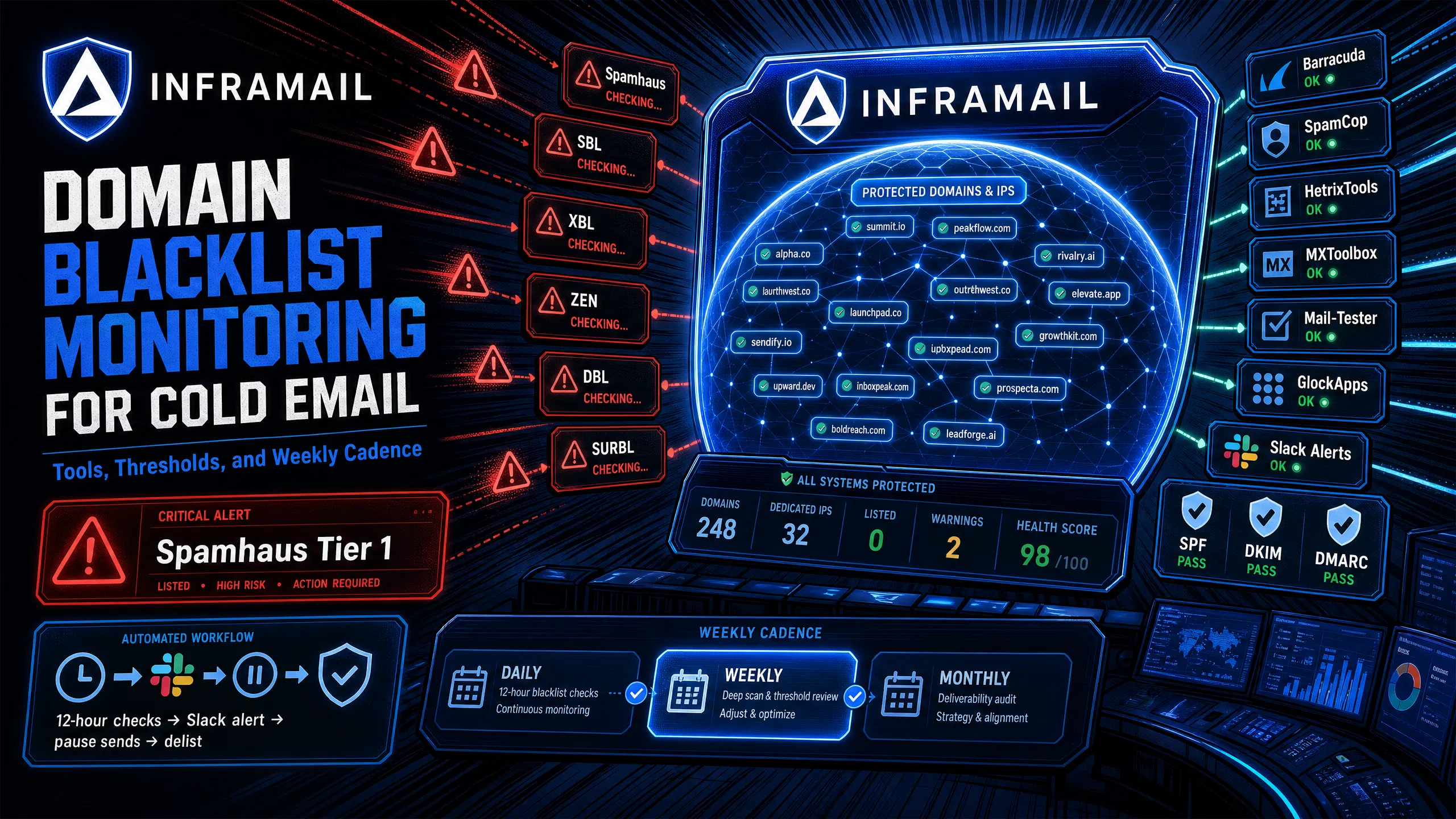
TL;DR: The speed at which you detect a blacklist listing determines how much damage it does. Spamhaus SBL is the highest-impact blacklist event for B2B cold email. Spamhaus's documented ISP adoption confirms SMTP-level rejection at Microsoft 365, Outlook, Yahoo, and AOL within hours of listing. Deploy HetrixTools for automated 12-hour checks on the $9.95/month Personal plan and route Spamhaus-tier alerts to Slack immediately. Everything else can wait for batch review.
Reply rates that drop sharply overnight with no copy changes, no list swap, and no domain age issue point to one cause: a missed blacklist event. A spam trap hit can land your sending IP on Spamhaus SBL/XBL, and mail may start routing to the spam folder before you catch it, silently draining campaign performance while your sequences keep firing. The fix isn't better copy or more warmup. It's a monitoring system that catches listings within minutes, routes the right alerts to the right people, and gives you enough context to act before the next send window.
This guide covers the tools, thresholds, cadence, and Slack configuration you need to monitor domain reputation across a multi-domain operation without drowning in false positives.
The sections below break down how quickly a listing compounds and which blacklists carry enough ISP weight to actually stop mail at the server level.
The cost of a 48-hour detection delay
At 50+ domains sending daily across multiple client campaigns, the question isn't whether a domain or IP lands on a blacklist in a given month. It's how fast you catch it. Bad input data, aggressive send volumes, and shared IP contamination all trigger listings, and the financial damage scales directly with how long the listing goes undetected.
A two-day send blackout on a client paying $3,000/month in retainer creates real costs:
Wasted retainer spend for that window
Warmup progress burned on affected inboxes
Churn risk if the same scenario repeats within one quarter
The goal of a monitoring system isn't to prevent every listing. It's to compress detection time as much as possible.
Which blacklists actually drive delivery failures
Not all blacklists carry equal weight. Monitoring dozens of them with equal urgency can create alert fatigue that causes teams to ignore the alerts that actually matter.
Spamhaus is widely regarded as the most impactful third-party blacklist for B2B cold email. Microsoft 365, Outlook, Yahoo, and AOL all reject listed IPs at the SMTP level based on Spamhaus SBL, XBL, and ZEN flags. For B2B senders targeting Microsoft-heavy audiences, a Spamhaus SBL listing causes near-complete delivery shutdown with visible error codes. A Spamhaus SBL listing can put the majority of your outbound dead in the water within hours.
The tier below Spamhaus includes SURBL, Barracuda, SpamCop, and Invaluement. These don't trigger the same immediate SMTP-level rejection, but commercial security gateways like Mimecast and Proofpoint use SURBL and similar services as weighted inputs in their spam scoring. A SURBL listing on its own might contribute points to a filter's risk score. Stack it with complaints, inactive recipients, or other negative signals, and you hit the rejection threshold.
Gmail and Google Workspace are the exception here. They don't appear to use external blacklists in the same way (except Spamhaus PBL for unauthorized IPs). Gmail filters by behavior and engagement instead, which means Gmail delivery failures are quieter and harder to catch until campaign damage has already accumulated. Standard blacklist checks won't surface them.
Understanding this priority order is the foundation of effective cold email infrastructure monitoring. Signal clarity beats comprehensive coverage of every obscure list.
Each tool below serves a different role in your monitoring stack, from automated background checks to manual verification during active incidents.
HetrixTools: best for automated multi-domain monitoring
For operations running 50-200 domains, HetrixTools is the strongest automated monitoring tool available. The platform offers a free tier and paid plans starting at $9.95/month, with higher tiers available for larger operations. The free tier provides blacklist monitoring with daily checks, email notifications, and 25 SMS credits per month, with Slack and other channels available on paid plans.
At up to 32 domains, the free tier covers your monitoring needs. At 50-200 domains, the Personal plan at $9.95/month provides 256 monitors and 12-hour check frequency.
Key capabilities for multi-domain operations:
Automated frequent checks across all configured domains and IPs
Broad blacklist coverage including all Spamhaus lists, Barracuda, SpamCop, and SURBL
Multi-channel alerts configurable by blacklist severity
Dashboard view showing all domains and current listing status in a single panel
MXToolbox: the market-standard manual check
MXToolbox is the standard for manual spot-checking and incident verification. The free plan checks one IP or domain every seven days against multiple blacklists. Paid plans (Delivery Center at $129/month) include adaptive blacklist monitoring across multiple domains and telephone support for delisting assistance.
For a 50-200 domain operation, MXToolbox works best as a secondary verification tool during your weekly manual review, not as your primary monitoring system. Its value is in instant, human-readable results you can screenshot for client reporting or use during an active incident investigation.
The Inframail spam metrics guide covers how to interpret these checks alongside other deliverability signals like bounce rates and complaint rates.
Free spot-check tools for quick verification
For rapid spot-checks during incident response, MultiRBL and Mail-Tester are both free and require no account. Paste your sending IP into MultiRBL and get results across numerous blacklists in seconds. Mail-Tester gives you a deliverability score combining blacklist status with SPF/DKIM/DMARC configuration checks. Inframail reports a 9.5/10 on Mail-Tester across tested domains, and scores below 8/10 typically warrant investigation.
GlockApps adds inbox placement testing across Gmail, Outlook, Yahoo, and other providers, which is critical for catching the quieter Gmail-side filtering failures that don't surface in blacklist checks.
For the DNS setup that feeds into these scores, the SPF, DKIM, and DMARC setup video shows how automated configuration through Inframail eliminates the manual DNS panel work that typically creates misconfiguration errors.
The goal of Slack integration is to get critical blacklist notifications to your phone within minutes of a listing, not hours. Configure alerts selectively: Spamhaus alerts go to Slack immediately, lower-tier listings go to email for batch review.
Create a Slack incoming webhook
A webhook is a URL that lets HetrixTools post alerts directly to your Slack channel without complex integrations or API keys. Here's the setup:
Create the webhook: Go to Slack API and create a new Incoming Webhooks app for your workspace.
Select your channel: Choose a dedicated #blacklist-alerts channel to keep it separate from other ops traffic.
Copy the URL: Copy the webhook URL Slack generates.
Paste into HetrixTools: In HetrixTools notification settings, paste the webhook URL under Slack integration.
Keep webhook URLs out of public repositories and test the connection before relying on it for live alerts.
Configure alert routing by blacklist tier
The most important configuration decision is what triggers a Slack alert versus what goes to email. Routing everything to Slack creates noise that trains your team to ignore alerts, which defeats the entire system.
Set alert routing as follows:
Spamhaus (SBL, XBL, ZEN, DBL): Slack alert with @channel mention, respond immediately
Barracuda, SpamCop, SURBL: Email alert, review within 24 hours
All other blacklists: Email digest, review weekly
This tiered routing means your Slack channel only pings for genuine emergencies. For context on why shared IP infrastructure amplifies blacklist exposure compared to dedicated IPs, the dedicated IP vs shared pool video covers the specific mechanics of how one bad actor on a shared pool contaminates your sending reputation.
The cadence below structures monitoring into three distinct layers, each with a defined scope, time commitment, and output.
Daily: automated checks running in the background
Automated monitoring should run frequently for high-volume senders. At 50+ domains sending daily, frequent checks via HetrixTools help you catch Spamhaus listings quickly, before a full day's send volume compounds the problem.
Your daily automated stack:
HetrixTools running 12-hour checks across all domains and IPs on the $9.95/month Personal plan
Slack webhook configured for Spamhaus-tier alerts only
HetrixTools email digest for Tier 2 listings (Barracuda, SpamCop, SURBL)
After initial setup, this layer runs with zero manual work and covers the vast majority of monitoring needs across your portfolio.
Weekly: manual review and triage
Run a manual review every week covering:
Review all HetrixTools alerts from the past 7 days: Check for false positives, look for patterns across multiple domains, and flag if the same IP appears in multiple listings.
Spot-check a rotating batch of high-volume domains via MXToolbox: Rotate which domains you check manually to cover your full portfolio over time.
Pull Mail-Tester scores on a handful of domains: Inframail reports 9.5/10 on Mail-Tester, and scores below 8/10 typically warrant investigation.
Run an inbox placement test on active campaign domains: Use GlockApps or GMass to check inbox vs spam split across Gmail and Outlook.
Review Inframail's deliverability monitoring dashboard: Check for domain and IP health flags, including any delisting activity from the previous week. This weekly review catches patterns that automated monitoring misses. Any single listing might look like a one-off, but three listings across different domains in the same week points to a systemic problem worth diagnosing.
Monthly: root cause audit
Once per month, run a deeper review to identify what's causing listings rather than just responding to them. Pull your sending logs for the previous 30 days and look for:
Bounce rate spikes
Complaint rate increases
Domains that hit send limits before their warmup schedule completed
The Inframail inbox warmup guide covers the warmup schedule that keeps new inboxes below blacklist-triggering thresholds. Common root causes include compromised sending infrastructure generating mail without your knowledge, bad list hygiene sending to spam traps, and too-aggressive send volumes before warmup is complete.
The tiers below define which listings require an immediate response, which can wait for a scheduled review, and which carry low enough ISP adoption to handle in a weekly batch.
Tier 1: critical, respond immediately
These listings require immediate investigation and campaign pause before the next send window:
Blacklist | Type | Impact | Recommended action |
|---|---|---|---|
Spamhaus SBL | IP/Domain | Critical | Pause all sends on affected domain/IP, investigate immediately |
Spamhaus XBL | IP | Critical | Pause all sends on affected IP, investigate immediately |
Spamhaus DBL | Domain | Critical | Pause domain-level sends, investigate immediately |
Spamhaus ZEN | Combined | Critical | Pause all sends on affected infrastructure, investigate immediately |
When a Tier 1 alert fires, pause all active campaigns on the affected domain or IP before you do anything else. Continued sending through a Spamhaus-listed domain deepens the listing and extends the remediation timeline.
Tier 2: high priority, review within 24 hours
These listings reduce inbox placement and compound with other negative signals, but don't trigger the same immediate SMTP-level rejection:
Blacklist | Type | Impact | Recommended action |
|---|---|---|---|
Barracuda BRBL | IP/Domain | High | Reduce send volume while investigating |
SpamCop | IP | High | Reduce send volume, check complaint sources |
SURBL | Domain/URI | High | Audit domain body content and link usage |
Invaluement | IP/Domain | High | Review sending patterns and list hygiene |
For Tier 2 listings, reduce send volume on the affected domain while you investigate. Don't pause completely unless your inbox placement test scores indicate serious delivery issues.
Tier 3: low priority, batch review weekly
Hundreds of smaller blacklists exist that major ISPs don't query in any meaningful way. A listing on an obscure list with no ISP adoption has near-zero measurable impact on your campaigns. Route these to a weekly email digest and investigate only if the same domain appears on multiple Tier 3 lists simultaneously, which suggests a genuine problem rather than a false positive.
The diagnostic process for any listing follows three steps: identify the specific blacklist and confirm its real-world impact level, diagnose the cause by checking recent sending behavior for complaint spikes, bounce spikes, spam trap hits, or infrastructure compromise, and then remediate before submitting any delisting request.
Blacklist | Typical delisting time | Process | Key requirement |
|---|---|---|---|
Spamhaus SBL/DBL | 24-72 hours (reported) | Manual request via web form | Documented proof of root cause remediation |
SpamCop | 24-48 hours (reported) | Auto-delists once reports stop | Pause sending, wait 48 hours |
Barracuda BRBL | 12-24 hours (reported) | Web form at barracudacentral.org | Fix root cause before submitting |
The step most operators skip on Spamhaus: consult the SBL listing page to understand exactly what the spam problem is before submitting. Spamhaus rejects requests that don't demonstrate the root cause has been permanently resolved, not just paused. For Microsoft-specific listings that often accompany Spamhaus SBL events, the Inframail Microsoft blacklist guide covers the remediation workflow for OLC and Office365 delisting processes.
For Barracuda, re-listing happens quickly if the problem recurs. A removal request without root cause remediation can result in extended listing periods without release, as the same issue triggers a new listing.
One of the most common blacklisting causes at agencies running shared IP infrastructure is external contamination: another sender on your shared pool sends spam, the pool gets flagged, and your campaigns fail even though your own sending behavior was clean. Dedicated IPs solve this problem directly.
With Inframail's dedicated IP setup (1 IP on the Unlimited Plan at $129/month, 3 IPs on the Agency Pack at $327/month), your sending reputation is isolated from every other sender on the platform. Your behavior alone determines your IP reputation, and a blacklisting event is always traceable to your own sending patterns.
Inframail's deliverability monitoring dashboard includes blacklist monitoring, which handles operational overhead for Tier 2 and Tier 3 listings. The platform also auto-configures SPF, DKIM, and DMARC records at domain setup, eliminating the misconfigured DNS records that inflate Mail-Tester scores and contribute to spam scoring. The 2025 cold email infrastructure guide covers the full infrastructure design decisions that reduce blacklist exposure at scale.
For campaigns targeting B2B prospects on Microsoft infrastructure, having dedicated IPs under direct control means you can isolate a blacklisted IP, investigate, remediate, and continue sending on your other dedicated IPs without pausing your entire operation. And when a blacklist emergency does happen, response time matters. Inframail support is available 16 hours every day from real people.
"One of the best mailbox infra vendors I have ever used super easy and quick setup and support is practically 24/7 with at max a 2min wait to get a question answered." - Verified user review of Inframail
For a full cost comparison before committing, the cold email infrastructure costs comparison covers how per-inbox pricing stacks up against flat-rate dedicated IP infrastructure across inbox tiers from 50 to 500.
Sign up to Inframail and get started today with dedicated US-based IPs, automated DNS configuration, and a built-in deliverability monitoring dashboard that flags blacklist events before they impact your campaigns.
Which blacklist has the most impact on cold email deliverability?
Spamhaus (SBL, XBL, ZEN, and DBL) is the most impactful third-party blacklist for B2B cold email, with confirmed SMTP-level rejection at Microsoft 365, Outlook, Yahoo, and AOL. A Spamhaus SBL listing can put the majority of your outbound dead in the water within hours, making it the highest-priority event in any monitoring system.
How often should I check my domains for blacklist listings?
Automated checks should run every 12 hours via a tool like HetrixTools on the $9.95/month Personal plan for high-volume senders. Run weekly manual spot-checks on rotating batches of 10-15 domains via MXToolbox or MultiRBL, and perform a monthly root-cause audit to identify patterns behind any listings from the previous 30 days.
How long does a Spamhaus delisting take?
Spamhaus SBL delisting typically takes 24-72 hours (reported) with a manual request and documented proof that the root cause has been permanently resolved. Spamhaus rejects requests that don't demonstrate the specific spam problem was identified and fixed.
Does Gmail use Spamhaus or other blacklists?
Gmail and Google Workspace don't appear to use external blacklists in the same way (except Spamhaus PBL for unauthorized IPs). Gmail filters by behavior and engagement signals, which means delivery failures are quieter and harder to catch via standard blacklist checks until campaign damage has already accumulated.
How do I stop blacklist alerts from creating noise in Slack?
Route only Spamhaus-tier (Tier 1) listings to a dedicated Slack channel with @channel mentions. Set Tier 2 listings (Barracuda, SpamCop, SURBL) to email-only alerts for batch review within 24 hours, and route all other listings to a weekly email digest. This structure keeps Slack alerts meaningful and prevents your team from ignoring the ones that actually require immediate action.
What does blacklist monitoring cost for 50-200 domains?
HetrixTools offers a free tier and paid plans starting at $9.95/month. MXToolbox paid plans provide additional monitoring capacity and faster check intervals for manual verification. Against the potential campaign cost of a missed listing, both tools represent a low-overhead addition to your infrastructure budget.
How do shared IP pools increase blacklist risk compared to dedicated IPs?
On shared IP infrastructure, any sender on your pool who triggers a Spamhaus or Barracuda listing can contaminate your reputation even if your own campaigns are clean. Dedicated IPs isolate your reputation entirely to your own sending behavior, making blacklisting traceable, preventable, and resolvable without waiting for a shared pool to be cleared by the infrastructure provider.
Spamhaus SBL: The Spamhaus Block List, which flags IP addresses confirmed to be sending spam. Microsoft 365, Outlook, Yahoo, and AOL reject email from SBL-listed IPs at the SMTP connection level.
Spamhaus DBL: The Spamhaus Domain Block List, which flags domains used in spam messages. A DBL listing affects domain-level reputation and is checked independently of SBL by many filtering systems.
SURBL: A URI-based blacklist that flags domains appearing in spam message bodies. Commercial security gateways like Mimecast and Proofpoint reportedly use SURBL as one weighted input in their spam scoring systems.
Dedicated IP: A sending IP address assigned exclusively to one sender's infrastructure. Your sending behavior alone determines its reputation, unlike shared IP pools where other senders' behavior affects your deliverability.
SPF/DKIM/DMARC: Three DNS-based authentication protocols that verify sender identity. SPF authorizes sending IP addresses, DKIM cryptographically signs messages, and DMARC specifies how receiving servers handle messages that fail either check. Misconfigured records can increase spam scores on Mail-Tester and contribute to blacklist risk.
Inbox placement rate: The percentage of sent emails that land in the recipient's inbox rather than the spam or promotions folder. Measured via tools like GlockApps across major providers. Higher rates indicate better deliverability for cold email campaigns.
Alert fatigue: The condition where a monitoring system generates so many alerts (including false positives or low-impact listings) that operators begin ignoring them, causing real critical events to go unaddressed. Prevented by tiered alert routing that reserves Slack notifications for Tier 1 blacklist events only.