
Dedicated IP Warmup Timeline for Cold Email: 4-Week Ramp Plan
Follow a 4-week dedicated IP warmup plan for cold email, including daily send-volume targets, warmup tools, monitoring checks, blacklist prevention, deliverability risks, and corrected Inframail cost comparisons.
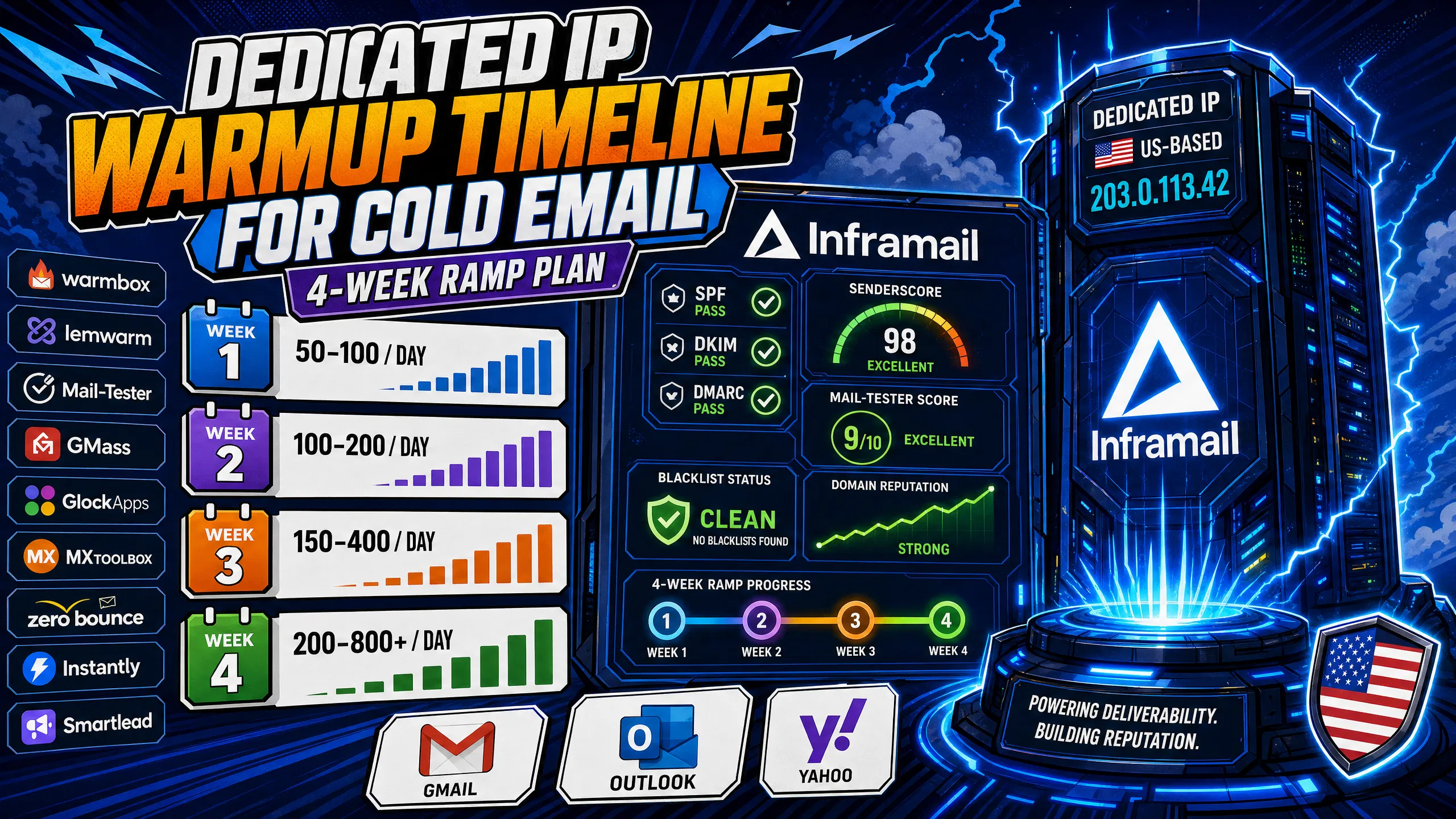
TL;DR: Warming a dedicated IP for cold email typically takes 15 to 60 days. Industry guidance recommends starting conservatively and ramping gradually, connecting each inbox to external warmup tools like Warmbox or Lemwarm, monitoring SenderScore and Mail-Tester regularly, and maintaining low bounce rates. Inframail automates SPF/DKIM/DMARC setup and provides dedicated US-based IPs on both plans: 1 IP on the Unlimited plan ($129/month) and 3 IPs on the Agency Pack ($327/month), so you spend time on campaigns instead of DNS panels.
A new dedicated IP carries no sending history, and inbox providers treat it as an unknown quantity, routing it to spam before a single campaign email is read. The fix is not a better subject line. It is a strict week-by-week volume ramp that builds enough positive engagement history for Gmail, Outlook, and Yahoo to trust your IP before you send a real campaign email.
Rush this and you burn the IP. Get it right and you have a clean, dedicated sending address that your agency controls entirely.
Most senders complete IP warmup within 30 days, though the full process can take anywhere from 15 to 60 days depending on list quality and send volume. Until that history builds, ISPs (Internet Service Providers) cap delivery and route unknown IPs straight to the spam folder.
Dedicated IP vs. shared IP for cold email
A dedicated IP is a sending address that belongs exclusively to your account or organization, so no one else's behavior affects your reputation. A shared IP pools multiple senders on the same address, meaning one bad actor in that pool can drag inbox placement rates down overnight.
Shared IP pools work like carpool lanes: your commute depends on every other driver. Inframail provides 1 dedicated US-based IP on the Unlimited plan and 3 on the Agency Pack, so your sending reputation stays isolated. Kidous Mahteme's dedicated vs. shared IP breakdown covers exactly why this separation matters at agency scale.
Key risks of skipping IP warmup
Skipping warmup or ramping too fast triggers the same response from every ISP: bulk foldering, then outright rejection. The infrastructure monitoring guide outlines the key health signals to track once you begin sending. Industry guidance suggests sustained bounce rates above 2% can act as spam signals that suppress email delivery, making list hygiene as critical as volume discipline during warmup.
This schedule represents a commonly recommended approach to total daily send volume across all inboxes on the IP. Industry guidance suggests starting conservatively and ramping gradually. Total duration runs 15 to 60 days depending on list quality and your sending capacity calculation. Many senders with clean, verified lists can reach higher volume within 30 days.
Warmup volume ramp:
Week | Days | Total daily sends | Goal |
|---|---|---|---|
1 | 1-7 | 50-100 emails/day | Build initial sending history |
2 | 8-14 | 100-200 emails/day | Increase engagement signals |
3 | 15-21 | 150-400 emails/day | Scale volume gradually |
4 | 22-30 | 200-800+ emails/day | Approach higher volume |
Week 1 (days 1-7): 50-100 emails/day
Industry guidance often recommends sending to your most engaged contacts first, specifically people who open, click, or reply consistently, as this can seed positive engagement signals that ISPs may interpret as proof the IP belongs to a legitimate sender. Keep warmup tool sends running in parallel via Warmbox or Lemwarm, as described in the inbox warmup guide.
Week 2 (days 8-14): 100-200 emails/day
Increase daily volume gradually, but only if week one shows healthy metrics: low bounce rates, minimal spam complaints, and no spam folder flags. Continue warming inboxes in parallel. Do not mix in cold prospects yet.
Week 3 (days 15-21): 150-400 emails/day
Your IP now has two weeks of positive history. You can start mixing in a small percentage of cold outreach, roughly 10-20% of total send volume, while keeping the majority going to engaged contacts. Run regular Mail-Tester checks to monitor email configuration health.
Week 4 (days 22-30): 200-800+ emails/day
By day 22, many senders have built enough reputation to support higher campaign volume. The full cold email infrastructure guide confirms many senders reach balanced warmup-to-campaign ratios by week four. Industry guidance often recommends continuing warmup tool sends permanently as a reputation buffer, as Lead Gen Jay's 100k/day breakdown recommends for sustained inbox placement.
Adjusting ramp speed by provider
Gmail weighs domain-level reputation heavily. Outlook enforces SPF, DKIM, and DMARC requirements for high-volume senders. If you see Outlook deferrals in week two, consider slowing down and verifying authentication records before resuming. The step-by-step Inframail setup tutorial covers both Gmail and Outlook compatibility in practice.
Inframail does not include a built-in warmup tool, so you need Warmbox or Lemwarm running alongside your campaign sends.
Setting up Warmbox for automated warmup
Connect each inbox using the IMAP/SMTP credentials exported from Inframail's CSV. Warmbox reportedly exchanges emails between a network of inboxes, generating open and reply signals that build sender reputation. Industry guidance typically recommends starting conservatively with low daily warmup volumes and gradually increasing as reputation builds.
Configuring Lemwarm alongside manual sends
Lemwarm connects via OAuth and reportedly auto-adjusts warmup volume based on deliverability signals. To connect inboxes to your sending platform, export the CSV from Inframail's Update tab and import directly to Instantly.ai or Smartlead using the Smartlead integration walkthrough, with IMAP/SMTP credentials ready to go.
Signs you need to pause warmup
Stop sends immediately if any of these signals appear:
Spam complaint rate exceeding 0.1% (Google's threshold) or 0.3% (Yahoo's threshold)
Bounce rate rising above 2%
IP appears on a major blacklist (Spamhaus, Barracuda, or SURBL)
Inbox placement rate dropping significantly on deliverability testing
Major deferral blocks from Gmail or Outlook
Tracking your IP's standing with inbox providers during the warmup period gives you early warning before issues affect campaign performance. The checks below cover the core areas to review on a consistent schedule.
SenderScore: weekly deliverability insight
SenderScore rates your IP on a 0-100 scale. A score of 80 or above indicates a solid sending reputation. Monitor it regularly during warmup. A significant drop in a short period signals you may need to slow volume and investigate complaint sources before continuing the ramp.
Verify inbox placement with Mail-Tester and GMass
Send a test email to Mail-Tester and check your configuration score. Use GlockApps for a cross-provider breakdown showing inbox vs. spam placement across multiple providers.
Daily blacklist checks for warmup IPs
Regular blacklist monitoring is critical during early warmup. Check your IP against MXToolbox Blacklist Lookup frequently during the first two weeks. Inframail's deliverability dashboard includes built-in blacklist monitoring and auto-submits delisting requests when flags appear, as detailed in the Inframail FAQ.
Four mistakes destroy new IP reputation faster than any other factor:
Rushing volume: Jumping to high daily sends before your reputation is established can overwhelm ISP trust algorithms and route you straight to spam. The deliverability guide for cold email confirms consistency beats speed every time.
Unverified lists: High bounce rates from invalid addresses in the first two weeks can damage a new IP's reputation. Verify every list with ZeroBounce before any warmup send, and compare tools in the verification tool comparison.
Missing authentication: Sending without correct SPF/DKIM/DMARC records can undermine trust signals from your very first email. Inframail auto-configures all three during domain setup, eliminating the manual copy-paste errors that cause authentication failures. Spencer Painter's bulletproof infrastructure guide shows exactly how authentication failures kill campaigns before they start.
High bounce rates: Industry guidance suggests sustained bounce rates above 2% can signal spam concerns. Maintain low hard bounce and soft bounce rates throughout all four weeks.
Use this checklist to run a clean 30-day ramp from domain purchase to full campaign volume.
Days 1-3: Initial sends and DNS verification
Purchase domains through Inframail or transfer existing ones
Confirm SPF, DKIM, and DMARC auto-configuration is complete
Export IMAP/SMTP credentials using the CSV download tab
Import CSV to Instantly.ai or Smartlead
Connect inboxes to Warmbox or Lemwarm at 3-5 warmup emails/day
Run Mail-Tester baseline check: target 9+/10
Days 4-7: Build sender reputation
Send 50 total emails/day to most engaged contacts only
Monitor bounce rate: keep hard bounces below 2%
Check SenderScore at end of week one
Confirm no blacklist flags via MXToolbox
Days 8-14: Adjust volume and optimize warmup
Increase to 150 emails/day if week one metrics are clean
Continue ramping warmup tool volume gradually
Run second Mail-Tester check and verify inbox placement via GMass test
Days 15-21: Ready for higher send volume
Increase to 400 emails/day
Introduce cold outreach at 10-20% of total volume
Monitor spam complaint rate: keep below 0.1%
Review spam detection metrics in the Inframail dashboard
Prevent blacklists at peak volume
Increase to 800+ emails/day
Maintain warmup tool sends running permanently as a reputation buffer
Check SenderScore regularly and run periodic infrastructure health audits
Provider | 50 inboxes/month | IP type | DNS setup | Warmup tool (est.) |
|---|---|---|---|---|
Inframail Unlimited | $129 + domains | Dedicated (1 IP) | Automated | $15-50/mo (external) |
Inframail Agency Pack | $327 + domains | Dedicated (3 IPs) | Automated | $15-50/mo (external) |
Google Workspace | $350-420 (50 x $7-8.40/inbox) | Shared pools | Varies | $15-50/mo (external) |
Maildoso | Platform fees vary | Infrastructure varies | Automated | $15-50/mo (external) |
Warmup tool costs apply to all providers. Tools like Warmbox and Lemwarm run approximately $15-50/month and are required regardless of which infrastructure provider you use.
On the Unlimited plan ($129/month), 50 inboxes cost $221-291/month less than Google Workspace's $350-420/month, or up to $3,492 saved annually. Agencies needing 3 dedicated IPs can move to the Agency Pack at $327/month, which still saves $23-93/month at 50 inboxes versus Google Workspace and delivers stronger reputation isolation across client campaigns. The how to warm up inboxes guide covers the full migration and warmup process for teams switching from any provider.
Agencies switching to Inframail report the operational impact goes beyond cost savings.
"InfraMail makes it remarkably easy to purchase domains, configure them correctly, create inboxes, and initiate warm-up immediately. The level of automation is exceptional and clearly designed for serious operators; it removes friction and allows you to focus on execution rather than setup." - Verified user review of Inframail
Inframail's Unlimited plan gives you dedicated IP infrastructure, automated SPF/DKIM/DMARC setup, and flat-rate pricing at $129/month, so you can run a clean 4-week warmup ramp without managing DNS panels or paying per-seat fees. Sign up to Inframail and get started today.
Can you warm multiple dedicated IPs in parallel?
Yes, but standard practice typically requires each IP to follow its own independent warmup schedule. Plan your ramp timeline separately per IP, as volume on one IP generally does not build reputation for another.
What if my SenderScore drops during warmup?
Reduce daily volume immediately, verify list quality, and re-check SPF/DKIM/DMARC authentication before resuming. Do not increase volume again until SenderScore stabilizes at a healthy level for several consecutive days.
Can you reach 1,000+ daily sends in under 4 weeks?
Attempting to hit 1,000+ sends too early in the warmup process can trigger ISP filtering and reduce inbox placement rates. Gradual warmup schedules exist because consistent positive engagement history built over time is essential for reputation building.
How do you handle manual warmup without a tool?
Send to your most engaged contacts in small daily batches, track opens and replies in a spreadsheet, and increase volume gradually. Manual warmup can work for a small number of inboxes but becomes challenging to manage at scale without Warmbox or Lemwarm automating the process.
How long does dedicated IP blacklist recovery take?
Spamhaus typically processes removals once the underlying issue is resolved, with timeframes varying by list type. Inframail's dashboard auto-submits delisting requests, as detailed in the Inframail FAQ.
Dedicated IP: A unique sending IP address exclusively allocated to your account or organization, where your sending behavior alone determines your reputation with inbox providers. Inframail includes 1 dedicated US-based IP on the Unlimited plan ($129/month) and 3 on the Agency Pack ($327/month).
DNS propagation: The time it takes for updated DNS records (SPF, DKIM, DMARC) to spread across global DNS servers after a change, typically completing in 15 minutes to 48 hours. Inframail auto-configures these records at domain setup to eliminate propagation errors.
Inbox placement rate: The percentage of sent emails that land in the recipient's primary inbox rather than the spam or promotions folder, typically measured via deliverability testing tools like GMass or GlockApps.
SenderScore: A 0-100 reputation score assigned to your sending IP that reflects your sending reputation with inbox providers. A score of 80 or above indicates a solid sending reputation ready for full campaign volume.