
Cold email sequence best practices: what top senders do differently
High-performing cold email sequences depend on short, direct copy and technically sound infrastructure working together. Reply-rate problems commonly trace back
TL;DR: High-performing cold email sequences depend on short, direct copy and technically sound infrastructure working together. Reply-rate problems commonly trace back to infrastructure failures like unwarmed domains, missing or broken DNS records (SPF, DKIM, DMARC), inboxes overheated from too many sends per day, and domains aged out from prolonged high-volume use. Top senders keep email bodies in the 50-to-125-word range, spread volume across multiple domains on dedicated IPs, and automate SPF, DKIM, and DMARC setup to protect sender reputation from day one. Inframail's flat-rate model at $129/month for unlimited inboxes gives campaign managers the infrastructure to run these practices at scale without per-inbox cost penalties.
Most cold email advice focuses entirely on copywriting. The problem is that even a perfectly written email fails when it lands in spam or gets sent from a domain with misconfigured DNS records. Dedicated IPs remove the shared-reputation variable entirely.
Top senders treat sequence design and technical infrastructure as one unified system, and the practices below reflect exactly that.
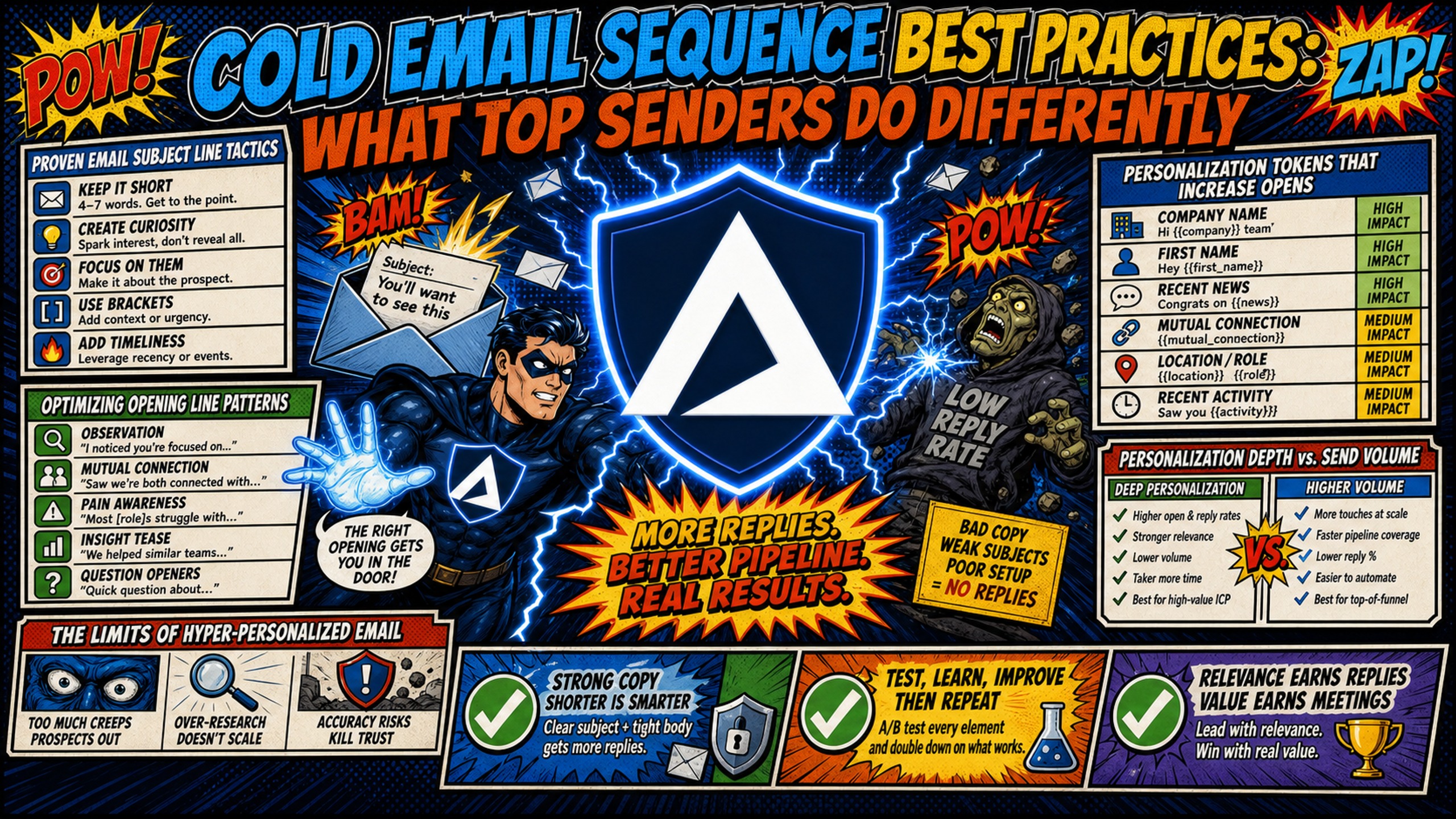
Proven email subject line tactics and body length
Average senders write whatever feels complete. Top senders treat length as a variable they actively control.
Subject line length directly shapes whether a prospect opens your email. A study of 5.5 million emails found 2-to-4-word subject lines hit 46% open rates, with performance dropping sharply beyond 7 words. Keep the core message in the first 40 characters, since mobile clients truncate well before desktop. For cold outreach, keep subject lines to 2-4 words and always write them in lowercase.
Body copy follows the same logic. Boomerang found that messages between 50 and 125 words all drew response rates above 50%, with response rates declining steadily beyond 125 words. Three to four sentences is the sweet spot, and five sentences is the practical upper limit before response rates fall.
Personalization tokens that increase opens
Use {{first_name}} and {{company_name}} in the body, not the subject line. Adding the prospect's name to a subject line raised open probability by 20% in a Stanford and Chicago Booth field experiment, but token-heavy subject lines read as automated marketing rather than direct outreach. Reserve company-specific references for the opening line, where they carry the most weight.
All-lowercase subject lines tend to outperform Title Case because they read like internal mail rather than marketing, a pattern Gong found across 85 million cold emails. Results vary by dataset, so test it on your own list. ALL CAPS reduces open rates and raises spam complaint risk, so avoid it.
Optimizing opening line patterns
The opening line appears in the email preview pane before the prospect clicks, and that preview determines whether they open or delete.
Patterns that consistently produce replies start with a direct observation about the prospect, not a pleasantry about the sender. Avoid "hope this finds you well," "my name is," or "I'm reaching out because." Instead, use patterns like "Noticed your team recently expanded your [department]" or "Saw you launched [specific initiative]."
Personalization depth vs. send-volume trade-off
Deep personalization (15 minutes of research per prospect) caps daily output at 20-30 emails per sender. Campaigns targeting fewer than 50 recipients average a 5.8% reply rate, nearly three times the 2.1% seen in large blasts, confirming that tight targeting matters more than deep research on every individual. The practical approach is semi-personalization: use company-level signals (recent funding, hiring trends, product launch) with token-based customization, then spread volume across multiple domains to protect deliverability without sacrificing output. The Inframail cold email legality guide covers compliance considerations when scaling volume this way.
The limits of hyper-personalized email
The sections below cover where deeper personalization effort stops returning proportional gains and what to focus on instead.
Personalization ROI in cold sequences
Data quality and targeting precision compound faster than hyper-personalization effort. The gap between top and bottom performers in cold email comes down to list accuracy, targeting specificity, and sending infrastructure, not whether each email took 15 minutes to write. Verified email lists achieve roughly 2x the reply rate of unverified lists at the same level of personalization effort. Put research time into building a tighter target account list rather than crafting bespoke paragraphs for every recipient.
Choosing effective CTAs
The sections below cover CTA structure, meeting booking placement, and how link tracking choices affect whether your message reaches the inbox.
Single vs. multi-CTA impact on replies
Average senders include multiple CTAs to give prospects options. Top senders pick one and build the entire email around it.
Multiple CTAs in a single email divide the prospect's attention and lower the probability of any action. One clear, binary CTA produces higher reply rates than three options. The Inframail CTA guide video covers six CTA formats ranked by reply performance. Pick one CTA per email and build the entire body to support it.
Meeting booking rates by CTA design
Interest-based CTAs ("Worth a quick look?" or "Open to a 10-minute call this week?") outperform direct booking link drops in initial outreach. A Calendly link in the first email signals that you've already assumed the prospect is interested, which creates friction and reduces replies. Reserve direct booking links for follow-up steps after a prospect has responded positively.
How link tracking affects deliverability
Shared tracking domains accumulate spam flags from other users on the same platform. If the sending platform's default tracking domain gets flagged, your emails take the hit even when your own sending behavior is clean. Use custom tracking subdomains per sending domain to isolate tracking reputation.
Plain-text CTAs with no hyperlinks in the first email remove tracking domain risk from the equation and produce cleaner scores in spam filter testing. The Inframail spam health metrics guide covers how to test for this before a campaign goes live.
Optimizing sequence length
The sections below cover how many steps a sequence should run, how to space follow-ups, and how to read reply rate decay across a sequence.
Ideal step count
Average sequences run until the sender gives up. Top senders cap at 5 steps, because the bulk of replies land in the first ten days.
Most sequences should run 4 to 5 steps. Enterprise sequences with multiple stakeholders can justify 6 to 7. Reply rates drop sharply after step 3. The widening-gap cadence below spreads the same touches slightly further to reduce spam complaint risk.
Steps 4 and 5 function as clean-up touchpoints for slow responders. Steps 6 and beyond serve to keep a door open rather than generate meaningful new volume, and extending further risks accumulating spam complaints without proportional reply return.
Timing follow-ups for higher replies
A widening gap cadence spaces follow-ups progressively to avoid spam complaints while staying visible in a busy inbox:
- Step 1: Day 1 (initial send)
- Step 2: Day 3 (2-day gap)
- Step 3: Day 7 (4-day gap)
- Step 4: Day 14 (7-day gap)
- Step 5: Day 21 (7-day gap)
A single follow-up lifts total replies by 65.8% according to Backlinko and Pitchbox's analysis of 12 million outreach emails, so send it on every sequence.
Reply rate decay by step
The majority of replies come from steps 1 and 2. Step 3 catches a meaningful secondary batch, and steps 4 and 5 together produce less than 15% of the total reply volume a sequence generates. Track positive reply rate (prospects who show interest) separately from total reply rate (which includes opt-out responses). A pattern of open rate below 30%, reply rate below 2%, and bounce rate above 2% signals domain health issues rather than copy problems, so fix infrastructure before rewriting subject lines.
Setting up infrastructure to improve inbox placement
The sections below cover DNS authentication, warmup phases, list verification, daily volume limits, IP strategy, and cost structure for campaign managers running sends at scale.
Required DNS records
Average senders configure DNS records after deliverability problems appear. Top senders authenticate every domain before a single email goes out.
Subject line and body copy become irrelevant if your email never reaches the inbox. SPF, DKIM, and DMARC records form the authentication foundation that receiving servers check before deciding where to place your message. SPF declares which mail servers are authorized to send from your domain, DKIM adds a cryptographic signature to verify the message was not altered in transit, and DMARC tells receiving servers what to do when either check fails. These three protocols work together to protect domain reputation and ensure messages pass authentication checks.
Inframail configures all three records automatically during domain setup, removing manual DNS panel work entirely. The Inframail infrastructure monitoring guide covers how to track domain health after setup.
DNS setup steps for inbox health
Manual DNS configuration for a batch of 10 new domains on a traditional registrar follows this sequence:
- Log into the registrar DNS panel for each domain and open the DNS editor.
- Add the SPF TXT record to authorize the sending server.
- Add the DKIM TXT record (a long public key string) to the DNS zone.
- Add the DMARC TXT record with an enforcement policy (p=none to monitor, p=quarantine or p=reject to enforce).
- Verify each record using a tool like MXToolbox. Propagation typically takes 15 minutes to 2 hours but can extend to 48 hours.
At 50 domains, that process runs to 12+ hours of manual work according to Inframail. Inframail automates DNS configuration at provisioning, and exported IMAP/SMTP credentials drop directly into a CSV for import into Instantly or Smartlead, as detailed in the Inframail to Smartlead integration guide.
How long to warm up new inboxes
Average senders launch campaigns the day a domain goes live. Top senders treat the 21-28 day warmup phase as a non-negotiable prerequisite.
New inboxes typically require 21 to 28 days of warmup before active campaign sending. Start at 5-10 emails per day and scale gradually to 30-50 daily sends per inbox over that period. Inframail does not include a built-in warmup tool.
External tools like Warmbox or Lemwarm handle warmup for inboxes on Inframail's platform. The Inframail inbox warmup guide covers the warmup process for inboxes migrated to Inframail's platform.
Warmup monitoring requires tracking three metrics: bounce rate (target below 2%), spam complaints (below 0.1%), and open rate (above 20% as a floor). Increase over 3-4 weeks (21-28 days) until each inbox reaches full sending capacity. Domains launched before completing warmup trigger behavioral flags that persist for weeks and delay active campaigns.
Vetting your lead data for deliverability
Average senders import a list and start sending. Top senders verify every address before the first email leaves the inbox.
A bounce rate above 2% signals to receiving servers that list quality is poor, and that signal persists against the sending domain long after you clean the list. Use a tool like ZeroBounce or NeverBounce to verify your list before importing into your sending platform. The Inframail comparison of ZeroBounce and NeverBounce covers which tool fits which use case. Target bounces below 2% on every campaign and spam complaints below 0.1%.
Calculating safe daily message limits
The formula is straightforward: Total Daily Volume ÷ (Emails per Inbox × Inboxes per Domain) = Domains Needed. For 1,000 emails per day at 35 sends per inbox and 2 inboxes per domain, you need approximately 15 domains. The Inframail sending capacity guide walks through this calculation for different plan configurations. Scaling volume means adding more inboxes and domains, not pushing existing inboxes past their safe threshold.
Safe sending limits for healthy inboxes
Keep daily volume at 30-50 emails per inbox after warmup completes. The Unlimited Plan on Inframail supports up to 80,000 cold emails per month (roughly 3,600 per workday). The Agency Pack at $327/month supports up to 300,000 per month across 3 dedicated IPs. Pushing volume beyond 50 emails per inbox per day on a warmed inbox triggers inbox-level spam filter signals that erode domain reputation over time.
IP strategy for email deliverability
Average senders accept shared IP pools as the default. Top senders isolate their reputation on dedicated IPs where their own sending behavior alone determines inbox placement.
Shared IP pools expose your sender reputation to the behavior of every other user on the same pool. One bad actor on a shared range gets the entire pool flagged, affecting campaigns that have nothing to do with the violation. Dedicated IPs isolate your reputation so your sending behavior alone determines ESP trust.
Cost per inbox at 50 domains
Inframail's infrastructure achieves a 98%+ deliverability rate and a 68.3% blacklist delisting success rate within 48 hours. The Inframail dedicated vs. shared IP guide covers how this plays out in practice across different sending volumes.
For campaign managers running 50+ domains across multiple client accounts, the cost comparison is direct. Google Workspace Flexible Plan at $8.40/user/month runs $420/month for 50 inboxes. Inframail's Unlimited Plan costs $129/month flat, regardless of inbox count.
The Agency Pack includes 3 dedicated IPs. Domain costs ($5-16/year per domain) and warmup tool costs ($15-50/inbox/month) apply on both sides.
2026 cold email benchmarks
Table 1: 2025-2026 cold email performance benchmarks
Source: cleanlist.ai 2026 cold email statistics
| Metric | Industry average | Top performers |
|---|---|---|
| Open rate | 42% | 65%+ |
| Reply rate | 3.1% | 8-12% |
Published 2026 benchmarks vary widely across datasets, reflecting differences in list size, targeting precision, and sending volume.
Note: Apple Mail Privacy Protection pre-loads tracking pixels and inflates open rate figures across all senders, so treat open rate as directional only.
Table 2: Total cost model comparison across 50, 100, and 200 inboxes
| Cost variable | Google Workspace (Flexible Plan) | Inframail (Unlimited Plan) |
|---|---|---|
| Platform fee - 50 inboxes | $420.00/mo ($8.40/seat) | $129.00/mo (flat rate) |
| Platform fee - 100 inboxes | $840.00/mo ($8.40/seat) | $129.00/mo (flat rate) |
| Platform fee - 200 inboxes | $1,680.00/mo ($8.40/seat) | $129.00/mo (flat rate) |
| Sending platform (e.g., Instantly, Smartlead) | Market rate - applies equally to both | Market rate - applies equally to both |
| Domain costs | $5.00 - $16.00/yr per domain | $5.00 - $16.00/yr per domain |
| Warmup tools | External tool required | External tool required ($15-50/inbox/month) |
Domain costs ($5-16/year per domain), warmup tool costs ($15-50/inbox/month), and sending platform fees apply to both platforms and are not included in the platform cost rows above.
Sequence drafting checklist
Copy and paste before every send:
- Subject line is 2-4 words and lowercase.
- Email body is under 5 sentences (50-to-125-word range).
- Contains exactly one low-friction, interest-based CTA.
- Sent in plain-text format (no HTML or heavy formatting).
- Custom tracking domain is configured (if using link tracking).
- SPF, DKIM, and DMARC records are verified on the sending domain.
- Inbox has completed a minimum 21-28 day warmup period.
- Daily send volume stays at or below 50 emails per inbox.
- List has been verified for bounces (target below 2%).
Getting the infrastructure right removes the biggest variable between a good sequence and one that never gets seen. One Inframail user described the operational difference directly:
"The setup is ridiculously fast. SPF, DKIM, DMARC, forwarding - all handled in literally seconds without me having to dig through docs or guess what records to add. Unlimited inboxes on a flat price? That alone saves me hundreds every month compared to Google Workspace or similar." - Verified user review of Inframail
Start sending on infrastructure built for cold email
Inframail is a flat-rate Microsoft email infrastructure platform for agencies and campaign managers running 50-200 cold email domains. It automates SPF, DKIM, and DMARC configuration at provisioning, includes 1 to 3 dedicated US-based IPs depending on plan, and holds the platform fee at $129/month regardless of inbox count. Domain and warmup costs apply separately. Inframail provisions Microsoft inboxes only. Teams that need Google Workspace inboxes specifically should factor that in.
In this case study, Jake, founder of Quantum Flow AI, shares how using Inframail for cold email infrastructure improved deliverability, generated dozens to hundreds of leads, and helped clients book dozens of meetings.
Sign up to Inframail and get started today.
FAQs
What are the benchmark reply rates for cold email in 2026?
Published 2026 benchmarks put the B2B cold email average between roughly 3% and 5%, with variation across datasets reflecting differences in list size, targeting precision, and sending volume. Top-decile senders reach 8% to 12% through tighter targeting, verified list hygiene, and dedicated IP infrastructure.
How many domains do you need to send 1,000 cold emails per day?
At 35 emails per inbox per day with 2 inboxes per domain, you need approximately 15 domains to reach 1,000 daily sends safely. Each additional 1,000 daily sends requires approximately 15 more domains.
When should you pause a cold email campaign?
Pause immediately if bounce rate exceeds 2% or spam complaints exceed 0.1%, as both signals indicate domain reputation damage that compounds the longer sending continues. Fix the infrastructure issue before changing any copy.
How does A/B testing affect deliverability?
Run copy variants across identical sending infrastructure (same inboxes, same IP, same send windows) to isolate copy performance from infrastructure variables. Track positive reply rate rather than open rate to avoid Apple Mail pixel preloading distortions.
Does Inframail integrate with Instantly and Smartlead?
Inframail exports IMAP/SMTP credentials to CSV after inbox provisioning, and that CSV imports directly into Instantly, Smartlead, and other sending platforms. The full workflow is documented in the Inframail to Smartlead integration guide.
What is the full monthly cost of running 50 inboxes on Inframail vs. Google Workspace?
On the Inframail Unlimited Plan, the platform fee is $129/month flat. Google Workspace Flexible Plan runs $8.40/user/month, putting 50 inboxes at $420/month in platform fees alone, with domain costs ($5-16/year per domain) and warmup tool costs ($15-50/inbox/month) applying to both sides.
Key terms glossary
SPF (Sender Policy Framework): A DNS TXT record that tells receiving servers which mail servers are authorized to send email from your domain. Missing or misconfigured SPF causes messages to fail authentication checks and land in spam.
DKIM (DomainKeys Identified Mail): A cryptographic signature added to outgoing emails that allows receiving servers to verify the message originated from your domain and was not altered in transit.
DMARC: A policy record that instructs receiving servers how to handle emails that fail SPF or DKIM checks, with three enforcement levels: monitor (p=none), quarantine, or reject.
ESP (Email Service Provider): A platform or service that provides email infrastructure for sending, receiving, and managing email campaigns at scale.
Dedicated IP: An IP address assigned exclusively to a single sender, ensuring that no other sender's behavior affects your sending reputation or inbox placement rates.
Warmup: The process of gradually increasing sending volume from a new domain or inbox over 21-28 days to build a positive sending reputation before launching full campaigns.
IMAP (Internet Message Access Protocol): A protocol that allows email clients to access and manage messages stored on a mail server, enabling multiple devices to sync the same inbox.
SMTP (Simple Mail Transfer Protocol): The protocol used to send email messages between mail servers and from email clients to mail servers.
Inbox placement rate: The percentage of sent emails that land in the recipient's primary inbox rather than spam or promotions folders, distinct from delivery rate which only confirms the server accepted the message.