
Cold email follow-up reminder: when and how to send
Most cold email replies arrive after the first send, not on it. A study of 12 million outreach emails found a single follow-up produces 65.8% more replies than
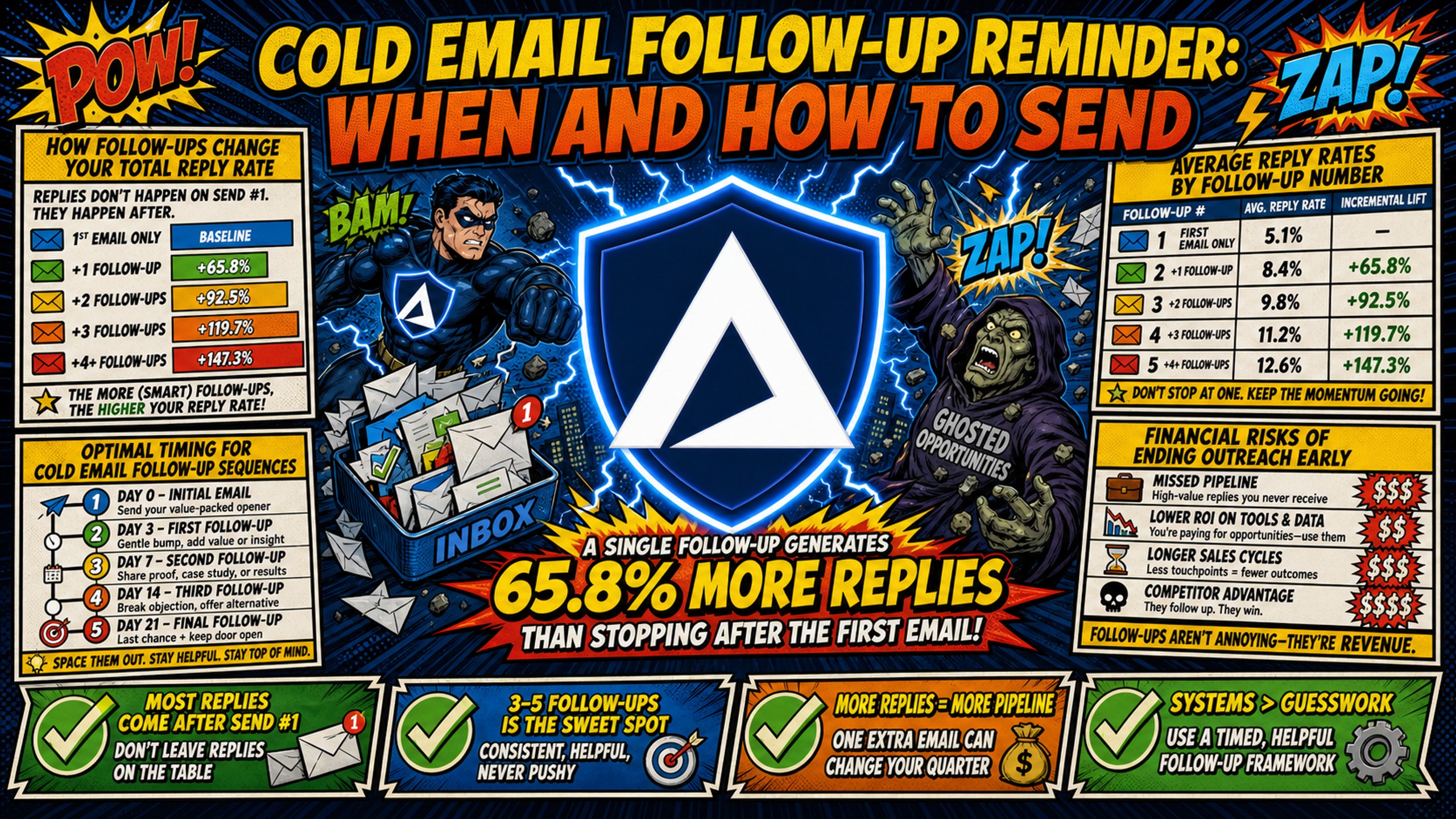
TL;DR: Most cold email replies arrive after the first send, not on it. A study of 12 million outreach emails found a single follow-up produces 65.8% more replies than a one-touch send, and one agency benchmark puts a 4-touch sequence (day 0, 3, 7, 14) at 4.9% cumulative reply rate against 1.9% for a single touch. Thread every follow-up under the original subject line and make each one add something new. The cost catch is volume: four touches put four times the sending volume through your infrastructure, and Google Workspace at $350 to $420/month for 50 inboxes scales with it. Flat-rate infrastructure holds the same 50 inboxes at $163/month all-in, with warmup tools additional on both sides.
Adding a structured follow-up sequence to a cold email campaign increases your total replies. Yet most agencies stop after one send, either because scaling the inbox infrastructure eats their margin or because manual DNS setup creates a bottleneck that can't clear fast enough to keep up with new clients.
This guide covers the exact timing, copy frameworks, and deliverability hygiene needed to run follow-up sequences that generate replies without flagging spam filters, plus the infrastructure math, because follow-ups multiply sending volume and that has a direct cost attached to it.
How follow-ups change your total reply rate
Cold outreach rarely converts on the first touch. A study of 12 million outreach emails found that a single follow-up produces 65.8% more replies than a one-touch send, and that sequences of three or more messages deliver the best overall response rate. The same study puts the baseline reply rate across all outreach emails at 8.5%.
That gap between a single send and a full sequence is where most agencies leave meetings on the table. A prospect may have seen the first email, found it relevant, and simply moved on without replying. A timed follow-up sent with new context brings that prospect back into the conversation without requiring new list acquisition or additional domain spend.
Average reply rates by follow-up number
One agency benchmark drawn from 47 client accounts puts a single touch at 1.9% cumulative reply rate and a full 4-touch sequence at 4.9%. The table below reflects that distribution across touches:
| Touch | Timing | Cumulative reply rate |
|---|---|---|
| Touch 1 | Day 0 | 1.9% |
| Touch 2 | Day 3 | 3.3% |
| Touch 3 | Day 7 | 4.3% |
| Touch 4 | Day 14 | 4.9% |
These are directional figures from one agency's published dataset, not a category standard. What holds up across larger samples is the direction: each follow-up captures a smaller share of replies than the one before it, and the cumulative gain still more than doubles a single-touch campaign.
Financial risks of ending outreach early
Every domain you purchase and warm up carries an upfront cost. If you stop outreach after one email, you recover roughly 40% of the reply value from that domain investment, which makes the effective cost-per-reply more than twice what it needs to be.
For an agency running 50 domains at $5 to $16 per domain per year plus a $129/month platform fee, each domain needs to carry its full reply-rate potential across the sequence to justify the outlay. Stopping early doesn't cut costs, it inflates cost-per-reply on infrastructure you've already paid for.
Optimal timing for cold email follow-up sequences
The spacing between follow-ups determines whether your sequence feels like a relevant reminder or spam. A 3-day gap before the first follow-up is the common practitioner default, long enough for the original email to resurface without reading as pressure.
A prospect who doesn't reply in the first 24 hours has not rejected your message. They've deprioritized or buried it. Waiting 3 days gives the original email time to re-surface in their mental queue while maintaining context.
| Day | Action | Email type | Goal |
|---|---|---|---|
| Day 0 | Initial email | Full pitch | First impression |
| Day 3 | Follow-up 1 | Short nudge | Re-surface thread |
| Day 7 | Follow-up 2 | Value-add | Build trust and relevance |
| Day 14 | Follow-up 3 | Break-up | Final conversion push |
| Day 15+ | Stop | Archive | Protect domain health |
Day 3: Timing your first email bump
The day 3 follow-up is a low-friction nudge that re-opens the original thread. Keep it short, two to three sentences, no new attachments, and no hard CTA. The goal is to re-enter the prospect's inbox at a moment when the original email is still recognizable.
Day 7: Adding utility to follow-ups
The day 7 email transitions from a nudge to a value-add. Include a relevant resource, a short case study, or a specific insight tied to the prospect's industry. A prospect who ignored the first two emails may engage here if the new content is genuinely relevant to a problem they're actively dealing with.
Day 14: Ending your cold email sequence
The day 14 email is the break-up. Keep it brief, acknowledge that the timing may not be right, and leave the door open without pressure. Removing the obligation to respond with a yes is what makes this touch work, and the mechanics are covered in the templates section below. Stop the sequence here, since each additional touch adds complaint risk against the 0.3% spam complaint ceiling that inbox providers enforce.
Why the 3-7-14 cadence protects deliverability
The 3-7-14 cadence captures the majority of replies within the first two weeks while maintaining strict deliverability hygiene. Spacing the sequence this way keeps daily sending volume per inbox manageable and avoids the spike patterns that trigger inbox provider filters. Each email should go out during business hours in the prospect's local timezone to improve the chance of landing at the top of their inbox during a working session.
Preventing spam filter triggers in follow-ups
High-frequency follow-up sequences multiply total sending volume. A 4-touch sequence puts four times the outbound volume through your inbox infrastructure compared to a single send. Google and Yahoo have both enforced requirements for SPF, DKIM, and DMARC authentication from bulk senders since February 2024, and non-compliant emails face temporary and permanent rejections.
Pre-campaign deliverability checklist:
- SPF record configured and verified for each sending domain
- DKIM record active and passing alignment checks
- DMARC policy configured with at least p=none, and passing
- The domain in the From: header aligned with either the SPF domain or the DKIM domain
- Sending domain not listed on any major blacklist (MXToolbox, Spamhaus)
- Daily send volume per inbox capped at 40 emails, split 70% warmup and 30% campaign, giving 12 campaign emails per inbox per day
- Domain warmup completed before campaign start (requires an external tool)
- Avoid spam trigger keywords in subject lines or body copy
- Avoid PDF attachments in initial or first follow-up touches
- Keep follow-up threads under original subject line (no new subject)
- Unsubscribe mechanism active and functional
Run this audit across all sending domains weekly, not just at launch. A blacklisted domain degrades deliverability and can affect campaign performance across your infrastructure. For a full health monitoring framework, the Inframail infrastructure monitoring guide covers the alert workflows in detail.
Thread follow-ups under the original subject line
Threading follow-up emails under the original subject line keeps the conversation context intact for the prospect and signals to inbox providers that this is a reply, not a new mass send. Keeping the subject consistent also reduces the signal load that triggers content-based filters. A follow-up that arrives under a fresh subject line reads as a second cold email rather than a continuation of the first.
Remove high-risk spam keywords
Words like "free," "guarantee," "act now," and "100% satisfied" are commonly flagged as spam triggers by content filters. Modern inbox providers score trigger words alongside sender reputation and recipient engagement history. Individual content rules carry small scores against the filter's overall threshold, so trigger words matter in combination rather than individually, and an otherwise clean email rarely crosses the threshold on one phrase alone.
Stagger follow-up sends for inbox health
Distribute follow-up volume across multiple inboxes rather than sending all day 3 follow-ups from one address in a single morning. This is domain rotation in practice: spreading volume across domains and inboxes so no single sender exceeds a safe daily ceiling. A practical ceiling is 40 emails per inbox per day including warmup, which leaves 12 campaign emails per inbox per day. Platforms like Smartlead or Instantly handle this staggering automatically, and connecting Inframail to Smartlead via CSV export is a common setup for agencies managing multiple client sequences.
That 12-email figure is the number that sizes your infrastructure. To find the inbox count a sequence needs, divide daily campaign volume by 12. A campaign sending 2,500 emails a day needs 209 inboxes, not the 50 to 80 a higher per-inbox assumption would suggest.
Keep attachments out of early touches
Attachments from unknown senders are scanned and filtered more aggressively than plain text, so early touches are the wrong place for them. Reserve attachments for later conversations where the prospect has already shown intent. An attachment in a day 3 follow-up compounds any keyword risk already present in the body copy, and modern inbox providers score both content and sending behavior together. Nick Abraham's 2026 deliverability breakdown covers how this dual scoring works in current campaigns.
Win back prospects with targeted value offers
The fastest way to kill a cold email sequence is to "bump" the same message repeatedly. A follow-up that repeats the original ask gives the prospect no new reason to reply. The value-add framework replaces the bump with a specific, relevant offer tied to a problem the prospect is likely facing.
Prove value with real campaign data
Share a specific result from a comparable client rather than a vague claim. A line like "We helped a [industry] company book [X] meetings in [Y] days using this exact approach" gives the prospect a concrete reference point. Fill the brackets with results you can actually stand behind, and pair the claim with a named outcome rather than a generic "we deliver results" statement.
Provide a relevant resource link
Link to an ungated resource that solves a specific problem for the prospect: a short article, a benchmark report, or a one-page framework. This positions the follow-up as genuinely useful, reduces the cognitive friction of a reply, and builds trust before a sales conversation starts. For example, sharing Inframail's infrastructure cost comparison works well if the prospect is evaluating per-inbox spend.
Use industry benchmarks as a hook
Industry-specific benchmarks make strong follow-up hooks. "The average agency in [niche] sees a [X]% reply rate from cold email. Our clients in the same niche are hitting [Y]%."
That specificity forces the prospect to evaluate their own performance against a real benchmark, which creates a reason to respond that has nothing to do with pressure. Use figures from your own campaigns, not numbers borrowed from a vendor's marketing page. The Inframail video on reply-rate CTAs covers how to structure this kind of data-driven offer effectively.
Use permission-based follow-ups
Asking for permission to send a resource ("Can I send you a 2-minute breakdown of how we did this?") reduces the perceived commitment of replying. The prospect isn't agreeing to a sales call, they're agreeing to receive information. This is why practitioners reach for permission framing on prospects who opened but did not click.
Cold email follow-up sequence templates
The templates below cover each touch in a 4-touch sequence, from the day 3 nudge through to the day 14 break-up.
High-response B2B follow-up templates
Day 3 (Nudge):
Subject: (leave blank, reply to original thread)
"Hi [First Name], wanted to make sure this didn't get buried. Any interest in a quick 15-minute call this week? [Your name]"
Day 7 (Value-Add):
Subject: (leave blank, reply to original thread)
"Hi [First Name], thought this might be relevant to what you're working on: [link to resource or case study]. Agencies in [niche] have been using this approach to hit [specific result]. Worth a quick chat? [Your name]"
Day 14 (Break-Up):
Subject: (leave blank, reply to original thread)
"Hi [First Name], I'll stop reaching out after this. If the timing isn't right, no worries at all. If you ever want to revisit, my calendar link is below. Either way, best of luck with [relevant company initiative]. [Your name]"
The logic behind the break-up email
The break-up email works because it removes the pressure of the sales context entirely. Framing the final touch as "I'll stop reaching out after this" gives the prospect a reason to respond now rather than continuing to defer. Many cold email practitioners report that the break-up email generates a higher reply rate than the day 7 follow-up, precisely because the prospect feels the window closing.
Loading sequences into your sending platform
All three templates can be loaded directly into Smartlead or Instantly as automated sequence steps with send delays set to 3, 7, and 14 days. Inframail's Smartlead integration guide covers the exact CSV import format for inbox credentials, so the full sequence runs from provisioned inboxes without manual configuration. Aaron Shepherd's cold email campaign walkthrough covers how to structure these sequences in Instantly for high-volume multi-client campaigns.
Benchmark reply rates for follow-up emails
Use this scorecard to measure campaign health at each stage. If any stage falls below the benchmark range, troubleshoot copy before adjusting timing.
| Stage | Benchmark reply rate | Action if below benchmark |
|---|---|---|
| Initial email (Day 0) | 1.9% (40% of sequence replies) | Revise subject line and first sentence |
| Follow-up 1 (Day 3) | +1.4 points | Shorten email, reduce friction |
| Follow-up 2 (Day 7) | +1.0 points | Improve value-add relevance |
| Follow-up 3 (Day 14) | +0.6 points | Test different break-up framing |
| Cumulative (full sequence) | 4.9% | Audit list quality and deliverability |
Benchmark ranges reflect one agency's published 47-client dataset and are directional, not a category standard.
Critical mistakes ruining your response rates
The following mistakes are the most common reasons cold email sequences fail to generate replies or damage domain health.
Limit follow-ups to protect domain health
Sequences of three or more touches produce the best overall response rate, and this guide stops at four to keep complaint rates inside the ceiling inbox providers enforce. Yahoo tells senders to keep spam rates below 0.3%, and exceeding that level can lead to spam placement or blocking.
At agency scale, running 50 to 200 domains means a single sending domain above 0.3% can drag down performance across the whole campaign. That makes per-domain health monitoring a baseline requirement, not an optional step.
Keep the subject line consistent
Changing the subject line mid-sequence breaks threading context and signals a new send to inbox providers rather than a follow-up. This increases the likelihood of the follow-up landing in promotions or spam rather than the primary inbox. Keep all follow-ups threaded under the original subject line unless the sequence is starting fresh with a new angle.
Cut pushy language from reminders
Aggressive language in follow-ups, anything that sounds pushy, demanding, or emotionally manipulative, reduces engagement and increases complaint rates. Spam filters are trained to catch this kind of tone, and when copy sounds exaggerated or coercive, it can trigger automated content scoring as well as manual flags from prospects who report the message directly.
User complaints are what inbox providers actually measure, which is why a reported message costs more than a filtered one. One prospect hitting the spam button moves a metric that a content filter alone does not. The Inframail video on cold email failure patterns covers 37 specific mistakes that kill campaign performance, including the tone patterns that lead to manual flagging.
Monitor every domain individually
Every domain in your infrastructure needs individual health monitoring. A single blacklisted domain bleeds deliverability across the entire campaign if it's sharing sending volume with healthy domains. Inframail's deliverability monitoring dashboard tracks domain and IP health with blacklist monitoring, and the platform auto-submits delisting requests when domains are flagged, at a 68.3% delisting success rate.
The dedicated IP structure matters here. Shared IP pools mean one sender's poor practices can affect every user on that IP range. Inframail's Unlimited Plan gives each account 1 dedicated US-based IP, and the Agency Pack includes 3, so your sending reputation reflects only your own campaigns.
Infrastructure costs at follow-up scale
Running a 4-touch sequence across 50 inboxes generates four times the sending volume of a single email. That volume multiplication makes per-inbox pricing expensive fast.
| Inboxes | Google Workspace | Inframail (platform + domains) | Monthly savings |
|---|---|---|---|
| 50 | $350 to $420/mo | $129 + ~$34 domains = $163/mo | $187 to $257/mo |
| 100 | $700 to $840/mo | $129 + ~$68 domains = $197/mo | $503 to $643/mo |
| 200 | $1,400 to $1,680/mo | $129 + ~$135 domains = $264/mo | $1,136 to $1,416/mo |
Note: domain costs shown are annual registration fees ($5 to $16/year) amortized monthly. Warmup tools cost $19 to $49/month per inbox and are additional on both sides, though flat-rate warmup tools covering unlimited inboxes cost considerably less at this volume. Sending platform costs (typically $37 to $147/month regardless of inbox count) are also additional and identical on both sides. Inframail does not include built-in warmup, and external warmup guidance is available in the Inframail help center.
"Unlimited inboxes on a flat price? That alone saves me hundreds every month compared to Google Workspace or similar." - Verified user review of Inframail
At 200 inboxes, Inframail's flat-rate model saves over $1,100/month compared to Google Workspace base costs, margin that would otherwise go toward infrastructure rather than campaign work.
Automated DNS configuration is the other variable. Setting up domains manually typically runs 15 to 30 minutes per domain on most DNS hosts, with propagation governed by the record's TTL. At scale, this manual work creates bottlenecks. Inframail handles that configuration automatically, reclaiming that time for campaign work.
For agencies evaluating alternatives with shared IP pools, the Maildoso alternatives comparison covers the full shared versus dedicated IP trade-off. For a fuller monthly infrastructure spend model above 200 inboxes, the Inframail 7-platform cost comparison provides a complete breakdown.
Putting the sequence together
Four touches at day 0, 3, 7, and 14 capture roughly two and a half times the replies of a single send. Thread every follow-up under the original subject line, give each one something the last one didn't have, and stop at four to keep complaints inside the 0.3% ceiling.
The constraint that decides whether any of this is affordable is volume. Four touches at 12 campaign emails per inbox per day means four times the inboxes, and on per-seat pricing that is four times the bill. Flat-rate infrastructure is what keeps the sequence length a copy decision rather than a budget one.
Sign up to Inframail and get started today on the Unlimited Plan ($129/month) to run follow-up sequences at scale without per-seat cost penalties.
FAQs
How many follow-up emails should you send in a cold sequence?
Sequences of three or more touches produce the best overall response rate. A standard 4-touch sequence (day 0, day 3, day 7, day 14) reaches a cumulative reply rate of around 4.9%, compared to 1.9% if you stop after one email. Adding touches beyond four does not automatically harm domain health, provided each follow-up adds new value and spam complaint rates stay below 0.3%.
What is the best time delay between cold email follow-ups?
Send the first follow-up 2 to 3 days after the initial email, the second at day 7, and the final break-up email at day 14. A 3-day gap before the first follow-up is the common practitioner default, long enough for the original email to resurface without reading as pressure.
Does Inframail include built-in email warmup tools?
No, Inframail focuses on automated infrastructure provisioning and dedicated IPs. External warmup tools like Warmbox or Lemwarm ($19 to $49/month per inbox, or a flat monthly rate for unlimited inboxes on some plans) are required and are additional costs not reflected in the $129/month Unlimited Plan pricing.
What is the best subject line for a follow-up cold email?
Use a blank subject line (reply to thread) rather than a new subject line. Threading follow-ups under the original subject keeps conversation context intact and reduces the signal load for content-based spam filters, while keeping the From: header aligned with your SPF or DKIM domain as Google and Yahoo require of bulk senders.
What should a cold email follow-up say?
Each follow-up must add new utility: day 3 is a short nudge re-surfacing the original offer, day 7 adds a case study or relevant resource, and day 14 is a break-up that acknowledges the timing may not be right. Generic "just bumping this" follow-ups add no value and perform no better than silence.
How many inboxes does a 4-touch sequence need?
Divide your daily campaign email volume by 12, the number of campaign emails a single inbox can safely send per day at a 40-email daily limit and a 70/30 warmup-to-campaign split. A campaign sending 2,500 emails a day needs 209 inboxes. On flat-rate pricing that inbox count costs the same as 50 would.
How does dedicated IP infrastructure affect follow-up deliverability?
Dedicated IPs mean your sending reputation reflects only your own campaigns, not those of other users on a shared IP range. Inframail's Unlimited Plan includes 1 dedicated US-based IP and the Agency Pack includes 3, so reputation contamination from other senders is not a variable you have to manage.
Key terms glossary
Bumping: The practice of sending a low-value follow-up email (for example, "Just bumping this to the top of your inbox") that adds no new information or utility to the conversation.
Value-add follow-up: A follow-up email that provides new resources, case studies, or industry insights to help the prospect solve a specific business problem rather than simply repeating the original ask.
Domain rotation: The practice of distributing cold email volume across multiple domains and inboxes to keep daily sending volume per inbox low, which protects inbox placement rates across the full campaign.
Dedicated IP: An IP address used exclusively by one sender, ensuring that sending reputation is entirely under that sender's control and unaffected by other users on shared infrastructure.
SPF/DKIM/DMARC: Three DNS authentication records required by Google and Yahoo for bulk senders as of February 2024. Sender Policy Framework (SPF) specifies authorized sending servers, DomainKeys Identified Mail (DKIM) signs messages cryptographically, and Domain-based Message Authentication, Reporting and Conformance (DMARC) defines the policy for failed authentication checks.
Break-up email: The final touch in a cold email sequence, sent at day 14 in the cadence above, that acknowledges the prospect may not be interested and signals that outreach will stop. Often generates the highest reply rate of any follow-up touch because it removes the pressure of a sales context.