
Cold Email Domain Setup: 12 Best Practices for Deliverability
Master cold email domain setup with 12 best practices. Learn how to configure SPF, DKIM, and DMARC, automate warmup, and protect your sender reputation.
Updated July 10, 2026
TL;DR
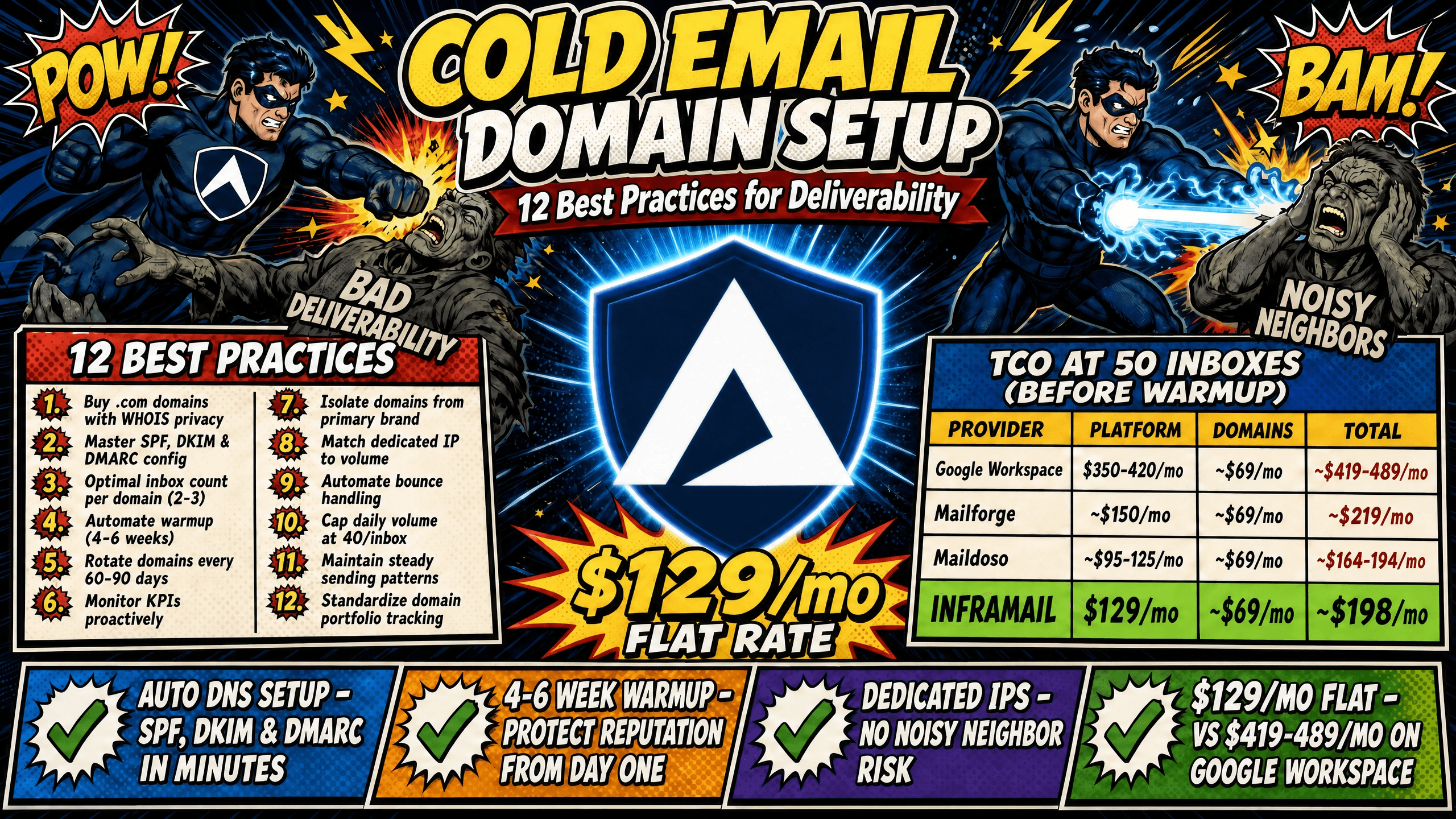
Setting up 50 cold email domains manually burns 12+ hours of DNS configuration work. Automated infrastructure cuts that to minutes. Per-inbox pricing models like Google Workspace ($7-8.40/seat) and Mailforge (~$3/mailbox) scale costs linearly, quietly eroding agency net margins as client campaigns grow. Dedicated IP infrastructure isolates sending reputation, eliminating "noisy neighbor" risk from shared IP pools used by Mailforge and Maildoso. Inframail delivers unlimited inboxes on dedicated US-based IPs at a flat $129/month, with automated SPF, DKIM, and DMARC configuration removing the technical bottleneck entirely.
Most agency founders focus their energy on copy and targeting while margin erosion happens quietly in DNS panels and per-seat billing cycles. This guide covers 12 best practices for cold email domain setup, from registrar selection through ongoing monitoring, with a complete checklist and cost comparison for agencies evaluating Mailforge alternatives.
Why proper domain setup protects your campaign revenue
ISPs at Google, Microsoft, and Yahoo evaluate every inbound email against domain age, authentication record quality (SPF, DKIM, and DMARC), and IP reputation. A gap in any of these three is enough to route campaigns to spam folders or block them entirely.
The financial impact is direct. When deliverability drops, reply rates fall, booked meetings decline, and clients churn. Inframail's infrastructure cost comparison details how infrastructure spend compounds across platforms when these fundamentals are ignored.
What total cost of ownership (TCO) actually means: TCO for cold email infrastructure includes the platform fee, domain registration costs, and external warmup tools. Most agencies only look at the headline price and miss the full picture.
Cost variable | Google Workspace | Inframail |
|---|---|---|
Platform fee (50 inboxes) | $350-420/mo | $129/mo |
Domain costs (amortized) | ~$34/mo | ~$34/mo |
Warmup tools | Separate cost | Separate cost |
Total (before warmup) | $384-454/mo | $163/mo |
Warmup tools are a separate cost on both platforms. The DFY Email Campaign Setup package from Inframail includes warmup at no additional charge.
1. Buying domains that prioritize sender reputation
Domain selection is the foundation of deliverability. A few concrete rules apply at every agency scale.
Use .com TLDs. ISPs treat .com domains as more trustworthy than alternative extensions like .xyz, .top, or country-specific TLDs commonly associated with spam. Avoid obvious sequential patterns like mailpool1.com and mailpool2.com, which signal automated bulk purchasing to spam filters.
Age your domains before sending. Wait at least 7-14 days after registration before beginning warmup. A brand-new domain with no history is a red flag for ISPs, and the Prospeo domain warmup guide makes this clear: never send from a domain registered the same day.
Protect WHOIS data. Enable WHOIS privacy at registration. This is standard practice for protecting registrant contact information and reducing unsolicited contact.
Choose safe naming variants. If a client's primary domain is acme.com, safe sending variants include getacme.com, tryacme.com, or useacme.com. Never send cold outreach from the primary business domain.
Agencies evaluating Mailforge alternatives should also review the Maildoso alternatives comparison for a broader look at how domain strategy differs across providers.
2. Mastering SPF, DKIM, and DMARC configuration
These three DNS authentication records are the technical backbone of deliverability. Gmail has required bulk senders to configure all three since February 1, 2024, and Outlook.com will enforce the same requirement for high-volume senders beginning May 5, 2025.
SPF (Sender Policy Framework) is a DNS TXT record that lists every IP address and hostname authorized to send email on behalf of your domain. Watch for the 10-lookup limit. Crossing it returns a PermError, which fails authentication silently.
DKIM (DomainKeys Identified Mail) applies a cryptographic signature to each outbound email, confirming the message was not altered in transit. Set up a custom DKIM record and a custom Return-Path domain aligned with the exact domain you're sending from.
DMARC (Domain-based Message Authentication, Reporting and Conformance) builds on SPF and DKIM by letting domain owners set authentication policies for receiving servers. Start with p=none for the first 1-2 weeks to monitor alignment without rejecting mail, then move to p=quarantine and p=reject as confidence in alignment grows.
Inframail automates this entire configuration process, provisioning SPF, DKIM, and DMARC records without any manual DNS panel work. Watch the 2-minute SPF, DKIM, and DMARC setup video from Inframail's channel to see the automation in practice.
Common DNS errors to avoid:
Duplicate SPF records on the same domain (only one SPF TXT record is permitted)
Exceeding the 10 DNS lookup limit in an SPF record
Syntax errors that cause silent failures during propagation
Skipping DMARC entirely, leaving domains vulnerable to spoofing
3. Calculating your optimal inbox count per domain
The industry-standard ratio is 2-3 inboxes per domain, with a daily cap of 40 emails per inbox. The scaling formula is straightforward: inboxes needed equals your daily email target divided by 40, rounded up. The Inframail help center's sending capacity calculator walks through this math in detail for multi-client deployments.
Scaling example for a 1,000 email/day campaign:
Target daily volume: 1,000 emails
Safe sends per inbox per day: 40
Inboxes required: 25
Domains required (at 2-3 inboxes each): 9-13 domains
4. Automating warmup to protect your domain reputation
Warmup is the process of gradually increasing sending volume on a new domain to build reputation with ISPs before launching active campaigns. Skipping or rushing warmup is the most common reason new domains land in spam immediately.
The honest warmup timeline is 4-6 weeks minimum for cold outbound at meaningful volume. Rushing to high volumes too early produces weak reputation signals and risks permanent spam folder placement.
Warmup volume framework by week:
Weeks 1-2: 5-10 emails/day, warmup sends only
Weeks 3-4: Ramp to 25-40 emails/day
Weeks 5-6: Reach 40-50 emails/day before enabling campaign traffic
The rule from Prospeo's domain warmup guide is direct: rush it and you get flagged, skip it and you burn a domain you paid to build.
Manual vs. automated warmup: Automated tools like Warmbox and Lemwarm run $15-50/month per inbox but handle scheduling and engagement automatically across dozens of domains simultaneously. Inframail requires external warmup tools on the Unlimited and Agency Pack plans. The exception is the DFY Email Campaign Setup package, which includes free warmup as part of onboarding. The Inframail warmup guide covers the process step-by-step.
Warmup blunders to avoid:
Sending campaign emails during the first 14 days
Inconsistent daily sending patterns that confuse ISP reputation scoring
Pausing warmup for several days and resuming at full volume, which resets the reputation signal ISPs have been building
5. Rotating sending domains to protect reputation
No domain lasts indefinitely under active cold outreach. Domain rotation means retiring domains with declining reputation metrics and replacing them with fresh, warmed domains so campaigns continue without interruption.
Identifying a domain under stress: Watch for these signals using your sending platform's analytics:
Open rates declining consistently over multiple send cycles
Spam complaint rates rising above 0.1%
Blacklist flags appearing in monitoring dashboards
Rotation cycle: Experienced cold email agencies rotate domains every 60-90 days to maintain peak reputation. Sending platforms like Instantly.ai and Smartlead handle domain rotation at the sequence level, distributing volume across your active domain pool automatically. The Smartlead integration guide shows how Inframail credentials export directly into Smartlead for this workflow.
Always maintain a 20% buffer of warmed spare domains so any single retirement does not create a capacity gap.
6. Monitoring proactively for consistent inbox health
Proactive monitoring catches deliverability problems before clients notice. Key performance indicators for a healthy domain portfolio:
Open rate: Primary campaign engagement signal to track over time
Hard bounce rate: Keep at or below 2% (above this signals list quality issues)
Spam complaint rate: Keep below 0.1% (0.3%+ indicates content or list problems)
Blacklist status: Check across major lists at least weekly
Blacklist monitoring is non-negotiable at agency scale. Inframail's deliverability dashboard tracks domain and IP health, flags blacklisted domains, and auto-submits delisting requests at a 68.3% success rate within 48 hours. The infrastructure monitoring guide covers alert protocols for agency owners managing large domain portfolios.
Bookmark Gmail Postmaster Tools and Microsoft SNDS from day one. The Inframail help center's spam metrics guide explains how to read and act on these signals. For external validation, tools like GlockApps and Mail-Tester verify inbox placement accuracy before campaign launch.
7. Preventing deliverability leaks via domain isolation
Never send cold email from your primary business domain. If that domain gets flagged or blacklisted, it takes your main brand communications with it.
Domain isolation means every campaign domain is a separate sending identity. The dedicated IP guide explains why this matters beyond protecting the primary domain: sending reputation is domain-specific, so negative signals on one sending domain stay contained and do not spread across your portfolio.
Safe naming conventions for sending domains:
Use variations that feel natural: get[brand].com, try[brand].com, [brand]hq.com
Avoid generic strings that look automated: emailmarketing[brand].com or outreach1[brand].com
Keep naming patterns consistent across all client domains for easier portfolio tracking
8. Matching dedicated IP volume to client needs
IP type determines how much control you have over sending reputation. Shared IP pools (used by Mailforge and Maildoso) distribute mailbox accounts across the same IP range shared by millions of businesses. One bad actor generating spam complaints or hitting spam traps can flag the entire range, damaging your campaigns even when your list hygiene is perfect.
Dedicated IPs work differently. As Inframail's IP comparison explains, your sending behavior alone determines ESP trust on a dedicated IP. No other sender's activity affects your campaigns.
Inframail plan options:
Unlimited Plan (1 dedicated US-based IP): $129/month, unlimited inboxes, suitable for agencies managing a single client campaign portfolio
Agency Pack (3 dedicated US-based IPs): $327/month, unlimited inboxes, appropriate when managing multiple high-volume client campaigns simultaneously
The dedicated IP vs. shared IP video on Inframail's channel walks through the technical differences in plain terms. For a direct performance comparison, the Maildoso review covers real inbox rates and limitations.
9. Stopping deliverability leaks with active bounce handling
Hard bounces occur when an email address is permanently invalid. Every hard bounce is a signal to ISPs that list quality is poor, and sustained rates above 2% trigger reputation penalties. Soft bounces indicate temporary rejections like full mailboxes or server timeouts, with elevated rates suggesting ISP throttling that can lead to domain reputation decline over time.
According to email deliverability benchmarks, Gmail spam rates should stay below 0.3% in Postmaster Tools, and hard bounces should stay at or below 1% on campaign sends.
Automate bounce cleaning before list import. Tools like NeverBounce and MillionVerifier verify list quality before you import into your sending platform. The Zerobounce vs NeverBounce comparison details which tool fits which use case. For agencies wanting an overview of automation tools that integrate with this workflow, the sales email automation roundup covers compatible options.
10. Capping daily volume to protect domain reputation
The professional standard is 40 emails per inbox per day, including both campaign emails and warmup sends. Many practitioners use a 1:1 ratio as a default: for every campaign email sent, also send a warmup email from the same inbox.
Daily send volume ramp for new mailboxes (weekly framework):
Weeks 1-2: 5-10 emails/day, warmup sends only
Weeks 3-4: Gradually ramp to 25-40 emails/day
Weeks 5-6: Approach 40-50 emails/day before enabling campaign traffic
Campaign launch: Cap total sends (campaign plus warmup combined) at 40/day per inbox
Exceeding 40 emails per inbox per day is one of the fastest ways to burn a domain. If deliverability dips, do not add more inboxes to compensate. Pause, diagnose the root cause, and stabilize before scaling back up.
11. Preventing deliverability dips with steady sending
ISP spam filters flag sudden volume spikes as suspicious. An inbox that sends 5 emails one day and 200 the next looks like a compromised account. Consistent, predictable sending patterns signal legitimate business activity.
Practical sending schedule rules:
Distribute volume across business hours in the recipient's time zone
Avoid large volume increases over a single 24-hour period
After any pause, ramp volume back gradually rather than restarting at full send capacity
Agencies running multi-client campaigns benefit from staggering campaign start times across different domains. If one client's campaign launches Monday, stagger the next by 3-5 days. ISP enforcement around volume patterns has tightened significantly, and sudden spikes are now treated as a reliable signal of compromised or automated accounts.
12. Standardizing how you track your domain portfolio
As client count grows past 5-10, informal tracking breaks down. Domain credentials, DNS status, warmup stage, and rotation schedules need a structured system so any team member can pick up the state of any domain without starting from scratch.
Weekly domain audit framework:
DNS propagation confirmed (run validation after any changes)
SSL status active on all domains
Blacklist status clean across all monitored lists
Bounce rates within acceptable thresholds
Warmup stage documented for each inbox
Handoff documentation for team growth: Every domain should have a record covering registrar login, DNS configuration dates, inbox credentials, warmup tool in use, warmup start date, and current daily send cap. When agencies hire an operations manager, complete documentation significantly reduces onboarding friction. The Inframail setup tutorial demonstrates how credentials export to CSV for direct import into sending platforms, which simplifies this handoff process.
Inframail's automated DNS configuration enforces consistent standards across every domain provisioned on the platform, eliminating the variation that comes from manual setup across different team members.
Essential domain setup checklist for agencies
Use this 24-point checklist to validate every new domain before campaign launch.
Pre-setup phase
Domain registered with WHOIS privacy enabled
Domain aged 7-14 days minimum before warmup
Naming variant confirmed (not primary business domain)
.com TLD selected
Registrar chosen with straightforward DNS panel access
DNS configuration
SPF record created with all authorized sending IPs
SPF lookup count verified at 10 or fewer
DKIM record created with custom selector
Custom Return-Path domain aligned to sending domain
DMARC record set to
p=nonefor initial monitoring phaseDNS propagation confirmed via external validator
DMARC reporting inbox set up to receive aggregate (rua) and forensic (ruf) reports
Inbox provisioning
Inbox count per domain set at 2-3 maximum
IMAP/SMTP credentials exported and stored securely
Credentials imported to sending platform
Contact list verified with bounce rate projected below 2%
Warmup phase
Warmup tool connected and schedule confirmed
Starting volume set at 5-10 emails/day
Campaign emails disabled for minimum 14 days
Warmup schedule set to run consistently every day without gaps
Pre-launch validation
Authentication pass rate confirmed at near 100% for SPF and DKIM
Gmail Postmaster Tools bookmarked and domain registered
Blacklist status clean across major lists
Domain added to monitoring dashboard with alert thresholds set
Common domain setup mistakes that collapse deliverability
Even experienced agency founders make these errors when scaling quickly.
Over-sending from new domains. Jumping to 50+ emails per day in the first two weeks consistently produces spam folder placement. ISPs need 4-6 weeks of consistent, low-volume sending to develop trust in a new domain.
Neglecting DMARC. SPF and DKIM alone are not enough. Without DMARC, your domain is vulnerable to spoofing and you lose access to the reporting data that would catch authentication failures early.
Inconsistent warmup patterns. Warmup tools need to run on a consistent daily schedule. Pausing warmup for a weekend and resuming Monday resets the reputation signal ISPs have been building.
Ignoring blacklist alerts. A domain on a blacklist during warmup rarely self-corrects. Without an active monitoring dashboard and automated delisting requests, blacklisted domains continue warming against an already-compromised reputation. Inframail's blacklist management guide covers the delisting process for Microsoft's infrastructure specifically.
Mixing client campaigns on shared domains. Each client's campaigns should run on dedicated domains. Cross-contamination means one client's deliverability problem bleeds into another's campaign.
Scaling by adding more inboxes when deliverability dips. Adding inboxes to a struggling campaign amplifies the problem rather than fixing it. Diagnose the root cause first, stabilize deliverability, then scale.
Mailforge alternatives: cost and infrastructure comparison
For agencies evaluating Mailforge and looking at alternatives, the key variables are IP type, pricing model, and setup automation. Here's how the main options compare for a 50-inbox deployment.
Provider | Pricing (50 inboxes) | IP infrastructure | DNS setup automation |
|---|---|---|---|
Inframail | $129/mo + domains | Dedicated US-based IP | Fully automated (SPF/DKIM/DMARC) |
Mailforge | ~$150/mo (annual billing) | Shared IP pool | Automated setup |
Maildoso | ~$95-125/mo | Shared IP pool | Automated setup |
Zapmail | ~$125/mo (annual billing) | Shared IP pool | Automated setup |
Domain costs (~$34/month amortized for 50 domains) and warmup tools are additional for all providers.
Mailforge pricing starts at approximately $3 per mailbox per month on annual billing, making the cost crossover with Inframail's flat rate around 43 mailboxes. Above that threshold, Inframail's cost stays flat while per-mailbox pricing scales linearly. At 200 inboxes, Google Workspace reaches $1,680/month while Inframail stays at $129/month plus domain costs.
The Zapmail vs Inframail comparison and the Mailreef vs Inframail comparison provide detailed breakdowns for those specific alternatives. For a 7-platform cost analysis, the infrastructure cost comparison includes ROI modeling across volume tiers. For agencies switching from existing providers, the Maildoso to Inframail guide and the Mailreef to Inframail guide cover how to move infrastructure without disrupting active campaigns.
Protect margins through standardized infrastructure
Domain setup determines whether your agency scales profitably or watches margins erode through infrastructure costs and deliverability failures. The 12 best practices covered here represent the operational standard for protecting client campaigns, but executing them manually across 50-200 domains keeps founders in DNS panels instead of closing new business.
Flat-rate infrastructure with automated DNS configuration removes that bottleneck. For agencies managing 50+ domains, the cost advantage against per-seat models compounds monthly, freeing budget to reinvest in team growth rather than inbox licensing. Inframail's 98%+ deliverability rate and 68.3% blacklist delisting success rate within 48 hours back this up with specific, checkable numbers.
Sign up to Inframail and get started today.
FAQs
How many domains do I need for a campaign sending 1,000 emails per day?
You need approximately 25 inboxes at the safe cap of 40 emails per inbox per day, which requires 9-13 domains at the 2-3 inbox-per-domain standard. Add a 20% buffer of spare warmed domains to cover rotation and reputation issues.
How long should I warm up a new domain before sending campaigns?
Warm up new domains for at least 4-6 weeks before launching active outreach, starting at 5-10 emails per day and ramping gradually, with no campaign emails sent during the first 14 days.
Should I use Google Workspace or Microsoft-based infrastructure for cold email?
Google Workspace costs $350-420/month for 50 inboxes at $7-8.40 per seat. Microsoft-based platforms like Inframail offer flat-rate pricing at $129/month for unlimited inboxes, saving $221-291/month on infrastructure costs alone before domain and warmup expenses.
What is the total cost of ownership for cold email infrastructure at 50 inboxes?
For 50 inboxes, Inframail costs $163/month total (platform fee plus approximately $34/month in amortized domain costs), compared to $350-420/month for Google Workspace before warmup tools. Warmup tools are a separate cost on both platforms.
How do I check if my domains are set up correctly before launching campaigns?
Use external validation tools like Mail-Tester or GlockApps to verify SPF, DKIM, and DMARC propagation, and register your domains in Gmail Postmaster Tools and Microsoft SNDS from day one to track sender reputation from the start.
Key terms
Cold email infrastructure: The technical foundation for sending high-volume outbound campaigns, including domains, DNS records, inboxes, IPs, and warmup systems.
Deliverability: The percentage of sent emails that successfully reach the recipient's inbox rather than being filtered to spam or blocked entirely.
DNS configuration: The process of setting up Domain Name System records (SPF, DKIM, DMARC) that authenticate your sending domain to ISPs.
Dedicated IP: An IP address used exclusively by one sender, where reputation is determined solely by that sender's behavior rather than shared with other users.
Warmup: The gradual increase of sending volume from a new email account or domain to build positive reputation with ISPs before launching active campaigns.
SPF (Sender Policy Framework): A DNS record listing all IP addresses authorized to send email on behalf of a domain.
DKIM (DomainKeys Identified Mail): A cryptographic signature added to email headers that verifies the message has not been altered in transit.
DMARC (Domain-based Message Authentication): An email authentication protocol that builds on SPF and DKIM to prevent email spoofing and provides reporting on authentication failures.
Hard bounce: A permanent email delivery failure caused by an invalid or non-existent address, which signals poor list quality to ISPs when rates exceed 2%.
Shared IP pool: An IP address range used by multiple senders simultaneously, where one sender's spam complaints or blacklist flags can damage deliverability for all senders on the same range.