
Cold email deliverability checklist for startups
: This cold email deliverability checklist gives startups a repeatable set of thresholds to run before launching a domain, during warmup, and weekly once campai
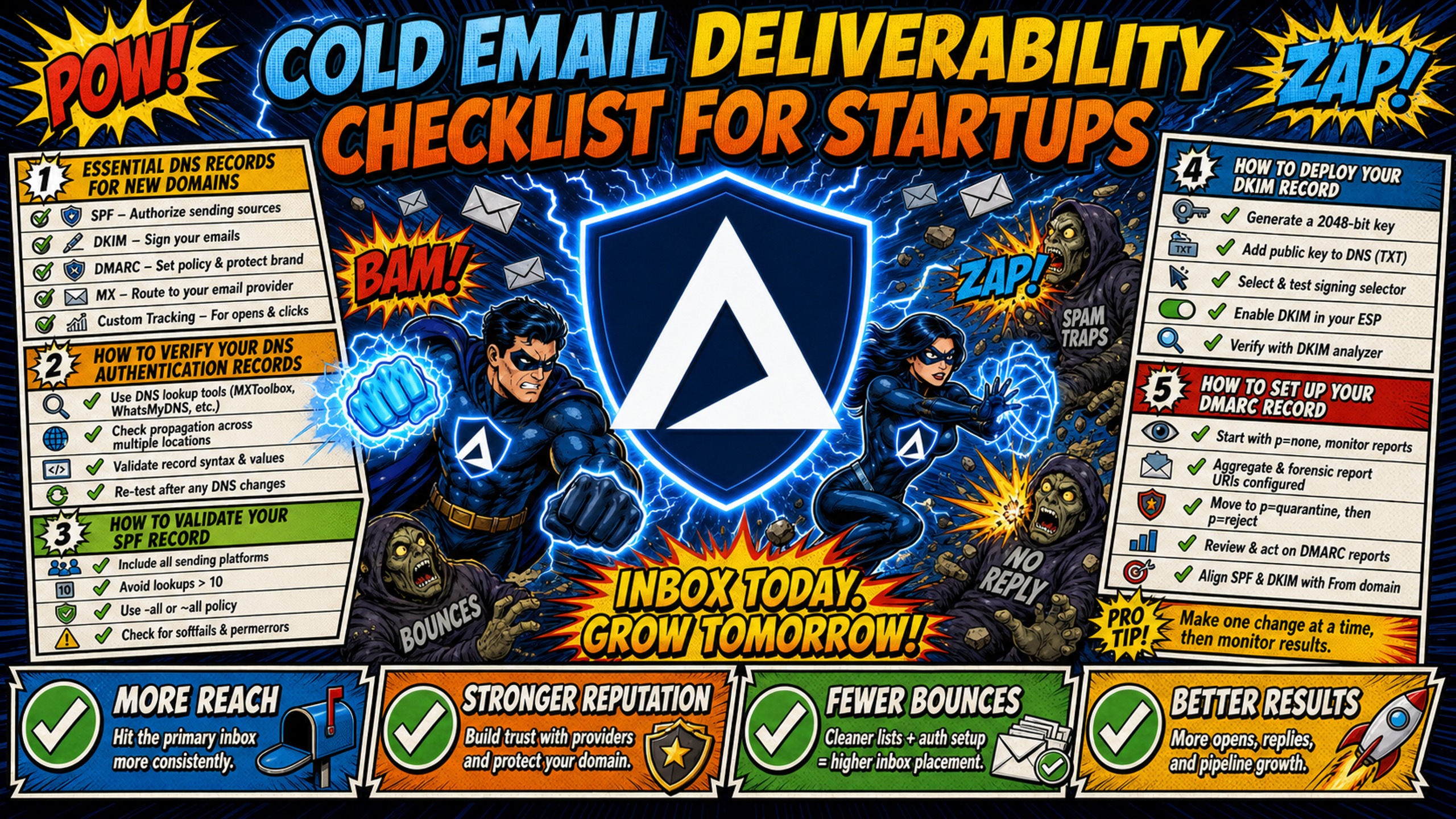
TL;DR: This cold email deliverability checklist gives startups a repeatable set of thresholds to run before launching a domain, during warmup, and weekly once campaigns are live. It covers six areas: DNS authentication (SPF, DKIM, DMARC), warmup milestones, list hygiene, content spam triggers, send volume limits, and reputation monitoring. The key thresholds are an inbox placement rate of 90%+ (versus a global average of roughly 83%, per MessageFlow's 2026 deliverability report), hard bounces under 1% and total bounces under 2%, spam complaints below 0.1% (per Google's sender guidelines), warmup volume of 5-10 emails per inbox per day in week 1 ramping to 35-50 per mailbox per day by week 4 (per MailTester Ninja), and external warmup tools at $15-50 per inbox per month, even when DNS setup is automated.
A global average inbox placement rate of roughly 83% (per MessageFlow's 2026 deliverability report) means about 17 out of every 100 cold emails never reach the primary inbox. For a startup sending 10,000 emails per month, that means about 1,700 emails miss the inbox (10,000 × 17%) before copy or targeting even enter the equation.
The fix is not a single setting. It is a repeatable cold email deliverability checklist with specific thresholds at every stage. This article gives you that checklist, section by section, with the numbers you need to act on each item.
| Category | Key Checks | Target Metric |
|---|---|---|
| Infrastructure | SPF, DKIM, DMARC (required), custom tracking domain (recommended) | SPF, DKIM, and DMARC all return valid records |
| Warmup | Daily warmup volume, engagement signals, gradual ramp-up | 5-10 emails/day in week 1, increasing to 35-50/day by week 4 |
| List Hygiene | Email verification, bounce rate, spam trap removal | Hard bounces under 1%, total bounces under 2% |
| Content | Spam trigger words, image-to-text ratio, plain text vs. HTML | Images at or below 40% of content, at least 400 characters of text (per MailGenius), minimal links |
| Send Volume | Daily sending caps, sending intervals, inbox rotation | 25-30 cold emails per warmed inbox/day, plus 10-15 warmup emails |
| Reputation Monitoring | Blacklist status, inbox placement, sender reputation, spam complaints | 90%+ inbox placement, spam complaints below 0.1%, weekly checks |
Essential DNS records for new domains
Authentication records determine whether receiving servers trust your domain. Without valid SPF, DKIM, and DMARC records, receiving servers treat your email as unverified, and inbox placement drops before your first sequence launches.
Configuring these records manually across multiple registrars takes hours. Each domain requires logging into a DNS panel, creating TXT records, waiting for propagation, and verifying syntax. Inframail's automated DNS configuration handles SPF, DKIM, and DMARC setup without any manual panel work, which removes the most tedious step from this checklist.
Flat-rate infrastructure matters when domain count scales. At 50 inboxes, the cost difference between per-seat and flat-rate pricing becomes significant.
| Provider | Monthly Platform Cost (50 inboxes) | Pricing Model |
|---|---|---|
| Inframail Unlimited | $147 flat + domains ($5-16/year each) | Flat rate, unlimited inboxes |
| Google Workspace | $420 ($8.40 per seat, Flexible Plan) | Per-seat annual or flexible |
| Maildoso | $75 ($2.50 per mailbox at 30 mailboxes), $225 ($0.75 at 300), $499 ($0.49 at 1,000), per Maildoso's pricing page | Per-mailbox tier |
Domain costs and warmup tools ($15-50 per inbox per month) apply on both sides and are not reflected in platform fees.
How to verify your DNS authentication records
Run a DNS lookup on your domain using MXToolbox or a similar tool. Check that SPF, DKIM, and DMARC records exist as TXT entries. A missing record shows as "not found" or returns no results. All three records must return valid syntax before you send a single email.
How to validate your SPF record
Your domain must have exactly one SPF record. Multiple SPF records cause a permanent error that invalidates authentication. Confirm the record includes the correct IP addresses or include mechanisms for your sending platform. SPF allows a maximum of 10 DNS lookups per evaluation (per RFC 7208, section 4.6.4), so exceeding this limit silently breaks authentication.
How to deploy your DKIM record
- Generate a DKIM key pair through your email provider, or create the RSA key pair manually with a free tool such as EasyDMARC's DKIM Record Generator.
- Publish the public key as a TXT record under the provider's selector (e.g.,
selector._domainkey.yourdomain.com). - Verify the selector matches between your DNS record and the provider's configuration.
Inframail automates DKIM key generation and record publishing, so records are published correctly without manual verification.
How to set up your DMARC record
Start with a p=none policy to monitor authentication failures without blocking email. Add a reporting address (rua=mailto:dmarc@yourdomain.com) to receive aggregate reports. After 2-4 weeks of clean reports, move to p=quarantine and eventually p=reject. Skipping the monitoring phase risks blocking legitimate email.
How to configure your custom tracking domain
A custom tracking domain protects your primary domain's reputation when recipients click tracked links. Create a subdomain (e.g., track.yourdomain.com), point it to your sending platform via a CNAME record, and verify it in the platform's settings. Without a custom tracking domain, your emails share tracking infrastructure with every other sender on that platform.
Measuring your email warmup progress
Warmup is a measured ramp with specific daily volume milestones, not a binary on/off switch. A new domain needs 2-3 weeks minimum before meaningful cold volume, and 4-6 weeks before full volume. Warmup requires an external tool like Warmbox or Lemwarm, even when your infrastructure platform automates DNS. Budget $15-50 per inbox per month for warmup tools.
Week 1: Establishing daily sending limits
Send 5-10 warmup emails per inbox per day, and only move on when you see zero bounces, replies returning, and nothing landing in spam, per MailTester Ninja's warmup gating metrics. Focus on high-probability replies to build positive engagement signals. Do not send any cold outreach during week 1.
Week 2: Managing 10-20 emails daily
Ramp to 10-20 warmup emails per inbox per day, per MailTester Ninja's email warmup guide. Monitor reply rates and spam complaints before increasing volume. Healthy warmup reply rates stay at 25% or higher, per TrulyInbox's warmup guide. If rates fall below 25%, hold volume steady until they recover before increasing.
Ramping volume to 35-50 emails daily
In week 3, reach 20-35 warmup emails per inbox per day. By week 4, reach 35-50 per inbox per day, per MailTester Ninja's email warmup guide. Only increase if engagement signals remain healthy. Starting in week 5, begin real cold outreach capped at 25-30 sends per mailbox per day, while keeping warmup volume in the background at 10-15 emails per day.
Reaching maximum daily outreach limits
The maximum sustainable daily volume after a completed warmup is 35-50 emails per mailbox per day, per MailTester Ninja's email warmup guide, with cold outreach capped at 25-30 sends per mailbox per day while warmup runs at 10-15 per day in the background. Inframail's Unlimited Plan supports up to 80,000 cold emails per month (per workday) across unlimited inboxes, so per-inbox volume stays well within safe limits.
Identifying early engagement signals
Track opens, replies, and spam complaints as leading indicators. A reply rate above 5% and spam complaint rate below 0.1% indicate healthy warmup. If either metric moves in the wrong direction, pause the ramp and diagnose the cause before continuing.
Clean your lists and target better leads
Bad lists damage sender reputation faster than any other factor. A single campaign with a 7% bounce rate can undo weeks of careful warmup. The bounce threshold for healthy cold email is under 2% total, with hard bounces under 1%. Top senders keep hard bounce rates under 0.5% (per Digital Applied's 2026 email deliverability benchmarks).
Selecting reliable email verification tools
Choose a verification tool with real-time verification, catch-all detection, and integration with your sending platform. NeverBounce's entry pay-as-you-go rate of $0.008 per email makes it roughly 60% cheaper than ZeroBounce's $0.0195 entry rate. MillionVerifier is typically the cheapest option for bulk verification.
Identifying critical bounce thresholds
Hard bounce threshold: under 1% per campaign. Total bounce threshold: under 2%. Above these levels, pause the campaign and clean the list before resuming. For opt-in lists, hard bounces should stay even lower, at 0.3-0.5%.
Cleaning lead data to avoid spam traps
Remove role-based addresses (info@, admin@), inactive domains, and purchased lists. Spam traps are often recycled addresses left dormant by previous owners. Verification tools catch most traps, but no tool catches all of them.
How to automate suppression list updates
Use your sending platform's suppression list feature to automatically remove unsubscribed contacts and hard bounces. Automate opt-out processing so an unsubscribed contact never receives another email. Manual suppression list management across multiple platforms introduces errors that compound over time.
How to audit your domains for spam risks
Spam filters evaluate content, links, images, and HTML structure together. A cold email spam check before every campaign launch catches issues that quietly reduce inbox placement without triggering a bounce or blacklist event.
Common spam trigger words to avoid
Spam trigger words like "free," "guarantee," "act now," "limited time," "no obligation," "risk-free," "earn money," and "cash bonus" flag promotional or low-quality content (see SendLayer's list of spam trigger words to avoid). Context matters more than individual words. "Free trial" in a legitimate SaaS pitch carries less risk than "FREE MONEY" in all caps. Excessive capitalization and punctuation ("FREE!!!") amplify the penalty.
The ideal link to image ratio
Keep images at or below 40% of email content and include at least 400 characters of text, per MailGenius's image-to-text ratio guide. Avoid image-only emails entirely. Keep links to a minimum, since each additional link increases spam filter scrutiny.
Avoiding spam filters with tokens
Use personalization tokens (first name, company name, custom field) to make each email unique. Identical content across large batches signals bulk automation to spam filters.
HTML vs plain text spam filter impact
Plain text emails generally achieve higher inbox placement than heavy HTML. If using HTML, keep the code clean, avoid embedded forms or JavaScript, and always include a plain text version. Most cold email sending platforms handle this automatically.
Testing subject lines for inbox placement
Run a seed list test before launch with 3-5 subject line variants. Avoid all-caps, excessive punctuation, and spam trigger words. Measure which variant achieves the highest inbox placement rate, not just open rate.
Managing daily send caps and intervals
Volume and timing affect cold email sender reputation as much as content does. Sending 200 emails from a single inbox on day one guarantees a spam flag regardless of how clean your list is or how good your copy reads.
Setting daily cold email send caps
For a brand-new domain in its first month, limit outreach to 10-20 emails per day. For properly warmed inboxes with 4-6 weeks of warmup history, keep volume within the caps described in the warmup milestones above.
Targeting recipient time zones for replies
Send during the recipient's local business hours. Use your sending platform's time zone scheduling feature to stagger sends across US and Canadian time zones.
How to stagger your outreach volume
Spread sends across the day with 5-15 minute intervals between sends. This mimics human sending behavior and prevents the sudden volume spikes that mailbox providers flag as automated. Blasting 50 emails in 30 seconds from a single inbox is the fastest way to trigger a spam filter.
Rotating domains to protect sender health
Distribute volume across multiple domains and inboxes so no single domain carries the full campaign load. This is where flat-rate pricing matters: per-seat providers charge for every additional inbox, making rotation expensive. Inframail's $147/month flat rate supports unlimited inbox rotation without incremental cost.
How to monitor primary inbox placement
Delivery and inbox placement are different metrics. Delivery means the receiving server accepted the email. Inbox placement means it landed in the primary inbox rather than spam or promotions. Your inbox placement checklist should track the second metric, not the first.
| Metric | Industry Average | Target |
|---|---|---|
| Inbox placement rate | 83% | 90%+ |
| Spam folder rate | 6.1% | Under 3% |
| Missing emails | 4.9% | Under 2% |
Sources for industry averages: the inbox placement rate comes from the MessageFlow 2026 email deliverability report. The spam folder rate (6.1% median) and missing email rate (4.9% median missing or blocked) come from Digital Applied's 2026 email deliverability benchmarks.
How to run effective seed list tests
Create a seed list of 20-50 test addresses across major providers (Gmail, Outlook, Yahoo). Send test campaigns to this list and check where each email lands. Run seed list tests before every major campaign launch and after any infrastructure change.
Monitoring your inbox placement rates
Track inbox placement rate weekly. The global average sits at roughly 83% and a strong sender reputation typically produces around 92% (per MessageFlow's 2026 deliverability report). If your rate drops below 80%, diagnose the cause before sending more volume.
Defining healthy reply rate targets
The average cold email reply rate is about 3.43%, per Martal Group's 2026 B2B cold email statistics. Reply rates of 4-6% are rated good and 7%+ strong, per ORRJO's State of B2B Outbound 2026, which describes well-run programs as holding 5-8% reply rates. Below 2% indicates a deliverability or targeting problem. Track reply rate per campaign, not as an aggregate, to isolate which sequences underperform.
Reducing bounces in cold campaigns
Verify every list before sending, remove hard bounces immediately after each campaign, and monitor bounce rate per campaign rather than per month. A single campaign with a high bounce rate can damage domain reputation even if the monthly average looks acceptable.
Monitoring key sender reputation signals
Cold email sender reputation is the cumulative score that determines inbox placement. Monitor blacklists, spam complaints, unsubscribe rate, and domain reputation weekly. Catching a reputation dip early prevents the kind of collapse that takes weeks to recover from.
How to fix flagged sending domains
- Identify which blacklist flagged the domain using MXToolbox or Google Postmaster Tools.
- Determine the root cause (volume spike, list quality, shared IP contamination).
- Submit a delisting request and pause sending until resolved.
- Run warmup at low volume for 2-4 weeks before resuming campaigns.
Inframail's blacklist monitoring auto-submits delisting requests when domains are flagged, with a 68.3% delisting success rate within 48 hours.
Fixing low domain reputation signals
Low domain reputation often comes from high bounce rates or low engagement. A bounce rate above 2% on any campaign is a warning sign, and above 5% indicates a serious problem. Fix reputation by cleaning lists, reducing volume, and improving targeting before resuming full send rates.
Detecting blacklisted IP addresses
Use blacklist monitoring tools to check IP reputation weekly. Dedicated IPs isolate your reputation from other senders, unlike shared IP pools where one bad actor can get the entire range flagged. Inframail provides 1 dedicated US-based IP on the Unlimited Plan and 3 on the Agency Pack.
Spam complaint thresholds for deliverability
Keep spam complaint rate under 0.1% (1 complaint per 1,000 emails). Google and Yahoo's bulk-sender requirements, in force since February 2024, treat 0.3% as the hard ceiling that triggers enforcement action (per Google's email sender guidelines and Yahoo's sender best practices). Monitor via your sending platform's complaint tracking dashboard.
Safe unsubscribe rate benchmarks
A rising unsubscribe rate signals poor targeting or messaging. Always include a visible unsubscribe link in every email, both for compliance and because an unsubscribe is always better than a spam complaint.
Set up your cold email infrastructure with Inframail
Inframail is a flat-rate Microsoft email infrastructure provider for agencies running 50-200 cold email domains. The Unlimited Plan costs $147/month flat and includes automated DNS configuration for SPF, DKIM, and DMARC, 1 dedicated US-based IP, and blacklist monitoring with a 68.3% delisting success rate within 48 hours. Domain costs ($5-16 per year each) and warmup tools ($15-50 per inbox per month) are additional.
In this case study video, watch how Inframail helped a client run cost-effective cold email campaigns for their marketing agency and its clients, generate 25 interested prospects from a targeted list of just 500 email addresses, and consistently book 3-7 sales calls per day.
Sign up to Inframail and get started today.
FAQs
How long should I warm up domains before sending cold emails?
New domains need 2-3 weeks minimum and 4-6 weeks for full volume. Warmup requires an external tool like Warmbox or Lemwarm, even when your infrastructure platform automates DNS setup. Budget $15-50 per inbox per month for warmup tools.
What inbox placement rate is considered healthy?
90%+ is the target for cold email campaigns. The global average is roughly 83% (per MessageFlow's 2026 deliverability report), and below 80% indicates a deliverability problem that needs diagnosis before sending more volume.
How many emails can I safely send per day per inbox?
After a completed warmup, the maximum sustainable volume is 35-50 emails per mailbox per day (per MailTester Ninja's email warmup guide). Cap real cold outreach at 25-30 sends per mailbox per day while warmup runs at 10-15 per day in the background.
What should I do if my domain gets blacklisted?
Identify the blacklist, determine the cause, submit a delisting request, and pause sending until resolved. After delisting, run warmup at low volume for 2-4 weeks before resuming campaigns. Inframail's automated monitoring achieves a 68.3% delisting success rate within 48 hours.
How often should I check my sender reputation?
Weekly. Check blacklist status, spam complaint rate, bounce rate, and inbox placement rate every week. A weekly cadence catches dips before they cascade into a full deliverability collapse.
Key terms glossary
SPF: Sender Policy Framework. A DNS record that authorizes which servers can send email for a domain, limited to 10 DNS lookups per evaluation (per RFC 7208).
DKIM: DomainKeys Identified Mail. A DNS record that adds a digital signature to verify email authenticity and detect tampering.
DMARC: Domain-based Message Authentication, Reporting, and Conformance. A DNS record that tells receiving servers how to handle email that fails SPF or DKIM checks.
Inbox placement rate: The percentage of sent emails that land in the primary inbox rather than spam or promotions folders. Target: 90%+.
Dedicated IP: An IP address used exclusively by one sender, isolating reputation from other users on the same infrastructure.
Shared IP pool: A group of IP addresses shared by multiple senders, where one bad actor's sending behavior can affect everyone's inbox placement.
Warmup: The process of gradually increasing sending volume on a new domain or inbox over 2-6 weeks to build sender reputation with mailbox providers.
Bounce rate: The percentage of emails that cannot be delivered. Hard bounces (permanent failures) should stay under 1% for cold email, and total bounces should stay under 2%.
Spam complaint rate: The percentage of recipients who mark an email as spam. Google and Yahoo require this to stay below 0.3% (per Google and Yahoo), with under 0.1% as the safe target.
Blacklist: A list of IP addresses or domains flagged for sending spam, which receiving servers use to block or filter email.