
Best business email subject lines: 20 templates for B2B communication
> High-performing B2B subject lines sit between 30 and 50 characters, use role-specific language, and avoid spam-trigger words that raise complaint rates and da
TL;DR
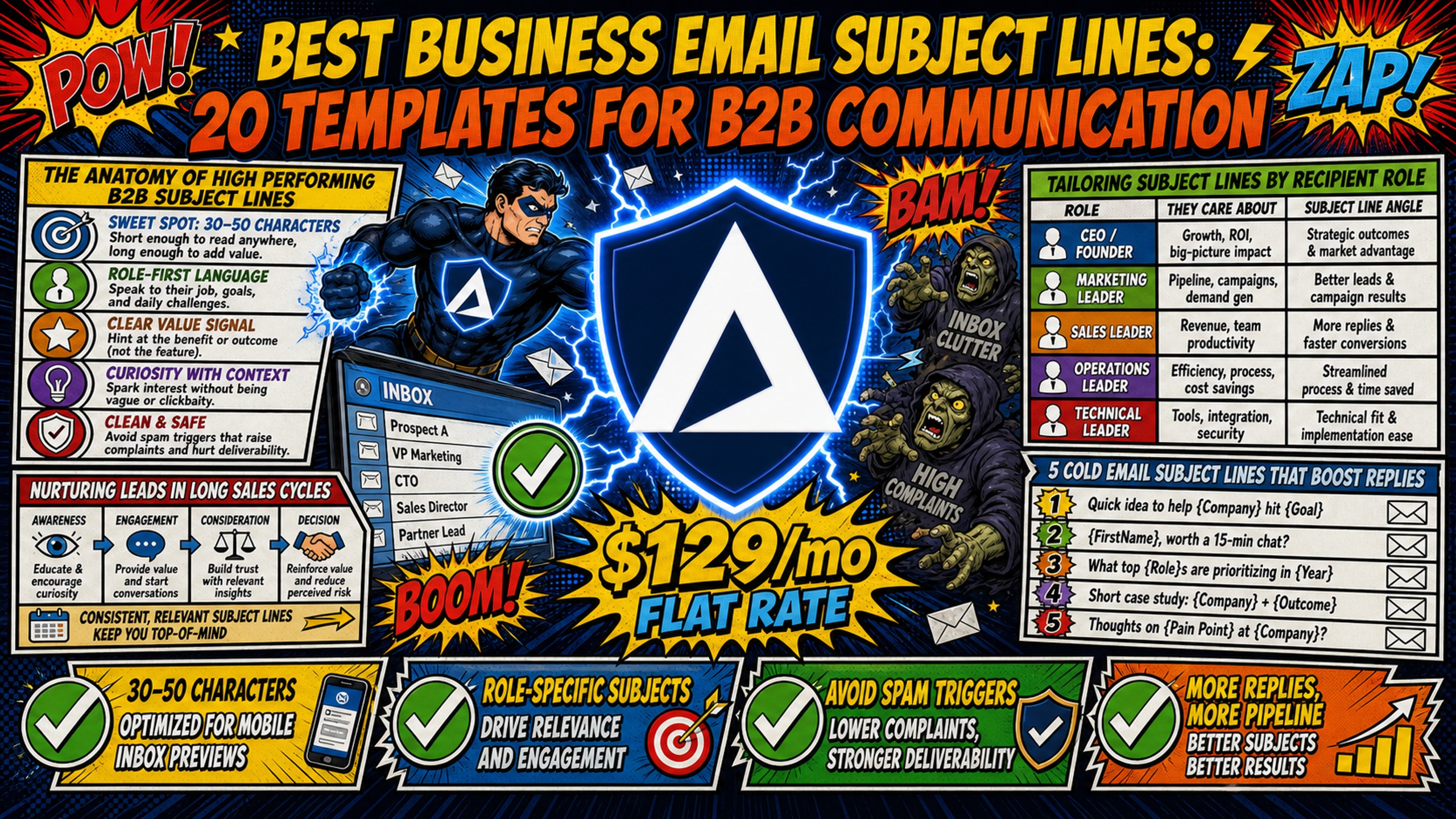
High-performing B2B subject lines sit between 30 and 50 characters, use role-specific language, and avoid spam-trigger words that raise complaint rates and damage domain reputation. Personalized subject lines that go beyond first-name merge tags lift reply rates from 3% to 7%, a 133% increase, based on industry benchmark data across millions of B2B emails. Running high-volume A/B tests on per-seat platforms like Google Workspace ($7-$8.40 per inbox) compounds infrastructure costs fast. Inframail's flat-rate $129/month Unlimited Plan keeps costs predictable regardless of how many inboxes you spin up. All 20 subject line templates below include the technical context needed to keep them landing in the primary inbox, not the spam folder.
A great subject line cannot save an email that lands in spam. Most B2B subject line guides focus purely on copy and ignore the technical reality. The wrong word choice, combined with weak authentication or a shared IP, accelerates deliverability failure. This guide bridges that gap, giving campaign managers 20 templates alongside the deliverability frameworks that make them work at scale.
The anatomy of high performing B2B subject lines
Strong B2B subject lines do three things: they signal relevance to the recipient's role, stay short enough to display fully on mobile, and avoid words that raise spam scores. Industry benchmark data across 5.5 million B2B emails shows subject lines in the 2-4 word range achieve a 46% open rate, while lines running 10+ words see open rates drop to around 34-35%. The gap is large enough to make character count a first-order variable, not an afterthought.
The other structural factor is friction. B2B buyers are not responding to generic outreach at scale, and reply rates jump from 3% (no personalization) to 7% (with personalization) when copy matches the recipient's role and context.
Nurturing leads in long sales cycles
B2B deals rarely close on the first touch, so subject lines in multi-step sequences need to evolve. Early-stage lines establish relevance, mid-stage lines add value with a new data point, and late-stage lines create a low-friction off-ramp. As covered in 10 years of cold email advice from Tech Sales With Higher Levels, every follow-up needs a fresh hook, not just "bumping this up," because that pattern gets filtered by both spam systems and human attention.
Tailoring subject lines by recipient role
An Ops Manager and a CFO care about entirely different outcomes. An Ops Manager responds to process efficiency language ("supplier onboarding - automated yet?"), while a CFO responds to financial impact language ("Q3 margin profile - quick thought"). Role-specific subject lines sit in the highest personalization tier and generate measurably higher open-rate lift compared to company-name-only personalization. Build a role lookup into your sequence templates before launching across a client portfolio.
Establishing authority in B2B outreach
Credibility in a subject line comes from specificity, not vague claims. Including a peer company result ("how [Company] solved [specific problem] in [timeframe]") signals that the sender understands the prospect's context. As Aaron Reeves' cold email breakdown demonstrates, the fastest path to a reply is showing you understand the prospect's current situation before asking for anything.
5 cold email subject lines that boost replies
The five templates below cover the highest-performing structural types across B2B outreach, from industry-specific pain to ROI-focused proof. Each template includes a variable key so you can adapt it to any client vertical without rewriting from scratch.
1. Customizing subject lines by sector
Template: [Industry term] at [Company] - [pain point]?
Example: "SaaS onboarding at Acme - too many manual steps?"
Industry-specific jargon signals immediately that this is not a blast email. Combine a recognizable process term ("EHR integration," "supplier onboarding," "fund reconciliation") with a pain-point question to create instant relevance. Chris Bussing's B2B subject lines follow this same sector-specificity pattern throughout his framework.
2. Using shared network introductions
Template: [Mutual contact] suggested I reach out
Example: "Sarah Chen suggested I reach out"
Mutual connection lines shift the default assumption from "cold outreach" to "warm referral." Keep the subject line short and confirm the connection is real before using it. Fabricating mutual contacts is a fast path to spam reports.
3. Targeting prospects with firmographic info
Template: [Company] just hired [X roles] - bottleneck coming?
Example: "Meridian just hired 4 SDRs - bottleneck coming?"
Firmographic triggers like recent hiring, funding rounds, or new office openings show active research. Signal-based emails generate significantly higher reply rates than static list outreach because they connect an observable event to an implied consequence the recipient will recognize.
4. Testing question-format subject lines
Template: Quick question about [specific function]
Example: "Quick question about your outbound stack"
Low-friction questions avoid the pattern of over-promising in the subject line, which is one of the primary drivers of spam complaints. As Salesman.com's cold email framework highlights, curiosity-based lines work best when the question is narrow and role-relevant, not broad and generic.
5. Crafting ROI-focused email openers
Template: We helped [peer] add [metric] in [timeframe]
Example: "We helped a 40-person agency add 8 meetings per week in 6 weeks"
Specific result lines front-load credibility. A peer company reference with a measurable outcome in a defined timeframe delivers more signal than a general value claim. Keep the peer reference as close to the prospect's company profile as possible in terms of industry, size, and role.
Proven subject line templates for sales follow-ups
Follow-up subject lines fail when they add no new information. The five templates below give each touch a distinct hook, from a value-add data point to a clean "permission to close" line. Inframail's cold email follow-up guide walks through exactly this sequencing in practice.
6. How to send polite email bumps
Template: Re: [original topic] - one more thought
A clean bump that adds one new sentence of value (a related stat, a peer example) performs better than "just following up" because it gives the recipient a reason to re-engage. Keep the subject line short and the email body under three sentences.
7. Adding value with fresh data
Template: [Industry stat] - thought you'd find this useful
Example: "69% of recipients flag by subject line - thought you'd find this useful"
Sharing a relevant industry benchmark or a recent study positions the follow-up as useful rather than pushy. This works especially well at the Day 7 touch in a 5-step sequence.
8. Time-sensitive B2B email subject lines
Template: Two open slots next week - Tuesday or Thursday?
Creating urgency without spam-trigger words means using concrete specifics, not manufactured scarcity. Offering two named slots removes scheduling back-and-forth and signals respect for the prospect's time. Timeline hooks consistently achieve higher meeting booking rates than problem-based hooks, making CTA and hook type one of the highest-leverage variables in meeting conversion.
9. High response breakup email draft
Template: Last one from me, [First Name]
The "permission to close" email consistently generates replies from prospects who were interested but never got around to responding. Keep the body to two sentences: acknowledge you are wrapping up, and leave one specific resource or insight as a parting gesture. This pattern triggers a reply response from previously silent prospects who felt low-friction enough to finally engage.
10. Winning back unresponsive leads
Template: [First Name] - any new initiatives on your side?
Re-engagement lines work best when they acknowledge time has passed and tie back to a relevant trend or challenge in the prospect's industry. Avoid referencing the original sequence directly. Start fresh with a new angle that connects to something observable in the prospect's current situation.
Email templates for B2B collaboration
Partnership outreach requires a different tone than sales outreach. The goal shifts from "solve my prospect's problem" to "build a mutual value exchange." Every line in this section uses mutual benefit as the hook.
11. Strategic B2B partnership email templates
Template: [Company] + [Company] - integration opportunity?
Name both companies in the subject line to show active research. Specificity in partnership outreach is the most reliable way to pass the "delete on first glance" threshold.
12. Partner outreach subject line examples
Template: Referral partnership for [vertical] agencies?
Agency-to-agency partnerships work when the value exchange is concrete. Naming the vertical signals that you have reviewed their client base and see a real overlap.
13. Messaging for integration partners
Template: [Platform] users on your side - worth connecting?
Tech integration outreach performs well when it names a shared platform the recipient already uses. This signals relevant context without a lengthy explanation.
14. Subject lines for event partnerships
Template: Co-host opportunity - [event topic]
Example: "Co-host opportunity - B2B outbound for SaaS in Q3"
Webinar and event co-hosting lines work best when they specify the topic and audience benefit. Name the subject and the audience in the subject line to give the recipient enough to make a quick yes/no decision.
15. Referral request email best practices
Template: Quick intro - [specific person or role] on your side?
Referral requests from existing partners or clients convert best when they ask for a specific type of introduction rather than a vague "anyone you know." Naming a role or department reduces the cognitive load on the recipient.
High-converting meeting request subject lines
Meeting request lines have one job: lower the friction between "I'm interested" and "I have time on my calendar." These five templates address different levels of decision-maker access and calendar availability.
16. Cold email meeting request tips
Template: 15 minutes next week - [specific topic]?
Scoping the time commitment in the subject line removes the biggest objection before the email is opened. "15 minutes" sets expectations clearly and converts better than "quick call," which carries no defined time cost.
17. Booking meetings via scheduling links
Template: [First Name] - scheduling link below
Including a scheduling link in the body only works if the subject line primes the expectation. This line signals a low-commitment action, not a lengthy sales process. Offering two or three named time slots in the body copy sets clear expectations before the recipient clicks through.
18. Proposing specific meeting times
Template: [First Name] - Tuesday 2pm or Thursday 10am?
Offering two specific time options replaces an open-ended scheduling decision with a simple yes or no, reducing the cognitive load that causes prospects to defer a reply. Presenting times in the subject line gets a yes/no in the reply, not a scheduling negotiation.
19. Low-friction call request templates
Template: Just 5 min to see if we're aligned
The psychological reduction from "15-minute call" to "5 minutes" cuts perceived time cost significantly. Use this template for re-engagement or when the prospect has engaged with an earlier email but not booked a call.
20. Concise B2B executive meeting pitches
Template: [First Name] - worth 10 minutes?
For C-level outreach, brevity signals respect for the executive's time. As Alex Berman's cold email breakdown demonstrates, ultra-short subject lines (1-4 words) combined with highly specific body copy under 100 words produce the strongest C-level reply rates.
Tailored email subject lines by industry
Industry-specific templates outperform generic ones because they use language the prospect uses internally. Each set below includes the sector signal that triggers relevance.
| Industry | High-converting templates | What works |
|---|---|---|
| SaaS | [Company] ARR growth - onboarding question / [Company] just hired 5 SDRs - bottleneck coming? / Why your churn probably spiked last quarter |
Growth-stage signals (hiring, funding) and product metrics (churn, ARR, onboarding drop-off) |
| Consulting | [Company] - new market entry angle / [Role] at scale-up - bench utilization question / Quick thought on your [service]'s margin profile |
Economics and capacity language (margin, utilization, growth initiative) |
| Supply chain | [Company]'s supplier onboarding - automated yet? / APAC logistics - shipping cost pressure? / Inventory costs this year - any reduction goal? |
Cost pressure, process efficiency, and regional specifics |
| Insurance | [Company] - risk layer you probably don't have yet / Commercial coverage gap - [industry] clients / Compliance question on [regulation] |
Regulatory and risk-specific language, compliance gaps |
| Healthcare | EHR integration at [Org] - still manual? / Revenue cycle at [Department] - claim denial rate? / Patient experience - [Org] measuring this way? |
Named systems (EHR, revenue cycle) and measurable clinical or operational outcomes |
A/B testing tactics for higher reply rates
High-volume A/B testing is cost-prohibitive on per-seat platforms. At Google Workspace rates of $7-$8.40 per inbox, running 100 inboxes to split-test subject line angles across 10 client accounts costs $700-$840/month in infrastructure alone. Inframail's flat-rate $129/month Unlimited Plan means testing more angles across more inboxes adds no additional platform cost, as detailed in Inframail's infrastructure cost breakdown.
Track reply rates by subject line type
Build a subject line tracking log with four columns: hook type (question, ROI proof, firmographic trigger, pain-agitation), character count, personalization level, and reply rate. Cluster results by hook type first, then by personalization level, to identify which structural pattern works best for each client vertical. Tracking by structural type rather than individual line performance surfaces patterns faster than testing each line in isolation.
How to A/B test B2B subject lines
Follow a three-step framework for every test:
- Hypothesis: Define the single variable you're testing (e.g., question format vs. ROI proof format) and the expected direction of change.
- Test: Run both versions on equal audience segments. Industry best practices recommend at least 20,000-30,000 recipients per variant with 3,000+ conversions to reach statistical significance, though smaller B2B tests can reveal directional insights with lower volumes.
- Analyze: Measure reply rate (not just open rate) as the primary metric, because open rate spikes that correlate with rising spam complaint rates indicate clickbait patterns that will damage domain reputation over time. Google enforces a 0.3% spam complaint ceiling. Campaigns that spike open rates through misleading subject lines risk breaching that threshold, at which point Gmail begins filtering all emails from the domain, including legitimate sends.
Data-driven rules for email personalization
More personalization depth consistently produces higher reply rates, but the technical effort per level scales steeply. Use this table to match personalization investment to expected return:
| Personalization level | Example subject line | Estimated open-rate lift | Technical effort |
|---|---|---|---|
| Generic | "Quick question for you" | Reference point | None |
| First name + company | "Quick question, [Name] at [Company]" | +22-26% | Merge tags only |
| Role-specific pain | "Heads of Sales usually hit this wall at 50 reps" | Significant lift | Segment by role |
| Activity signal | "Saw your post on outbound strategy - thought of this" | High lift | Manual research |
| Situational insight | "Saw [Company] just crossed 50 reps - bottleneck coming?" | High lift | Signal monitoring |
Avoid these 5 costly B2B subject line errors
The five errors below each damage deliverability in a different way, from activating spam filters to deceiving recipients into filing complaints. Avoiding them protects domain reputation across every campaign running on your infrastructure.
Common spam phrases to avoid
Certain words activate spam filters independent of authentication health. Using them in subject lines amplifies damage in systems with weak SPF/DKIM/DMARC alignment. The table below maps the highest-risk terms to safe alternatives:
| Risky word (spam trigger) | Safe alternative | Deliverability risk level |
|---|---|---|
| "Free" | "No cost," "Included" | High |
| "Guarantee" | "Here's what we saw," "Result: X" | High |
| "Urgent" / "Act now" | Specific date or time slot | High |
| "Limited time offer" | Specific calendar slot | Medium |
| "Exclusive deal" | State the specific terms | Medium |
| "Click here" | Descriptive anchor text | Context-dependent |
| "You won't believe" | State the specific outcome | Medium |
Spotting inauthentic personalization tactics
Fake "Re:" or "Fwd:" subject lines that simulate a prior conversation are among the fastest ways to generate spam reports. Recipients who open an email expecting a thread continuation and find a cold pitch feel deceived, and that emotional response drives "Mark as Spam" clicks. Deceptive subject line tactics produce significantly higher complaint rates than straightforward cold subject lines, compounding damage to domain reputation over the entire send sequence.
Optimize subject lines for mobile
Gmail and Yahoo cut off subject lines at 33-43 characters on mobile devices depending on the client. The "triad" - sender name, subject line, and preheader - must work together within that window. Front-load the most important information in the first 33 characters, and keep total length under 50 characters for maximum cross-device coverage, since the optimal range for open rates sits between 36 and 50 characters.
Why clickbait ruins B2B reply rates
The pattern is consistent across B2B outreach data: clickbait subject lines spike initial open rates but generate significantly higher complaint rates. That complaint spike feeds directly into Gmail's spam score, and at 0.3%, Google begins filtering all emails from the domain, including legitimate sends. A short-term open-rate win becomes a domain-reputation cost that affects every campaign sent from that infrastructure. Inframail's blacklist monitoring guide covers how to catch these signals early before a client campaign takes lasting damage.
Key considerations for email subject lines
Character count, emoji use, executive tone, and pre-send verification each affect whether a subject line reaches the inbox and earns a reply. The guidance below covers each variable with the specific thresholds and rules that apply to B2B cold outreach.
Ideal character counts for B2B emails
B2B cold email benchmarks across millions of sends show a consistent relationship between subject line length and performance:
| Subject line length | Open rate benchmark | Mobile display |
|---|---|---|
| 2-4 words (under 30 chars) | ~46% | Fully visible on all clients |
| 5-7 words (30-50 chars) | ~44% | Fully visible on most clients |
| 8-9 words (50-65 chars) | ~39% | Partial cut-off on mobile |
| 10+ words (65+ chars) | ~34-35% | Cut off on all mobile clients |
The 2-4 word range produces the best combination of context and brevity for B2B buyers, delivering the highest open rates at around 46% based on analysis of 5.5 million B2B emails. Lines under 4 words deliver the highest open rates at around 46%, while lines beyond 9 words get truncated and lose their message on mobile.
When to use emojis in cold email
Emojis do not directly trigger spam filters, but they look out of place for corporate and enterprise buyers and can drive up spam reports. Reserve them for SaaS startup outreach or consumer-adjacent B2B verticals, and test thoroughly before rolling out at scale. In regulated industries (healthcare, financial services, insurance), avoid emojis entirely.
Crafting high-reply C-level subject lines
These subject lines need to clear two tests before they get opened: the time cost test ("How long will this take?") and the relevance test ("Does this person understand my context?"). Address both in under 40 characters by naming a measurable outcome and acknowledging the time commitment explicitly. Ultra-short subject lines (1-4 words) combined with highly specific body copy under 100 words produce the strongest C-level reply rates, as demonstrated in Aaron Reeves' B2B outreach templates.
Subject lines that boost reply rates
Run every subject line through this verification checklist before sending:
- Under 50 characters (ideally 30-40)
- No spam-trigger words from the risky list above
- Personalization references something real and observable (hiring, funding, tool, role)
- Contains a single clear topic, not multiple value propositions
- Matches the tone of the email body (no bait-and-switch)
- Has been tested against SPF, DKIM, and DMARC alignment on the sending domain
For campaign managers running 50+ domains across multiple clients, Inframail's automated DNS setup handles SPF, DKIM, and DMARC record creation automatically, removing the technical setup variable from every subject line test. Inframail's platform delivers a 98%+ deliverability rate with a 68.3% blacklist delisting success rate within 48 hours, so subject line performance reflects copy and targeting quality, not infrastructure failure.
At $129/month for unlimited inboxes on Inframail's Unlimited Plan versus $350-$420/month for 50 inboxes on Google Workspace, the savings fund the warmup tools and sending platform costs that round out a full cold email stack. For a complete cost breakdown across platforms, the Inframail infrastructure comparison covers seven platforms side by side. Agencies connecting Inframail to Smartlead can follow the Inframail-to-Smartlead integration guide to export IMAP/SMTP credentials via CSV and get campaigns live without changing their sending platform.
"InfraMail makes it remarkably easy to purchase domains, configure them correctly, create inboxes, and initiate warm-up immediately. The level of automation is exceptional and clearly designed for serious operators; it removes friction and allows you to focus on execution rather than setup." - Verified user review of Inframail
Sign up to Inframail and get started today.
FAQs
How many characters should a B2B subject line be?
Keep B2B subject lines between 30 and 50 characters for general outreach, with 2-4 words delivering the highest open rates at around 46% in B2B contexts. For C-level outreach, target 1-4 words. Lines beyond 9 words or 65 characters get truncated on most mobile clients and see open rates drop to around 34-35%.
Do emojis hurt B2B email deliverability?
Emojis do not directly trigger spam filters, but they can look unprofessional to corporate buyers and increase spam reports. Reserve them for SaaS startup or consumer-adjacent B2B verticals, and avoid them entirely in regulated industries like healthcare and financial services.
How does Inframail protect domain reputation during high-volume testing?
Inframail provisions campaigns on dedicated US-based IPs and automates SPF, DKIM, and DMARC setup to isolate sender reputation from shared-pool contamination. The platform's deliverability monitoring dashboard auto-submits blacklist delisting requests with a 68.3% success rate within 48 hours.
What is the reply rate lift from personalized subject lines?
Personalized subject lines achieve a 7% reply rate compared to 3% for non-personalized sends, a 133% increase based on large-scale B2B email benchmark data. Activity-signal personalization (referencing a LinkedIn post, hiring event, or funding round) delivers the highest lift, estimated at 25-40% over generic subject lines.
What spam complaint rate triggers filtering by Gmail?
Google enforces a 0.3% spam complaint ceiling, with a recommended operational target below 0.1% to maintain consistent inbox placement. Clickbait subject lines that deceive recipients generate significantly higher complaint rates than transparent cold subject lines, making them a fast path to domain throttling.
Key terms glossary
SPF (Sender Policy Framework): A DNS record that specifies which mail servers are authorized to send email on behalf of your domain. Failing SPF alignment causes receiving servers to quarantine or reject your messages.
DKIM (DomainKeys Identified Mail): An email authentication method that adds a digital signature to your email headers, proving the message was not altered in transit. Inframail generates and publishes the DKIM public key automatically during domain setup.
DMARC (Domain-based Message Authentication, Reporting, and Conformance): An email validation system that uses SPF and DKIM to protect domains from spoofing and phishing. DMARC policies tell receiving servers what to do when SPF or DKIM checks fail.
Dedicated IP: An IP address used exclusively by one sender, ensuring their domain reputation reflects only their own sending behavior and is not affected by other users on a shared pool.
Inbox placement rate: The percentage of sent emails that land in the primary inbox rather than the spam or promotions folder. The target benchmark for B2B cold email is 85-92% or above.
Spam complaint rate: The percentage of recipients who mark an email as spam. Google requires this to stay below 0.3%, with the recommended operational ceiling at 0.1% to maintain stable domain reputation.
ARR (Annual Recurring Revenue): The value of recurring revenue normalized to a one-year period, commonly used as a growth metric for SaaS companies.
SDR (Sales Development Representative): A sales role focused on outbound prospecting and lead qualification, typically responsible for booking meetings for account executives.
EHR (Electronic Health Record): A digital system that stores patient medical records and clinical data, widely used in healthcare organizations.
APAC (Asia-Pacific): A geographic region encompassing countries in East Asia, Southeast Asia, South Asia, and Oceania, often referenced in logistics and supply chain contexts.
CTA (Call to Action): A prompt in marketing content that encourages the reader to take a specific action, such as clicking a link or booking a meeting.
IMAP (Internet Message Access Protocol): An email protocol that allows email clients to access messages stored on a mail server, commonly used for connecting sending platforms to email infrastructure.
SMTP (Simple Mail Transfer Protocol): The standard protocol for sending email messages between servers, used by email clients to submit outgoing mail.