
Automated vs. Manual Blacklist Monitoring: When to Invest in Tooling
Compare automated vs. manual blacklist monitoring for cold email operations, including labor costs, scale thresholds, ROI, alerts, auto-delisting, and when tooling pays for itself.
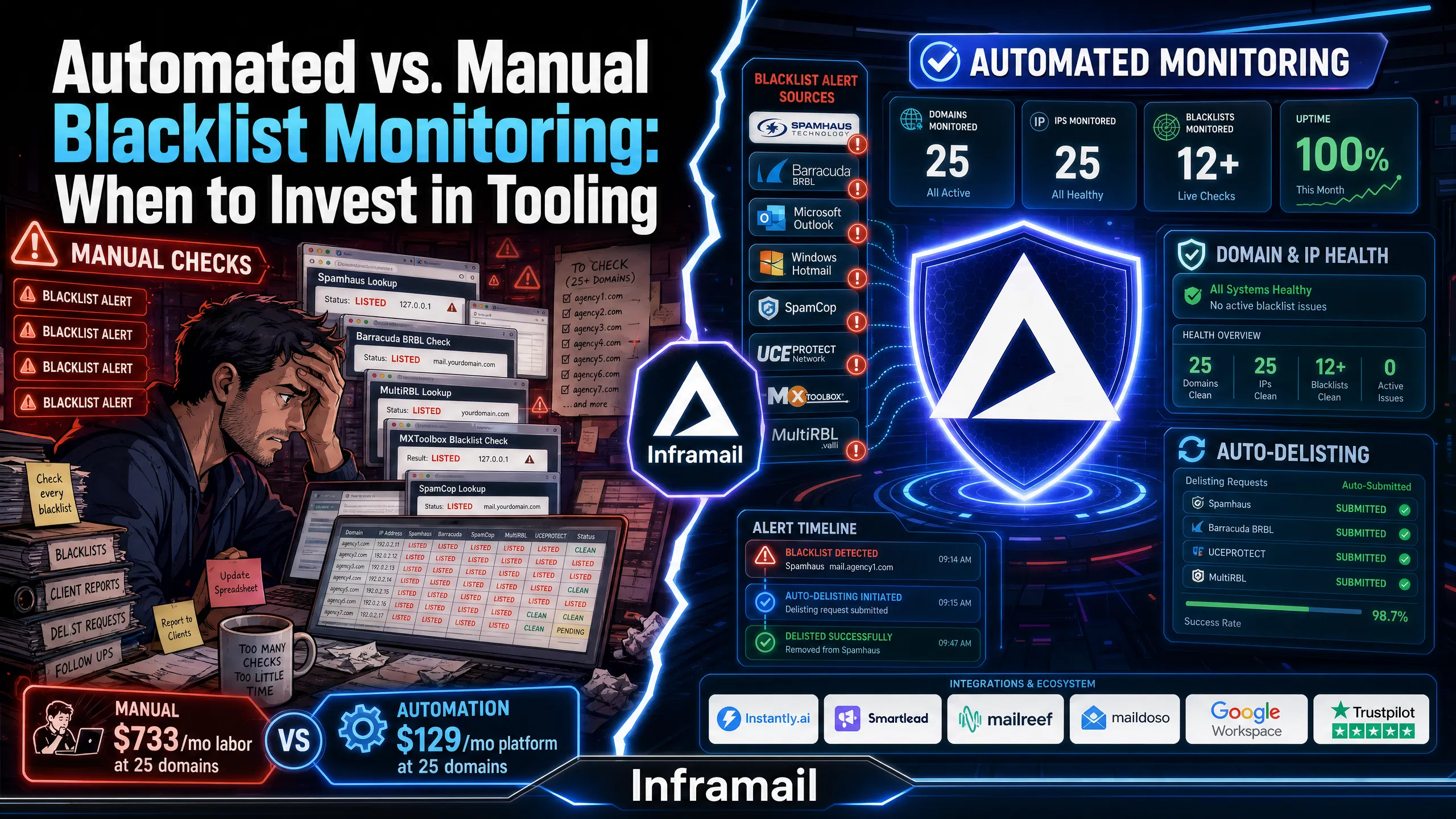
TL;DR: Manual blacklist monitoring requires consistent daily labor that scales linearly with domain count. At 25 domains, daily manual checks cost roughly $733/month in operations labor at a $40/hour fully-burdened rate. The Unlimited Plan is $129/month. Automation covers its own cost at that scale and saves more as domain count grows. The decision framework below shows which approach fits your domain count and growth trajectory.
At 50 domains, your operations team is either checking blacklists manually every day or it isn't. If it isn't, you're flying blind on one of the highest-impact deliverability risks in cold email. If it is, you're spending real labor hours on a task that automated tooling handles. The Unlimited Plan, which includes monitoring alongside full inbox infrastructure, is $129/month. Neither choice is neutral. This guide breaks down what manual monitoring actually costs, where automation pays for itself, and how to make the call based on your agency's scale.
A blacklist listing doesn't pause your campaigns politely. It cuts inbox placement overnight, and you often find out from a client asking why reply rates dropped rather than from a monitoring alert. Spamhaus, one of the most widely used blacklists globally, is checked by major mail servers and can significantly impact delivery until it's resolved. Barracuda BRBL is used in corporate mail filters. SpamCop listings trigger community-driven blocks across multiple ISPs.
The blacklists that actually affect deliverability
Not all blacklists carry equal weight. Understanding the tier structure determines where you spend monitoring resources.
Tier 1 (critical, must monitor):
Spamhaus: One of the most widely used blacklists globally, checked by major mail servers
Barracuda BRBL: Used in corporate mail filters, significant in B2B outbound
Microsoft internal blocklists: Specific to Outlook/Hotmail delivery, critical for Microsoft-based infrastructure
Tier 2 (important, should monitor):
SpamCop: Community-driven blacklist
UCEPROTECT: Reputation-based
Free tools like MXToolbox check against over 100 blacklists on demand, which is useful for spot checks but not sufficient for continuous coverage at agency scale. Our guide to getting off the Microsoft blacklist covers the specific resolution steps for Outlook blocks, which are particularly relevant for Microsoft-based infrastructure.
What late detection costs you
Detection speed is where manual and automated monitoring diverge most sharply, and where the financial case for automation gets clearest.
For agencies managing campaigns across multiple clients, a blacklisting that goes undetected during an active send window can compound deliverability damage before you've identified the root cause.
Most blacklist operators process removal requests within 24-48 hours for legitimate senders. The gap between automated detection and manual detection is where campaign damage accumulates. Our help article on campaign spam metrics covers the specific metrics to track when diagnosing deliverability drops.
Manual monitoring isn't just checking a website once a day. At agency scale, it's a structured set of daily tasks that consume real hours, introduce human error, and scale linearly with every new domain you add.
The daily and weekly task breakdown
For each domain and IP you manage, manual monitoring requires:
Daily checks and logging: Querying blacklist tools (MXToolbox, MultiRBL, Spamhaus lookup) per domain and IP, then recording status in a spreadsheet or tracking system.
Weekly reconciliation: Comparing current status against the prior week's baseline to identify new listings.
When a listing appears, you add:
Root cause investigation: Determining whether the trigger was list quality, send volume, shared IP contamination, or content issues.
Delisting and follow-up: Contacting blacklist operators directly, each with its own form and process, then confirming removal within the standard 24-48 hour window.
The process works. The problem is that it relies on consistent daily execution, and that discipline can break down in busy agency environments.
The real cost of manual monitoring labor
Operations managers tend to undercount manual monitoring costs because the labor isn't billed as a line item. It should be.
When you factor in the fully-burdened cost of operations staff (including benefits, taxes, and overhead), manual monitoring time represents real expense that should be compared against platform costs.
At $40/hour fully-burdened, here's what different levels of monthly monitoring time cost in labor:
Domain Count | Check Time Per Domain | Daily Labor | Monthly Hours (22 working days) | Monthly Labor Cost (at $40/hour fully-burdened) |
|---|---|---|---|---|
10 domains | 2 min/domain | 20 min/day | 7.3 hrs/month | $292/month |
25 domains | 2 min/domain | 50 min/day | 18.3 hrs/month | $733/month |
50 domains | 2 min/domain | 100 min/day | 36.7 hrs/month | $1,467/month |
100 domains | 2 min/domain | 200 min/day | 73.3 hrs/month | $2,933/month |
Assumes $40/hour fully-burdened operations labor rate (base salary + benefits + taxes + overhead) and daily checks across all active domains.
To determine whether automation makes financial sense, calculate your actual monthly monitoring time and multiply by your fully-burdened operations labor rate, then compare against platform costs.
At 25 domains, daily manual checks cost roughly $733/month in operations labor alone. Our Unlimited Plan runs $129/month. That's a $604/month gap before factoring in faster detection or automated delisting. At 50 domains, the labor cost climbs to $1,467/month against the same $129/month platform fee.
Where manual monitoring breaks down
Manual monitoring doesn't fail gradually. It fails at specific scale thresholds.
Small domain counts: Manual monitoring can be workable for smaller operations. Free tools like MXToolbox provide adequate coverage, and the total labor investment stays low. This is a rational trade-off for small operations or single-client setups.
Larger domain counts: The operational load tends to grow significantly. You're managing multiple clients, multiple domains per client, and multiple blacklists per domain. Infrastructure oversight at this scale creates operational drag that compounds as client count grows. At scale, manual monitoring at consistent daily cadence can become difficult to maintain reliably without errors.
Our cold email infrastructure monitoring guide covers how this breaks down in practice and what a reliable monitoring system requires at agency scale.
Automated monitoring changes the posture from reactive to proactive. You stop finding out about blacklistings from clients asking why reply rates dropped, and start finding out from dashboard alerts shortly after a listing occurs.
What automation provides that manual methods cannot
The functional difference between manual and automated monitoring is detection speed, and detection speed determines damage scope. Automated systems scan domains and IPs against major blacklists and alert you when something changes. Early detection enables faster resolution before deliverability issues compound.
Beyond detection speed, automated platforms provide capabilities that manual methods can't replicate at any cost:
Automated delisting workflow: Rather than manually filling out forms on Spamhaus or Barracuda, automated systems submit delisting requests on your behalf
Historical trending: Track listing patterns over time to identify root causes such as specific campaign batches, volume spikes, or list quality issues
Multi-domain dashboard: Monitor dozens or hundreds of domains from one interface without logging into multiple tools
Team access: Share monitoring data across operations, campaign managers, and account leads
The break-even calculation
Our Unlimited Plan costs $129/month and includes real-time blacklist monitoring, automated delisting, and a domain and IP health dashboard covering all inboxes on the platform. For agencies managing multiple domains, the labor time saved through automation can offset the platform cost.
At 25 domains, daily manual checks run 18.3 hours/month at a $40/hour fully-burdened rate. That's $733/month in labor against a $129/month platform fee, a $604/month difference. At 50 domains, labor climbs to $1,467/month against the same $129/month fee. At that point, automation isn't just convenient. It's cheaper than the alternative.
Our 7-platform infrastructure cost comparison shows how these figures stack up across the major providers in the cold email infrastructure market.
Our blacklist monitoring capabilities
Our monitoring stack is built into the broader email infrastructure platform. For agencies already using Inframail for inbox provisioning, real-time blacklist tracking, alerts, and auto-delisting are included as platform features on the Unlimited Plan at $129/month and the Agency Pack at $327/month.
The core monitoring features:
Real-time domain and IP health dashboard: Shows blacklist status across all domains and IPs in your account. When a listing appears, it becomes visible on the dashboard.
Automated delisting: When a domain gets blacklisted, we auto-submit delisting requests on your behalf.
Phantom redirect protection: Our Phantom redirect feature hides domain redirects from ESPs. This addresses a root-cause issue rather than treating the symptom after a blacklisting occurs.
DNS monitoring: Alongside blacklist monitoring, we track SPF, DKIM, and DMARC authentication records. A misconfigured DNS record can trigger a blacklisting. Our automated SPF, DKIM, and DMARC setup eliminates the manual configuration errors that create these vulnerabilities.
"Inframail has been absolute gold in terms of delivering a great customer experience, and allowing me to spin up cold email infrastructure at scale for my clients as easily and fast as possible" - Verified user review of Inframail
The right approach depends on domain count, team size, and growth trajectory. Use the following thresholds as starting points.
Scale thresholds for each approach
1-10 domains: Free tools are sufficient
At this scale, MXToolbox combined with daily manual checks is a reasonable trade-off. MXToolbox checks against over 100 blacklists. The Spamhaus lookup tool is worth bookmarking for direct checks on the single most consequential blacklist.
20-50 domains: Automation is often cost-justified
At 25 domains, daily manual checks consume 18.3 hours/month in operations labor, costing $733/month at a $40/hour fully-burdened rate. At 50 domains, that climbs to 36.7 hours/month and $1,467/month. Manual tracking across multiple clients at this range also introduces reliability risk as daily discipline becomes harder to maintain.
50+ domains: Automation becomes essential
At very large domain counts, consistent manual monitoring becomes operationally challenging. Our Agency Pack at $327/month covers unlimited domains across 3 dedicated US-based IPs, with the full monitoring stack available.
"We spent months hunting for a reliable cold-emailing stack. After repeated failures with another provider, we trialled two options—Inframail and a competitor. We chose the competitor. A month later, we switched back to Inframail. Zero issues since. Rock-solid infrastructure, sharp support, genuinely dependable." - Verified user review of Inframail
Hybrid approaches for transitioning agencies
If you're between 10-20 domains and not ready to commit to a full platform, two hybrid approaches reduce risk without the full platform cost.
Selective automation: Pay for monitoring on your highest-value client domains, and use free MXToolbox alerts for secondary domains. This captures the most financially damaging blacklistings while keeping costs minimal.
Tool stacking with free tiers: Combine multiple free monitoring tools with workflow automation to route alerts into a dedicated communication channel. This can provide near-automated detection without a full platform subscription, at the cost of no automated delisting and manual follow-up on every flag.
Both hybrid approaches work at smaller scales. Above that, the coordination overhead of managing multiple free tools can start consuming more time than a single platform would.
The Maildoso alternatives comparison guide provides a broader look at infrastructure platforms for agencies evaluating their full stack, not just the monitoring component.
Questions to ask vendors before buying
Before committing to any automated monitoring platform, get concrete answers to these questions:
How many blacklists do you monitor? (Look for comprehensive coverage including Spamhaus and Barracuda)
What is your average detection speed from listing to alert?
What is your auto-delisting success rate?
Do you monitor Microsoft's internal blocklists?
How does pricing scale with domain count? Are there per-domain overage charges?
What alert channels do you support?
Do you provide historical trending or only current status?
What is your support response time for blacklist emergencies?
Watch for red flags: vague answers on auto-delisting success rates, inability to name specific monitored blacklists, and pricing models with per-domain overages that create cost unpredictability as client count grows. For context on how we compare against other cold email infrastructure providers, the Mailreef vs. Inframail comparison covers the trade-offs across setup, cost, and monitoring depth.
Domain setup to live inboxes on our platform is fast. The platform auto-configures SPF, DKIM, and DMARC records without manual DNS panel work, and generates IMAP/SMTP credentials ready for CSV export.
Step 1: Connect your domains
Import your existing domains into the platform or purchase new ones directly. DNS configuration runs automatically. For agencies migrating from a different provider, our Smartlead integration guide walks through the full credential export and import process.
Step 2: Configure alerts and export credentials
Export IMAP/SMTP credentials to CSV and import to Instantly.ai or Smartlead. Set your alert preferences in the dashboard. Review the inbox warming guide to confirm your warmup schedule carries over correctly.
Step 3: Establish a clean baseline
Run a deliverability check via our spam metrics guidance before starting active campaigns. Confirm all domains show clean status on the health dashboard.
Step 4: Brief your team
Brief your operations team on the change in workflow. They should stop all manual blacklist checks from the transition date forward. Show them where to find blacklist alerts in the dashboard and who owns alert response when a listing appears. Establish an escalation protocol for listings detected during active campaign windows so response time stays within the standard 24-48 hour delisting window.
"I personally have over 1,000 email accounts with Inframail for one flat price." - Verified user review of Inframail
If manual monitoring is consuming hours each month or you're worried about missed blacklistings during active campaigns, our platform delivers automated blacklist monitoring, DNS auto-configuration, and dedicated IP infrastructure at a flat rate. The Unlimited Plan costs $129/month and includes real-time monitoring, automated delisting, and 1 dedicated US IP. The Agency Pack costs $327/month and includes 3 dedicated IPs for larger portfolios. Sign up to Inframail and get started today.
When does automated blacklist monitoring pay for itself financially?
Compare your actual monthly monitoring labor hours against platform costs. At 25 domains, daily manual checks cost $733/month in operations labor at a $40/hour fully-burdened rate. The Unlimited Plan is $129/month. That's a $604/month saving from month one, before accounting for faster detection or automated delisting. At 50 domains, the labor cost is $1,467/month against the same $129/month platform fee.
What is the auto-delisting success rate for our monitoring?
Our platform auto-submits delisting requests and achieves a 68.3% delisting success rate within 48 hours. Cases that require additional follow-up get flagged in the dashboard.
Does Inframail's blacklist monitoring work for all email providers?
Our monitoring covers US-based Microsoft email infrastructure. It is not compatible with Google Workspace inboxes. Teams running Google-based inboxes need to evaluate separate monitoring solutions.
How long does a blacklisting typically take to resolve after detection?
Most blacklist operators process removal requests within 24-48 hours for legitimate senders. Automated delisting tools shorten the time from detection to submission compared to manual workflows where daily checks may miss a listing entirely until the next scheduled review.
Can I use free tools instead of a paid platform for blacklist monitoring?
Yes, for small domain counts. MXToolbox and the Spamhaus lookup tool provide adequate coverage at small scale. At larger scales, the daily manual effort required to maintain consistent coverage starts to compete in cost with a $129/month platform, and the reliability gap from inconsistent manual checks grows.
What blacklists cause the most damage to cold email deliverability?
Spamhaus causes the most widespread damage because it is checked by major email providers and enterprise mail servers. A listing can block delivery to billions of mailboxes until resolved. Barracuda BRBL and Microsoft's internal blocklists are the next most consequential for B2B outbound campaigns targeting corporate inboxes.
Does blacklist monitoring come included in all Inframail plans?
Domain and IP health monitoring is available across our plans. The Unlimited Plan is $129/month and the Agency Pack is $327/month.
Blacklist (DNSBL/RBL): A database of IP addresses and domains flagged for sending spam. Mail servers query these lists to block or filter incoming messages from flagged senders.
Auto-delisting: An automated workflow that submits removal requests to blacklist operators on your behalf when a listing is detected, reducing manual intervention time.
Inbox placement rate: The percentage of sent emails that land in the recipient's primary inbox rather than spam or junk folders. Tracked via deliverability testing tools.
SPF/DKIM/DMARC: Email authentication protocols that verify sending identity. Misconfigured records can contribute to deliverability issues alongside send behavior and list quality issues.
Dedicated IP: A sending IP address used exclusively by your domains, meaning your reputation isn't affected by other senders sharing the same IP pool. Our Unlimited Plan includes 1 dedicated US-based IP, and our Agency Pack includes 3.
Fully-burdened labor rate: The true hourly cost of an employee including base salary, benefits, taxes, and overhead. This rate should be used when calculating manual task costs against platform alternatives.