
Automated DNS Setup for Cold Email: Eliminate Manual SPF/DKIM/DMARC Configuration
Automate cold email inbox provisioning with PowerShell, Microsoft Graph API, DNS setup, CSV exports, and cost comparisons against flat-rate infrastructure.
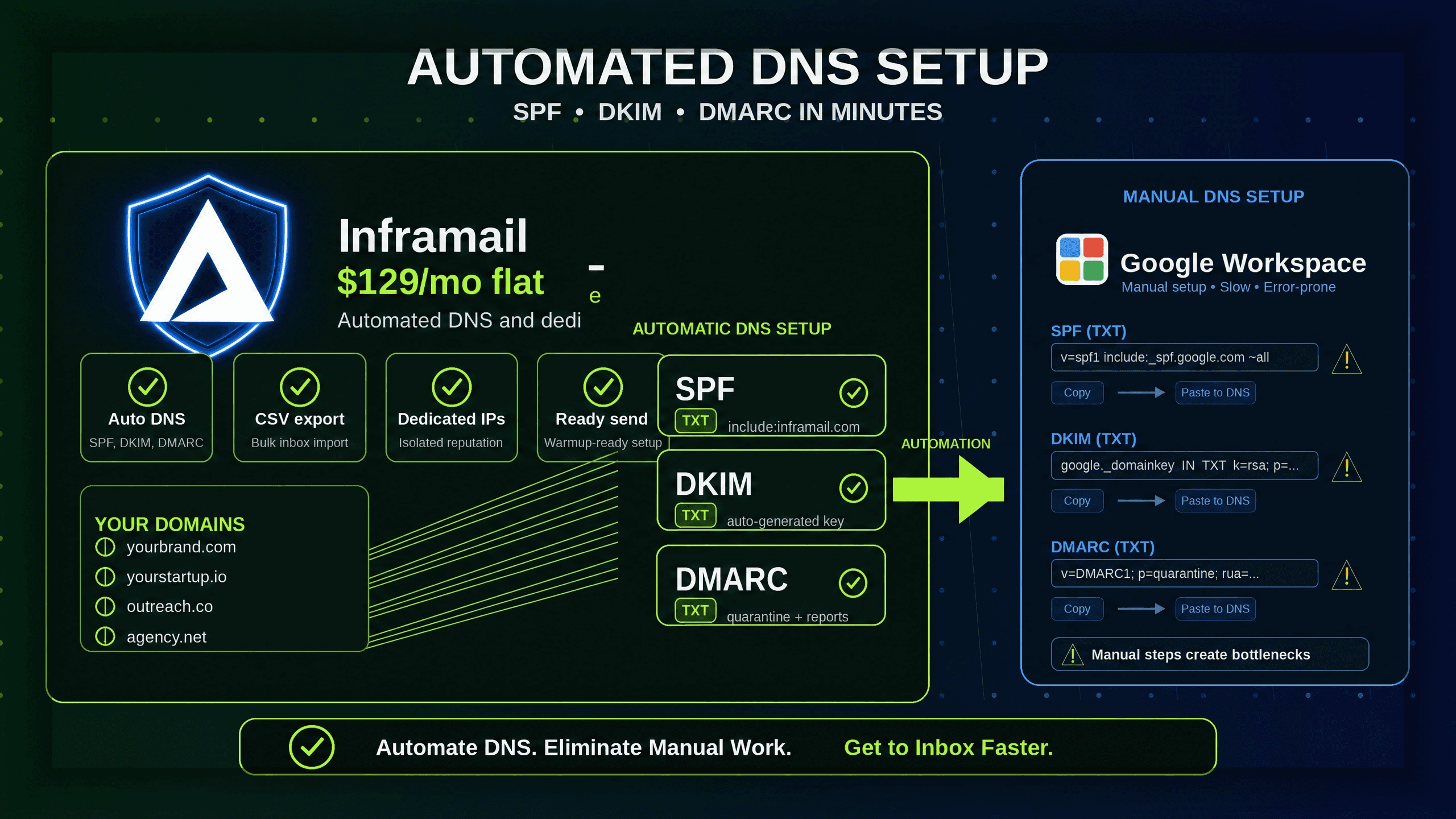
TL;DR: Manual DNS configuration burns approximately 12-18 hours for every 50 domains you provision, consuming two full business days of operational capacity that compounds every time you onboard a new client. Automated DNS platforms configure SPF, DKIM, and DMARC records instantly upon domain purchase, cutting that 12-18 hour block to under 30 minutes for the same 50 domains. At the same time, switching from Google Workspace to Inframail drops infrastructure costs from $350-420/month to $163/month for 50 inboxes, saving $2,244-$3,084 annually and returning operational hours to work that actually scales your agency.
Manual DNS configuration burns approximately 12-18 hours for every 50 domains you provision, yet automated platforms handle the same workload in under 30 minutes while dropping infrastructure costs from $350-420/month to $163/month for 50 inboxes. That gap is not a minor efficiency gain. For an agency managing 20-50 active clients, those reclaimed hours are the difference between an operations team that builds scalable onboarding systems and one that spends every Friday troubleshooting DNS propagation failures.
This article breaks down how automated DNS setup works, what time and cost savings are realistic at different agency scales, and how to implement it using Inframail's automated cold email infrastructure.
Most agencies do not track the true operational cost of manual DNS setup because it hides inside routine tasks. It looks like "configuring a new client" rather than "burning 14 hours on technical busywork." The result is an invisible margin drain that grows every time your sales team closes a new deal.
Calculating the cost of manual setup
The math is straightforward. Based on Inframail's internal benchmarking, manual DNS configuration ranges from 15-30 minutes per domain for experienced users, with less familiar operators taking considerably longer. Using a mid-range estimate of approximately 22 minutes per domain, the formula looks like this:
Domains x 22 minutes = total manual hours
Client count | New domains/month | Hours per month |
|---|---|---|
15 clients | 60 domains | 22 hours |
30 clients | 120 domains | 44 hours |
50 clients | 200 domains | 73 hours |
At 50 clients adding 4 new domains each month, manual DNS configuration alone consumes 73 hours per month, nearly two full work weeks. That time does not include troubleshooting propagation failures, fixing typos in TXT records, or re-authenticating inboxes that fail Mail-Tester checks.
Managing DNS across multiple registrars
Agencies routinely split domains across GoDaddy, Namecheap, and Cloudflare. Each platform uses different UI layouts, different field label conventions, and different propagation behavior.
Fragmented registrar interfaces multiply the surface area for human error. A single misplaced character in your SPF record breaks authentication completely, which means your deliverability collapses before the campaign sends a single email. Inframail's custom domain configuration guide details the most common DNS errors agencies make and how automated configuration eliminates them entirely.
Why manual DNS setup slows your growth
When sales closes 8-10 new clients in a single month, manual DNS becomes the growth bottleneck. Your operations capacity is capped not by how many clients you can serve, but by how fast one person can copy DNS records into multiple registrar panels.
The Inframail FAQ confirms that users can go from purchasing a domain to having ready-to-send inboxes in approximately 180 seconds. That compression in setup time is what allows agencies to onboard clients at the pace sales closes them, rather than at the pace a DNS panel allows.
Before comparing manual versus automated approaches, it helps to understand what SPF, DKIM, and DMARC actually do and why all three are mandatory for any cold email infrastructure.
SPF (Sender Policy Framework) is an email validation protocol that defines a list of authorized servers allowed to send email on behalf of your domain. Think of it as a guest list: receiving servers check whether the sending IP appears on that list before deciding how to handle the message.
DKIM (DomainKeys Identified Mail) adds a cryptographic signature to outgoing emails, proving the message has not been altered in transit. SPF confirms who is allowed to send, while DKIM confirms the message content is authentic.
DMARC (Domain-based Message Authentication, Reporting, and Conformance) sits on top of both, providing policy instructions for what receiving servers should do when SPF or DKIM checks fail. According to PowerDMARC, DMARC checks sender identity in the From field and tells servers whether to quarantine, reject, or deliver messages that fail authentication.
All three records publish as DNS TXT entries on your domain. Configuring them manually means generating cryptographic key pairs, copying values across platforms, and waiting for DNS propagation, which typically takes 24-48 hours globally. Automated platforms handle all of this the moment you purchase or transfer a domain.
How platforms populate SPF/DKIM/DMARC automatically
We connect to your domain's DNS management layer through API integrations. When you purchase a domain through Inframail, we generate the required DKIM key pair, construct the correct SPF record for our sending IP ranges, and write all three TXT records to your DNS zone automatically. No copy-paste, no panel login, no propagation guesswork.
We then provision Microsoft email inboxes under dedicated IP addresses and generate IMAP/SMTP credentials for each inbox. You export those credentials as a CSV and import them directly into Instantly.ai or Smartlead. Our platform compatibility guide confirms official integration support for both platforms.
Setting up automated DNS workflows
The complete workflow from domain purchase to active sending follows four phases:
Domain acquisition: Purchase or transfer domains through the platform. Inframail domains cost $5-$16 per year.
Automatic authentication: SPF, DKIM, and DMARC records configure without any manual DNS panel work.
Inbox provisioning: Create unlimited inboxes under dedicated US-based IPs and export IMAP/SMTP credentials to CSV.
Platform import: Import the CSV directly into Instantly.ai or Smartlead. Campaigns are operationally ready.
Criterion | Manual setup (Google Workspace) | Automated setup (Inframail) |
|---|---|---|
Setup time (50 domains) | 12-18 hours | Under 30 minutes |
Monthly cost (50 inboxes) | $350-420 | $129 flat + ~$34 domains = ~$163 |
IP type | Shared pool | Dedicated (1-3 US-based IPs) |
DNS configuration | Manual per registrar | Auto-configured on purchase |
Support | Standard Google support | Priority support, 16 hrs/day |
Manual process: 50 domains in 12-18 hours
The manual DNS workflow for every single domain follows this sequence:
Log into your domain registrar (GoDaddy, Namecheap, or Cloudflare)
Navigate to DNS management panel
Add SPF record as a TXT entry with the correct IP ranges
Generate DKIM key pair, then copy the public key into a new TXT record
Create DMARC policy TXT record with the correct reporting address and enforcement level
Save changes and wait 24-48 hours for global DNS propagation
Test via Mail-Tester to confirm all three records are passing
Multiply that sequence across 50 domains at 15-22 minutes each and you are looking at approximately 12-18 hours of active work, before adding propagation wait time and troubleshooting for records that need re-entry.
Automated DNS: 50 domains in 30 minutes
With automated DNS, the workflow compresses to three actions: purchase domains, create inboxes, export credentials. The platform's API handles record generation and propagation verification. Inframail's founder demonstrates the full 4-minute domain-to-inbox setup for 5 domains and 10 inboxes in an unedited video.
Calculating your real DNS time savings
For a 30-client agency adding an average of 4 new domains per client per month, automated DNS configuration saves approximately 44 hours monthly compared to the manual approach (120 domains x 22 minutes = 2,640 minutes = 44 hours). That is more than a full work week returned to your operational capacity every month.
Inframail is the flat-rate Microsoft email infrastructure provider that handles SPF, DKIM, and DMARC configuration automatically for unlimited inboxes at $129/month. Here is how the specific platform features work in practice.
Domain purchase to DNS configuration
You purchase domains directly inside the Inframail dashboard at $5-$16 per domain per year, or transfer existing domains you already own. The moment you add a domain to your account, we auto-configure SPF, DKIM, and DMARC records without requiring you to log into any DNS panel. The Inframail setup tutorial shows this step working in real time, including how bulk domain purchases trigger automatic record generation for every domain in the order.
"InfraMail makes it remarkably easy to purchase domains, configure them correctly, create inboxes, and initiate warm-up immediately. The level of automation is exceptional and clearly designed for serious operators; it removes friction and allows you to focus on execution rather than setup." - Verified user review of Inframail
Auto-populate SPF DKIM and DMARC
We generate the DKIM key pair, construct the correct SPF record for Microsoft's sending IP ranges, and write all three authentication records to your domain's DNS zone. Zero manual input required. This is particularly valuable for agencies managing domains across multiple registrars, because the platform abstracts away registrar-specific UI differences entirely.
Inbox creation and IMAP credential export
Once DNS is configured, you create unlimited Microsoft email inboxes under dedicated US-based IP addresses. The Unlimited Plan includes 1 dedicated US-based IP, and the Agency Pack includes 3 dedicated IPs. We isolate your sending reputation from every other user on the platform, so one bad actor cannot contaminate your client campaigns.
We generate IMAP/SMTP credentials for each inbox automatically. You download a credentials CSV from the Update tab and import it directly into your sending platform. The unlimited inbox creation demo shows this full export process in the Inframail 3.5 interface.
Connecting inboxes to sending platforms
The CSV format is compatible with Instantly.ai and Smartlead natively. Import the file, map the IMAP/SMTP fields, and your inboxes are active in the sending platform within minutes. We provide a complete Smartlead integration guide for agencies that run Smartlead as their primary outreach tool.
"Inframail has been absolute gold in terms of delivering a great customer experience, and allowing me to spin up cold email infrastructure at scale for my clients as easily and fast as possible." - Verified user review of Inframail
Here is the complete step-by-step process for provisioning 10 cold email domains with automated DNS configuration through Inframail.
Bulk buy domains via dashboard: Log into your Inframail account and navigate to the domain purchase section. Enter your desired domain names or use the platform's domain suggestion tool. Domains are priced at $5-$16 per year, so 10 domains cost $50-$160 annually on top of the $129/month platform fee. Select all 10 in a single bulk order. The ultimate cold email infrastructure guide covers domain naming conventions and volume purchasing strategy for agencies scaling to 50+ domains per client.
Automate SPF, DKIM, and DMARC: The moment your domain purchase completes, we trigger automatic DNS configuration for every domain in the order. We write SPF records with the correct Microsoft sending IP ranges, generate and publish DKIM key pairs, and set DMARC policies with appropriate enforcement levels. You do not need to touch a DNS panel at any point in this process. The Inframail founder demonstrates this live in a SPF/DKIM/DMARC setup video, showing automated configuration completing for 10+ inboxes in under 2 minutes.
Set up inboxes at scale: Navigate to the inbox creation screen and create your inboxes under the newly configured domains. Our flat-rate model means you can create 10, 50, or 500 inboxes with no per-seat charges. Users report setting up 10 inboxes in under 2 minutes, as shown in the unlimited inbox creation demo.
Export and integrate with your sending platform: Export your IMAP/SMTP credentials to CSV from the Update tab. The CSV includes all fields required for Instantly.ai or Smartlead import: inbox address, IMAP server, IMAP port, SMTP server, SMTP port, and password. Import the file to your sending platform, map the columns to the correct fields, and your inboxes are live. Our platform compatibility documentation confirms API support for Instantly.ai and direct CSV integration for Smartlead.
Verify DNS propagation and authentication: Once your inboxes are configured, run a Mail-Tester check on a test send from each domain. We report scores of 9.5/10 on Mail-Tester across tested domains. Before starting your first campaign, connect your inboxes to an external warmup tool (Warmbox or Lemwarm at $15-50/month) and run a 2-3 week warmup period. Our inbox warmup guide walks through this process. Our deliverability metrics guide explains what healthy authentication scores look like and how to interpret Mail-Tester output.
The time savings from automated DNS scale directly with client count. The table below shows the arithmetic at three common agency sizes, based on 4 new domains per client per month at 22 minutes of manual setup per domain.
Agency size | Monthly new domains | Manual setup time | Automated setup time | Hours saved monthly |
|---|---|---|---|---|
15 clients | 60 domains | ~22 hours | Under 2 hours | ~20 hours |
30 clients | 120 domains | ~44 hours | Under 2 hours | ~42 hours |
50 clients | 200 domains | ~73 hours | Under 3 hours | ~70 hours |
At 50 clients, manual DNS at 22 minutes per domain consumes 73 hours per month, nearly two full work weeks. We cut that block to under 3 hours, saving more than half a full-time work week every single month. Those recovered hours also make it straightforward to calculate your actual sending capacity and plan infrastructure without DNS bottlenecks constraining your growth.
"I've been using Inframail for a couple of months and the experience has been really good. I can set-up inboxes in 5mins while saving money on Google Workspace subscriptions and benefit from great deliverability. All of my campaigns on Inframail are on a >10% reply rate." - Verified user review of Inframail
Automated DNS setup solves the operational bottleneck, but it does not eliminate every deliverability consideration. Here is an honest breakdown of the trade-offs.
Deliverability considerations vs. Google Workspace
GMass's cold email infrastructure analysis confirms that Inframail was "the first of the private cold email infrastructure companies" (domain registered November 2022).
Google's native infrastructure carries massive sender reputation built across billions of legitimate accounts, creating a placement advantage that does not transfer automatically to Microsoft-based dedicated IPs.
However, dedicated IPs also carry a specific advantage: your sending reputation is completely isolated. Shared IP providers like Maildoso and Mailforge put your domain reputation at risk from other users on the same IP pool, where one aggressive sender can contaminate the entire range. Our dedicated IP vs. shared IP video walks through exactly how shared IP contamination works and why dedicated IPs protect your clients' campaigns.
The cost math also changes the calculus significantly. At 50 inboxes, our infrastructure costs $163/month versus $350-420/month on Google Workspace, as detailed in our cold email infrastructure cost comparison. At 200 inboxes, the comparison becomes approximately $396/month on Inframail (at $16/domain/year) versus $1,400-1,680/month on Google Workspace.
Inbox count | Google Workspace | Inframail (platform + domains) | Monthly savings | Annual savings |
|---|---|---|---|---|
50 inboxes | $350-420/mo | ~$163/mo | ~$187-257/mo | ~$2,244-3,084 |
200 inboxes | $1,400-1,680/mo | ~$396/mo | ~$1,004-1,284/mo | ~$12,048-15,408 |
The deliverability trade-offs are real considerations. Whether they matter to your agency depends on the volume you send and the margin compression you experience on Google Workspace. For agencies managing 50+ domains per client, the cost savings typically outweigh the placement considerations, especially when combined with proper inbox warmup and dedicated IP isolation.
Why we focus on Microsoft environments
We built Inframail on Microsoft's cloud platform and announced an enterprise partnership in January 2024. This is not a shared cloud account or workaround. It is dedicated US-based infrastructure built on the same foundational layer that powers Microsoft 365, providing the IP reputation, infrastructure reliability, and technical credibility that cold email at scale requires.
We provide US-based infrastructure only. If your clients require EU or APAC data residency, or if they specifically require Google Workspace IPs, this platform is not the right fit. Own that trade-off clearly rather than discovering it mid-campaign.
Vendor lock-in and migration considerations
Vendor lock-in is a legitimate concern for any agency building its operational stack around a single infrastructure provider. Our export model directly addresses this. Your IMAP/SMTP credentials export as a standard CSV file that imports to any platform accepting IMAP connections, including Instantly.ai, Smartlead, or any sending tool you adopt in the future.
If you decide to switch providers, our general migration guide shows that moving between providers follows a documented, repeatable process. You are not trapped by proprietary credential formats or closed API architectures.
At 50 domains, manual DNS costs you 12-18 hours. At 200 domains, it costs you nearly two full work weeks per month. The question is whether you can afford not to automate, while your competitors are launching clients in 14 days. Sign up to Inframail and get started today.
Which DNS providers does Inframail support for automation?
We auto-configure SPF, DKIM, and DMARC records for domains purchased through the platform. For domains you already own with common registrars, the automated configuration process handles record setup without requiring you to log into DNS panels directly.
How long does DNS propagation take with automated setup?
We configure records instantly, but global DNS propagation takes 24-48 hours for full worldwide consistency, with some cases taking up to 72 hours. Most mail servers begin recognizing your authentication records within the first 24 hours of configuration.
Do I need a warmup tool if I use automated DNS setup?
Yes. We provision and authenticate your inboxes but standard plans do not include a built-in warmup tool. You need an external service like Warmbox or Lemwarm ($15-50/month) for a 2-3 week warmup period, or our DFY Email Campaign Setup ($499/month or $3,497 one-time) includes it.
What happens if SPF, DKIM, or DMARC records fail authentication?
Receiving servers will quarantine or reject your emails based on your DMARC policy if authentication fails. Our automated configuration reduces failure rates, and you can verify all three records via Mail-Tester before launching any campaign.
Does automated DNS setup satisfy CAN-SPAM requirements?
Automated DNS handles the technical authentication layer (SPF/DKIM/DMARC) but does not cover CAN-SPAM requirements like physical address, unsubscribe mechanism, and accurate headers. Our cold email compliance guide covers the campaign-level requirements you need to meet.
SPF (Sender Policy Framework): A DNS TXT record that lists the IP addresses authorized to send email on behalf of your domain. Receiving servers check this record to verify the sending source is legitimate.
DKIM (DomainKeys Identified Mail): A cryptographic signature added to outgoing email headers that proves message content has not been altered since it left your server. Requires a public key published as a DNS TXT record and a private key stored by your email provider.
DMARC (Domain-based Message Authentication, Reporting, and Conformance): A DNS policy record that tells receiving servers what to do (deliver, quarantine, or reject) when SPF or DKIM checks fail. Also enables reporting so you can monitor authentication failures across your sending domains.
Dedicated IP: A sending IP address assigned exclusively to your account, meaning your sending reputation is determined entirely by your own behavior, not other users sharing the same IP range.
DNS propagation: The time it takes for DNS record changes to replicate across global nameservers after you publish them, typically ranging from a few minutes to 48 hours, with full worldwide consistency sometimes taking up to 72 hours in rare cases.
IMAP/SMTP credentials: The server address, port, and authentication details required to connect an email inbox to a sending platform. We export these as a CSV for bulk import into Instantly.ai or Smartlead.