
Agency Cold Email Onboarding: 5-Day Client Launch Playbook
Learn how to launch client cold email campaigns in 5 days. Discover strategies for domain sourcing, automated DNS setup, and deliverability monitoring.
Updated July 13, 2026
TL;DR:
Slow client onboarding destroys agency margins and delays revenue. This playbook covers a step-by-step, 5-day schedule for agency client onboarding, from domain purchase through campaign launch. By replacing manual DNS configuration with automated platforms like Inframail, agencies can provision 50 domains and 150 inboxes in minutes, not days. Mailforge uses shared IP pools that tie your sender reputation to other users' behavior. Inframail provides dedicated US-based IPs and flat-rate pricing of $129/month, saving agencies $221-291/month on infrastructure at 50 inboxes compared to Google Workspace.
When client onboarding takes 14 days, your agency pays for domains, warmup tools, and platform seats that generate zero revenue. That idle spend, stacked against thin margins, is where agency growth stalls. This playbook details a 5-day client launch schedule that cuts setup times while protecting your margins through flat-rate, dedicated IP infrastructure.
Manual DNS configuration is a major contributor to extended onboarding timelines. For every new client, someone on your team logs into a domain registrar, copies SPF TXT records character by character, waits 24-48 hours for propagation, and troubleshoots DKIM mismatches before repeating the process across every domain in that client's stack. Setting up 50 domains this way takes 12 or more hours across multiple sessions. For a small agency, that time comes directly from hours that should go toward acquiring the next client.
Infrastructure spend as a percentage of billings compounds the problem. Per-seat pricing scales linearly with inbox count, so each new client you add brings a proportional jump in infrastructure cost. At Google Workspace Business Starter's rate of $7-8.40 per user per month, 50 inboxes costs $350-420/month before a single email is sent, climbing to $700-840/month at 100 inboxes and $1,400-1,680/month at 200 inboxes.
The real cost of 14-day onboarding
Slow launches compress margins in two directions at once. Infrastructure bills run while campaigns sit idle, and any delay pushes your agency closer to the point where a frustrated client begins re-evaluating the relationship. For a client expecting results in week two who receives a "we're still setting up" update in week three, early churn risk increases before a single email lands in an inbox.
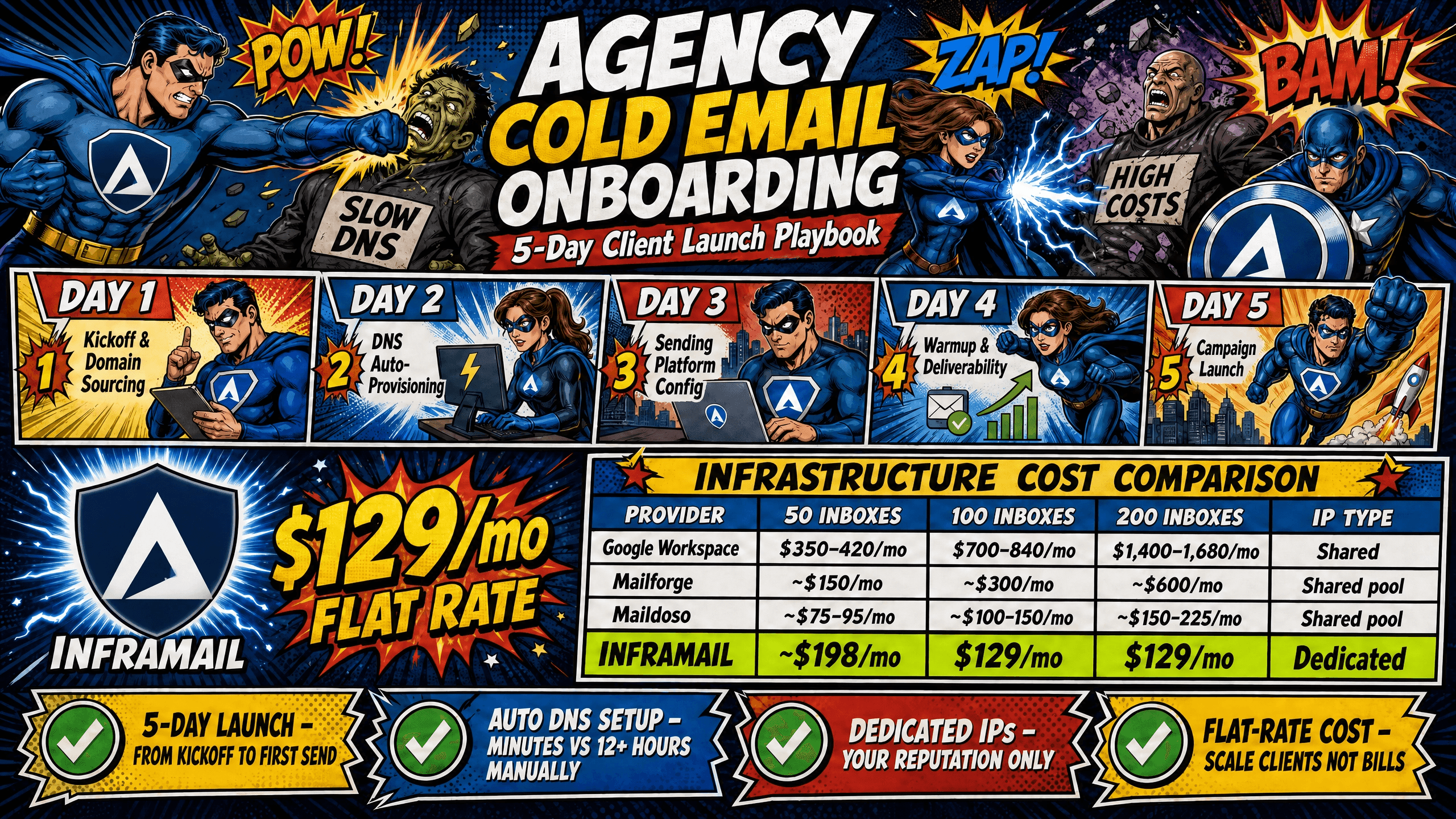
Inframail's flat-rate model changes this math: the $129/month infrastructure comparison across volume tiers shows how fixed costs decouple from client count growth.
Fixing the 14-day onboarding bottleneck
Two levers eliminate the 14-day timeline: automated DNS configuration and flat-rate pricing.
Cold email infrastructure is the technical stack of domains, mailboxes, DNS records, and sending servers configured specifically for outbound campaigns. TCO (total cost of ownership) covers every line item in that stack, including platform fees, domain registration, warmup tools, and the sending platform itself.
Automated DNS configuration removes manual TXT record entry entirely. Inframail's platform auto-provisions SPF, DKIM, and DMARC records without requiring registrar login, cutting 12+ hours of manual work to near zero. Flat-rate pricing means that as a client's inbox count grows, the infrastructure cost stays fixed at $129/month rather than scaling linearly.
Here is the full timeline at a glance.
Day | Focus | Deliverable |
|---|---|---|
Day 0 | Pre-onboarding prep | Domain list approved, kickoff agenda sent |
Day 1 | Client kickoff and domain sourcing | Domains purchased, naming convention confirmed |
Day 2 | DNS automation and inbox provisioning | 150 inboxes live, credentials exported |
Day 3 | Sender platform configuration | CSV imported to Instantly or Smartlead, tracking domains set |
Day 4 | Warmup initiation and deliverability baseline | Warmup ramp started, open rate monitoring active |
Day 5 | Campaign launch and handoff | First sends live, client dashboard access delivered |
Domain separation is the first principle of protecting a client's sending reputation. Cold email campaigns should never run from a client's primary branded domain because a deliverability problem on a campaign domain can contaminate the primary domain's reputation with major inbox providers. Build a stack of secondary domains closely related to the brand but distinct, and structure that domain stack before the kickoff call begins.
Kickoff call agenda and requirements checklist
Run the Day 1 kickoff with a structured agenda so nothing gets missed and the 5-day clock starts cleanly.
Kickoff call agenda:
Scope confirmation: Number of domains, inboxes per domain, total daily send volume target
Domain strategy review: New domains vs. pre-owned, naming conventions, registrar preference
Sending platform selection: Instantly or Smartlead, existing account or new setup needed
Timeline expectations: 5-day launch milestones and client response windows required
Warmup strategy: Volume ramp schedule and which warmup tool to use
Service Level Agreement (SLA) review: Deliverability targets, reporting schedule, escalation contacts
Required client assets checklist:
Brand name and approved domain variations (enough options to protect the brand and support real traffic patterns)
Target audience definition (Ideal Customer Profile, geography, industry)
Sending platform login credentials (if account exists)
Lead list or data source details
Offer summary and key messaging points
Written approval on domain names before purchase
Domain naming rules for better deliverability
Safe domain variations use a predictable pattern. Prefix-based formats (get[brand].com, try[brand].com) and suffix-based formats ([brand]hq.com, [brand]group.com) work well because they relate clearly to the brand without exact-match use of the primary domain. Stick to .com wherever possible for primary campaign domains, with .co and .io as secondary options when .com is unavailable.
Choosing registrars for bulk domain buying
Traditional registrars like Namecheap or GoDaddy require manual DNS configuration after purchase, which means accessing each domain's control panel separately to set MX, SPF, DKIM, and DMARC records. Inframail's platform handles domain purchasing at $5-16 per domain per year and auto-configures DNS records on purchase, cutting the registrar step from hours to minutes. The infrastructure cost comparison shows how domain costs factor into the full TCO across providers.
Client kickoff: Confirming launch details
Get written confirmation (email is sufficient) on two items before purchasing any domains: the final approved domain list and the total inbox count. Domain purchases are not reversible on a useful timeline, and buying domains the client later rejects creates both cost and delay. Set a clear response window at the kickoff call so the connection between client responsiveness and launch timing is explicit.
DNS configuration is the process of setting up domain records (SPF, DKIM, DMARC, and MX) that authorize which servers can send email on behalf of a domain and verify sender identity to receiving servers. Manual configuration requires accessing each domain's DNS panel, entering TXT record strings for each record type, waiting 24-48 hours for propagation, and then testing to confirm records resolved correctly. At 50 domains, that process takes 12 or more hours across multiple sessions.
Automating new inbox provisioning
Inframail's platform eliminates the manual panel work by auto-generating and pushing SPF, DKIM, and DMARC records when domains are provisioned. Agencies can provision inboxes across multiple domains through the dashboard. Customer accounts report setup times of 10 inboxes in 2 minutes, with the platform recommending 3 inboxes per domain as a best practice for deliverability. Each inbox is created under dedicated US-based IPs (1 IP on the Unlimited Plan, 3 IPs on the Agency Pack), which means your sending reputation stays isolated from other platform users.
Inframail automates DNS setup, eliminating hours of manual panel configuration across 50+ domains.
Configuring SPF, DKIM, and DMARC
Each DNS record type serves a specific deliverability function:
SPF (Sender Policy Framework): Lists which mail servers can send email from a domain. Without it, receiving servers cannot verify the sender is legitimate.
DKIM (DomainKeys Identified Mail): A cryptographic signature that verifies the message wasn't altered in transit.
DMARC (Domain-based Message Authentication, Reporting, and Conformance): Tells receiving servers what to do with emails that fail SPF or DKIM checks.
Inframail's platform sets all three automatically, streamlining the setup process for agencies managing multiple domains.
Validating DNS records for delivery
After provisioning, verify that records propagated correctly using a tool like MxToolbox. Check four items:
MX records point to the correct mail server
SPF TXT records are formatted without syntax errors
DKIM selectors return the expected public key
DMARC policies are set to at least "p=none" (monitoring mode) before graduating to "quarantine" or "reject"
Inframail's blacklist monitoring dashboard tracks domain and IP health automatically, with a 68.3% delisting success rate when a domain gets flagged.
Standardizing client infrastructure updates
Every client should have a dedicated infrastructure document that records domain names, inbox addresses, SMTP/IMAP server settings, login credentials (stored securely in a password manager), and the warmup start date for each inbox. This document doubles as the handoff deliverable on Day 5. Maintaining it in a shared workspace with view-only access for the client eliminates support tickets from clients who can't locate their own sending credentials. The agency monitoring guide covers how to structure ongoing health tracking across multiple clients.
Mailforge is a common reference when agencies search for cold email infrastructure alternatives to Google Workspace. However, two structural limitations create compounding problems at agency scale: shared IP pools and per-mailbox pricing.
On shared IP infrastructure, your sending reputation reflects the combined behavior of every user on the same IP range. Mailforge's infrastructure distributes mailbox accounts across a shared pool used by multiple businesses simultaneously. Research tracking cold email delivery on shared infrastructure shows measurably lower inbox placement compared to dedicated IP setups, as documented in the Maildoso deliverability review using the same shared-pool architecture. That gap directly affects the meeting volume a client sees, and from a client retention standpoint, a drop in inbox placement is visible within weeks.
Per-mailbox pricing creates a second problem as client count grows. Mailforge pricing starts at approximately $3 per mailbox per month, putting 50 mailboxes at around $150/month and 200 mailboxes at approximately $600/month. Inframail's $129/month flat rate covers unlimited inboxes regardless of whether that number is 50 or 500. The cost advantage compounds significantly at scale, as shown in the infrastructure cost comparison:
Provider | 50 inboxes | 100 inboxes | 200 inboxes | IP type |
|---|---|---|---|---|
Google Workspace | $350-420/mo | $700-840/mo | $1,400-1,680/mo | Shared |
Mailforge | ~$150/mo | ~$300/mo | ~$600/mo | Shared pool |
Maildoso | ~$75-95/mo | ~$100-150/mo | ~$150-225/mo | Shared pool |
Inframail | $129/mo | $129/mo | $129/mo | Dedicated (1-3 IPs) |
Note: Domain costs ($5-16/domain/year on Inframail, ~$12/domain/year at standard registrars) and warmup tools ($15-50/month per inbox for external tools) are additional on all platforms and are not reflected above.
Importing keys for campaign launch
After Day 2 provisioning, Inframail generates IMAP and SMTP credentials for every inbox automatically. Export these as a CSV file directly from the platform dashboard, and verify the CSV matches the column structure required by your sending platform. Instantly and Smartlead each provide an import template that defines the expected column headers and order, and the Inframail export should be mapped against that template before uploading. The Inframail-to-Smartlead integration guide covers exact column mapping for Smartlead's bulk import.
Inframail exports IMAP/SMTP credentials as a CSV, eliminating manual inbox-by-inbox entry into sending platforms.
Setting sender rotation and daily limits
Cold email platforms rotate senders automatically when you import multiple inboxes, distributing send volume across the stack. Set a daily cap of up to 50 emails per inbox on new domains, staying conservative in the first 30 days. The Inframail sending capacity guide explains how to calculate total daily volume capacity based on inbox count.
Deliverability monitoring setup
Inframail's blacklist monitoring dashboard tracks the health of every domain and IP automatically. When a domain gets flagged, the platform auto-submits delisting requests with a 68.3% success rate. Set up email alerts for blacklist events so the agency catches issues before the client notices. The spam metrics help article covers which bounce and open thresholds should trigger a manual review.
Template: Configuring client sending platforms
Use this standard configuration for every new client account in Instantly or Smartlead:
Sender profile setup:
Display name: First name only (e.g., "Sarah") or "First Last" if the client prefers
Reply-to address: Use the sending inbox, not the client's primary domain
Email signature: Keep it minimal, name, title, company, one link
Custom tracking domain: Set up a subdomain of the campaign domain (e.g., track.getclientbrand.com)
Warmup is the process of gradually increasing email sending volume from a new inbox to build a positive sender reputation before sending cold campaigns at full volume. Skipping warmup on new domains is the most common cause of deliverability failures in the first campaign week. No inbox provider treats a brand-new domain that sends 100 emails on day one the same as a domain with weeks of consistent, engaged sending history. The inbox warmup migration guide covers the specific warmup approach for Microsoft-based infrastructure.
Mailforge support and warmup setup
Mailforge does not include a native built-in warmup feature. Warmforge, a companion product from the same Salesforge product family, provides warmup at $12/inbox per month as a separate purchase. Third-party warmup integrations with tools like Instantly or Smartlead are also available, but all warmup on Mailforge builds reputation at the IP level rather than the domain level, since Mailforge runs on a shared IP pool. When one user on the same IP pool sends spammy content, the entire pool's reputation can degrade, including inboxes that have been properly warmed.
Inframail requires external warmup tools such as Warmbox or Lemwarm, at $15-50/month per inbox. Warmup on dedicated IPs builds reputation for that specific IP and domain combination, meaning no other user's behavior can contaminate warmup progress. At the $129/month flat rate, the savings versus Google Workspace at 50 inboxes ($221-291/month on infrastructure alone) comfortably absorb external warmup costs. Inframail's DFY Email Campaign Setup package ($3,497 one-time or $499/month) includes free domain warmup for agencies that want the full onboarding handled externally.
Optimizing ramp logic for cold email
Microsoft 365 inboxes respond well to a conservative ramp schedule. Start warmup volume low and increase gradually each week:
Week 1: 5-10 warmup emails per day, zero campaign sends
Week 2: 10-20 warmup emails per day, zero campaign sends
Week 3: 20-30 warmup emails per day, introduce 5-15 campaign sends
Week 4+: Maintain 20-30 warmup emails ongoing, scale campaign sends incrementally
During the initial sending period, maintain a warmup-to-campaign ratio close to 1:1 to avoid a reputation gap between what inbox providers see from warmup activity and what they see from live sends, adjusting warmup volume down gradually as sender reputation stabilizes. Microsoft inboxes are less forgiving than Gmail when volume increases too quickly, and sudden spikes are a primary trigger for automatic filtering.
Detecting early signs of deliverability drops
Monitor these metrics daily during the warmup phase:
Warmup open rate: Warmup tool emails should maintain high open rates internally. Lower rates can indicate placement issues.
Spam report rate: Any rate above 0.1% (1 complaint per 1,000 emails) requires immediate volume reduction
Bounce rate: Hard bounces above 2% point to list quality problems, not infrastructure problems
Reply rate: Warmup tools generate internal replies to simulate legitimate two-way correspondence, while no consistent industry benchmark exists for a specific reply rate target, monitoring for a sudden drop in reply activity from your warmup tool can indicate a placement or engagement issue worth investigating. The Inframail spam metrics guide provides specific thresholds and explains when to pause campaigns versus adjust volume.
Validating warmup for client launch
Before transitioning any inbox from warmup to live campaign status, run a deliverability test using a tool like GlockApps on each sending domain. Confirm the inbox reaches the primary folder for both Gmail and Outlook recipients. Only transition inboxes that pass the deliverability test to live campaign status. Inboxes showing any spam placement should stay on warmup for an additional week before retesting.
Transitioning from warmup to active sending is a controlled process. On Day 5, confirm that each inbox has completed its minimum warmup period, that DNS records are propagated and clean, and that the lead list has been verified for bounce rate risk. Do not compress the warmup duration regardless of client pressure to launch early.
Pre-launch checks for inbox health
Run through this checklist before activating any campaign sequence:
Custom tracking domain resolves correctly (test with a browser load)
Blacklist status clean for all sending domains (check Inframail monitoring dashboard)
Lead list verified with an email verification tool (target under 2% bounce rate)
DMARC record set to at least "p=none" with a valid reporting address
Daily sending limits confirmed in the platform settings
Test send passed to both Gmail and Outlook seed addresses
Warmup tool set to maintenance mode (not stopped, ongoing maintenance warmup continues)
Unsubscribe link or opt-out method included in every sequence step
Inframail's monitoring dashboard flags blacklisted domains and auto-submits delisting requests with a 68.3% success rate.
Automating inbox activation monitoring
Set automated alerts in the sending platform for triggers that indicate deliverability degradation, such as bounce rate exceeding 2% on any sending domain and a consistent, meaningful drop in open rates on active campaigns (a sustained decline that indicates likely spam folder placement rather than normal day-to-day variation). Both are early indicators of deliverability issues that require immediate volume reduction. Inframail's monitoring dashboard handles blacklist detection and auto-delisting automatically, so Day 5 alert setup covers campaign-level performance metrics that the infrastructure tool doesn't surface. The agency owner's monitoring guide provides a full alert framework for multi-client stacks.
Client handoff checklist and documentation
The Day 5 handoff document should include:
Infrastructure summary: Domain list, inbox count, dedicated IP addresses, platform login credentials
Campaign configuration: Sending limits, sequence step counts, tracking domain setup
Performance baseline: Expected deliverability rate, daily send capacity calculation
Reporting schedule: Weekly metrics summary (reply rate, meeting booked rate, bounce rate)
Escalation contact: Direct support path for deliverability issues (Inframail provides support 16 hours a day, 7 days a week, from real people)
Warmup maintenance note: Warmup tools remain active in maintenance mode throughout the campaign lifecycle
Client communication template: Launch confirmation
Use this template to notify the client that campaigns are live:
Subject: Your cold email campaigns are live
Hi [First Name],
Your campaigns went live today. Here's what to expect in the first week:
Daily send volume: [X] emails across [Y] sending inboxes
Expected reply rate baseline: 3-5% (increases as sending history builds)
First performance report: [Date, 7 days from today]
Your infrastructure dashboard login is [URL]. Use it to monitor domain health and blacklist status. The monitoring system catches issues automatically and submits delisting requests when flagged.
Any questions, reply here or reach out at [support contact].
Clear, proactive communication prevents the two most common sources of client anxiety during onboarding: uncertainty about what's happening and frustration at not knowing what comes next. Agencies that send status updates at each milestone generate fewer inbound support requests and maintain stronger relationships through the warmup period, when results aren't visible yet.
Templates for faster client onboarding
Day 0: Asset request email
Subject: Getting your campaign infrastructure ready, need these assets
Hi [First Name],
To hit the 5-day launch target, I need a few things from you by [date]:
Approved domain name variations (I'll send 10 options for you to choose from)
Target audience definition (industry, company size, geography)
Sending platform login (if you have an Instantly or Smartlead account)
Lead list source details
Once I have these, domain purchasing and DNS setup start immediately.
Day 2: DNS and inbox confirmation
Subject: Infrastructure update: 150 inboxes live
Hi [First Name],
DNS setup is complete across all 50 domains. 150 inboxes are provisioned and credentials are imported into [platform name]. Warmup starts today. Next update: Day 5 with your launch confirmation.
Managing client response time windows
Setting clear response windows for all client approvals during the kickoff call helps maintain the 5-day timeline. Set a clear, agreed response window for all client approvals during the kickoff call. The specific timeframe should reflect the client relationship and launch urgency, but the expectation itself must be documented and referenced in every subsequent status update. When clients understand that delayed approvals put the launch timeline at risk, they tend to prioritize faster turnaround. Document this expectation in kickoff call notes and reference it in every status update so the link between client responsiveness and launch timing stays explicit.
Technical issues during the first 5 days are common and manageable when the agency has a documented response process. Build a short SOP for the four most common failure types before the first client launch.
"InfraMail makes it remarkably easy to purchase domains, configure them correctly, create inboxes, and initiate warm-up immediately. The level of automation is exceptional and clearly designed for serious operators. It removes friction and allows you to focus on execution rather than setup." - Verified user review of Inframail
Sign up to Inframail to automate DNS setup and start provisioning domains today. For agencies that want the full setup handled without dedicating internal team time to infrastructure, Inframail's Done-For-You service ($3,497 one-time or $499/month) includes domain warmup, sending platform configuration, a deliverability consultant, and the first 2,500 leads in any niche.
What are the main alternatives to Mailforge?
The main Mailforge alternatives are Inframail, Maildoso, Mailscale, and Infraforge. Inframail stands out by offering flat-rate pricing of $129/month for unlimited inboxes plus 1-3 dedicated US-based IPs, while Mailforge charges per mailbox slot on a shared IP pool.
How does Mailforge pricing compare to its competitors?
Mailforge charges approximately $3 per mailbox per month, putting 50 inboxes at around $150/month and 200 inboxes at approximately $600/month. Inframail charges a flat $129/month regardless of inbox count, so the cost advantage compounds significantly as an agency scales beyond 50 inboxes.
What are the key features of Mailforge?
Mailforge features automated mailbox provisioning and shared IP pool infrastructure. It does not include a native warmup feature. Warmforge, a companion product from the same Salesforge product family, is available separately at $12/inbox per month for warmup coverage. It does not provide dedicated IP isolation, which means inbox placement depends in part on the sending behavior of other users on the same shared IP range.
Is Mailforge easy to set up and use?
Mailforge offers automated setup that reduces manual configuration time, and user reviews on G2 frequently highlight setup speed as a strength. However, managing deliverability on shared IPs requires more ongoing monitoring compared to dedicated IP infrastructure, where only that client's own sending behavior determines reputation.
What do user reviews say about Mailforge's support and reliability?
Mailforge's G2 reviews highlight reliable automated setup, though recent reviews reference deliverability incidents tied to Microsoft blocking on shared IP infrastructure. Inframail provides support 16 hours a day, 7 days a week, from real people, with a direct escalation path for deliverability issues that affect live campaign performance.
How long should warmup run before launching cold campaigns?
New Microsoft inboxes require a minimum warmup period before transitioning to live campaign sends, with most sources recommending at least 14 days and many recommending 30 days for brand-new domains. Running warmup below the recommended minimum is the most common cause of first-campaign spam placement.
Can pre-owned client domains migrate to Inframail without disrupting active campaigns?
Yes, but treat pre-owned domains as new senders during the first week after migration, running reduced volume while monitoring bounce and spam report rates daily. MX record updates take 24-48 hours to propagate, so keep the old provider active during the transition window to avoid message loss.
Cold email infrastructure: The technical stack of domains, mailboxes, DNS records, dedicated IP addresses, and mail servers configured specifically for outbound cold email campaigns.
TCO (total cost of ownership): The complete monthly cost of running cold email campaigns, including platform fees, domain registration ($5-16/year per domain on Inframail), warmup tools ($15-50/month per inbox), and sending platform costs.
Deliverability: The percentage of sent emails that land in the recipient's primary inbox rather than the spam folder. Inframail's infrastructure operates at 98%+ deliverability across its dedicated IP stack.
DNS configuration: The process of creating domain records (SPF, DKIM, DMARC, and MX) that authorize mail servers and verify sender identity to receiving inbox providers.
Warmup: The multi-week process of gradually increasing email send volume from a new inbox to establish a positive sender reputation before cold campaign sends begin.
Dedicated IP: A mail server IP address used exclusively by one sender, meaning sending reputation is determined only by that sender's own behavior.
Shared IP pool: A mail server IP address shared by multiple senders simultaneously, where one user's spam complaints or bounce rates can degrade inbox placement for all other users on the same IP range.
SPF (Sender Policy Framework): A DNS TXT record listing which mail servers are authorized to send email from a domain, used by receiving servers to verify sender legitimacy.
DKIM (DomainKeys Identified Mail): A cryptographic signature attached to outgoing emails that allows receiving servers to verify the message was not altered in transit.
DMARC (Domain-based Message Authentication, Reporting, and Conformance): A DNS policy record that tells receiving servers how to handle emails that fail SPF or DKIM authentication checks.