
10 cold email mistakes that kill campaign reply rates
A healthy reply rate for broad B2B cold email campaigns runs 3% to 6%, and Apollo states that anything under 3% points to a targeting or deliverability problem
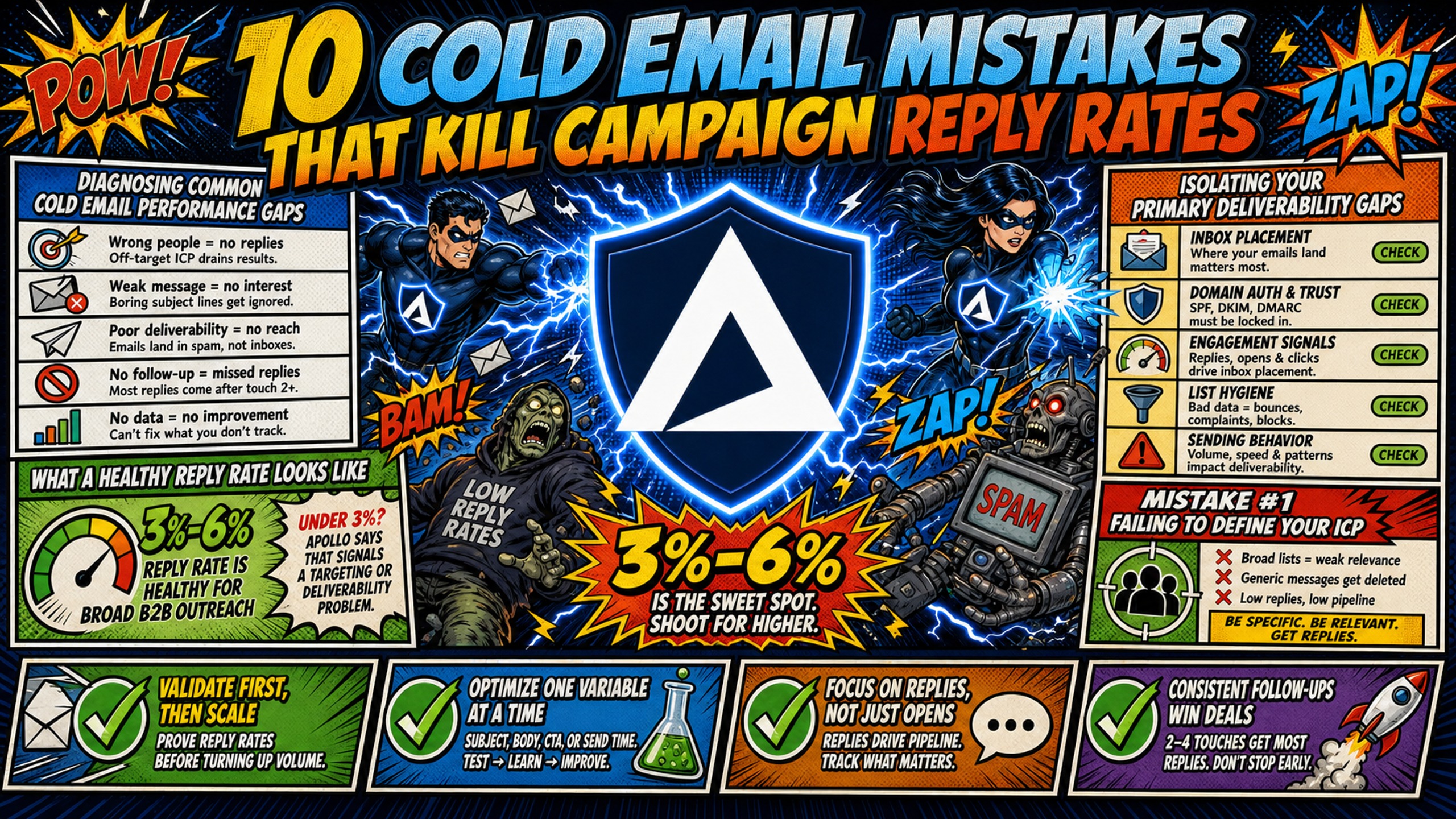
TL;DR: A healthy reply rate for broad B2B cold email campaigns runs 3% to 6%, and Apollo states that anything under 3% points to a targeting or deliverability problem rather than a dead channel. Inframail's help page cites 5% to 15% as average for tighter-targeted campaigns. Reply rate is the share of recipients who answer, and it only counts once mail reaches the inbox, where Validity put the 2025 global average inbox placement rate at 87.2% and Microsoft the toughest provider at 77.4%. So check SPF, DKIM, DMARC and blacklist status before auditing copy, because a reply rate measured from spam-foldered sends tells you nothing. The ten mistakes below span targeting, subject lines, templates, DNS setup, send velocity, inbox placement, blacklists, cadence, CTAs, and reply handling, and Belkins' analysis of 16.5 million emails, cited by Woodpecker, shows campaigns under 50 recipients average a 5.8% reply rate against 2.1% for lists of 1,000 or more.
Your cold email isn't getting replies. Before you blame the tool or decide the channel is dead, check these ten failure points. Teams clearing 6% reply rates aren't lucky, they're avoiding specific errors that tank everyone else's numbers.
Diagnosing common cold email performance gaps
Reply rate problems are diagnosable. Start with benchmarks. For broad B2B campaigns, a healthy cold email reply rate sits between 3% and 6%, with rates under 3% signaling a targeting or deliverability problem. Woodpecker's cold email statistics page cites a 3.43% average reply rate from a third-party benchmark report. Woodpecker, which has sent over 20 million sales emails through its platform, rates 5% to 10% as good and 10%+ as excellent.
What a healthy reply rate looks like
If you're below 3%, something is broken. Apollo puts a good reply rate for broad B2B campaigns at 3% to 6%, and states that under 3% typically indicates a targeting or deliverability issue. Inframail's spam diagnostic help page cites 5% to 15% as average, which reflects tighter-targeted campaigns.
| Symptom | Likely cause | First diagnostic step |
|---|---|---|
| Opens under 20% | Infrastructure failure | Confirm with a seed list test, since Apple Mail Privacy Protection inflates opens, then check SPF, DKIM, DMARC records and blacklist status |
| Opens above 40% but zero replies | Targeting or copy failure | Audit ICP fit and message relevance |
| High bounce rate (above 2%) | List quality or DNS issue | Verify contact sources and authentication records |
| Sudden drop after good performance | Blacklist or reputation damage | Run blacklist check immediately |
Isolating your primary deliverability gaps
Deliverability gating comes before engagement benchmarking. If your emails land in spam, your reply rate is meaningless. Verify SPF, DKIM, and DMARC records first, then check blacklist status using the monitoring steps in Mistake 7. Only after infrastructure passes should you audit targeting and copy.
Mistake 1: Failing to define your ICP
Sending to the wrong people kills reply rates faster than any copy problem. Smaller, targeted lists outperform large spray-and-pray campaigns. Belkins' analysis of 16.5 million emails, cited by Woodpecker, shows campaigns under 50 recipients average a 5.8% reply rate against 2.1% for lists of 1,000 or more.
Avoid scaling before validating leads
Don't scale send volume until you've validated that your list converts. A 5% reply rate on 100 sends beats a 1% reply rate on 1,000 sends, and the smaller list protects your domain health while you refine targeting.
4 signs your audience data is flawed
- Bounce rate above 2%: Your contact data is stale or scraped from low-quality sources.
- Opens but zero replies: You're reaching people who aren't decision-makers.
- Replies asking why you contacted them: Your targeting criteria are too broad.
- High spam complaint rate: Recipients don't recognize why they're on your list.
Refining your ideal customer profile
Tighten your ICP definition to company size, industry, tech stack, and specific pain point. Export 100 contacts, manually verify 20 fit the profile, then send a small test batch before scaling to thousands.
Mistake 2: Weak or spam-trigger subject lines
Your subject line determines whether anyone opens the email. Spam filters typically weigh subject line signals alongside sender reputation, engagement history, and body content to make placement decisions.
Subject lines that trigger filters
ALL CAPS subject lines can increase spam risk, as can excessive exclamation marks and dollar signs. Mailjet's spam word guidance lists "guaranteed" (especially with unrealistic claims), "urgent action required," and "exclusive offer" as common triggers. It also notes that spam filters look for a combination of tactics, with words being just one piece of the puzzle. Misleading subject lines with fake "RE:" or "FWD:" prefixes can damage sender reputation.
Test subject lines for open rate
Run A/B tests on 10% of your list before full sends. Test short versus long, question versus statement, and personalized versus generic. Track open rate differences to isolate what your specific audience responds to.
Writing subject lines that get opened
Aim for subject lines under about 50 characters, avoid all caps and symbols, and make them specific to the recipient's situation. "Quick question about [Company]'s outbound" beats "Increase revenue 10x guaranteed!"
Mistake 3: Generic templates that read as mass mail
Generic templates with first-name merge tags don't fool anyone. If your email would work for 500 other companies, it's too generic to earn a reply.
Beyond basic merge tag limitations
First name and company name merge tags are table stakes, not personalization. Real personalization references a specific trigger event, a recent company announcement, a shared connection, or a detail that proves you did research beyond a database export.
Diagnose why your emails sound canned
Read your email out loud. If it sounds like a form letter, it is. Check whether you could swap the recipient's company name with a competitor and the email would still make sense. If yes, rewrite it.
Draft emails that actually get replies
Lead with a specific observation about their business, connect it to a problem you solve, and ask a low-friction question. Skip the three-paragraph intro about your company.
Mistake 4: Neglecting DNS and domain setup
Missing or misconfigured DNS records are the most preventable infrastructure failure. SPF, DKIM, and DMARC records tell receiving servers your emails are legitimate, and skipping them sends you straight to spam.
Manual DNS setup across multiple domains burns hours and creates errors. One typo in an SPF record or a missing DKIM key kills deliverability for every email from that domain.
DNS record best practices for deliverability
For Google Workspace, the SPF record is v=spf1 include:_spf.google.com ~all, as given in Google's SPF record documentation. DKIM requires a 2048-bit key added as a TXT record at google._domainkey.yourdomain.com, as described in Google's DKIM setup documentation, and DMARC starts with p=none to collect reports before moving to quarantine or reject. For Microsoft 365, the SPF record is v=spf1 include:spf.protection.outlook.com -all, as given in Microsoft's SPF configuration documentation. DKIM requires two CNAME records, at selector1._domainkey and selector2._domainkey, pointing to the Microsoft DKIM hostnames generated for your tenant, as described in Microsoft's DKIM configuration documentation.
| Record type | Google Workspace value | Microsoft 365 value | Common error |
|---|---|---|---|
| SPF | v=spf1 include:_spf.google.com ~all | v=spf1 include:spf.protection.outlook.com -all | Typo in include statement |
| DKIM | 2048-bit TXT at google._domainkey | Two CNAME records (selector1, selector2) | Wrong key length or missing selector |
| DMARC | v=DMARC1; p=none | v=DMARC1; p=none | Starting at p=reject before testing |
Inframail is a Microsoft-only platform. It does not provision Google Workspace inboxes, so teams that need Google Workspace infrastructure should not use it, and the Microsoft 365 records above are the ones it configures automatically. Inframail automates SPF, DKIM, and DMARC configuration across unlimited domains, eliminating the manual DNS panel work that creates these errors. The platform provisions domains with correct records in minutes instead of the 12-plus hours manual setup requires for 50 domains.
Why warmup duration matters for reach
New domains need a minimum of 30 days of warmup before campaign sends, starting at 5 to 10 warmup emails per day and ramping to 150 per day by day 30, per Smartlead's warmup guide.
Checklist for identifying infrastructure gaps
- Verify SPF, DKIM, and DMARC records exist and use correct syntax.
- For brand-new domains, confirm a minimum of 30 days of warmup before campaign sends, per Smartlead's warmup guide. For inboxes migrated to Inframail, Inframail's recommended warmup schedule, run through your sending platform, is 14 days for standard warmup and 7 days for previously warmed domains.
- Check blacklist status before every campaign launch, using the steps in Mistake 7.
- Test inbox placement with a seed list across Gmail, Outlook, and Yahoo.
What per-inbox pricing costs at scale
Adding inboxes is how you stay under the per-inbox send caps covered in Mistake 5, so inbox cost decides whether that fix is affordable at scale.
At the volume a scaling outbound motion reaches, the per-seat math breaks. For 50 inboxes, Google Workspace Business Starter costs $420 per month at $8.40 per user on the Flexible Plan. Inframail's platform fee is $147 per month flat for unlimited inboxes. Savings on platform fees alone at that tier: $273 per month, or $3,276 annually.
Domain costs ($5 to $16 per domain per year, so $21 to $67 per month across 50 domains, $42 to $133 per month across 100 domains, or $83 to $267 per month across 200 domains, assuming one domain per inbox), warmup tools ($15 to $50 per inbox per month), and your sending platform subscription apply on both sides and are not included in this comparison.
Below roughly 18 inboxes, per-seat pricing is cheaper (10 inboxes cost $84 per month on Google Workspace versus $147 flat). The flat rate wins past that point, and the gap widens fast.
| Infrastructure | 50 inboxes per month | 100 inboxes per month | 200 inboxes per month | Cost per inbox |
|---|---|---|---|---|
| Inframail Unlimited Plan | $147 flat | $147 flat | $147 flat | $2.94 at 50, $1.47 at 100, $0.74 at 200 |
| Google Workspace Flexible | $420 | $840 | $1,680 | $8.40 at any scale |
Note: Your sending platform subscription costs the same on both sides and is billed separately, so it is not included in this table.
Inframail's Unlimited Plan costs $147/month for up to 80,000 sends. Campaigns exceeding that monthly allowance require the $387/month Agency Plan.
Mistake 5: Ramping send volume too fast
Sending too many emails too fast from a new domain or inbox triggers spam filters. Email providers can treat sudden volume spikes as a spam signal, and exceeding safe daily caps gets domains flagged.
Safe daily send caps per inbox
Warmup volume and campaign volume are separate. The 5 to 10 emails per day in Mistake 4 covers warmup sends before campaigns start. Smartlead's sending limit documentation sets the ceiling at 50 cold emails per day or fewer per mailbox and advises starting below it once warmup is done. A practical staged ramp is no more than 30 per day in weeks one and two of sending, then 30 to 50 per day through day 30. This ramp is a working guideline, not a Smartlead finding.
How to audit your current send velocity
Export send logs from your sending platform and calculate average daily sends per inbox. Check whether volume spiked suddenly (for example, from 20 to 100 per day overnight), which triggers spam filters.
Scaling send volume without blacklists
Add more inboxes instead of pushing higher volume per inbox. Ten inboxes sending 30 per day reach the same 300 daily emails as six inboxes sending 50 per day, with more headroom under the cap. Distribute volume across domains and inboxes to stay under per-inbox caps.
Mistake 6: Confusing delivery with inbox placement
Email delivery means the receiving server accepted your message. Inbox placement means it landed in the primary inbox, not spam or promotions. You can have 98% delivery and 40% inbox placement if spam filters flag your content.
Inbox placement vs deliverability metrics
Delivery rate measures emails that didn't bounce. Inbox placement rate measures emails that reached the primary inbox. Validity's 2026 Benchmark Report puts the average global inbox placement rate for 2025 at 87.2%, with Microsoft the toughest mailbox provider at 77.4%. For B2B senders in 2025, Validity reports that average inbox placement fell by 1.3% at hosting platforms and by 5.8% at filtering companies (a placement decline, not a reply rate), which Validity attributes to most businesses using both a hosting platform and a corporate spam filter.
Fixing copy that triggers spam filters
Avoid spam trigger words in body copy, not just subject lines. Excessive links, image-heavy emails, and URL shorteners can also trigger filters.
Key questions to isolate spam triggers
- Does inbox placement improve when you remove all links from the email body?
- Do test emails to seed addresses land in spam across Gmail, Outlook, and Yahoo, or just one provider?
- Does plain text email land in the inbox while HTML versions go to spam?
- Are you using URL shorteners or tracking domains with poor reputation?
Use Inframail's spam diagnostic process to identify whether content or infrastructure is causing placement issues. If placement drops across every provider, rule out blacklisting using the steps in Mistake 7.
Mistake 7: Overlooking blacklist status alerts
Blacklist incidents surface with little warning, and by the time you notice reply rates dropping, the damage is done. A blacklisted domain or IP kills deliverability for every campaign until you get delisted. Inframail provides 1 dedicated US-based IP on the Unlimited Plan and 3 on the Agency Pack, so another sender's behavior does not affect your reputation.
How to monitor your domain blacklist status
MXToolbox tests mail server IPs against over 100 DNS-based blacklists. Set up automated monitoring that checks your sending IPs and domains regularly.
Signs your sender reputation is tanking
Reply rates drop suddenly across all campaigns, open rates fall below 20% (a softer signal, since Apple Mail Privacy Protection inflates opens), and seed test emails land in spam when they previously hit the inbox. Check blacklist status immediately when you see these signals.
Clearing your sender reputation fast
Submit delisting requests to each blacklist where you're flagged. Provide evidence that you've fixed the root cause (stopped sending to bad lists, authenticated your domain, reduced complaint rates). Inframail reports 98%+ deliverability, and its blacklist monitoring includes automated delisting requests with a 68.3% success rate within 48 hours.
Mistake 8: Broken cadence in your outreach
Sending one email and giving up leaves replies on the table. Per Woodpecker's follow-up data, campaigns with three to five follow-up steps hit 8.3% reply rates versus 4.1% for no follow-ups. Instantly's 2026 Benchmark Report, as cited by Woodpecker, found that 58% of replies come from the first email.
Limit your follow-ups for better replies
Three to five total touches (initial email plus two to four follow-ups) is a practical range for most campaigns. Woodpecker puts the optimal sequence length in 2026 at 4 to 7 touchpoints, so this range is tighter. The tighter range trades some reply upside for lower risk, because cold lists have no prior relationship with you and every extra touch adds unsubscribe and spam complaint exposure. If your complaint rates stay low, you can test extending to Woodpecker's 4 to 7 touches.
Checklist to audit your sequence flow
- Does your sequence include at least two follow-ups after the initial email?
- Are follow-up emails spaced three to five days apart, not sent back-to-back?
- Does each follow-up add new information or a different angle, not just bump the same message?
- Do you stop the sequence after three to five total touches to avoid spam complaints?
Why timing ruins your reply rates
Sending follow-ups too fast (one day after the initial email) annoys prospects. Waiting too long (two weeks) means they've forgotten the first email. Three to five business days between touches keeps you on their radar without spamming them.
Mistake 9: Leaving prospects with no next step
A weak or missing call-to-action kills replies even when everything else works. Prospects who are interested don't know what to do next, so they do nothing.
Your CTA should be low-friction, specific, and easy to say yes to. "Let me know if you're interested" is too vague. "Are you available for 15 minutes Tuesday at 2pm or Wednesday at 10am?" gives them a clear next step.
Check your CTA against these 3 criteria
- Specific: Includes a concrete ask (book a call, reply with a time, answer a question), not a vague "let me know."
- Low-friction: Requires minimal effort (reply with one word, pick from two time slots, answer a yes or no question).
- Single: One clear ask per email, not three different options that force them to choose.
3 low-friction CTA patterns to test
- Binary question: "Is improving outbound deliverability a priority for Q1?" (Easy to answer yes or no.)
- Specific time slots: "Are you free for 15 minutes Tuesday at 2pm or Thursday at 11am?" (Pick one or suggest another.)
- Reply with one word: "Should I send over a one-page example? Reply 'yes' and I'll share it." (Takes a few seconds to answer.)
Mistake 10: Letting positive replies go cold
Positive replies sit unanswered while you focus on the next campaign. A prospect who replies today is hot, but waiting three days means they've moved on or talked to a competitor.
Monitor replies to boost response time
Set up reply monitoring so positive responses trigger immediate notifications. Faster response times can increase the likelihood of booking meetings while the prospect is still engaged.
How to audit your reply handling
Check your average time from reply received to response sent. If it stretches beyond a few hours during business hours, interested prospects go cold. Verify that replies route to someone who can respond, not a generic inbox no one checks daily.
Configuring your reply monitor
Route replies to a dedicated inbox or Slack channel with notifications enabled. If you have a team, assign ownership so one person replies within one hour during business hours. If you are the only sender, put a mobile notification on the reply inbox. Use your sending platform's reply detection to pause sequences when someone responds positively.
Most cold email failure is diagnosable. The ten mistakes above account for the majority of low reply rates, and infrastructure errors are the most preventable.
In this case study video, watch how Inframail helped a client reduce cold email costs and save time with reliable infrastructure and strong deliverability, balance high-volume outreach with lead quality, and book 10–30 qualified appointments per month for their clients.
Sign up to Inframail and get started today to remove DNS configuration, per-inbox cost spikes, and shared IP contamination as failure points.
FAQs
What's a good reply rate for cold email?
A healthy reply rate for broad B2B cold email campaigns is 3% to 6%. Rates under 3% signal a targeting or deliverability problem. Inframail's help page cites 5% to 15% as average for tighter-targeted campaigns.
How long should I warm up domains before sending?
Warm brand-new domains for a minimum of 30 days before campaign sends, starting at 5 to 10 warmup emails per day and ramping to 150 per day by day 30, per Smartlead's warmup guide. For inboxes migrated to Inframail, the recommended schedule, run through your sending platform, is shorter: 14 days for standard warmup and 7 days for previously warmed domains.
Why are my emails landing in spam?
Common causes include missing or misconfigured SPF, DKIM, or DMARC records, sending from a blacklisted domain or IP, using spam trigger words in subject lines or body copy, and exceeding safe daily send limits per inbox.
How many follow-ups should I send?
As a working guideline, send three to five total touches (initial email plus two to four follow-ups). Per Woodpecker, campaigns with three to five follow-up steps hit 8.3% reply rates versus 4.1% for no follow-ups. Per Woodpecker, spam and unsubscribe risk triples after four follow-ups.
Should I blame my sending platform for low reply rates?
Low reply rates usually trace to targeting, copy, infrastructure, or follow-up mistakes, not the sending platform. Run the diagnostic checklist in this article to verify DNS setup, warmup status, send velocity, and blacklist status before switching platforms.
Key terms glossary
Deliverability: The ability for your emails to successfully land in the recipient's inbox instead of spam or junk folders. Distinct from delivery, which only measures whether the receiving server accepted the message.
Inbox placement rate: The percentage of delivered emails that land in the primary inbox instead of spam or promotions folders. Track this separately from delivery rate to identify content or reputation issues.
Sender reputation: A score email providers assign to your domain and IP based on sending behavior, complaint rates, and engagement. Poor reputation causes emails to land in spam even with correct DNS records.
SPF, DKIM, DMARC: DNS records that authenticate your emails. SPF specifies which servers can send from your domain, DKIM adds a cryptographic signature, and DMARC tells receiving servers what to do with emails that fail authentication.
Domain warmup: The process of gradually increasing send volume from a brand-new domain over a minimum of 30 days to build sender reputation. Migrated or previously warmed inboxes can need less, such as the 7 to 14 days in Inframail's recommended schedule, run through your sending platform. Skipping warmup or ramping too fast triggers spam filters and damages deliverability.